�Ý�Û
You can also eject discs when the
ignition switch is of f . The disc that
was last selected is ejected f irst.
Load the desired CDs into the
magazine, and load the magazine
into the changer according to the
instructions that came with the unit.
To remove the disc currently in play,
press the eject ( ) button. When
you remove a
disc is removed from a
slot, the system automatically begins
the load sequence so you can load
another CD in that position. If you do
not remove the disc from the
changer within 15 seconds, the
system returns to the previous mode
(AM/FM or satellite radio). The disc
will reload into the system and will
remainthereinapausemode. An optional eight disc CD changer is
available for your vehicle from your
dealer.
This disc changer uses the same
controls used f or the in-dash CD
changer or the radio.
To remove a different CD from the
changer,firstselectitwiththe
appropriate icon or the CH/DISC bar.
When that CD begins playing, press
the eject button. Continue pressing
the eject button to remove all the
discs f rom the changer. To select the CD changer, press the
CD/AUX/XM or CD/AUX button.
The disc and track numbers will be
displayed. To select a dif f erent disc,
use the CH/DISC bar. To select the
previous disc, press the side, or
side to select the next disc in
sequence.
If you select an empty slot in the
magazine, the changer will search
f or the next available CD to load and
play.
Operating the Optional CD
Changer
Removing CDs f rom the In-dash
CD Changer
A M/FM/CD Changer
Features
159
�����—�����—�����y�
�������������y���
�(���%�������y���
�����y
�Û�Ý�´
�µ �´
�µ
�´
�µ
The VOL button adjusts the volume
up ( ) or down ( ). Press the top
or bottom of the button, hold it until
the desired volume is reached, then
release it.
If you are listening to the radio, use
the CH button to change stations.
Each time you press the top ( ) of
the button, the system goes to the
next preset station on the band you
are listening to. Press the bottom
( ) to go back to the previous
station. If youareplayingaCD,thesystem
skips to the beginning of the next
track each time you press the top
( ) of the CH button. Press the
bottom ( ) to return to the
beginning of the current track. Press
it twice to return to the previous
track. You will see the disc and track
numbers in the display.
If youareplayingatapeinthe
optional tape player, press the top
( ) of the CH button to advance to
the next selection. Press the bottom
( ) to go back to the previous
selection. The system senses a silent
period, then resumes playing.
The MODE button changes the
mode. Pressing the button
repeatedly selects FM1, FM2, AM,
CD (if a CD is loaded), or a tape (if
equipped). On models with satellite
radio system, you can also select
XM1 and XM2.
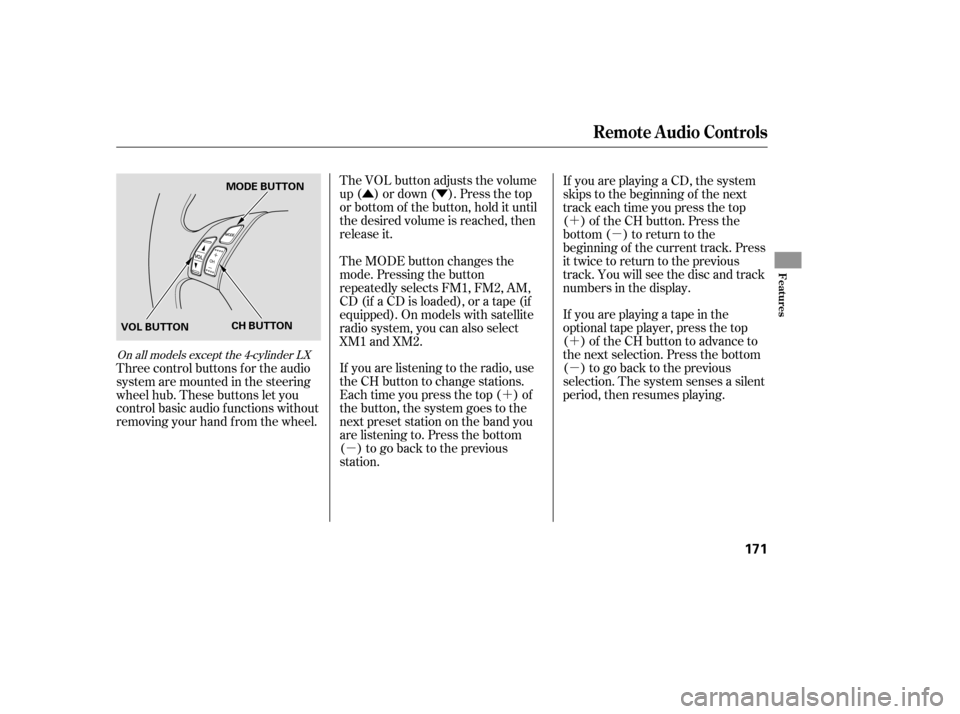
Three control buttons f or the audio
system are mounted in the steering
wheel hub. These buttons let you
control basic audio f unctions without
removing your hand f rom the wheel.
On all models except the 4-cylinder LX
Remote Audio Controls
Features
171
VOL BUTTON MODE BUTTON
CH BUTTON
�����—�����—�����y�
�������������y���
�(���%�������y���
�����y