Page 299 of 600

Ejecting a Disc
Press the eject button on the DVD player faceplate to
eject the disc. There is not an eject button on the remote
control.
If a disc is ejected from the player, but is not removed,
the DVD player will reload the disc after a short period of
time. The disc will be stored in the DVD player. The DVD
player will not resume play of the disc automatically.
Remote Control
To use the remote control, aim it at the transmitter
window below the video screen and press the desired
button. Direct sunlight or very bright light may affect the
ability of the RSE system to receive signals from the
remote control. If the remote control does not seem to
be working, the batteries may need to be replaced. See
“Battery Replacement” later in this section.
Objects blocking the line of sight may also affect the
function of the remote control.
Notice:Storing the remote control in a hot area or
in direct sunlight may damage it, and the repairs will
not be covered by your warranty. Keep the remote
control stored in a cool, dry place.
To extend the life of the batteries, the remote control
does not have a press and hold feature.
Remote Control Buttons
O(Power):Press this button to turn the DVD player
on and off.
v(Title):Press this button to return the DVD to the
main menu of the DVD.
n,q,p,o(Menu Navigation Arrows):Use the
arrow buttons to navigate through a menu.
3-121
Page 302 of 600

Battery Replacement
To change the batteries, do the following:
1. Remove the battery compartment door located on
the bottom of the remote control.
2. Replace the two AA batteries in the compartment.
Make sure that they are installed correctly, using
the diagram on the inside of the battery
compartment.
3. Close the battery door securely.
If the remote control is to be stored for a long period of
time, remove the batteries and keep them in a cool, dry
place.Problem Recommended Action
No power. The ignition might not be
in on or accessory.
The parental control
button might have been
turned on. The power
indicator light will ash.
Disc will not play. The system might be off.
The parental control button
might have been turned
on. The power indicator
light will ash.
The system might be
in auxiliary mode.
The disc is upside down
or is not compatible.
The picture does not ll the
screen. There are black
borders on the
top and bottom or on
both sides or it looks
stretched out.Check the display mode
settings in the display
menu.
The disc was ejected, but
it was pulled back into the
DVD player.The disc is being stored in
the DVD player. Press the
eject button again to eject
the disc.
3-124
Page 357 of 600

{CAUTION:
Snow can trap exhaust gases under your
vehicle. This can cause deadly CO (carbon
monoxide) gas to get inside. CO could
overcome you and kill you. You cannot see
it or smell it, so you might not know it is in your
vehicle. Clear away snow from around the base
of your vehicle, especially any that is blocking
your exhaust pipe. And check around again
from time to time to be sure snow does not
collect there.
Open a window just a little on the side of the
vehicle that is away from the wind. This will help
keep CO out.Run your engine only as long as you must. This saves
fuel. When you run the engine, make it go a little faster
than just idle. That is, push the accelerator slightly. This
uses less fuel for the heat that you get and it keeps the
battery charged. You will need a well-charged battery to
restart the vehicle, and possibly for signaling later on with
your headlamps. Let the heater run for a while.
Then, shut the engine off and close the window almost all
the way to preserve the heat. Start the engine again and
repeat this only when you feel really uncomfortable from
the cold. But do it as little as possible. Preserve the fuel
as long as you can. To help keep warm, you can get out
of the vehicle and do some fairly vigorous exercises
every half hour or so until help comes.
4-45
Page 405 of 600

If your trailer is equipped with electric brakes, you can
get a jumper harness (electric trailer brake control)
with a trailer battery feed fuse from your dealer.
If you need to tow a light-duty trailer with a standard
four-way round pin connector, you can also get an
adapter form your dealer.
Heavy-DutyTrailer Wiring Harness
Package
For vehicles equipped with heavy duty trailering, the
harness is connected to the trailer plug mounted to the
hitch platform.The eight-wire harness contains the following trailer
circuits:
Yellow: Left Stop/Turn Signal
Dark Green: Right Stop/Turn Signal
Brown: Taillamps
White: Ground
Light Green: Back-up Lamps
Light Blue: CHMSL*
Red: Battery Feed**
Dark Blue: Trailer Brake
* The Center High-Mounted Stoplamp (CHMSL) wire
is tied next to the trailer wiring harness for use with
a trailer, slide-in camper or cap.
**If you are charging a remote (non-vehicle) battery,
turn on the headlamps to boost the vehicle system
voltage and properly charge the battery.
4-93
Page 406 of 600
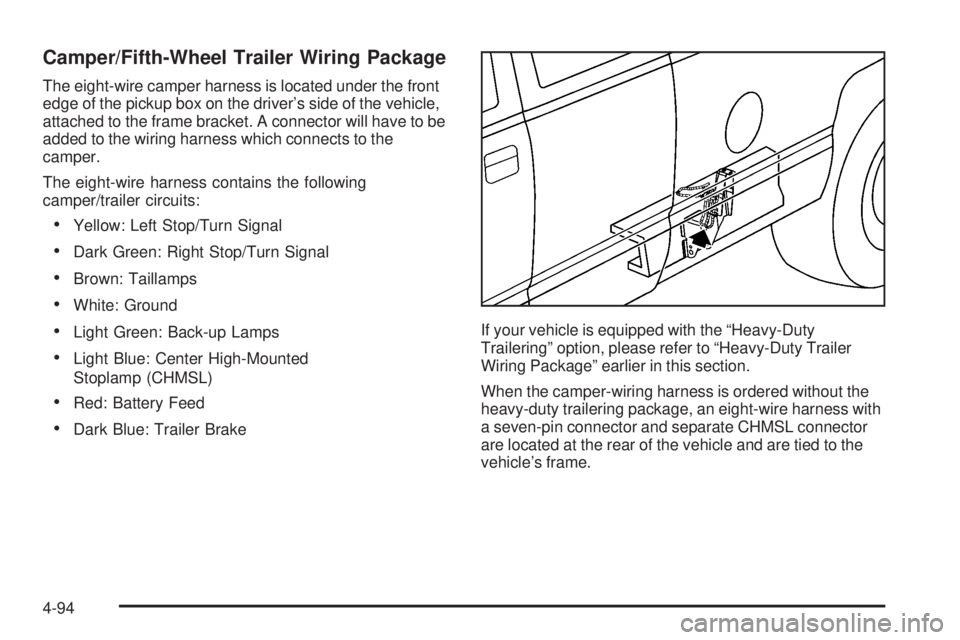
Camper/Fifth-Wheel Trailer Wiring Package
The eight-wire camper harness is located under the front
edge of the pickup box on the driver’s side of the vehicle,
attached to the frame bracket. A connector will have to be
added to the wiring harness which connects to the
camper.
The eight-wire harness contains the following
camper/trailer circuits:
Yellow: Left Stop/Turn Signal
Dark Green: Right Stop/Turn Signal
Brown: Taillamps
White: Ground
Light Green: Back-up Lamps
Light Blue: Center High-Mounted
Stoplamp (CHMSL)
Red: Battery Feed
Dark Blue: Trailer BrakeIf your vehicle is equipped with the “Heavy-Duty
Trailering” option, please refer to “Heavy-Duty Trailer
Wiring Package” earlier in this section.
When the camper-wiring harness is ordered without the
heavy-duty trailering package, an eight-wire harness with
a seven-pin connector and separate CHMSL connector
are located at the rear of the vehicle and are tied to the
vehicle’s frame.
4-94
Page 407 of 600
Electric Brake Control Jumper
{CAUTION:
Be sure to use only the correct trailer brake
harness, the one intended for use on your
vehicle. If you use some other trailer brake
harness, even if it seems to t, your trailer
brakes may not work at all. You could have a
crash in which you or others could be injured.
Use only the trailer brake harness intended for
your vehicle. If it is no longer available to you,
be sure to get a proper replacement from your
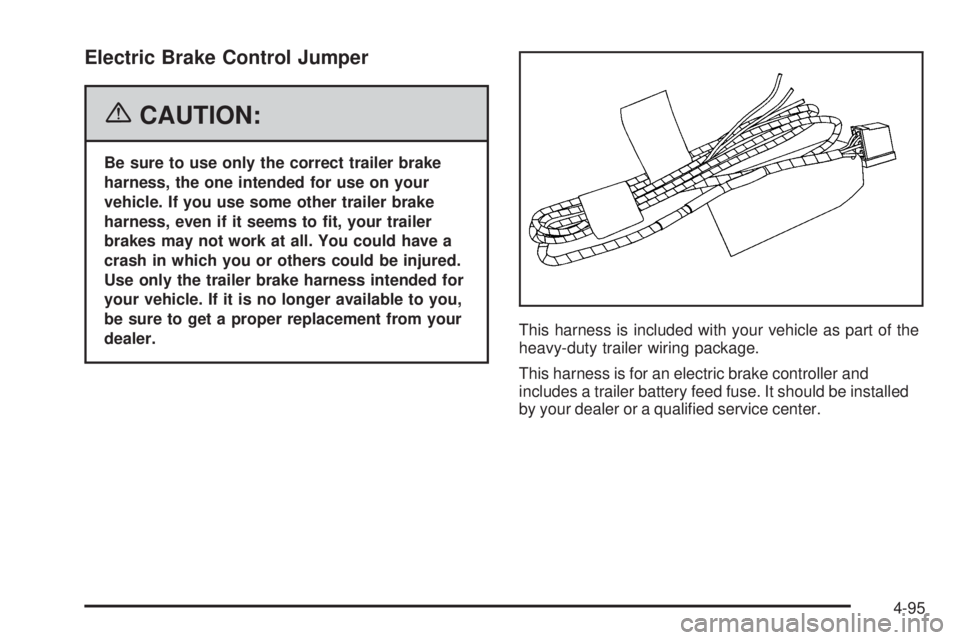
dealer.This harness is included with your vehicle as part of the
heavy-duty trailer wiring package.
This harness is for an electric brake controller and
includes a trailer battery feed fuse. It should be installed
by your dealer or a qualied service center.
4-95
Page 408 of 600

Auxiliary Battery
The auxiliary battery provision can be used to supply
electrical power to additional equipment that you
may choose to add, such as a slide-in camper.
If your vehicle has this
provision, this relay will be
located on the passenger’s
side of the vehicle, next
to the auxiliary battery.
When using this provision, connection should only be
made to the upper stud (A) of the relay. Do not make
connections to the lower stud (B) of the relay.
The auxiliary battery circuit is protected by a megafuse
located behind the auxiliary battery.
Be sure to follow the proper installation instructions that
are included with any electrical equipment that you install.Notice:Leaving electrical equipment on for
extended periods will drain the battery. Always turn
off electrical equipment when not in use and do not
use equipment that exceeds the maximum amperage
rating for the auxiliary battery provision.
Power Winches
If you wish to use a power winch on your vehicle, only
use it when your vehicle is stationary or anchored.
Trailer Recommendations
You must subtract your hitch loads from the CWR for your
vehicle. Weigh your vehicle with the trailer attached, so
that you won’t go over the GVWR or GAWR. If you are
using a weight-distributing hitch, weigh the vehicle
without the spring bars in place.
You’ll get the best performance if you spread out the
weight of your load the right way, and if you choose
the correct hitch and trailer brakes.
For more information, seeTowing a Trailer on
page 4-67.
4-96
Page 413 of 600

Service............................................................5-4
Accessories and Modications..........................5-4
California Proposition 65 Warning.....................5-4
Doing Your Own Service Work.........................5-5
Adding Equipment to the Outside of
Your Vehicle..............................................5-5
Fuel................................................................5-5
Gasoline Octane............................................5-6
Gasoline Specications....................................5-6
California Fuel...............................................5-7
Additives.......................................................5-7
Fuel E85 (85% Ethanol)..................................5-8
Fuels in Foreign Countries...............................5-9
Filling the Tank............................................5-10
Filling a Portable Fuel Container.....................5-11
Checking Things Under the Hood....................5-12
Hood Release..............................................5-13
Engine Compartment Overview.......................5-14
Engine Oil (Gasoline Engine)..........................5-20
Engine Oil Life System (Gasoline Engine)........5-23
Engine Air Cleaner/Filter (Gasoline Engines).......5-25
Automatic Transmission Fluid
(Except Allison Transmission
®) ....................5-28Automatic Transmission Fluid
(Allison Transmission
®) ...............................5-30
Manual Transmission Fluid.............................5-33
Hydraulic Clutch...........................................5-34
Engine Coolant.............................................5-35
Coolant Surge Tank Pressure Cap..................5-37
Engine Overheating.......................................5-37
Overheated Engine Protection Operating Mode
(V8 Engines Only)......................................5-39
Cooling System............................................5-40
Engine Fan Noise.........................................5-45
Power Steering Fluid.....................................5-45
Windshield Washer Fluid................................5-46
Brakes........................................................5-47
Battery........................................................5-51
Jump Starting...............................................5-52
Rear Axle.......................................................5-58
Four-Wheel Drive............................................5-59
Front Axle......................................................5-60
Noise Control System.....................................5-62
Tampering with Noise Control System
Prohibited.................................................5-62
Section 5 Service and Appearance Care
5-1