2006 GMC ENVOY page 33
[x] Cancel search: page 33Page 144 of 524
Easy Exit Seat
The control for the easy exit seat function is located on
the driver’s door below the memory buttons 1 and 2.
The easy exit seat button is used to program and recall
the desired driver’s seat position when exiting or
entering the vehicle. The mirrors, power lumbar, recline,
and adjustable pedals, if equipped, positions will not
be stored or recalled when using the easy exit seat
function. The seat position can be saved for up to
two drivers.
To store the easy exit seat position, do the following:
1. Press and release the 1 or 2 button of the memory
control for less than three seconds. The seat will
move to the stored memory position.
2. Adjust the seat to the desired exit position.
3. Press and hold the easy exit seat button for more
than three seconds. A double chime will sound to
let you know that the position has been stored
for the selected button 1 or 2.To repeat the procedure for a second driver, follow the
preceding steps, but press the other numbered
memory control button.
To recall the easy exit seat position, do one of the
following:
Press the easy exit seat button on the memory
control while the vehicle is in PARK (P). The
seat will move to the stored exit position.
Or, if the easy exit seat feature is activated in the
Driver Information Center (DIC), removing the key
from the ignition will move the seat to the exit
position. See “Easy Exit Seat” underDIC Vehicle
Customization on page 3-60for more information on
activating this feature in the DIC.
If an easy exit seat position has not been stored, the
default position is all the way rearward.
2-64
Page 149 of 524

The main components of your instrument panel are the following:
A. Exterior Lamp Control. SeeHeadlamps on
page 3-14. Dome Lamp Override Button. SeeDome
Lamp Override on page 3-18. Instrument Panel
Brightness Control. SeeInstrument Panel Brightness
on page 3-17. Fog Lamp Button (If Equipped).
SeeFog Lamps on page 3-17.
B. Air Outlets. SeeOutlet Adjustment on page 3-27.
C. Turn Signal/Multifunction Lever. SeeTurn
Signal/Multifunction Lever on page 3-7.
D. OnStar and Audio Steering Wheel Controls. See
Audio Steering Wheel Controls on page 3-139.
E. Instrument Panel Cluster. SeeInstrument Panel
Cluster on page 3-32.
F. Audio Steering Wheel Controls. SeeAudio Steering
Wheel Controls on page 3-139.
G. Ignition Switch. SeeIgnition Positions on page 2-19.
H. Audio System. SeeAudio System(s) on page 3-66.
I. Climate Controls. SeeDual Climate Control
System on page 3-20.
J. Hood Release. SeeHood Release on page 5-11.K. Driver Information Center (DIC) Steering Wheel
Controls. SeeDriver Information Center (DIC)
on page 3-50.
L. Transfer Case Controls. See “Automatic Transfer
Case” underFour-Wheel Drive on page 2-27.
M. Shift Lever and StabiliTrak
®(If Equipped) Button.
SeeShifting Into Park (P) on page 2-32and
StabiliTrak
®System on page 4-9.
N. Lighter. SeeAshtray(s) and Cigarette Lighter on
page 3-20.
O. Accessory Power Outlets. SeeAccessory Power
Outlet(s) on page 3-19.
P. Parking Brake. SeeParking Brake on page 2-31.
Q. Rear Window Washer/Wiper. See “Rear Window
Washer/Wiper” underWindshield Washer on
page 3-10.
R. Rear Window Defogger. See “Rear Window
Defogger” underDual Climate Control System on
page 3-20andDual Automatic Climate Control
System on page 3-23.
S. Glove Box. SeeGlove Box on page 2-56.
3-5
Page 152 of 524

If a bulb is burned out, replace it to help avoid an
accident. If the arrows don’t go on at all when you signal
a turn, check the fuse. SeeFuses and Circuit Breakers
on page 5-103and check for burned-out bulbs.
If you have a trailer towing option with added wiring for
the trailer lamps, a turn signal asher is used. With
this asher installed, the signal indicator will ash even
if a turn signal bulb is burned out. Check the front
and rear turn signal lamps regularly to make sure they
are working.
Turn Signal On Chime
If your turn signal is left on for more than 3/4 of a mile
(1.2 km), a chime will sound at each ash of the
turn signal. To turn off the chime, move the turn signal
lever to the off position.
Headlamp High/Low-Beam Changer
To change the headlamps from low to high beam,
push the lever toward the instrument panel. To return to
low-beam headlamps, pull the multifunction lever
toward you. Then release it.When the high beams are
on, this indicator light on
the instrument panel
cluster will also be on.
Flash-to-Pass
This feature lets you use your high-beam headlamps to
signal a driver in front of you that you want to pass.
It works even if your headlamps are in the automatic
position.
To use it, pull the turn signal lever toward you, then
release it.
If your headlamps are in the automatic position or on
low beam, your high-beam headlamps will turn on.
They’ll stay on as long as you hold the lever toward you.
The high-beam indicator on the instrument panel
cluster will come on. Release the lever to return to
normal operation.
3-8
Page 175 of 524

z\y(Mode):Press this button to change the
direction of airow (panel, bi-level or oor) to the
rear seat area.
zby(Temperature):Press this button to increase
and decrease the temperature setting.
Warning Lights, Gages, and
Indicators
This part describes the warning lights and gages that
may be on your vehicle. The pictures will help you
locate them.
Warning lights and gages can signal that something is
wrong before it becomes serious enough to cause
an expensive repair or replacement. Paying attention to
your warning lights and gages could also save you
or others from injury.Warning lights come on when there may be or is a
problem with one of your vehicle’s functions. As you will
see in the details on the next few pages, some
warning lights come on briey when you start the
engine just to let you know they’re working. If you are
familiar with this section, you should not be alarmed
when this happens.
Gages can indicate when there may be or is a problem
with one of your vehicle’s functions. Often gages
and warning lights work together to let you know when
there’s a problem with your vehicle.
When one of the warning lights comes on and stays on
when you are driving, or when one of the gages
shows there may be a problem, check the section that
tells you what to do about it. Please follow this
manual’s advice.
Waiting to do repairs can be costly—and even
dangerous. So please get to know your warning lights
and gages. They’re a big help.
Your vehicle may also have a Driver Information Center
(DIC) that works along with the warning lights and
gages. SeeDriver Information Center (DIC) on
page 3-50.
3-31
Page 177 of 524
Speedometer and Odometer
Your speedometer lets you see your speed in both
miles per hour (mph) and kilometers per hour (km/h).
Your odometer shows how far your vehicle has
been driven, in either miles (used in the United States)
or kilometers (used in Canada).
The odometer mileage can be checked without the
vehicle running. Simply press the trip stem located on
the instrument panel cluster.
You may wonder what happens if your vehicle needs a
new odometer installed. The new one will be set to
the correct mileage total of the old odometer.
Trip Odometer
The trip odometer can tell you how far your vehicle has
been driven since you last set the trip odometer to zero.
Your vehicle’s odometer works together with the Driver
Information Center (DIC). You can set a Trip A and
Trip B odometer. See “Trip Information” underDIC
Operation and Displays on page 3-51.The odometer mileage can be checked without the
vehicle running. Simply press the trip stem on the
instrument panel cluster.
If your vehicle ever needs a new odometer installed, the
new one will be set to the correct mileage total of the
old odometer.
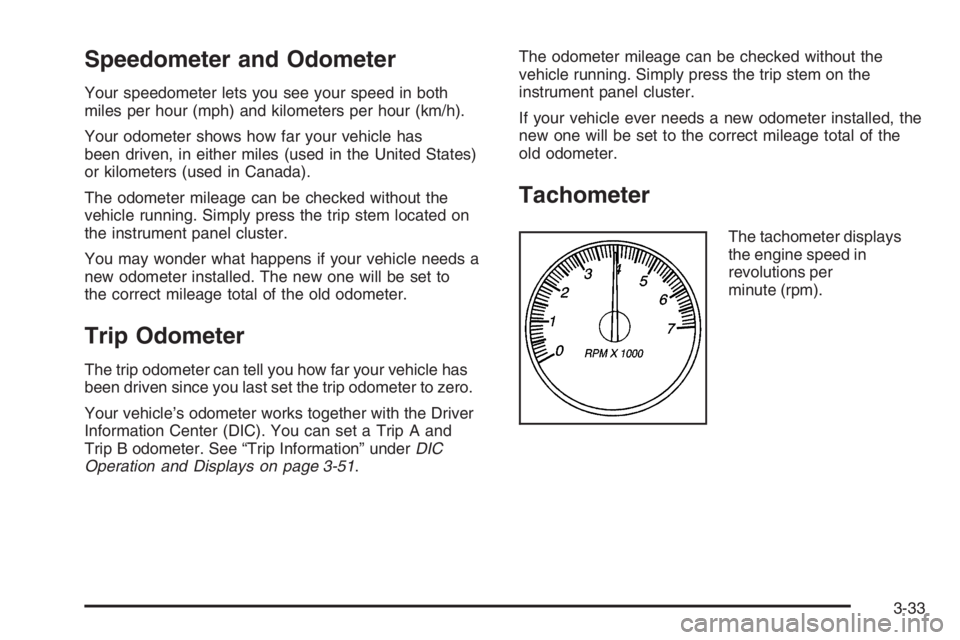
Tachometer
The tachometer displays
the engine speed in
revolutions per
minute (rpm).
3-33
Page 178 of 524

Safety Belt Reminder Light
When the key is turned to RUN or START, a chime will
sound for several seconds to remind you and your
passengers to buckle your safety belts. The driver safety
belt light will also come on and stay on for several
seconds, then it will ash for several more. You should
buckle your seat belt.
This chime and light will be
repeated if the driver
remains unbuckled and the
vehicle is in motion.
If the driver’s belt is buckled, neither the chime nor the
light will come on.
Passenger Safety Belt
Reminder Light
Several seconds after the key is turned to RUN or
START, a chime will sound for several seconds
to remind the front passenger to buckle their safety belt.
This would only occur if the passenger airbag is
enabled. SeePassenger Sensing System on page 1-67
for more information. The passenger safety belt light
will also come on and stay on for several seconds, then
it will ash for several more.
This chime and light will be
repeated if the passenger
remains unbuckled and
the vehicle is in motion.
If the passenger’s safety belt is buckled, neither the
chime nor the light will come on.
3-34
Page 179 of 524
Airbag Readiness Light
There is an airbag readiness light on the instrument
panel, which shows the airbag symbol. The system
checks the airbag’s electrical system for malfunctions.
The light tells you if there is an electrical problem.
The system check includes the airbag sensors, the
airbag modules, the wiring and the crash sensing and
diagnostic module. For more information on the
airbag system, seeAirbag System on page 1-58.
This light will come on
when you start your
vehicle, and it will ash for
a few seconds. Then
the light should go out.
This means the system
is ready.
If the airbag readiness light stays on after you start the
vehicle or comes on when you are driving, your
airbag system may not work properly. Have your vehicle
serviced right away.{CAUTION:
If the airbag readiness light stays on after you
start your vehicle, it means the airbag system
may not be working properly. The airbags in
your vehicle may not inate in a crash, or they
could even inate without a crash. To help
avoid injury to yourself or others, have your
vehicle serviced right away if the airbag
readiness light stays on after you start
your vehicle.
The airbag readiness light should ash for a few
seconds when you turn the ignition key to RUN. If the
light doesn’t come on then, have it xed so it will
be ready to warn you if there is a problem.
3-35
Page 181 of 524

Your vehicle has a rear seat that will accommodate a
rear-facing child restraint. A label on your sun visor says,
“Never put a rear-facing child seat in the front.” This
is because the risk to the rear-facing child is so great, if
the airbag deploys.
{CAUTION:
Even though the passenger sensing system is
designed to turn off the passenger’s frontal
airbag if the system detects a rear-facing child
restraint, no system is failsafe, and no one can
guarantee that an airbag will not deploy under
some unusual circumstance, even though it is
turned off. We recommend that rear-facing
child restraints be secured in the rear seat,
even if the airbag is off.
If the word OFF or the off symbol is lit on the airbag
status indicator, it means that the passenger sensing
system has turned off the right front passenger’s frontal
airbag. SeePassenger Sensing System on page 1-67
for more on this, including important safety information.If, after several seconds, all status indicator lights
remain on, or if there are no lights at all, there may be a
problem with the lights or the passenger sensing
system. See your dealer for service.
{CAUTION:
If the off indicator and the airbag readiness light
ever come on together, it means that something
may be wrong with the airbag system. If this
ever happens, have the vehicle serviced
promptly, because an adult-size person sitting
in the right front passenger seat may not have
the protection of the frontal airbag. SeeAirbag
Readiness Light on page 3-35.
3-37