Page 2 of 360
Seating and Safety Restraints 151
Seating 151
Safety restraints 166
Airbags 180
Child restraints 187
Tires, Wheels and Loading 201
Tire Information 203
Tire Inflation 205
Tire Pressure Monitoring System (TPMS) 217
Vehicle loading 221
Trailer towing 228
Recreational towing 234
Driving 235
Starting 235
Brakes 238
Air suspension 245
Transmission operation 248
Roadside Emergencies 265
Getting roadside assistance 265
Hazard flasher switch 266
Fuel pump shut-off switch 266
Fuses and relays 268
Changing tires 277
Lug Nut Torque 284
Jump starting 285
Wrecker towing 290
Customer Assistance 292
Reporting safety defects (U.S. only) 300
Cleaning 301
Table of Contents
2
2006 Expedition(exd)
Owners Guide (post-2002-fmt)
USA(fus)
Page 6 of 360
BREAKING-IN YOUR VEHICLE
Your vehicle does not need an extensive break-in. Try not to drive
continuously at the same speed for the first 1,000 miles (1,600 km) of
new vehicle operation. Vary your speed frequently in order to give the
moving parts a chance to break in.
Drive your new vehicle at least 500 miles (800 km) before towing a
trailer. Additionally, during the first 500 miles (800 km) that you tow a
trailer, do not drive over 70 mph (112 km/h) and do not make starts at
full throttle. This style of driving will help the engine and other parts of
your vehicle break in at the heavier loads. For more detailed information
about towing a trailer, refer toTrailer towingin theTires, Wheels and
Loadingchapter.
Do not add friction modifier compounds or special break-in oils during
the first few thousand miles (kilometers) of operation, since these
additives may prevent piston ring seating. SeeEngine oilin the
Maintenance and Specificationschapter for more information on oil
usage.
SPECIAL NOTICES
New Vehicle Limited Warranty
For a detailed description of what is covered and what is not covered by
your vehicle’s New Vehicle Limited Warranty, refer to theWarranty
Guidethat is provided to you along with yourOwner’s Guide.
2006 Expedition(exd)
Owners Guide (post-2002-fmt)
USA(fus)
Introduction
6
Page 7 of 360
Service Data Recording
Service data recorders in your vehicle are capable of collecting and
storing diagnostic information about your vehicle. This potentially
includes information about the performance or status of various systems
and modules in the vehicle, such as engine, throttle, steering or brake
systems. In order to properly diagnose and service your vehicle, Ford
Motor Company, Ford of Canada, and service and repair facilities may
access vehicle diagnostic information through a direct connection to your
vehicle when diagnosing or servicing your vehicle.
Event Data Recording
Other modules in your vehicle — event data recorders — are capable of
collecting and storing data during a crash or near crash event. The
recorded information may assist in the investigation of such an event.
The modules may record information about both the vehicle and the
occupants, potentially including information such as:
•how various systems in your vehicle were operating;
•whether or not the driver and passenger seatbelts were buckled;
•how far (if at all) the driver was depressing the accelerator and/or the
brake pedal;
•how fast the vehicle was traveling; and
•where the driver was positioning the steering wheel.
To access this information, special equipment must be directly connected
to the recording modules. Ford Motor Company and Ford of Canada do
not access event data recorder information without obtaining consent,
unless pursuant to court order or where required by law enforcement,
other government authorities or other third parties acting with lawful
authority. Other parties may seek to access the information
independently of Ford Motor Company and Ford of Canada.
2006 Expedition(exd)
Owners Guide (post-2002-fmt)
USA(fus)
Introduction
7
Page 14 of 360
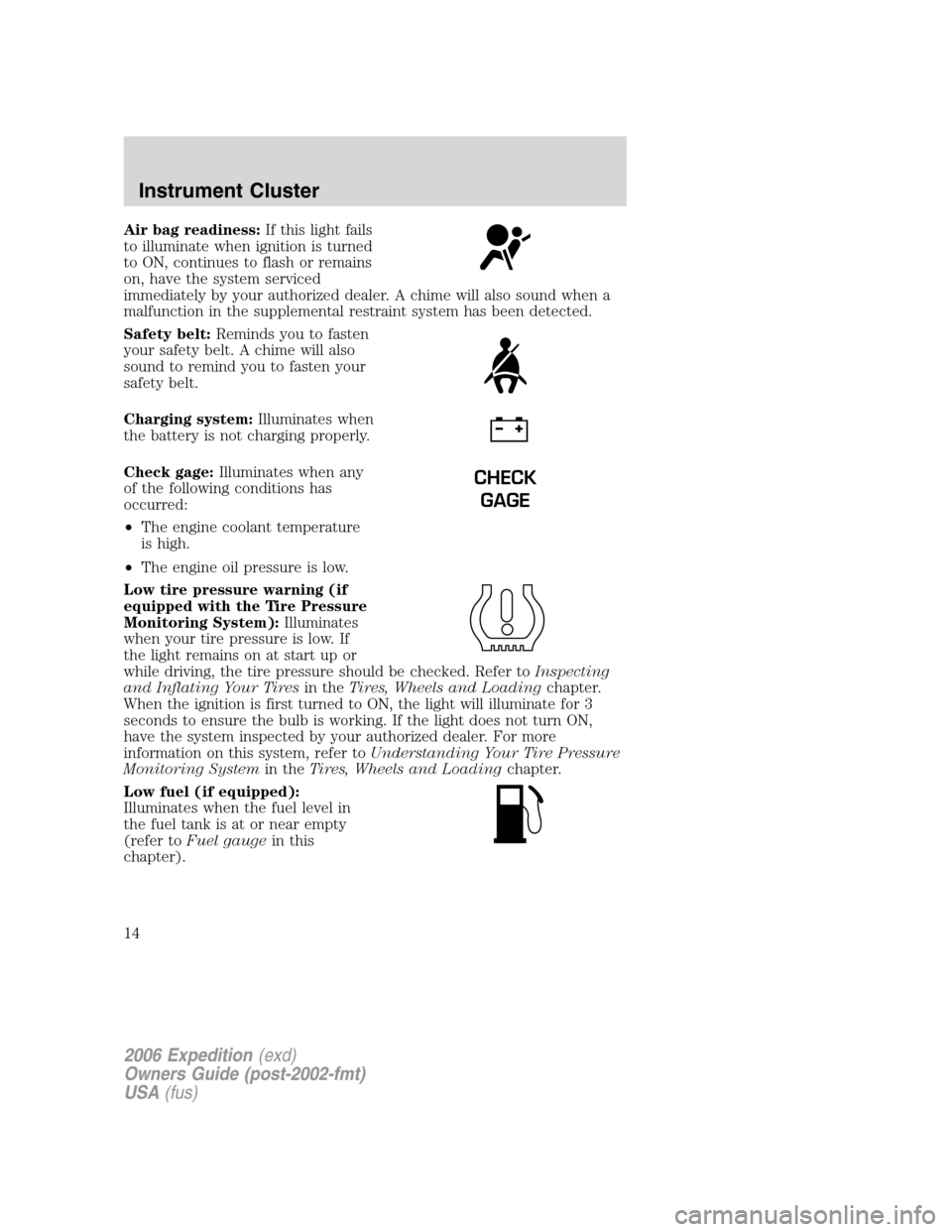
Air bag readiness:If this light fails
to illuminate when ignition is turned
to ON, continues to flash or remains
on, have the system serviced
immediately by your authorized dealer. A chime will also sound when a
malfunction in the supplemental restraint system has been detected.
Safety belt:Reminds you to fasten
your safety belt. A chime will also
sound to remind you to fasten your
safety belt.
Charging system:Illuminates when
the battery is not charging properly.
Check gage:Illuminates when any
of the following conditions has
occurred:
•The engine coolant temperature
is high.
•The engine oil pressure is low.
Low tire pressure warning (if
equipped with the Tire Pressure
Monitoring System):Illuminates
when your tire pressure is low. If
the light remains on at start up or
while driving, the tire pressure should be checked. Refer toInspecting
and Inflating Your Tiresin theTires, Wheels and Loadingchapter.
When the ignition is first turned to ON, the light will illuminate for 3
seconds to ensure the bulb is working. If the light does not turn ON,
have the system inspected by your authorized dealer. For more
information on this system, refer toUnderstanding Your Tire Pressure
Monitoring Systemin theTires, Wheels and Loadingchapter.
Low fuel (if equipped):
Illuminates when the fuel level in
the fuel tank is at or near empty
(refer toFuel gaugein this
chapter).
CHECK
GAGE
2006 Expedition(exd)
Owners Guide (post-2002-fmt)
USA(fus)
Instrument Cluster
14
Page 15 of 360
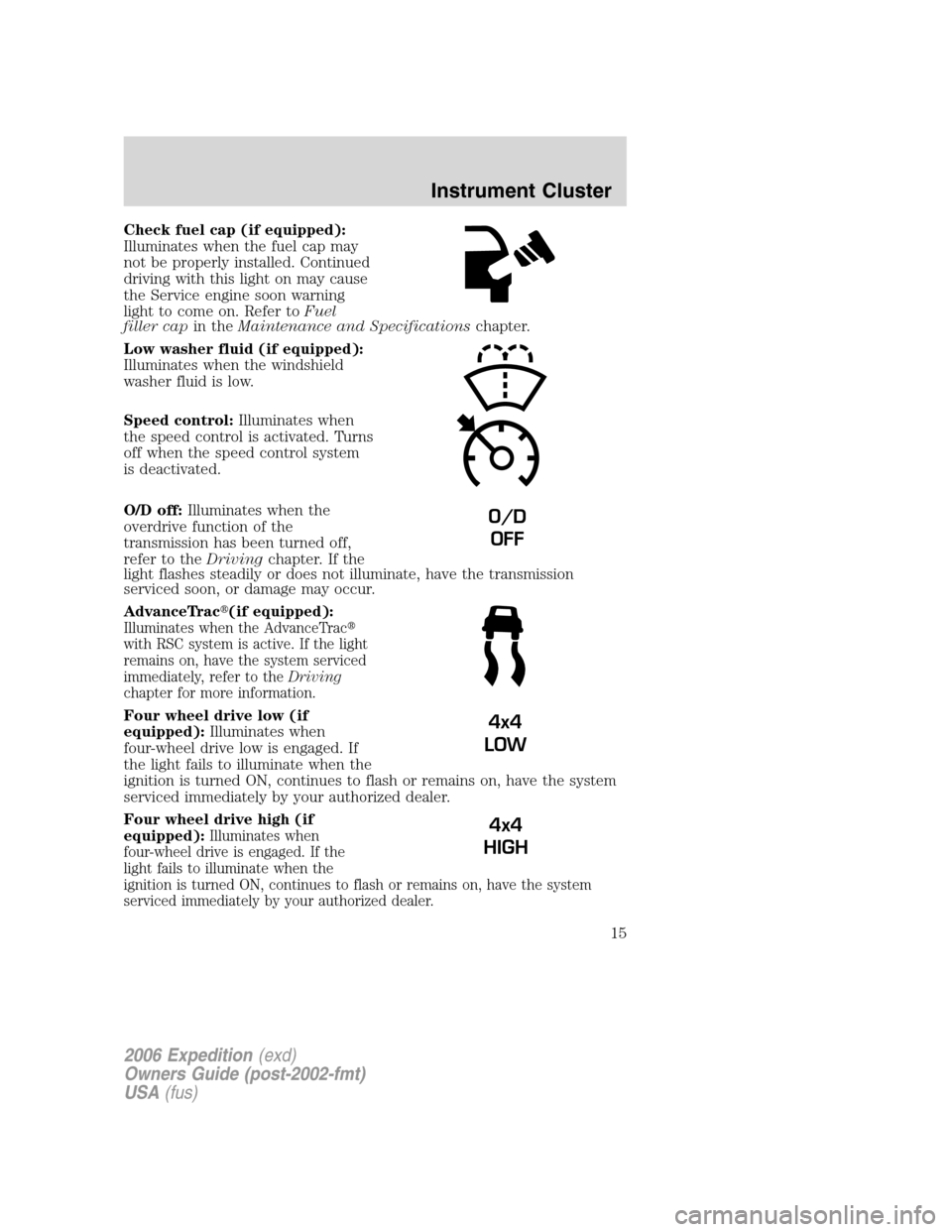
Check fuel cap (if equipped):
Illuminates when the fuel cap may
not be properly installed. Continued
driving with this light on may cause
the Service engine soon warning
light to come on. Refer toFuel
filler capin theMaintenance and Specificationschapter.
Low washer fluid (if equipped):
Illuminates when the windshield
washer fluid is low.
Speed control:Illuminates when
the speed control is activated. Turns
off when the speed control system
is deactivated.
O/D off:Illuminates when the
overdrive function of the
transmission has been turned off,
refer to theDrivingchapter. If the
light flashes steadily or does not illuminate, have the transmission
serviced soon, or damage may occur.
AdvanceTrac�(if equipped):
Illuminates when the AdvanceTrac�
with RSC system is active. If the light
remains on, have the system serviced
immediately, refer to theDriving
chapter for more information.
Four wheel drive low (if
equipped):Illuminates when
four-wheel drive low is engaged. If
the light fails to illuminate when the
ignition is turned ON, continues to flash or remains on, have the system
serviced immediately by your authorized dealer.
Four wheel drive high (if
equipped):
Illuminates when
four-wheel drive is engaged. If the
light fails to illuminate when the
ignition is turned ON, continues to flash or remains on, have the system
serviced immediately by your authorized dealer.
O/D
OFF
4x4
LOW
4x4
HIGH
2006 Expedition(exd)
Owners Guide (post-2002-fmt)
USA(fus)
Instrument Cluster
15
Page 41 of 360
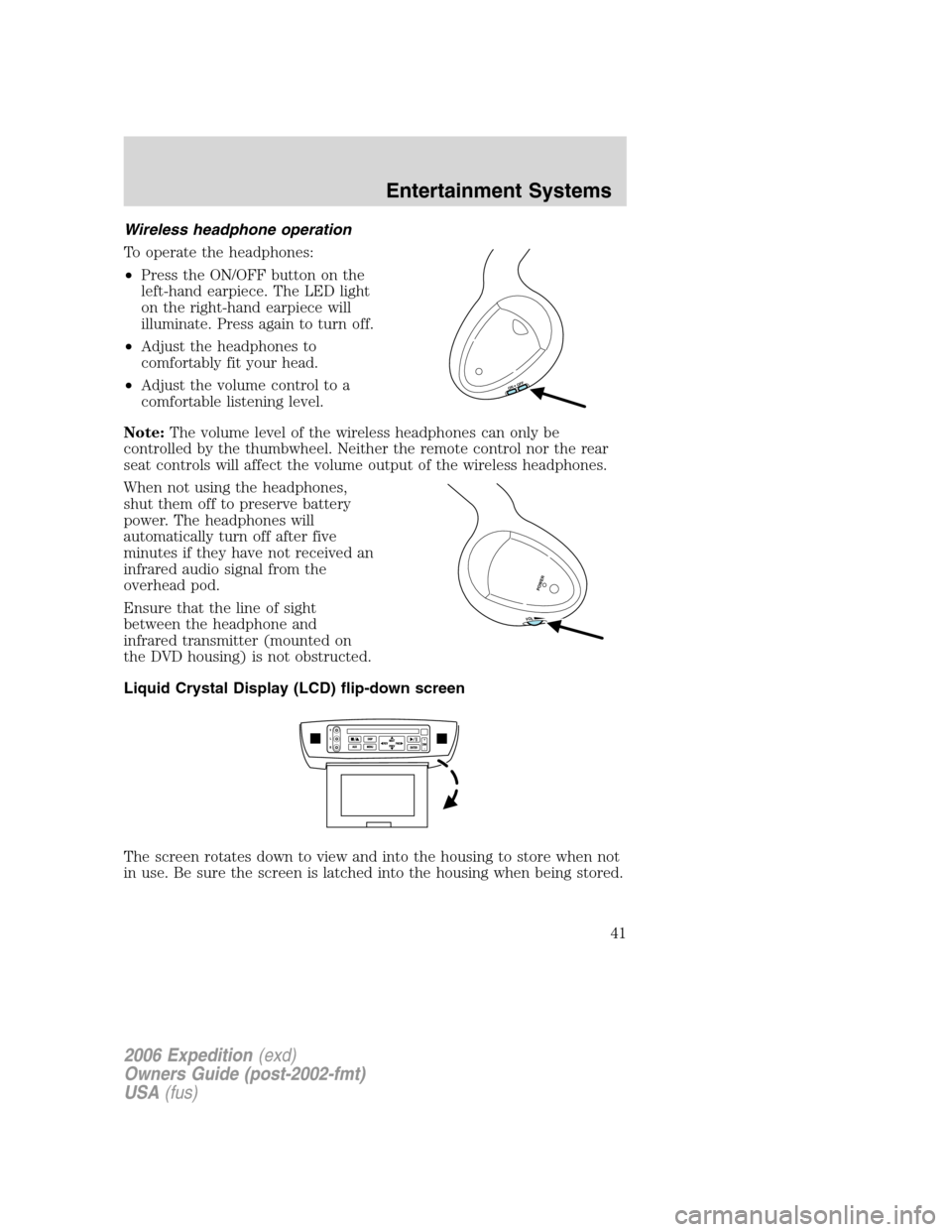
Wireless headphone operation
To operate the headphones:
•Press the ON/OFF button on the
left-hand earpiece. The LED light
on the right-hand earpiece will
illuminate. Press again to turn off.
•Adjust the headphones to
comfortably fit your head.
•Adjust the volume control to a
comfortable listening level.
Note:The volume level of the wireless headphones can only be
controlled by the thumbwheel. Neither the remote control nor the rear
seat controls will affect the volume output of the wireless headphones.
When not using the headphones,
shut them off to preserve battery
power. The headphones will
automatically turn off after five
minutes if they have not received an
infrared audio signal from the
overhead pod.
Ensure that the line of sight
between the headphone and
infrared transmitter (mounted on
the DVD housing) is not obstructed.
Liquid Crystal Display (LCD) flip-down screen
The screen rotates down to view and into the housing to store when not
in use. Be sure the screen is latched into the housing when being stored.
ON OFF
V
O
L
POW
ER
2006 Expedition(exd)
Owners Guide (post-2002-fmt)
USA(fus)
Entertainment Systems
41
Page 106 of 360
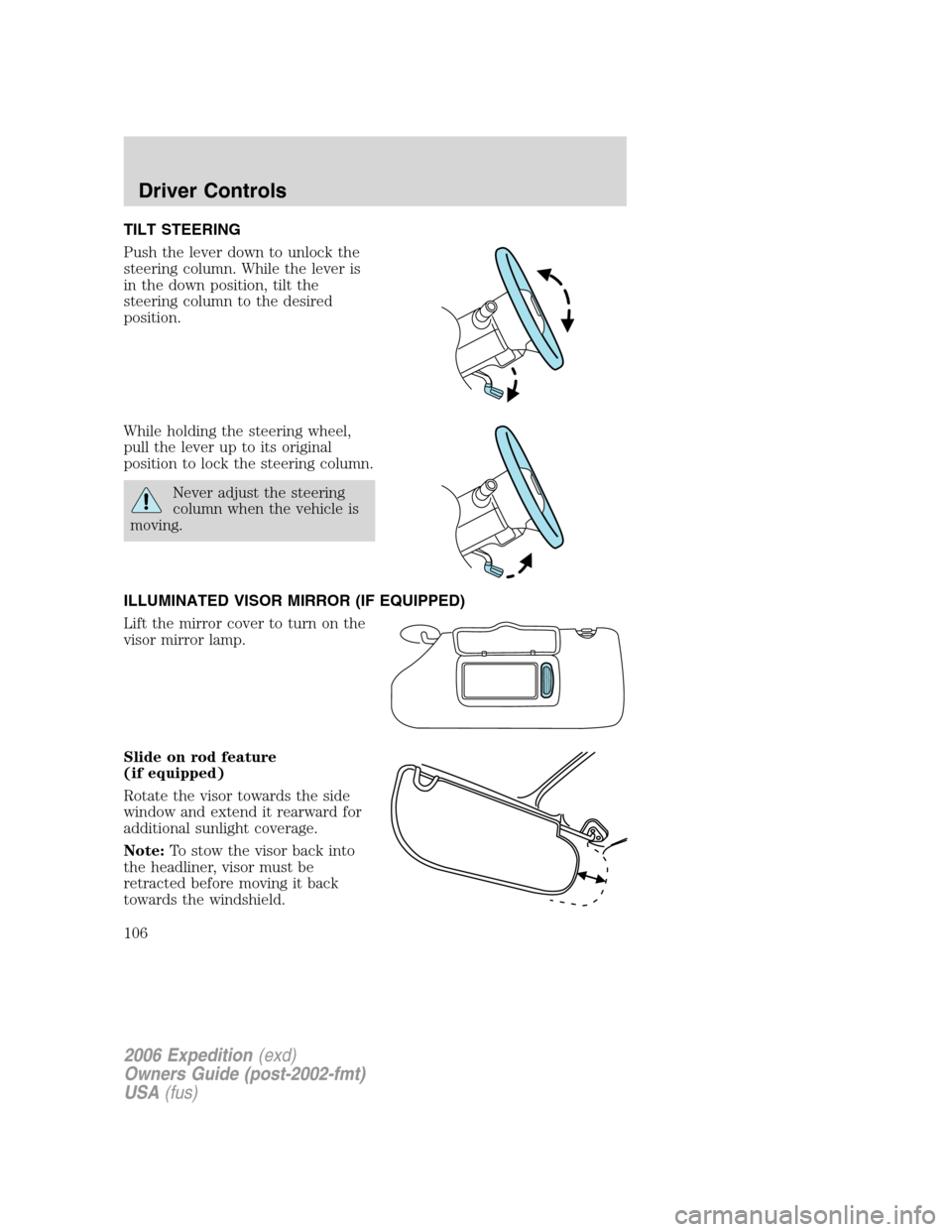
TILT STEERING
Push the lever down to unlock the
steering column. While the lever is
in the down position, tilt the
steering column to the desired
position.
While holding the steering wheel,
pull the lever up to its original
position to lock the steering column.
Never adjust the steering
column when the vehicle is
moving.
ILLUMINATED VISOR MIRROR (IF EQUIPPED)
Lift the mirror cover to turn on the
visor mirror lamp.
Slide on rod feature
(if equipped)
Rotate the visor towards the side
window and extend it rearward for
additional sunlight coverage.
Note:To stow the visor back into
the headliner, visor must be
retracted before moving it back
towards the windshield.
2006 Expedition(exd)
Owners Guide (post-2002-fmt)
USA(fus)
Driver Controls
106
Page 115 of 360
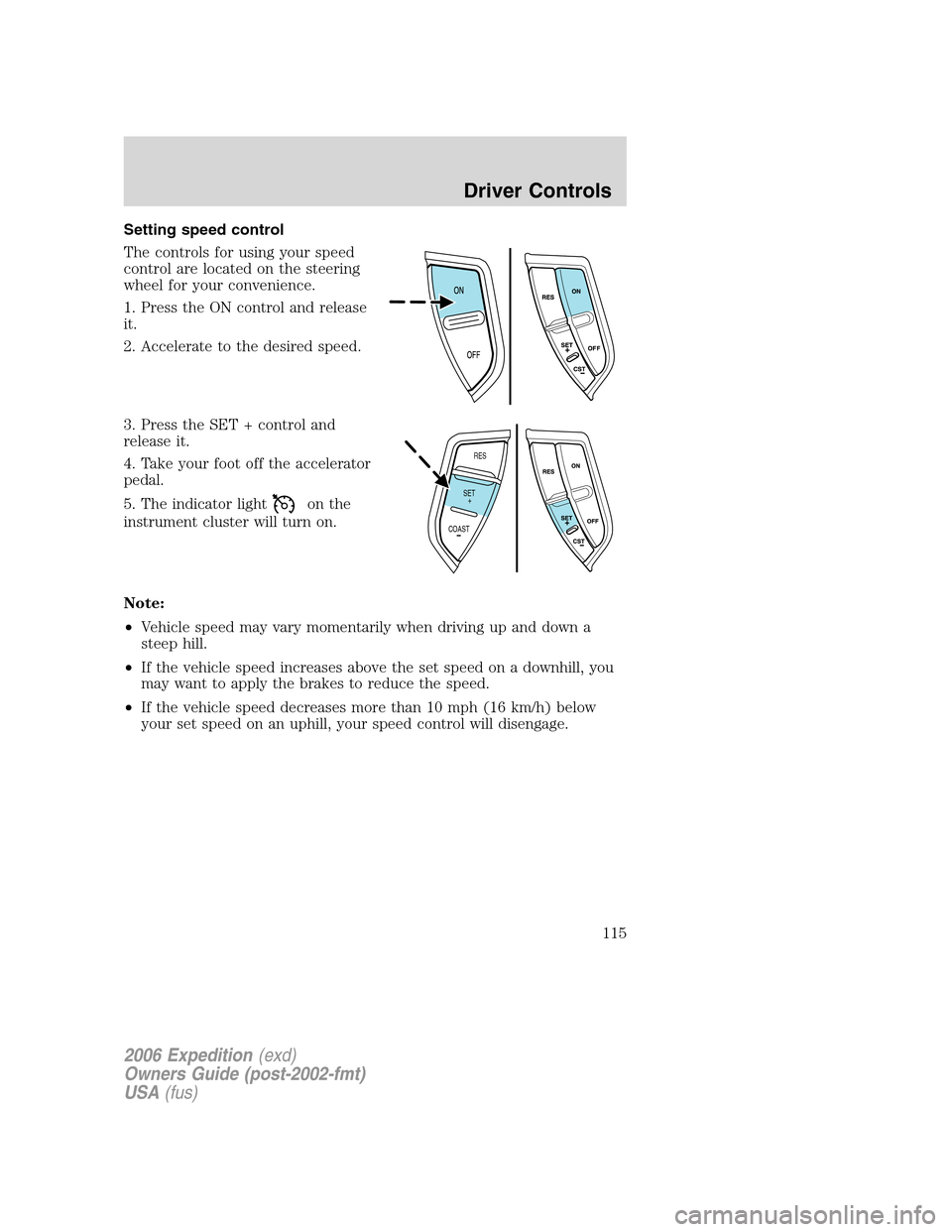
Setting speed control
The controls for using your speed
control are located on the steering
wheel for your convenience.
1. Press the ON control and release
it.
2. Accelerate to the desired speed.
3. Press the SET + control and
release it.
4. Take your foot off the accelerator
pedal.
5. The indicator light
on the
instrument cluster will turn on.
Note:
•Vehicle speed may vary momentarily when driving up and down a
steep hill.
•If the vehicle speed increases above the set speed on a downhill, you
may want to apply the brakes to reduce the speed.
•If the vehicle speed decreases more than 10 mph (16 km/h) below
your set speed on an uphill, your speed control will disengage.
RES
SET
COAST+
2006 Expedition(exd)
Owners Guide (post-2002-fmt)
USA(fus)
Driver Controls
115