Page 26 of 288
14.LOAD:The load feature allows
you to load up to six single CDs into
the audio system. Press LOAD. “In”
will appear in the display when the system is ready. Insert the CD.
Autoload:To load up to six CDs into the system: Press and hold LOAD
until a beep is heard. When “In” is displayed, insert the desired CD.
When “In” is displayed again, insert the next CD. Continue until all six
are loaded (if desired).
15.SEEK — TRACK:In radio
mode, press to find the next (
)
or previous (
) listenable station
on the frequency band.
In CD mode, press to listen the next (
) or previous () track.
16.CD door:Insert CDs label side
up.
17.FM 1/2:Press to enter FM
mode. Press to toggle between FM1
and FM2.
18.AM:Press to enter AM mode.
2006 Escape(204)
Owners Guide (post-2002-fmt)
USA(fus)
Entertainment Systems
26
Page 27 of 288
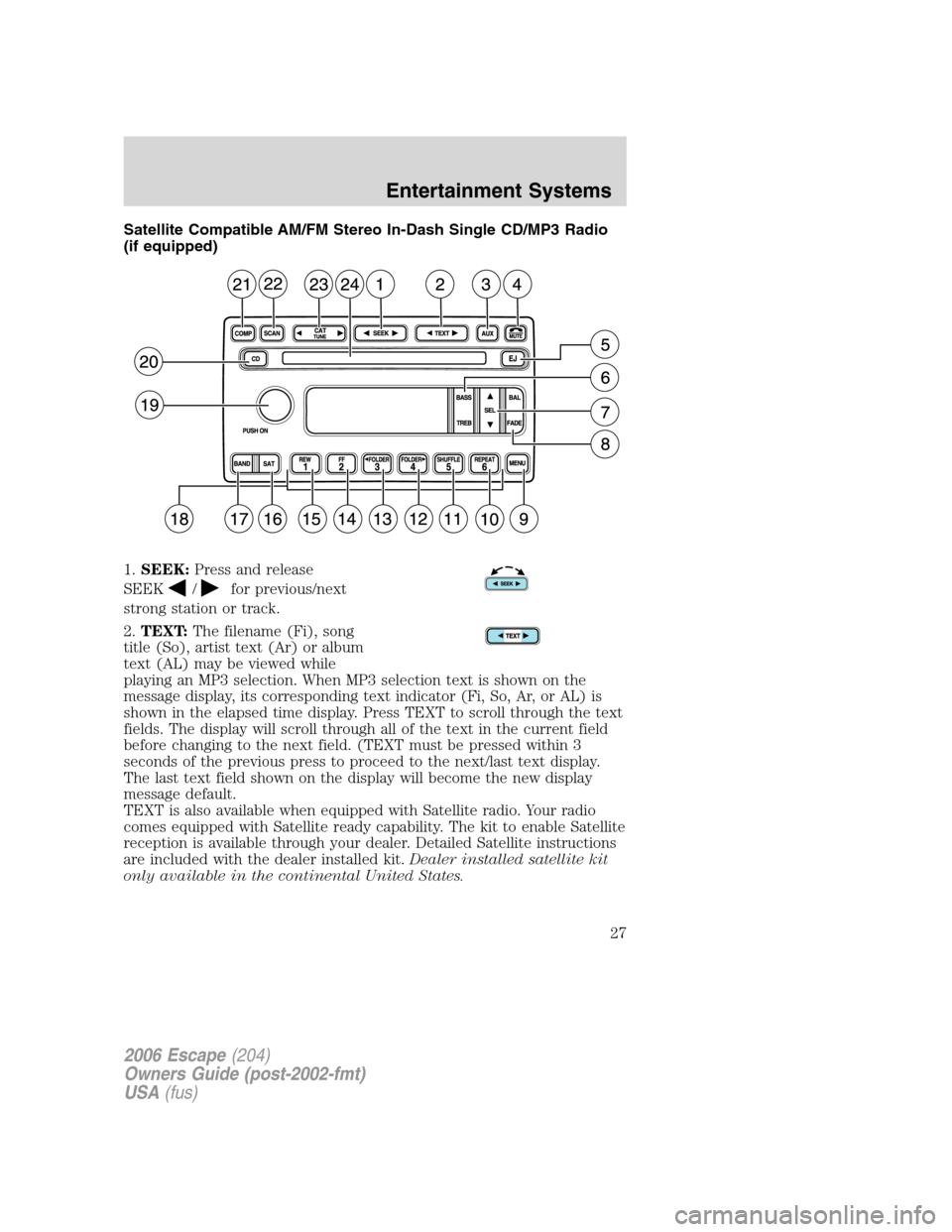
Satellite Compatible AM/FM Stereo In-Dash Single CD/MP3 Radio
(if equipped)
1.SEEK:Press and release
SEEK
/for previous/next
strong station or track.
2.TEXT:The filename (Fi), song
title (So), artist text (Ar) or album
text (AL) may be viewed while
playing an MP3 selection. When MP3 selection text is shown on the
message display, its corresponding text indicator (Fi, So, Ar, or AL) is
shown in the elapsed time display. Press TEXT to scroll through the text
fields. The display will scroll through all of the text in the current field
before changing to the next field. (TEXT must be pressed within 3
seconds of the previous press to proceed to the next/last text display.
The last text field shown on the display will become the new display
message default.
TEXT is also available when equipped with Satellite radio. Your radio
comes equipped with Satellite ready capability. The kit to enable Satellite
reception is available through your dealer. Detailed Satellite instructions
are included with the dealer installed kit.Dealer installed satellite kit
only available in the continental United States.
2006 Escape(204)
Owners Guide (post-2002-fmt)
USA(fus)
Entertainment Systems
27
Page 28 of 288

3.AUX:This control is not
operational.
4.MUTE:Press to MUTE playing
media; press again to return to
playing media
5.EJ:Press to eject a CD.
6.Bass:Press BASS; then press
SEL
/to decrease/increase
the bass output.
Treble:Press TREB; then press
SEL
/to decrease/increase
the treble output.
7.Select:Use with Bass, Treble,
Balance, Fade and other menu
selections.
8.Balance:Press BAL; then press
SEL
/to shift sound to the
left/right speakers.
Fade:Press FADE; then press
SEL
/to shift sound to the
rear/front speakers.
9.Menu:Press MENU and SEL to
access AUTOSET, Speed sensitive
volume and Setting the clock.
Autoset:Press MENU until AUTOSET appears in the display. Press SEL
to toggle ON/OFF. Allows you to set the strongest local radio stations
without losing your original manually set preset stations for
AM/FM1/FM2. When the six strongest stations are filled, the station
stored in preset 1 will begin playing. If there are less than six strong
stations, the system will store the last one in the remaining presets.
Speed sensitive volume:Press MENU until SPEED VOL X appears in
the display. Then press SEL to increase (
) or decrease ()the
2006 Escape(204)
Owners Guide (post-2002-fmt)
USA(fus)
Entertainment Systems
28
Page 29 of 288

volume setting. The level will appear in the display.
Radio volume changes automatically and slightly with vehicle speed to
compensate for road and wind noise. Recommended level is 1–3. Level 0
turns the feature off and level 7 is the maximum setting.
Setting the clock:Press MENU until SELECT HOUR or SELECT
MINUTE is displayed. Use SEL to manually increase (
) or decrease
(
) the hours/minutes. Press MENU again to disengage clock mode.
Folder/Track mode:In MP3 mode, press MENU until MODE appears in
the display. Use SEL to toggle between FOLDER (only tracks within
selected folder are accessible) or TRACK (all tracks on disc are
accessible) MODE.
10.REPEAT:Press to repeat the
current CD/MP3 track.
11.SHUFFLE:Press to play the
CD/MP3 tracks on the current disc
in random order.
12.FOLDER
: Press to access
the next MP3 directory.
13.FOLDER
: Press to access
the previous MP3 directory.
14.FF(Fast forward): In CD/MP3
mode, press until desired selection
is reached.
15.REW(Rewind): In CD/MP3
mode, press until desired selection
is reached.
16.SAT (if equipped):Your radio
comes equipped with Satellite Ready
capability. The kit to enable the
Satellite reception is available through your dealer. Detailed satellite
instructions are included with the dealer installed kit.Dealer installed
satellite kit only available in the continental United States.
17.BAND:Press to toggle between
AM/FM1/FM2 frequency band.
2006 Escape(204)
Owners Guide (post-2002-fmt)
USA(fus)
Entertainment Systems
29
Page 32 of 288

2.CD Eject:Press to eject a CD.
The radio will resume playing.
3.Mute:Press to MUTE playing
media; press again to return to the
playing media.
4.Tape Eject:Press to eject the
cassette. The radio will resume
playing.
5.Tape 1–2/CD:Press to begin
tape play. If a cassette is already
playing, press to change playing
sides.
CD:If a CD is loaded in the radio,
pressing CD will cause the CD to
begin playing.
6.AUX:Press to toggle between the
current playing media and DVD (if
equipped).
7.MENU:Press to access the
following functions:
Clock:Press MENU until SELECT HOUR or SELECT MINUTE is
displayed. Press
SELto decrease/ increase hours or minutes.
Compression:In CD mode, press to bring soft and loud passages
together for a more consistent listening level. Press MENU until
COMPRESS is displayed. Use SEL to toggle on/off.
Speed sensitive volume:Radio volume changes automatically and
slightly with vehicle speed to compensate for road and wind noise.
Recommended level is 1–3. Level 0 turns the feature off and level 7 is
the maximum setting. Press MENU until SPEED VOL X appears in the
display. Then press SEL to increase/decrease the volume setting. The
level will appear in the display.
2006 Escape(204)
Owners Guide (post-2002-fmt)
USA(fus)
Entertainment Systems
32
Page 33 of 288
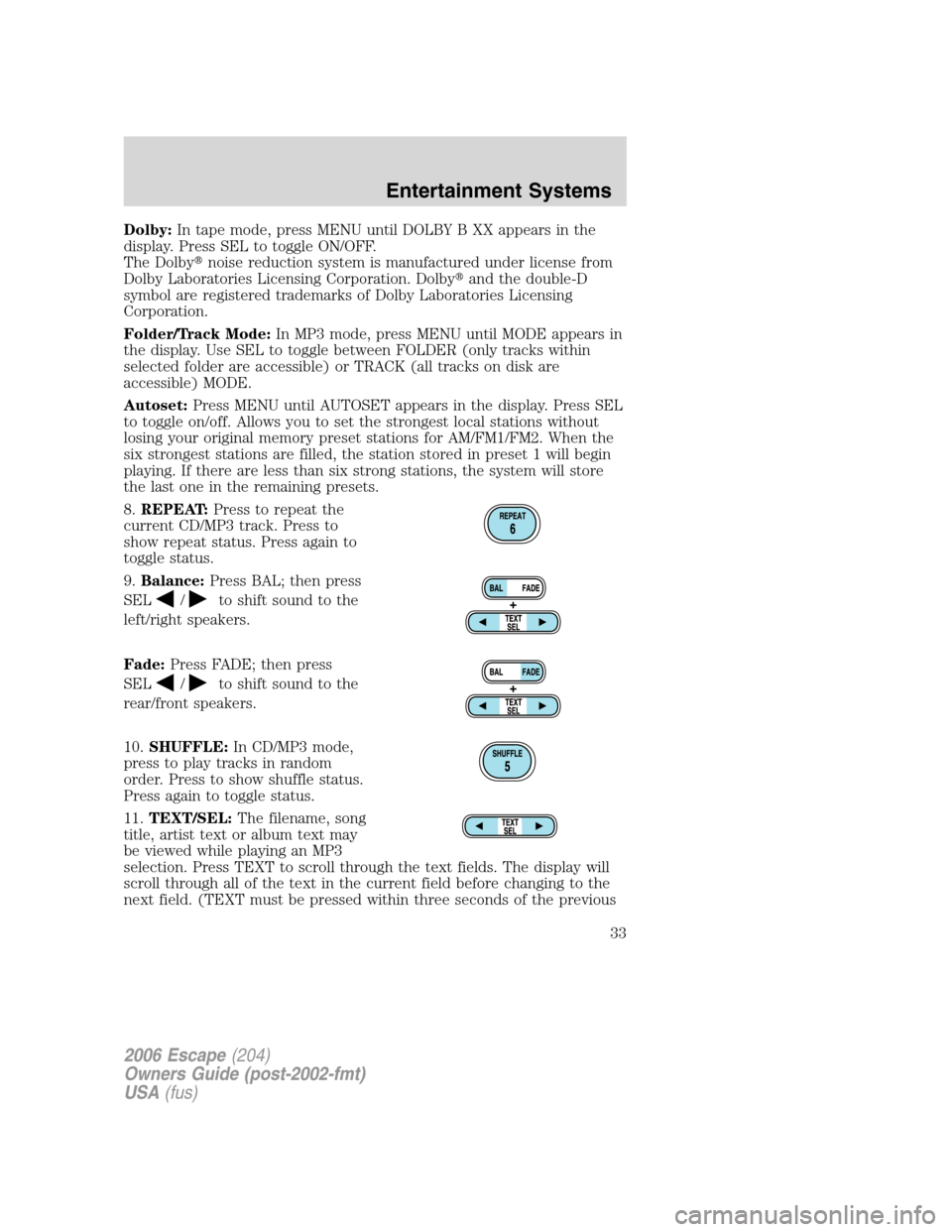
Dolby:In tape mode, press MENU until DOLBY B XX appears in the
display. Press SEL to toggle ON/OFF.
The Dolby�noise reduction system is manufactured under license from
Dolby Laboratories Licensing Corporation. Dolby�and the double-D
symbol are registered trademarks of Dolby Laboratories Licensing
Corporation.
Folder/Track Mode:In MP3 mode, press MENU until MODE appears in
the display. Use SEL to toggle between FOLDER (only tracks within
selected folder are accessible) or TRACK (all tracks on disk are
accessible) MODE.
Autoset:Press MENU until AUTOSET appears in the display. Press SEL
to toggle on/off. Allows you to set the strongest local stations without
losing your original memory preset stations for AM/FM1/FM2. When the
six strongest stations are filled, the station stored in preset 1 will begin
playing. If there are less than six strong stations, the system will store
the last one in the remaining presets.
8.REPEAT:Press to repeat the
current CD/MP3 track. Press to
show repeat status. Press again to
toggle status.
9.Balance:Press BAL; then press
SEL
/to shift sound to the
left/right speakers.
Fade:Press FADE; then press
SEL
/to shift sound to the
rear/front speakers.
10.SHUFFLE:In CD/MP3 mode,
press to play tracks in random
order. Press to show shuffle status.
Press again to toggle status.
11.TEXT/SEL:The filename, song
title, artist text or album text may
be viewed while playing an MP3
selection. Press TEXT to scroll through the text fields. The display will
scroll through all of the text in the current field before changing to the
next field. (TEXT must be pressed within three seconds of the previous
2006 Escape(204)
Owners Guide (post-2002-fmt)
USA(fus)
Entertainment Systems
33
Page 34 of 288
button press to proceed to the next/last text display. ) The last text field
shown on the display will become the new display message default.
TEXT is also available when equipped with Satellite radio. Your radio
comes equipped with Satellite ready capability. The kit to enable Satellite
reception is available through your dealer. Detailed Satellite instructions
are included with the dealer installed kit.Dealer installed satellite kit
only available in the continental United States.
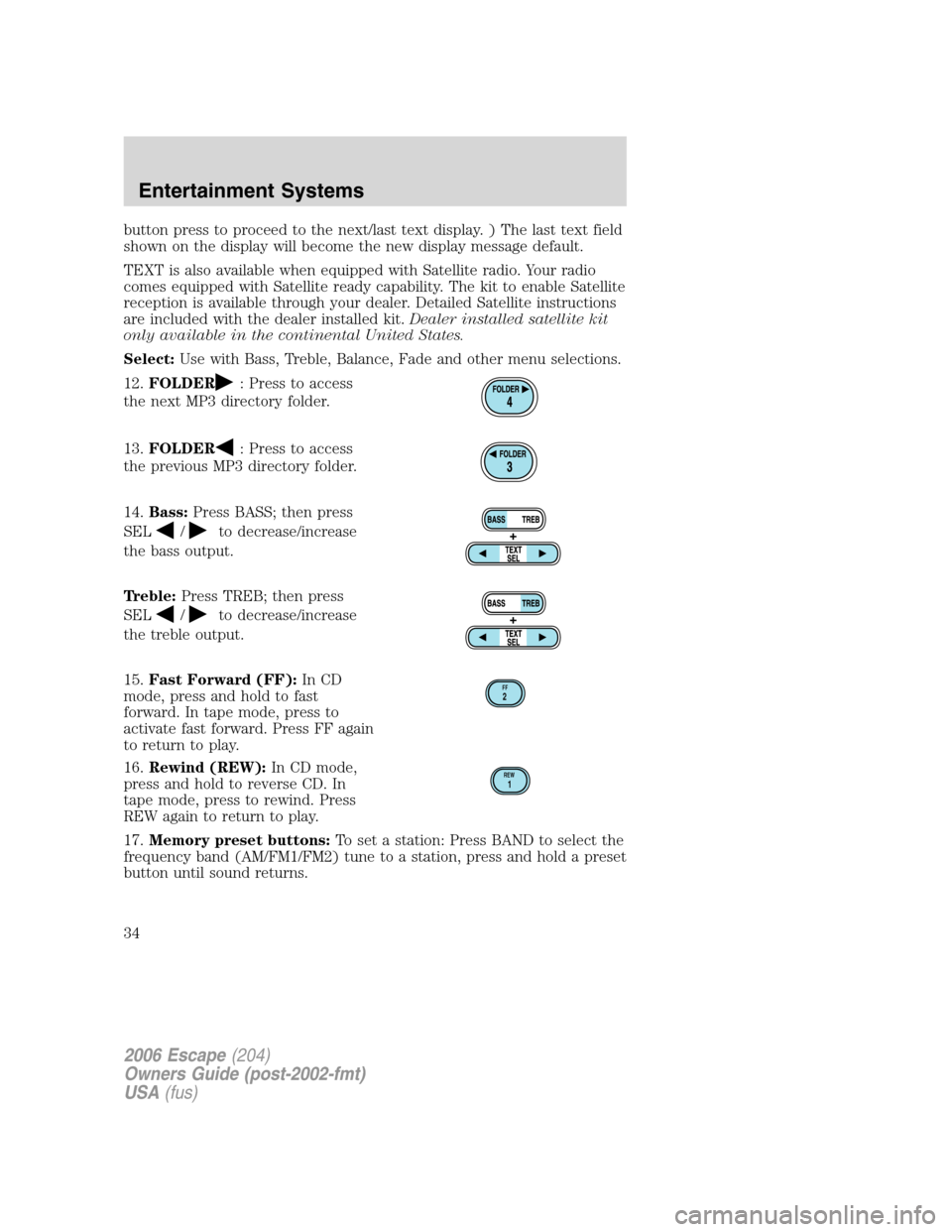
Select:Use with Bass, Treble, Balance, Fade and other menu selections.
12.FOLDER
: Press to access
the next MP3 directory folder.
13.FOLDER
: Press to access
the previous MP3 directory folder.
14.Bass:Press BASS; then press
SEL
/to decrease/increase
the bass output.
Treble:Press TREB; then press
SEL
/to decrease/increase
the treble output.
15.Fast Forward (FF):In CD
mode, press and hold to fast
forward. In tape mode, press to
activate fast forward. Press FF again
to return to play.
16.Rewind (REW):In CD mode,
press and hold to reverse CD. In
tape mode, press to rewind. Press
REW again to return to play.
17.Memory preset buttons:To set a station: Press BAND to select the
frequency band (AM/FM1/FM2) tune to a station, press and hold a preset
button until sound returns.
FF2
REW1
2006 Escape(204)
Owners Guide (post-2002-fmt)
USA(fus)
Entertainment Systems
34
Page 36 of 288

GENERAL AUDIO INFORMATION
Radio frequencies:AM and FM frequencies are established by the
Federal Communications Commission (FCC) and the Canadian Radio and
Telecommunications Commission (CRTC). Those frequencies are:
AM - 530, 540–1700, 1710 kHz
FM- 87.7, 87.9–107.7, 107.9 MHz
Radio reception factors:There are three factors that can affect radio
reception:
•Distance/strength: The further you travel from an FM station, the
weaker the signal and the weaker the reception.
•Terrain: Hills, mountains, tall buildings, power lines, electric fences,
traffic lights and thunderstorms can interfere with your reception.
•Station overload: When you pass a broadcast tower, a stronger signal
may overtake a weaker one and play while the weak station frequency
is displayed.
Cassette/player care:
Do:
•Use only cassettes that are 90 minutes long or less.
•Tighten very loose tapes by inserting a finger or pencil into the hole
and turning the hub.
•Remove loose labels before inserting tapes.
•Allow tapes which have been subjected to extreme heat, humidity or
cold to reach a moderate temperature before playing.
•Clean the cassette player head with a cassette cleaning cartridge after
10–12 hours of play to maintain good sound/operation.
Don’t:
•Expose tapes to direct sunlight, extreme humidity, heat or cold.
•Leave tapes in the cassette player for a long time when not being
played.
2006 Escape(204)
Owners Guide (post-2002-fmt)
USA(fus)
Entertainment Systems
36
