2006 CHEVROLET TRAIL BLAZER brake sensor
[x] Cancel search: brake sensorPage 159 of 534
Automatic Headlamp System
When it is dark enough outside, your Automatic
Headlamp System will turn on your headlamps at the
normal brightness along with other lamps such as
the taillamps, sidemarker, parking lamps and the
instrument panel lights. The radio lights will also be on.
Your vehicle is equipped with a light sensor on the
top of the instrument panel. Be sure it is not covered or
the system will be on whenever the ignition is on.
The system may also turn on your lights when driving
through a parking garage, heavy overcast weather
or a tunnel. This is normal.
There is a delay in the transition between the daytime
and nighttime operation of the Daytime Running
Lamps (DRL) and the automatic headlamp systems, so
that driving under bridges or bright overhead street
lights does not affect the system. The DRL and
automatic headlamp system will only be affected when
the light sensor sees a change in lighting lasting
longer than the delay.If you start your vehicle in a dark garage, the automatic
headlamp system will come on immediately. Once
you leave the garage, it will take about one minute for
the automatic headlamp system to change to DRL if it is
light outside. During that delay, your instrument panel
cluster may not be as bright as usual. Make sure
your instrument panel brightness control is in the full
bright position.
Only vehicles rst sold in the United States can idle with
the automatic headlamp system off. To idle with the
automatic headlamp system off, set the parking brake
while the ignition is off. Then start your vehicle. The
automatic headlamp system will stay off until you release
the parking brake, shift out of park or turn the exterior
lamp control to the off position (US vehicles only)
as described previously.
3-15
Page 203 of 534
SERVICE BRAKE SYSTEM
If a problem occurs with the brake system this message
will appear on the DIC. If this message appears, stop
as soon as possible and turn off the vehicle. Restart the
vehicle and check for the message on the DIC display.
If the message is still displayed, or appears again when
you begin driving, the brake system needs service.
See your GM dealer.
SERVICE STABILITRAK
If you ever see the SERVICE STABILITRAK message,
it means there may be a problem with your StabiliTrak®
system. If you see this message, try to reset the
system by performing the following: stop; turn off the
engine; then start the engine again. If the SERVICE
STABILITRAK message still comes on, it means there
is a problem. You should see your GM dealer for
service. The vehicle is safe to drive, however, you do
not have the benet of StabiliTrak
®, so reduce your
speed and drive accordingly. Press the select button to
acknowledge this message and clear it from the
DIC display.
SERVICE TIRE MONITOR
If your vehicle has a Tire Pressure Monitor (TPM)
system, this message will be displayed if one or more of
the tire monitor sensors have malfunctioned or if all of
the tire monitor sensors have not been programmed
successfully. See your GM dealer. Press the select
button to acknowledge this message and clear it from
the DIC display. The message will reappear at each
ignition cycle until the system has been serviced.
STABILITRAK ACTIVE
The STABILITRAK ACTIVE message will be displayed
anytime the system activates to maintain vehicle
stability. Any combination of engine speed management,
brake traction control, and stability control will display
the STABILITRAK ACTIVE message on the DIC.
STABILITRAK NOT READY
The STABILITRAK NOT READY message may be
displayed if driving conditions delay system initialization.
This is normal. Once the system initializes, the
STABILITRAK NOT READY message will no longer be
displayed on the DIC.
3-59
Page 346 of 534
3. Shift the transmission in PARK (P).
4. Follow the dolly manufacturer’s instructions to
attach and secure the vehicle being towed to
the dolly and then the loaded dolly to the tow
vehicle. Use an adequate clamping device to ensure
that the front wheels are locked into the straight
position.
5. Release the parking brake only after the vehicle
being towed is rmly attached to the towing
vehicle.
6. Turn the ignition to LOCK.
If the tow vehicle will not be started or driven for
six weeks or more, remove the battery cable
from the negative terminal (post) of the battery.
Electronically Controlled Air
Suspension System
Your vehicle may be equipped with an electronically
controlled air suspension system that automatically
keeps your vehicle level as you load and unload.
The system includes a compressor, two height sensors
and two air springs supporting the rear axle.The system also has an internal clock to prevent
overheating if the inator is used for prolonged periods.
If the system overheats, all leveling function stops
until the system cools down. During this time, the
indicator light on the air inator switch will be ashing.
The ignition has to be on for the system to inate,
in order to raise the vehicle to the standard ride height
after loading. The system can lower the vehicle to
the standard ride height after unloading with the ignition
on and also for up to 30 minutes after the ignition
has been turned off.
You may hear the compressor operating when you load
your vehicle, and periodically as the system adjusts
the vehicle to the standard ride height.
Load leveling will not function normally with the inator
hose attached to the inator outlet. Remove the
inator hose from the outlet during loading and
unloading.
If the vehicle is parked for an extended period of time,
some bleed down of the suspension is normal. Upon
starting the vehicle, proper height will be achieved.
4-58
Page 429 of 534

The TPMS sensor matching process is outlined below:
1. Set the parking brake.
2. Turn the ignition switch to RUN with the engine off.
3. Turn the headlamp switch from off to parking
lamps four times within three seconds. A double
horn chirp will sound and the TPMS low tire warning
light will begin to ash. The double horn chirp
and ashing TPMS warning light indicate that the
TPMS matching process has started. The TPMS
warning light should continue ashing throughout
the matching procedure. The SERVICE TIRE
MONITOR message will be displayed on the Driver
Information Center (DIC).
4. Start with the driver’s side front tire.
5. Remove the valve cap from the valve cap stem.
Activate the TPMS sensor by increasing or
decreasing the tire’s air pressure for 10 seconds,
then stop and listen for a single horn chirp. The
single horn chirp should sound within 15 seconds,
conrming that the sensor identication code has
been matched to this tire and wheel position. If you
do not hear the conrming single horn chirp, you will
need to start over with step number one. To let
air-pressure out of a tire you can use the pointed
end of the valve cap, a pencil-style air pressure
gage, or a key.
6. Proceed to the passenger’s side front tire, and
repeat the procedure in Step 5.7. Proceed to the passenger’s side rear tire, and
repeat the procedure in Step 5.
8. Proceed to the driver’s side rear tire, and repeat the
procedure in Step 5.
9. After hearing the conrming horn chirp for the
driver’s side rear tire, check to see if the TPMS
warning light is still ashing. If yes, turn the ignition
switch to LOCK to exit the sensor matching
process. If the TPMS warning light is not ashing,
the ve minute time limit has passed and you
will need to start the process over beginning
with Step 1.
10. Set all four tires to the recommended air pressure
level as indicated on the Tire and Loading
Information label.
11. Put the valve caps back on the valve stems
The spare tire does not have a TPMS sensor. If you
replace one of the road tires with the spare, the CHECK
TIRE PRESSURE message will be displayed on the
DIC screen. This message should go off once you
re-install the road tire containing the TPMS sensor.
The SERVICE TIRE MONITOR message is displayed
when the TPMS is malfunctioning. One or more missing
or inoperable TPMS sensors will cause the SERVICE
TIRE MONITOR message to be displayed. See
your dealer for service.
5-69
Page 471 of 534
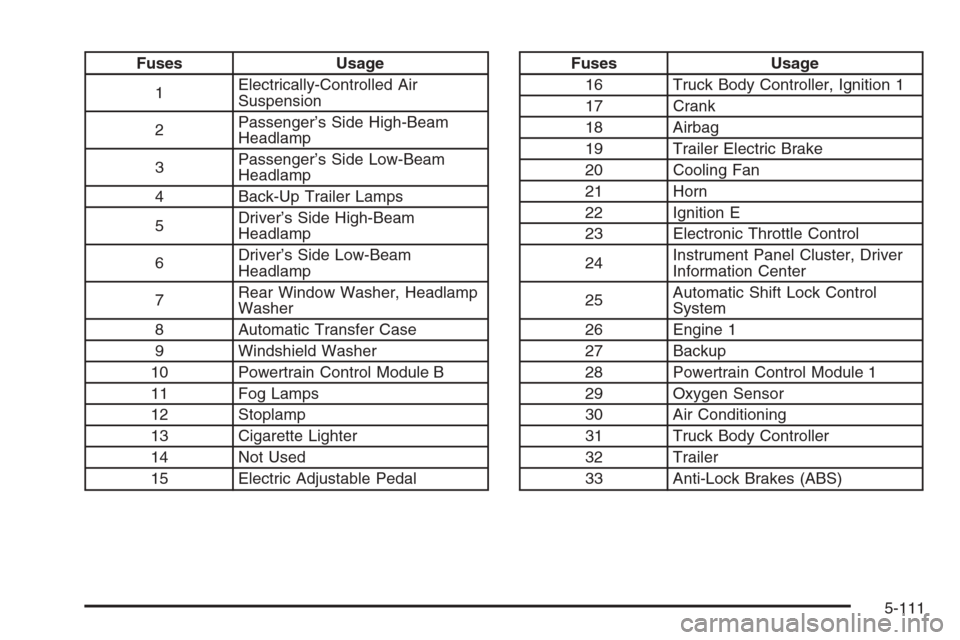
Fuses Usage
1Electrically-Controlled Air
Suspension
2Passenger’s Side High-Beam
Headlamp
3Passenger’s Side Low-Beam
Headlamp
4 Back-Up Trailer Lamps
5Driver’s Side High-Beam
Headlamp
6Driver’s Side Low-Beam
Headlamp
7Rear Window Washer, Headlamp
Washer
8 Automatic Transfer Case
9 Windshield Washer
10 Powertrain Control Module B
11 Fog Lamps
12 Stoplamp
13 Cigarette Lighter
14 Not Used
15 Electric Adjustable PedalFuses Usage
16 Truck Body Controller, Ignition 1
17 Crank
18 Airbag
19 Trailer Electric Brake
20 Cooling Fan
21 Horn
22 Ignition E
23 Electronic Throttle Control
24Instrument Panel Cluster, Driver
Information Center
25Automatic Shift Lock Control
System
26 Engine 1
27 Backup
28 Powertrain Control Module 1
29 Oxygen Sensor
30 Air Conditioning
31 Truck Body Controller
32 Trailer
33 Anti-Lock Brakes (ABS)
5-111
Page 474 of 534
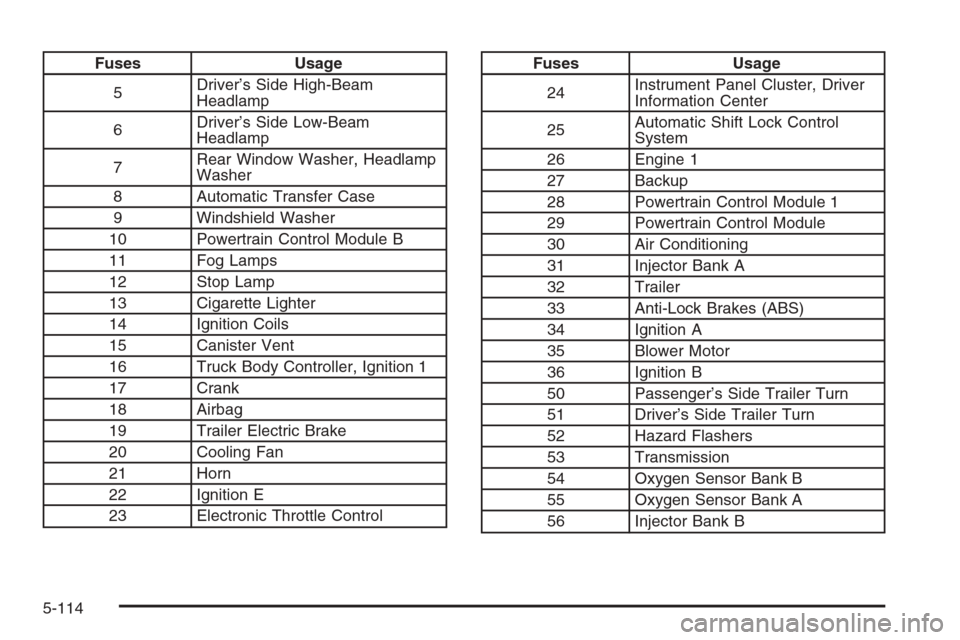
Fuses Usage
5Driver’s Side High-Beam
Headlamp
6Driver’s Side Low-Beam
Headlamp
7Rear Window Washer, Headlamp
Washer
8 Automatic Transfer Case
9 Windshield Washer
10 Powertrain Control Module B
11 Fog Lamps
12 Stop Lamp
13 Cigarette Lighter
14 Ignition Coils
15 Canister Vent
16 Truck Body Controller, Ignition 1
17 Crank
18 Airbag
19 Trailer Electric Brake
20 Cooling Fan
21 Horn
22 Ignition E
23 Electronic Throttle ControlFuses Usage
24Instrument Panel Cluster, Driver
Information Center
25Automatic Shift Lock Control
System
26 Engine 1
27 Backup
28 Powertrain Control Module 1
29 Powertrain Control Module
30 Air Conditioning
31 Injector Bank A
32 Trailer
33 Anti-Lock Brakes (ABS)
34 Ignition A
35 Blower Motor
36 Ignition B
50 Passenger’s Side Trailer Turn
51 Driver’s Side Trailer Turn
52 Hazard Flashers
53 Transmission
54 Oxygen Sensor Bank B
55 Oxygen Sensor Bank A
56 Injector Bank B
5-114