Page 278 of 534
s(Play/Pause):Press this button to start play of a
DVD or CD. Press this button while a DVD or CD is
playing to pause it. Press this button again to continue
the play of the DVD or CD.
When the DVD is playing, press the pause button then
press the fast forward button. The DVD will continue
playing in a slow play mode. To cancel slow play mode,
press the play/pause button.
u(Next Track/Chapter):Press this button to advance
to the beginning of the next track or chapter. This
button may not work when the DVD is playing the
copyright information or the previews.
Battery Replacement
To change the batteries, do the following:
1. Remove the battery compartment door located on
the bottom of the remote control.
2. Replace the two AA batteries in the compartment.
Make sure that they are installed correctly, using
the diagram on the inside of the battery
compartment.
3. Close the battery door securely.
If the remote control is to be stored for a long period of
time, remove the batteries and keep them in a cool,
dry place.
Problem Recommended Action
No power. The ignition might not be
in on or accessory.
The parental control
button might have been
turned on. The power
indicator light will ash.
Disc will not play. The system might be off.
The parental control
button might have been
turned on. The power
indicator light will ash.
The system might be in
auxiliary mode.
The disc is upside down
or is not compatible.
The picture does not
ll the screen. There are
black borders on the top
and bottom or on both
sides or it looks
stretched out.Check the display
mode settings in the
display menu.
The disc was ejected, but
it was pulled back into the
DVD player.The disc is being stored in
the DVD player. Press the
eject button again to eject
the disc.
3-134
Page 279 of 534
Problem Recommended Action
In auxiliary mode, the
picture moves or scrolls.Check the auxiliary input
connections at both
devices.
Change the Video Format
to PAL or NTSC. See
“Stereo RCA Jacks”
previously for how to
change the video format.
The language in the audio
or on the screen is wrong.Check the audio or
language selection in the
main DVD menu.
The remote control does
not work.Check to make sure there
is no obstruction between
the remote control and the
transmitter window.
Check the batteries to
make sure they are not
dead or installed
incorrectly.
The parental control
button might have been
turned on. The power
indicator light will ash.Problem Recommended Action
After stopping the player,
I push Play but
sometimes the DVD starts
where I left off and
sometimes at the
beginning.If the stop button was
pressed one time, the
DVD player will resume
playing where the DVD
was stopped. If the stop
button was pressed two
times the DVD player will
begin to play from the
beginning of the DVD.
The auxiliary source is
running but there is no
picture or sound.Check that the DVD
player is in the auxiliary
source mode.
Check the auxiliary input
connections at both
devices.
My disc is stuck in the
player. The Load/Eject
button does not work.Turn the DVD power off,
then on, then press the
load/eject button on the
DVD player.
Do not attempt to forcibly
remove the disc from the
DVD player. This could
permanently damage the
disc and DVD player.
3-135
Page 373 of 534
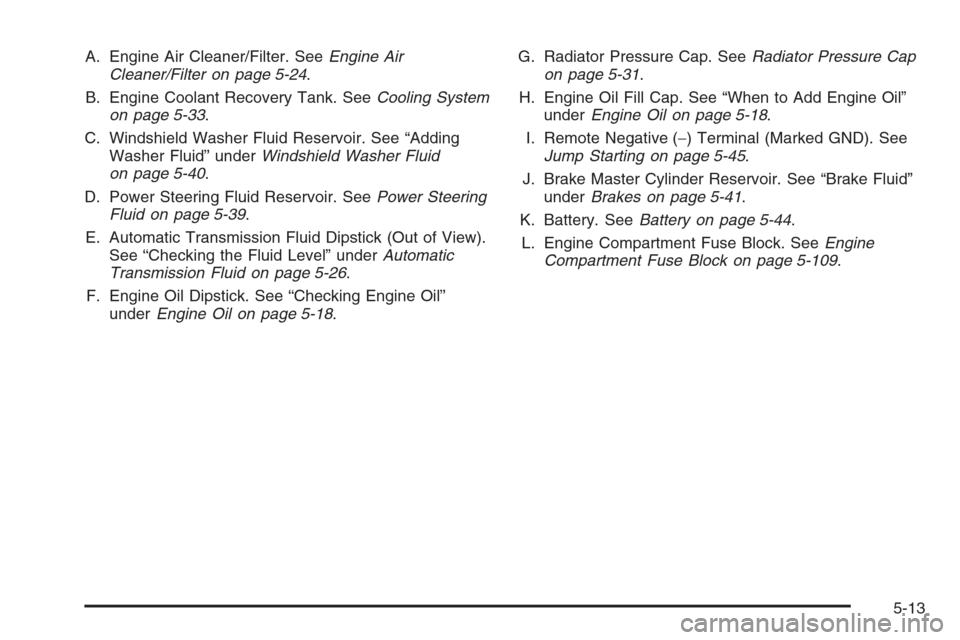
A. Engine Air Cleaner/Filter. SeeEngine Air
Cleaner/Filter on page 5-24.
B. Engine Coolant Recovery Tank. SeeCooling System
on page 5-33.
C. Windshield Washer Fluid Reservoir. See “Adding
Washer Fluid” underWindshield Washer Fluid
on page 5-40.
D. Power Steering Fluid Reservoir. SeePower Steering
Fluid on page 5-39.
E. Automatic Transmission Fluid Dipstick (Out of View).
See “Checking the Fluid Level” underAutomatic
Transmission Fluid on page 5-26.
F. Engine Oil Dipstick. See “Checking Engine Oil”
underEngine Oil on page 5-18.G. Radiator Pressure Cap. SeeRadiator Pressure Cap
on page 5-31.
H. Engine Oil Fill Cap. See “When to Add Engine Oil”
underEngine Oil on page 5-18.
I. Remote Negative (−) Terminal (Marked GND). See
Jump Starting on page 5-45.
J. Brake Master Cylinder Reservoir. See “Brake Fluid”
underBrakes on page 5-41.
K. Battery. SeeBattery on page 5-44.
L. Engine Compartment Fuse Block. SeeEngine
Compartment Fuse Block on page 5-109.
5-13
Page 375 of 534
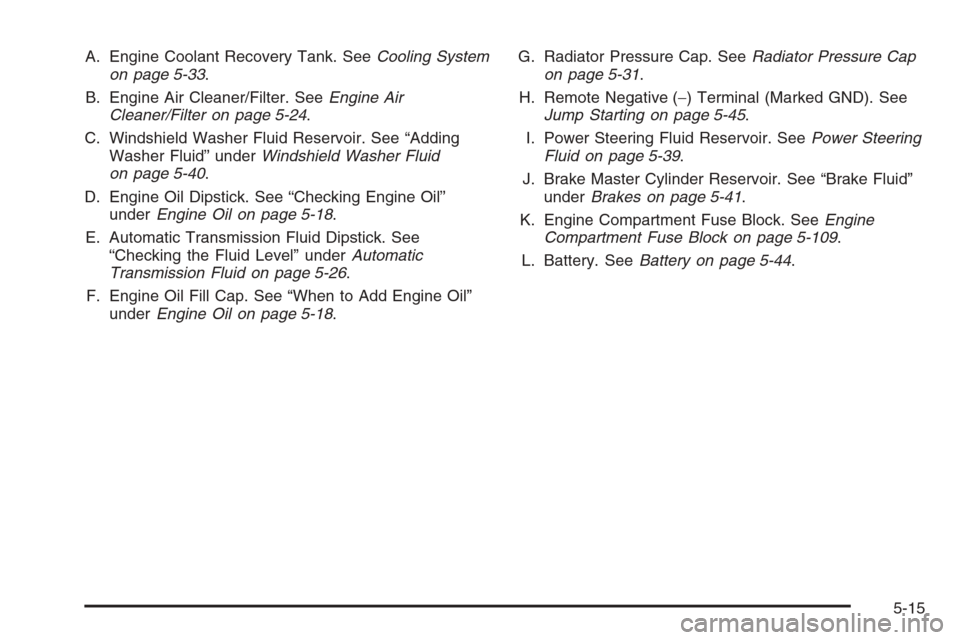
A. Engine Coolant Recovery Tank. SeeCooling System
on page 5-33.
B. Engine Air Cleaner/Filter. SeeEngine Air
Cleaner/Filter on page 5-24.
C. Windshield Washer Fluid Reservoir. See “Adding
Washer Fluid” underWindshield Washer Fluid
on page 5-40.
D. Engine Oil Dipstick. See “Checking Engine Oil”
underEngine Oil on page 5-18.
E. Automatic Transmission Fluid Dipstick. See
“Checking the Fluid Level” underAutomatic
Transmission Fluid on page 5-26.
F. Engine Oil Fill Cap. See “When to Add Engine Oil”
underEngine Oil on page 5-18.G. Radiator Pressure Cap. SeeRadiator Pressure Cap
on page 5-31.
H. Remote Negative (−) Terminal (Marked GND). See
Jump Starting on page 5-45.
I. Power Steering Fluid Reservoir. SeePower Steering
Fluid on page 5-39.
J. Brake Master Cylinder Reservoir. See “Brake Fluid”
underBrakes on page 5-41.
K. Engine Compartment Fuse Block. SeeEngine
Compartment Fuse Block on page 5-109.
L. Battery. SeeBattery on page 5-44.
5-15
Page 377 of 534
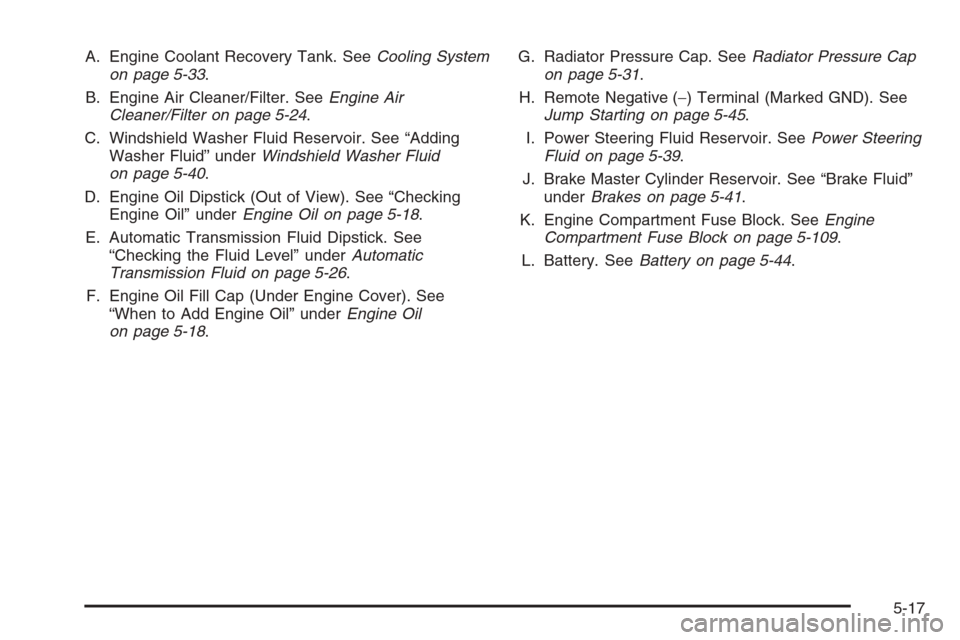
A. Engine Coolant Recovery Tank. SeeCooling System
on page 5-33.
B. Engine Air Cleaner/Filter. SeeEngine Air
Cleaner/Filter on page 5-24.
C. Windshield Washer Fluid Reservoir. See “Adding
Washer Fluid” underWindshield Washer Fluid
on page 5-40.
D. Engine Oil Dipstick (Out of View). See “Checking
Engine Oil” underEngine Oil on page 5-18.
E. Automatic Transmission Fluid Dipstick. See
“Checking the Fluid Level” underAutomatic
Transmission Fluid on page 5-26.
F. Engine Oil Fill Cap (Under Engine Cover). See
“When to Add Engine Oil” underEngine Oil
on page 5-18.G. Radiator Pressure Cap. SeeRadiator Pressure Cap
on page 5-31.
H. Remote Negative (−) Terminal (Marked GND). See
Jump Starting on page 5-45.
I. Power Steering Fluid Reservoir. SeePower Steering
Fluid on page 5-39.
J. Brake Master Cylinder Reservoir. See “Brake Fluid”
underBrakes on page 5-41.
K. Engine Compartment Fuse Block. SeeEngine
Compartment Fuse Block on page 5-109.
L. Battery. SeeBattery on page 5-44.
5-17
Page 406 of 534
Notice:If you leave your radio or other accessories
on during the jump starting procedure, they could
be damaged. The repairs would not be covered
by your warranty. Always turn off your radio and
other accessories when jump starting your vehicle.
3. Turn off the ignition on both vehicles. Unplug
unnecessary accessories plugged into the cigarette
lighter or the accessory power outlets, if equipped.
Turn off the radio and all lamps that are not
needed. This will avoid sparks and help to save
both batteries. And it could save the radio!
4. Open both hoods and locate the batteries. Find
the positive (+) and negative (−) terminals on each
battery. Your vehicle has a remote negative (−) jump
starting terminal. You should always use this remote
terminal instead of the terminal on the battery.
The remote negative (−) terminal is located on the
front engine lift bracket on vehicles with the
4.2L L6 engine or the engine accessory drive bracket
for vehicles with the 5.3L or 6.0L V8 engines, and is
marked GND (Ground). SeeEngine Compartment
Overview on page 5-12for more information on
location.
{CAUTION:
Using a match near a battery can cause battery
gas to explode. People have been hurt doing
this, and some have been blinded. Use a
ashlight if you need more light.
Be sure the battery has enough water. You do
not need to add water to the battery installed
in your new vehicle. But if a battery has ller
caps, be sure the right amount of uid is there.
If it is low, add water to take care of that rst.
If you do not, explosive gas could be present.
Battery uid contains acid that can burn you.
Do not get it on you. If you accidentally get it
in your eyes or on your skin, ush the place
with water and get medical help immediately.
5-46
Page 408 of 534
8. Now connect the black negative (−) cable to the
negative (−) terminal of the good battery. Use a
remote negative (−) terminal if the vehicle has one.
Do not let the other end touch anything until the
next step. The other end of the negative (−) cable
does not go to the dead battery. It goes to a
heavy, unpainted metal engine part or to the remote
negative (−) terminal on the vehicle with the dead
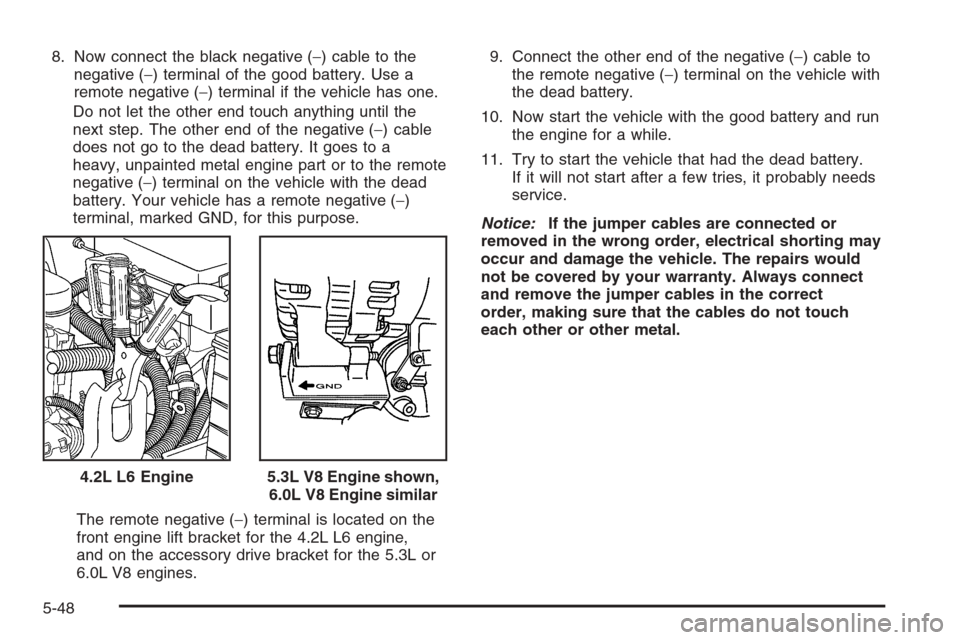
battery. Your vehicle has a remote negative (−)
terminal, marked GND, for this purpose.
The remote negative (−) terminal is located on the
front engine lift bracket for the 4.2L L6 engine,
and on the accessory drive bracket for the 5.3L or
6.0L V8 engines.9. Connect the other end of the negative (−) cable to
the remote negative (−) terminal on the vehicle with
the dead battery.
10. Now start the vehicle with the good battery and run
the engine for a while.
11. Try to start the vehicle that had the dead battery.
If it will not start after a few tries, it probably needs
service.
Notice:If the jumper cables are connected or
removed in the wrong order, electrical shorting may
occur and damage the vehicle. The repairs would
not be covered by your warranty. Always connect
and remove the jumper cables in the correct
order, making sure that the cables do not touch
each other or other metal.
4.2L L6 Engine
5.3L V8 Engine shown,
6.0L V8 Engine similar
5-48