2006 CHEVROLET SILVERADO CD player
[x] Cancel search: CD playerPage 299 of 594
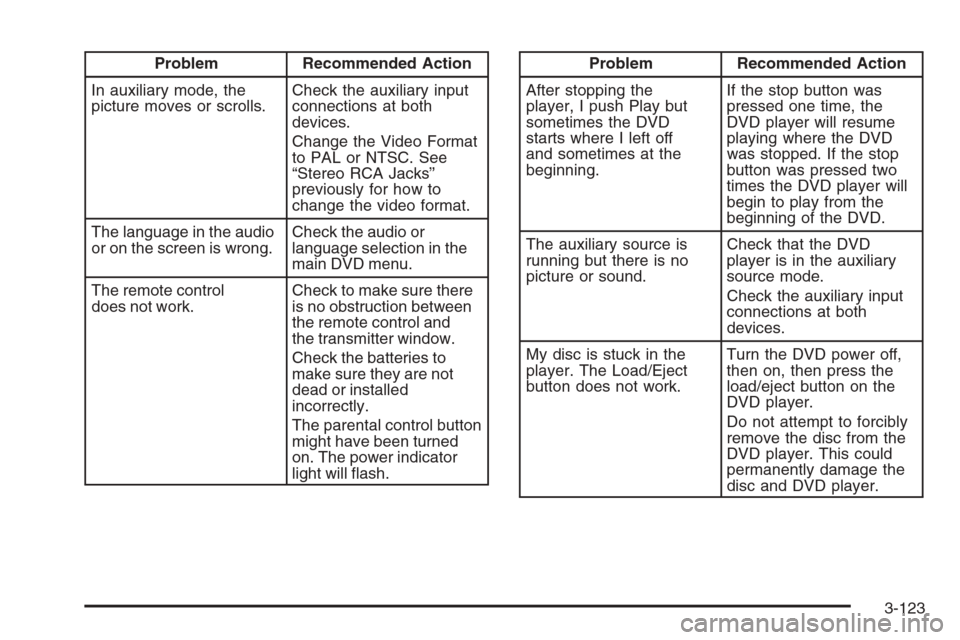
Problem Recommended Action
In auxiliary mode, the
picture moves or scrolls.Check the auxiliary input
connections at both
devices.
Change the Video Format
to PAL or NTSC. See
“Stereo RCA Jacks”
previously for how to
change the video format.
The language in the audio
or on the screen is wrong.Check the audio or
language selection in the
main DVD menu.
The remote control
does not work.Check to make sure there
is no obstruction between
the remote control and
the transmitter window.
Check the batteries to
make sure they are not
dead or installed
incorrectly.
The parental control button
might have been turned
on. The power indicator
light will ash.Problem Recommended Action
After stopping the
player, I push Play but
sometimes the DVD
starts where I left off
and sometimes at the
beginning.If the stop button was
pressed one time, the
DVD player will resume
playing where the DVD
was stopped. If the stop
button was pressed two
times the DVD player will
begin to play from the
beginning of the DVD.
The auxiliary source is
running but there is no
picture or sound.Check that the DVD
player is in the auxiliary
source mode.
Check the auxiliary input
connections at both
devices.
My disc is stuck in the
player. The Load/Eject
button does not work.Turn the DVD power off,
then on, then press the
load/eject button on the
DVD player.
Do not attempt to forcibly
remove the disc from the
DVD player. This could
permanently damage the
disc and DVD player.
3-123
Page 300 of 594
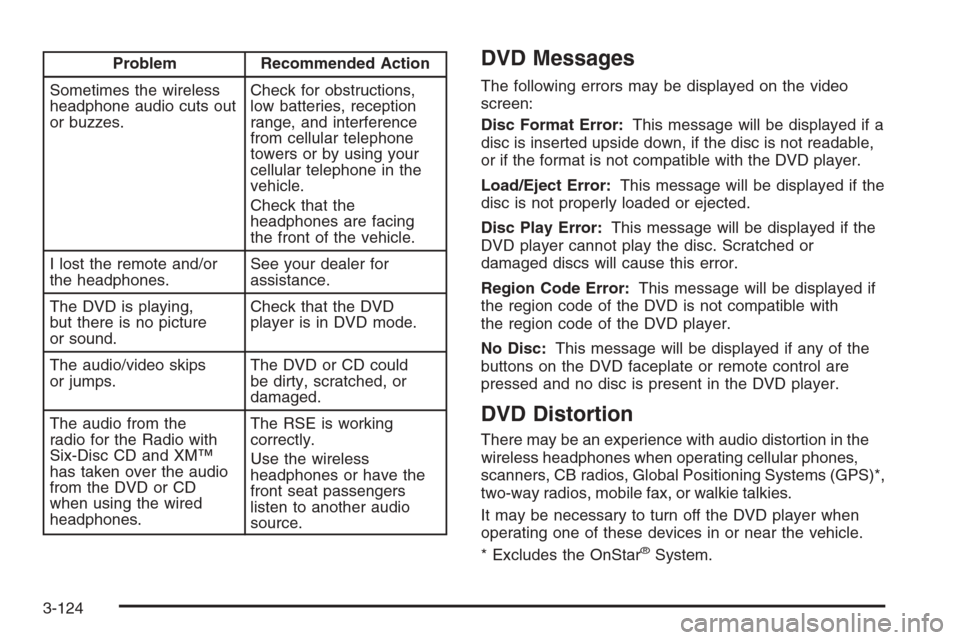
Problem Recommended Action
Sometimes the wireless
headphone audio cuts out
or buzzes.Check for obstructions,
low batteries, reception
range, and interference
from cellular telephone
towers or by using your
cellular telephone in the
vehicle.
Check that the
headphones are facing
the front of the vehicle.
I lost the remote and/or
the headphones.See your dealer for
assistance.
The DVD is playing,
but there is no picture
or sound.Check that the DVD
player is in DVD mode.
The audio/video skips
or jumps.The DVD or CD could
be dirty, scratched, or
damaged.
The audio from the
radio for the Radio with
Six-Disc CD and XM™
has taken over the audio
from the DVD or CD
when using the wired
headphones.The RSE is working
correctly.
Use the wireless
headphones or have the
front seat passengers
listen to another audio
source.DVD Messages
The following errors may be displayed on the video
screen:
Disc Format Error:This message will be displayed if a
disc is inserted upside down, if the disc is not readable,
or if the format is not compatible with the DVD player.
Load/Eject Error:This message will be displayed if the
disc is not properly loaded or ejected.
Disc Play Error:This message will be displayed if the
DVD player cannot play the disc. Scratched or
damaged discs will cause this error.
Region Code Error:This message will be displayed if
the region code of the DVD is not compatible with
the region code of the DVD player.
No Disc:This message will be displayed if any of the
buttons on the DVD faceplate or remote control are
pressed and no disc is present in the DVD player.
DVD Distortion
There may be an experience with audio distortion in the
wireless headphones when operating cellular phones,
scanners, CB radios, Global Positioning Systems (GPS)*,
two-way radios, mobile fax, or walkie talkies.
It may be necessary to turn off the DVD player when
operating one of these devices in or near the vehicle.
* Excludes the OnStar
®System.
3-124
Page 304 of 594
Radio Reception
You may experience frequency interference and static
during normal radio reception if items such as cellphone
chargers, vehicle convenience accessories, and
external electronic devices are plugged into the
accessory power outlet. If there is interference or static,
unplug the item from the accessory power outlet.
AM
The range for most AM stations is greater than for FM,
especially at night. The longer range can cause
station frequencies to interfere with each other. For
better radio reception, most AM radio stations will boost
the power levels during the day, and then reduce
these levels during the night. Static can also occur when
things like storms and power lines interfere with radio
reception. When this happens, try reducing the treble on
your radio.
FM Stereo
FM stereo will give the best sound, but FM signals will
reach only about 10 to 40 miles (16 to 65 km). Tall
buildings or hills can interfere with FM signals, causing
the sound to fade in and out.
XM™ Satellite Radio Service
XM™ Satellite Radio Service gives digital radio
reception from coast-to-coast in the 48 contiguous
United States, and in Canada (if available). Just as with
FM, tall buildings or hills can interfere with satellite
radio signals, causing the sound to fade in and out.
In addition, traveling or standing under heavy foliage,
bridges, garages, or tunnels may cause loss of the XM™
signal for a period of time. The radio may display
NO SIGNAL to indicate interference.
Care of the Cassette Tape Player
A tape player that is not cleaned regularly can cause
reduced sound quality, ruined cassettes, or a damaged
mechanism. Cassette tapes should be stored in their
cases away from contaminants, direct sunlight, and
extreme heat. If they are not, they may not operate
properly or may cause failure of the tape player.
The tape player should be cleaned regularly after every
50 hours of use. The radio may display CLEAN to
indicate that the tape player has been used for 50 hours
without resetting the tape clean timer. If this message
appears on the display, the cassette tape player
needs to be cleaned. It will still play tapes, but it should
be cleaned as soon as possible to prevent damage
to the tapes and player.
3-128
Page 305 of 594
If there is a reduction in sound quality, try a known good
cassette to see if the tape or the tape player is at
fault. If this other cassette has no improvement in sound
quality, clean the tape player.
For best results, use a scrubbing action, non-abrasive
cleaning cassette with pads which scrub the tape
head as the hubs of the cleaner cassette turn. The
recommended cleaning cassette is available through
your dealer.
When cleaning the cassette tape player with the
recommended non-abrasive cleaning cassette, it is
possible that the cassette may eject, because the cut
tape detection feature on the radio may recognize it as a
broken tape, in error. To prevent the cleaning cassette
from being ejected, use the following steps:
1. Turn the ignition on.
2. Turn the radio off.
3. Press and hold the TAPE DISC button for
ve seconds. READY will appear on the display
and the cassette symbol will ash for ve seconds.
4. Insert the scrubbing action cleaning cassette.
5. Eject the cleaning cassette after the manufacturer’s
recommended cleaning time.
When the cleaning cassette has been ejected, the
cut tape detection feature will be active again.A non-scrubbing action, wet-type cleaner which uses a
cassette with a fabric belt to clean the tape head
can be used. This type of cleaning cassette will not
eject on its own. A non-scrubbing action cleaner may not
clean as thoroughly as the scrubbing type cleaner.
The use of a non-scrubbing action, dry-type cleaning
cassette is not recommended.
After the player is cleaned, press and hold the eject
button for ve seconds to reset the CLEAN indicator.
The radio will display --- or CLEANED to show the
indicator was reset.
Cassettes are subject to wear and the sound quality
may degrade over time. Always make sure the cassette
tape is in good condition before the tape player is
serviced.
Care of Your CDs and DVDs
Handle CDs carefully. Store them in their original cases
or other protective cases and away from direct
sunlight and dust. The CD player scans the bottom
surface of the disc. If the surface of a CD is damaged,
such as cracked, broken, or scratched, the CD will
not play properly or not at all. If the surface of a CD is
soiled, take a soft, lint free cloth or dampen a clean, soft
cloth in a mild, neutral detergent solution mixed with
water, and clean it. Make sure the wiping process starts
from the center to the edge.
3-129
Page 306 of 594
Do not touch the bottom side of a CD while handling it;
this could damage the surface. Pick up CDs by
grasping the outer edges or the edge of the hole and
the outer edge.
Care of the CD and DVD Player
The use of CD lens cleaners for CDs is not advised,
due to the risk of contaminating the lens of the CD optics
with lubricants internal to the CD mechanism.
Fixed Mast Antenna
The xed mast antenna can withstand most car washes
without being damaged. If the mast should ever become
slightly bent, straighten it out by hand. If the mast is badly
bent, replace it.
Check occasionally to make sure the mast is still
tightened to the cowl. If tightening is required, tighten
by hand, then with a wrench one quarter turn.
XM™ Satellite Radio Antenna
System
The XM™ Satellite Radio antenna is located on the roof
of your vehicle. Keep this antenna clear of snow and
ice build up for clear radio reception.
If your vehicle has a sunroof, the performance of the
XM™ system may be affected if the sunroof is open.
Loading items onto the roof of your vehicle can interfere
with the performance of the XM™ system. Make sure
the XM™ Satellite Radio antenna is not obstructed.
Chime Level Adjustment
The radio is used to adjust the vehicle’s chime level.
To change the volume level of the chime, press and hold
pushbutton 6 with the ignition on and the radio power off.
The volume level will change from the normal level to
loud, and LOUD will appear on the radio display. To
change back to the default or normal setting, press and
hold pushbutton 6 again. The volume level will change
from the loud level to normal, and NORMAL will appear
on the radio display. Each time the chime volume is
changed, three chimes will sound as an example of the
new volume selected. Removing the radio and not
replacing it with a factory radio or chime module will
disable vehicle chimes.
3-130
Page 580 of 594
Appearance Care (cont.)
Weatherstrips............................................5-119
Windshield and Wiper Blades......................5-121
Ashtray(s)......................................................3-19
Audio System(s).............................................3-70
AM-FM Radio.............................................3-72
Audio Steering Wheel Controls....................3-127
Care of Your Cassette Tape Player...............3-128
Care of Your CD and DVD Player................3-130
Care of Your CDs and DVDs .......................3-129
Chime Level Adjustment.............................3-130
Fixed Mast Antenna...................................3-130
Radio with Cassette and CD.........................3-85
Radio with CD............................................3-74
Radio with Six-Disc CD................................3-99
Rear Seat Audio (RSA)...............................3-125
Setting the Time for Radios with
Radio Data Systems (RDS).......................3-71
Setting the Time for Radios without
Radio Data Systems (RDS).......................3-71
Theft-Deterrent Feature...............................3-126
Understanding Radio Reception...................3-128
XM™ Satellite Radio Antenna System...........3-130
Automatic Headlamp System............................3-14
Automatic Transmission
Fluid..................................................5-27, 5-30
Operation...................................................2-24
Auxiliary Roof Mounted Lamp Switch.................3-16B
Battery..........................................................5-51
Battery Warning Light......................................3-39
Before Leaving on a Long Trip.........................4-39
Brake
Anti-Lock Brake System (ABS)........................ 4-7
Emergencies................................................ 4-9
Parking......................................................2-49
System Warning Light..................................3-41
Brakes..........................................................5-48
Braking........................................................... 4-6
Braking in Emergencies..................................... 4-9
Break-In, New Vehicle.....................................2-20
Bulb Replacement...........................................5-62
Center High-Mounted Stoplamp (CHMSL)
and Cargo Lamp......................................5-67
Front Turn Signal, Sidemarker
and Daytime Running Lamps.....................5-64
Halogen Bulbs............................................5-62
Headlamps.................................................5-62
License Plate Lamps....................................5-71
Pickup Box Identication and
Fender Marker Lamps...............................5-69
Replacement Bulbs......................................5-72
Roof Marker Lamps.....................................5-66
Taillamps, Turn Signal, Stoplamps
and Back-up Lamps.................................5-69
Buying New Tires...........................................5-87
2
Page 581 of 594
C
Calibration.............................2-56, 2-58, 2-60, 2-62
California Fuel.................................................. 5-7
California Proposition 65 Warning....................... 5-4
Canadian Owners................................................ ii
Capacities and Specications..........................5-134
Carbon Monoxide...................2-14, 2-54, 4-42, 4-67
Care of
Safety Belts..............................................5-119
Your Cassette Tape Player..........................3-128
Your CD and DVD Player...........................3-130
Your CDs and DVDs ..................................3-129
Cargo Lamp...................................................3-18
Cargo Lamp Light...........................................3-49
Center Console Storage Area...........................2-76
Center Front Passenger Position, Safety Belts....1-26
Center High-Mounted Stoplamp (CHMSL)
and Cargo Lamp.........................................5-67
Chains, Tire...................................................5-92
Check
Engine Light...............................................3-45
Checking Things Under the Hood......................5-12
Chemical Paint Spotting.................................5-123
Child Restraints
Child Restraint Systems...............................1-38
Infants and Young Children...........................1-34
Lower Anchors and Tethers for Children..........1-44
Older Children.............................................1-32
Securing a Child Restraint in
a Rear Seat Position................................1-55Child Restraints (cont.)
Securing a Child Restraint in
the Center Front Seat Position...................1-57
Securing a Child Restraint in the
Right Front Seat Position (Crew Cab).........1-58
Securing a Child Restraint in
the Right Front Seat Position
(Regular and Extended Cab).............1-60, 1-66
Where to Put the Restraint...........................1-42
Chime Level Adjustment.................................3-130
Cigarette Lighter.............................................3-19
Cleaning
Aluminum or Chrome-Plated Wheels.............5-121
Exterior Lamps/Lenses................................5-120
Fabric/Carpet............................................5-118
Finish Care...............................................5-120
Inside of Your Vehicle.................................5-116
Instrument Panel, Vinyl, and
Other Plastic Surfaces.............................5-119
Leather....................................................5-118
Tires........................................................5-122
Underbody Maintenance.............................5-122
Washing Your Vehicle.................................5-120
Weatherstrips............................................5-119
Windshield and Wiper Blades......................5-121
Climate Control System...................................3-20
Dual ..........................................................3-21
Dual Automatic............................................3-24
Outlet Adjustment........................................3-29
3
Page 589 of 594
Q
Questions and Answers About Safety Belts.........1-17
R
Radios..........................................................3-70
AM-FM Radio.............................................3-72
Care of Your Cassette Tape Player...............3-128
Care of Your CD and DVD Player................3-130
Care of Your CDs and DVDs .......................3-129
Radio with Cassette and CD.........................3-85
Radio with CD............................................3-74
Radio with Six-Disc CD................................3-99
Rear Seat Audio........................................3-125
Setting the Time for Radios with
Radio Data Systems (RDS).......................3-71
Setting the Time for Radios without
Radio Data Systems (RDS).......................3-71
Theft-Deterrent..........................................3-126
Understanding Reception............................3-128
Rear Axle......................................................5-56
Locking......................................................4-12
Rear Door Security Locks................................2-12
Rear Doors....................................................2-13
Rear Safety Belt Comfort Guides......................1-30
Rear Seat Audio (RSA)..................................3-125
Rear Seat Entertainment System.....................3-114
Rear Seat Operation...............................1-10, 1-11Rear Seat Passengers, Safety Belts..................1-27
Rearview Mirror, Automatic
Dimming with Compass................................2-60
Rearview Mirror, Automatic Dimming with
Compass and Temperature Display................2-62
Rearview Mirror, Automatic Dimming
with OnStar®and Compass..........................2-56
Rearview Mirror, Automatic Dimming with OnStar®,
Compass and Temperature Display..................2-58
Rearview Mirrors.............................................2-56
Reclining Seatbacks.......................................... 1-6
Recommended Fluids and Lubricants.................6-15
Recovery Hooks.............................................4-47
Recreational Vehicle Towing.............................4-62
Remote Keyless Entry System............................ 2-4
Remote Keyless Entry System, Operation............ 2-5
Removing the Flat Tire and
Installing the Spare Tire................................5-99
Removing the Spare Tire and Tools...................5-95
Replacement Bulbs.........................................5-72
Reporting Safety Defects
Canadian Government..................................7-14
General Motors...........................................7-14
United States Government............................7-13
Restraint System Check
Checking the Restraint Systems....................1-88
Replacing Restraint System
Parts After a Crash..................................1-89
Retained Accessory Power (RAP)......................2-22
11