2006 CHEVROLET MALIBU warning light
[x] Cancel search: warning lightPage 182 of 442
DIC Warnings and Messages
These messages will appear if there is a problem
detected in one of your vehicle’s systems.
Any message will clear when the vehicle’s condition
is no longer present. To acknowledge a message and
clear it from the display, press any of the three DIC
buttons. The warning message will come back on
the next time the vehicle is turned off and back on
if the condition is still present. With most messages,
a warning chime will sound when the message is
displayed. Your vehicle may have other warning
messages.
AUTO (Automatic) LIGHTS OFF:This message will
display if the automatic headlamp system is disabled
with the headlamp switch.
AUTO (Automatic) LIGHTS ON:This message will
display if the automatic headlamp system is enabled
with the headlamp switch.
BRAKE FLUID:This message will display to inform the
driver that the brake uid level is low while the ignition
is in ON. Have the brake system serviced by your
GM dealer as soon as possible.CHANGE OIL SOON:This message will display when
the life of the engine oil has expired and it should be
changed.
When you acknowledge the CHANGE OIL SOON
message by clearing it from the display, you still must
reset the engine oil life system separately. SeeEngine
Oil Life System on page 5-20,Engine Oil on page 5-17,
andScheduled Maintenance on page 6-4for more
information.
CHECK GAS CAP:This message will display if the
gas cap has not been fully tightened. You should
recheck your gas cap to make sure that it is on properly.
A few driving trips with the cap properly installed
should turn the message off.
DOOR AJAR:This message will display if one or more
of the vehicle’s doors are not closed properly. When
this message displays, you should make sure that the
door is closed completely.
ENGINE DISABLED:This message will display if the
starting of the engine is disabled. Have your vehicle
serviced immediately by your GM dealer.
3-50
Page 183 of 442
ENG (Engine) PWR (Power) REDUCED:This
message will display to inform you that the vehicle has
reduced engine power to avoid damaging the engine.
Reduced engine power can affect the vehicle’s ability
to accelerate. If this message is on, but there is no
reduction in performance, proceed to your destination.
The performance may be reduced the next time the
vehicle is driven. The vehicle may be driven at a reduced
speed while this message is on, but acceleration and
speed may be reduced. Anytime this message stays on,
the vehicle should be taken to your GM dealer for service
as soon as possible.
GATE AJAR:If your vehicle has a liftgate, this
message will display when the liftgate of your vehicle
is not closed completely. You should make sure that
the liftgate is closed completely. SeeLiftgate (MAXX)
on page 2-16for more information.
ICE POSSIBLE:This message will display when the
outside air temperature is cold enough to create icy
road conditions.
KEY FOB BATT (Battery) LOW:This message will
display if the remote keyless entry transmitter battery is
low. You should replace the battery in the transmitter.
See “Battery Replacement” underRemote Keyless Entry
System Operation on page 2-6.
LOW COOLANT:This message will display when there
is a low level of engine coolant. Have the cooling system
serviced by your GM dealer as soon as possible.LOW FUEL:This message will display when your
vehicle is low on fuel. You should rell the fuel tank as
soon as possible. You will also see a low fuel warning
light on the instrument panel cluster. SeeFuel on
page 5-5andFilling the Tank on page 5-8.
LOW WASHER FLUID:This message will display
when your vehicle is low on windshield washer uid.
You should rell the windshield washer uid reservoir
as soon as possible. See “Adding Washer Fluid”
underWindshield Washer Fluid on page 5-38.
POWER STEERING:This message will display if a
problem has been detected with the electric power
steering, if equipped. Have your vehicle serviced
immediately by your GM dealer.
PUSH PARK PEDAL:This message is displayed if
the parking brake is left engaged. SeeParking Brake
on page 2-33for more information.
SERVICE AIR BAG:There is a problem with the
airbag system when this message appears. Have your
vehicle serviced immediately by your GM dealer.
TRUNK AJAR:If your vehicle has a trunk, this
message will display when the trunk lid of your vehicle
is not closed completely. You should make sure
that the trunk lid is closed completely. SeeTrunk
(Sedan) on page 2-15for more information.
3-51
Page 246 of 442
Braking
SeeBrake System Warning Light on page 3-36.
Braking action involves perception time and
reaction time.
First, you have to decide to push on the brake pedal.
That is perception time. Then you have to bring up your
foot and do it. That is reaction time.
Average reaction time is about three-fourths of a
second. But that is only an average. It might be less
with one driver and as long as two or three seconds or
more with another. Age, physical condition, alertness,
coordination, and eyesight all play a part. So do alcohol,
drugs, and frustration. But even in three-fourths of a
second, a vehicle moving at 60 mph (100 km/h) travels
66 feet (20 m). That could be a lot of distance in an
emergency, so keeping enough space between
your vehicle and others is important.
And, of course, actual stopping distances vary greatly
with the surface of the road, whether it is pavement
or gravel; the condition of the road, whether it is
wet, dry, or icy; tire tread; the condition of your brakes;
the weight of the vehicle; and the amount of brake
force applied.Avoid needless heavy braking. Some people drive
in spurts — heavy acceleration followed by heavy
braking — rather than keeping pace with traffic. This is
a mistake. Your brakes may not have time to cool
between hard stops. Your brakes will wear out much
faster if you do a lot of heavy braking. If you keep pace
with the traffic and allow realistic following distances,
you will eliminate a lot of unnecessary braking.
That means better braking and longer brake life.
If your engine ever stops while you are driving, brake
normally but do not pump your brakes. If you do,
the pedal may get harder to push down. If your engine
stops, you will still have some power brake assist.
But you will use it when you brake. Once the power
assist is used up, it may take longer to stop and
the brake pedal will be harder to push.
Adding non-GM accessories can affect your vehicle’s
performance. SeeAccessories and Modications
on page 5-3.
4-6
Page 247 of 442
Anti-Lock Brake System (ABS)
Your vehicle may have the Anti-Lock Brake System
(ABS), an advanced electronic braking system that will
help prevent a braking skid.
If your vehicle has ABS,
this warning light on the
instrument panel will come
on briey when you
start your vehicle.
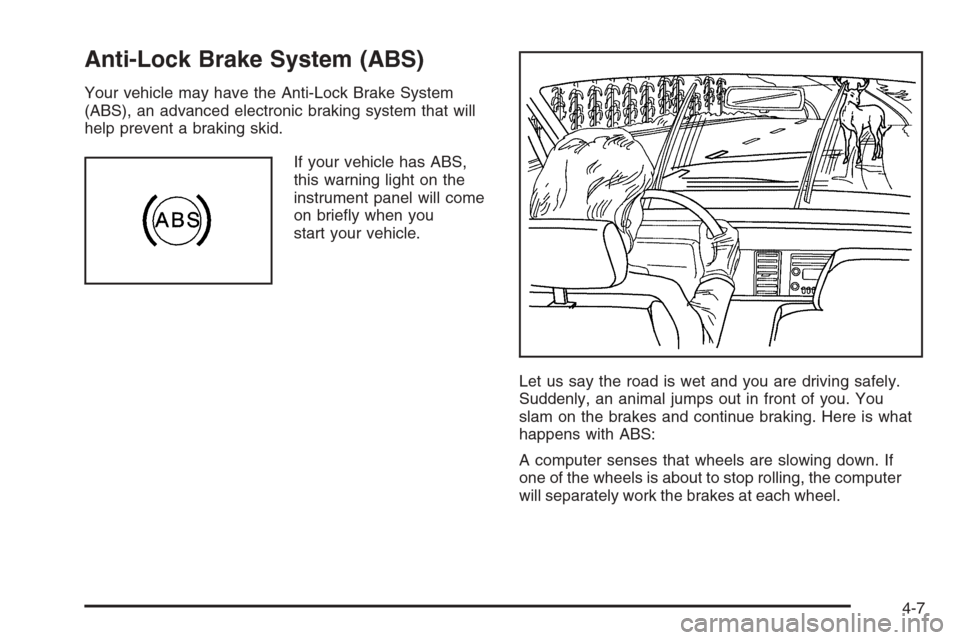
Let us say the road is wet and you are driving safely.
Suddenly, an animal jumps out in front of you. You
slam on the brakes and continue braking. Here is what
happens with ABS:
A computer senses that wheels are slowing down. If
one of the wheels is about to stop rolling, the computer
will separately work the brakes at each wheel.
4-7
Page 250 of 442
If your vehicle is in cruise control when the traction
control system begins to limit wheel spin, the cruise
control will automatically disengage. When road
conditions allow you to safely use it again, you may
re-engage the cruise control. SeeCruise Control
on page 3-11.
The Traction Control System operates in all transaxle
shift lever positions except park or neutral. But the
system can upshift the transaxle only as high as the
shift lever position you’ve chosen, so you should use
the lower gears only when necessary. SeeAutomatic
Transaxle Operation (Base Models) on page 2-27
orAutomatic Transaxle Operation (SS Models)
on page 2-30.
When the system is off,
this warning light, located
on the instrument panel
cluster, will come on to
let you know if there’s
a problem, or if the system
has been turned off.
When this warning light is on, the system will not limit
wheel spin. Adjust your driving accordingly.To limit wheel spin, especially in slippery road
conditions, you should always leave the Traction Control
System on. But you can turn the system off if you prefer.
To turn the system on or off, press the TC button
located under the climate controls. In order to effectively
“rock” the vehicle, you will need to turn off TCS.
If you press the TC button once, the traction control
system will turn off and the traction control system
warning light will come on. Press the TC button again
to turn the system back on. The traction control system
warning light will go off.
When you turn the system off, the Traction Control
System warning light will come on and stay on. If the
Traction Control System is limiting wheel spin when you
press the button to turn the system off, the warning
light will come on — but the system won’t turn off right
away. It will wait until there’s no longer a current
need to limit wheel spin.
Adding non-GM accessories can affect your vehicle’s
performance. SeeAccessories and Modications
on page 5-3for more information.
4-10
Page 251 of 442
Enhanced Traction System (ETS)
Your vehicle may have an Enhanced Traction System
(ETS) that limits wheel spin. This is especially useful
in slippery road conditions. The system operates only
if it senses that one or both of the front wheels are
spinning or beginning to lose traction. When this
happens, the system reduces engine power and may
also upshift the transaxle to limit wheel spin.
This light will come on
when your Enhanced
Traction System is
engaged and limiting
wheel spin.
You may feel or hear the system working, but this is
normal.
If your vehicle is in cruise control when the Enhanced
Traction System begins to limit wheel spin, the
cruise control will automatically disengage. When
road conditions allow you to safely use it again, you
may re-engage the cruise control. SeeCruise Control
on page 3-11.The Enhanced Traction System operates in all transaxle
shift lever positions. But the system can upshift the
transaxle only as high as the shift lever position you’ve
chosen, so you should use the lower gears only
when necessary.
When the system is on,
this warning light will
come on to let you know
there’s a problem.
When this warning light is on, the system will not limit
wheel spin. Adjust your driving accordingly.
To limit wheel spin, especially in slippery road
conditions, you should always leave the Enhanced
Traction System on. But you can turn the system off
if you prefer.
4-11
Page 252 of 442
To turn the system on
or off, press the traction
control button located
on the center console
under the climate
control system.
When you turn the system off, the Enhanced Traction
System warning light will come on and stay on.
If the Enhanced Traction System is limiting wheel spin
when you press the button to turn the system off,
the warning light will come on — but the system won’t
turn off right away. It will wait until there’s no longer
a current need to limit wheel spin.
You can turn the system back on at any time by
pressing the button again. The traction control system
warning light should go off.Steering
Electric Power Steering
If your vehicle has the electric power steering system
and the engine stalls while you are driving, the power
steering assist system will continue to operate until you
are able to stop your vehicle. If you lose power steering
assist because the electric power steering system is not
functioning, you can steer, but it will take more effort.
If you turn the steering wheel in either direction several
times until it stops, or hold the steering wheel in the
stopped position for an extended amount of time, you
may notice a reduced amount of power steering assist.
The normal amount of power steering assist should return
shortly after a few normal steering movements.
The electric power steering system does not require
regular maintenance. If you suspect steering system
problems, contact your dealer for service repairs.
SeeDIC Warnings and Messages on page 3-50.
Hydraulic Power Steering
If your vehicle has the hydraulic power steering system
and you lose power steering assist because the engine
stops or the power steering system is not functioning, you
can steer, but it will take much more effort.
4-12
Page 261 of 442
Hydroplaning
Hydroplaning is dangerous. So much water can build
up under your tires that they can actually ride on
the water. This can happen if the road is wet enough
and you are going fast enough. When your vehicle
is hydroplaning, it has little or no contact with the road.
Hydroplaning does not happen often. But it can if
your tires do not have much tread or if the pressure in
one or more is low. It can happen if a lot of water is
standing on the road. If you can see reections from
trees, telephone poles, or other vehicles, and raindrops
dimple the water’s surface, there could be hydroplaning.
Hydroplaning usually happens at higher speeds.
There just is not a hard and fast rule about hydroplaning.
The best advice is to slow down when it is raining.
Driving Through Deep Standing Water
Notice:If you drive too quickly through deep
puddles or standing water, water can come in
through your engine’s air intake and badly damage
your engine. Never drive through water that is
slightly lower than the underbody of your vehicle.
If you cannot avoid deep puddles or standing water,
drive through them very slowly.
Driving Through Flowing Water
{CAUTION:
Flowing or rushing water creates strong
forces. If you try to drive through owing water,
as you might at a low water crossing, your
vehicle can be carried away. As little as
six inches of owing water can carry away a
smaller vehicle. If this happens, you and other
vehicle occupants could drown. Do not ignore
police warning signs, and otherwise be very
cautious about trying to drive through
owing water.
Some Other Rainy Weather Tips
Besides slowing down, allow some extra following
distance. And be especially careful when you
pass another vehicle. Allow yourself more clear
room ahead, and be prepared to have your
view restricted by road spray.
Have good tires with proper tread depth.
SeeTires on page 5-54.
4-21