2006 CHEVROLET MALIBU engine
[x] Cancel search: enginePage 109 of 442
Make sure the shift lever is fully in PARK (P) before
starting the engine. Your vehicle has an automatic
transaxle shift lock control system. You have to apply
your regular brake and press the shift lever button
before you can shift from PARK (P) while the ignition
key is in ON. If you cannot shift out of PARK (P), ease
pressure on the shift lever and push the shift lever
all the way into PARK (P) as you maintain brake
application. Then move the shift lever into another gear.
SeeShifting Out of Park (P) on page 2-35later in
this section.
REVERSE (R):Use this gear to back up.
Notice:Shifting to REVERSE (R) while your vehicle
is moving forward could damage the transaxle.
The repairs would not be covered by your warranty.
Shift to REVERSE (R) only after your vehicle is
stopped.
To rock your vehicle back and forth to get out of snow,
ice, or sand without damaging your transaxle, see
If Your Vehicle is Stuck in Sand, Mud, Ice, or Snow on
page 4-32.
NEUTRAL (N):In this position, your engine does not
connect with the wheels. To restart when you are
already moving, use NEUTRAL (N) only. Also, use
NEUTRAL (N) when your vehicle is being towed.
{CAUTION:
Shifting into a drive gear while your engine is
running at high speed is dangerous. Unless
your foot is rmly on the brake pedal, your
vehicle could move very rapidly. You could
lose control and hit people or objects. Do not
shift into a drive gear while your engine is
running at high speed.
Notice:Shifting out of PARK (P) or NEUTRAL (N)
while the engine is running at high speed may
damage the transaxle. The repairs would not be
covered by your warranty. Be sure the engine is not
running at high speeds when shifting your vehicle.
AUTOMATIC OVERDRIVE (D):This position is for
normal driving. If you need more power for passing,
and you are:
Going less than 35 mph (55 km/h), push your
accelerator pedal about halfway down.
Going about 35 mph (55 km/h) or more, push
the accelerator all the way down.
MANUAL MODE (M):This position, allows you to
change gears similar to a manual transaxle. If your
vehicle has this feature, see Driver Shift Control (DSC).
2-31
Page 110 of 442
Driver Shift Control (DSC)
This feature allows you to select lower or higher driving
gears when the shift lever is in MANUAL MODE (M).
The button for this mode is located on the left side of
the shift lever knob.
To use this feature, do the following:
1. Move the shift lever from AUTOMATIC
OVERDRIVE (D) rearward into the MANUAL
MODE (M). The vehicle will be in the MANUAL
MODE (M) and a gear based on the current
driving speed.
While driving in MANUAL MODE (M), the transaxle
will remain in the selected drive gear unless:
A shift is required to protect the engine or
transaxle or,
The vehicle slows almost to a stop (the vehicle
will automatically downshift)
2. Press the plus button to upshift or the minus button
to downshift.When the shift lever is rst moved into MANUAL
MODE (M), the display on the instrument panel shows
M1, M2, M3, M4. Position M for the manual mode and
a number representing the gear the transaxle is in.
Press the minus (−) end of the button on the shift
lever to downshift. Press the plus (+) end of the button
to upshift. The shift lever must be moved back to
DRIVE (D) to turn off the manual mode and return
to fully automatic shifting.
While using the Driver Shift Control (DSC) feature
the vehicle will have rmer shifting and increased
performance. You can use this for sport driving or when
climbing hills to stay in gear longer or to downshift for
more power or engine braking.
The transaxle will only allow you to shift into gears
appropriate for the vehicle speed and engine revolutions
per minute (RPM). The transaxle will not automatically
shift to the next higher gear if the engine RPM is
too high.
When coming to a stop in the manual mode, the vehicle
will automatically downshift to the proper gear based
on speed. Upon acceleration you will need to manually
upshift to the desired gear.
2-32
Page 112 of 442
Shifting Into Park (P)
{CAUTION:
It can be dangerous to get out of your vehicle
if the shift lever is not fully in PARK (P) with
the parking brake rmly set. Your vehicle can
roll. If you have left the engine running, the
vehicle can move suddenly. You or others
could be injured. To be sure your vehicle will
not move, even when you are on fairly level
ground, use the steps that follow. If you are
pulling a trailer, seeTowing a Trailer on
page 4-42.
1. Hold the brake pedal down with your right foot and
set the parking brake.
2. Move the shift lever into PARK (P) by holding in the
button on the shift lever and pushing the shift lever
all the way toward the front of the vehicle.
3. Turn the ignition key to OFF.
4. Remove the key and take it with you. If you can
leave your vehicle with the ignition key in your
hand, your vehicle is in PARK (P).
Leaving Your Vehicle With the Engine
Running
{CAUTION:
It can be dangerous to leave your vehicle
with the engine running. Your vehicle could
move suddenly if the shift lever is not fully in
PARK (P) with the parking brake rmly set.
And, if you leave the vehicle with the engine
running, it could overheat and even catch re.
You or others could be injured. Do not leave
your vehicle with the engine running.
If you have to leave your vehicle with the engine
running, be sure your vehicle is in PARK (P) and your
parking brake is rmly set before you leave it. After
you have moved the shift lever into PARK (P), hold
the regular brake pedal down. Then, see if you
can move the shift lever away from PARK (P) without
rst pushing the button.
If you can, it means that the shift lever was not fully
locked in PARK (P).
2-34
Page 114 of 442
Parking Over Things That Burn
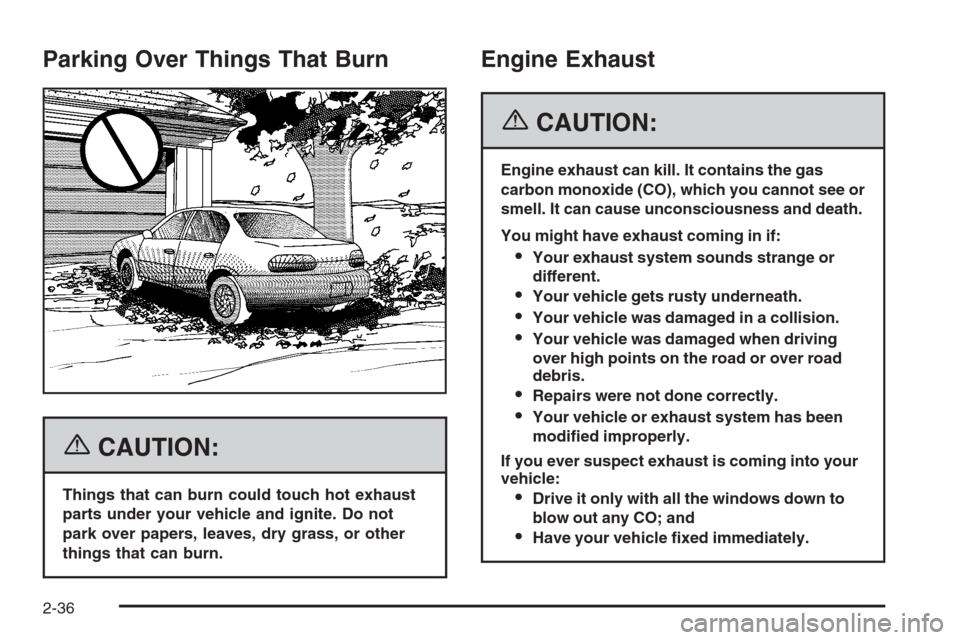
{CAUTION:
Things that can burn could touch hot exhaust
parts under your vehicle and ignite. Do not
park over papers, leaves, dry grass, or other
things that can burn.
Engine Exhaust
{CAUTION:
Engine exhaust can kill. It contains the gas
carbon monoxide (CO), which you cannot see or
smell. It can cause unconsciousness and death.
You might have exhaust coming in if:
Your exhaust system sounds strange or
different.
Your vehicle gets rusty underneath.
Your vehicle was damaged in a collision.
Your vehicle was damaged when driving
over high points on the road or over road
debris.
Repairs were not done correctly.
Your vehicle or exhaust system has been
modied improperly.
If you ever suspect exhaust is coming into your
vehicle:
Drive it only with all the windows down to
blow out any CO; and
Have your vehicle xed immediately.
2-36
Page 115 of 442
Running the Engine While Parked
It is better not to park with the engine running. But if you
ever have to, here are some things to know.
{CAUTION:
Idling the engine with the climate control
system off could allow dangerous exhaust into
your vehicle. See the earlier caution under
Engine Exhaust on page 2-36.
Also, idling in a closed-in place can let deadly
carbon monoxide (CO) into your vehicle even if
the climate control fan is at the highest setting.
One place this can happen is a garage.
Exhaust — with CO — can come in easily.
NEVER park in a garage with the engine
running.
Another closed-in place can be a blizzard.
SeeWinter Driving on page 4-27.
{CAUTION:
It can be dangerous to get out of your vehicle
if the shift lever is not fully in PARK (P) with
the parking brake rmly set. Your vehicle can
roll. Do not leave your vehicle when the engine
is running unless you have to. If you have
left the engine running, the vehicle can move
suddenly. You or others could be injured.
To be sure your vehicle will not move, even
when you are on fairly level ground, always
set your parking brake and move the shift
lever to PARK (P).
Follow the proper steps to be sure your vehicle will
not move. SeeShifting Into Park (P) on page 2-34.
If you are parking on a hill and if you are pulling a trailer,
also seeTowing a Trailer on page 4-42.
2-37
Page 134 of 442
Traction Control System (TCS) Warning
Light........................................................3-38
Traction Control System Active Light...............3-38
Enhanced Traction System Warning Light.........3-39
Enhanced Traction System Active Light............3-39
Engine Coolant Temperature Warning Light......3-40
Engine Coolant Temperature Gage..................3-40
Malfunction Indicator Lamp.............................3-41
Oil Pressure Light.........................................3-44
Security Light...............................................3-45
Cruise Control Light......................................3-45
Highbeam On Light.......................................3-45
Fuel Gage...................................................3-46
Driver Information Center (DIC).......................3-47
DIC Operation and Displays...........................3-47
DIC Warnings and Messages.........................3-50
DIC Vehicle Personalization............................3-52Audio System(s).............................................3-54
Setting the Time for Radios without Radio
Data Systems (RDS)..................................3-55
Setting the Time for Radios with Radio Data
Systems (RDS).........................................3-55
Radio with CD (Base Level)...........................3-56
Radio with CD (Up Level)..............................3-61
Radio with Six-Disc CD.................................3-71
Rear Seat Entertainment System....................3-86
Rear Seat Audio (RSA)
(Without Entertainment System).................3-101
Rear Seat Audio (RSA)
(With Entertainment System).....................3-103
Theft-Deterrent Feature................................3-105
Audio Steering Wheel Controls
(Three Spoke).........................................3-105
Audio Steering Wheel Controls
(Four Spoke)...........................................3-106
Radio Reception.........................................3-106
Care of Your CDs and DVDs........................3-107
Care of the CD and DVD Player...................3-107
Fixed Mast Antenna (MAXX Only).................3-108
Backglass Antenna (Sedan Only)..................3-108
XM™ Satellite Radio Antenna System............3-108
Section 3 Instrument Panel
3-2
Page 156 of 442
Temperature Control:Turn the center knob clockwise
or counterclockwise to increase or decrease the
temperature inside your vehicle.
When it’s cold outside 0°F (−18°C) or lower, use the
engine coolant heater, if equipped, to provide warmer air
faster to your vehicle. An engine coolant heater warms
the coolant that the engine uses to provide heat to
warm the inside of your vehicle. For more information,
seeEngine Coolant Heater on page 2-26.
#(Air Conditioning):Press this button to turn the air
conditioning system on or off. When the air conditioning
button is pressed, an indicator light will come on to
let you know that air conditioning is activated.
On hot days, open the windows to let hot inside air
escape; then close them. This helps to reduce the
time it takes for your vehicle to cool down. It also
helps the system to operate more efficiently.For quick cool down on hot days, do the following:
1. Select the vent mode.
2. Select the highest fan speed.
3. Select air conditioning.
4. Select the recirculation mode.
5. Select the coolest temperature.
Using these settings together for long periods of time
may cause the air inside of your vehicle to become too
dry. To prevent this from happening, after the air in
your vehicle has cooled, turn the recirculation mode off.
The air-conditioning system removes moisture from
the air, so you may sometimes notice a small amount
of water dripping underneath your vehicle while idling
or after turning off the engine. This is normal.
3-24
Page 158 of 442
Rear Window Defogger
The rear window defogger uses a warming grid to
remove fog or frost from the rear window.
heated mirror, if equipped. An indicator light will come
on to let you know that the rear window defogger
and heated mirror, if equipped, is activated. Be sure to
clear as much snow from the rear window as possible.
If driving below 50 mph (80 km/h), the rear window
defogger will turn off about 15 minutes after the button
is pressed. If turned on again, the defogger will only
run for about seven minutes before turning off. The
defogger can also be turned off by pressing the button
again or by turning off the engine.If your vehicle’s speed is maintained above 50 mph
(80 km/h), the rear window defogger will remain on
once the button is pressed.
If your vehicle has the remote start feature, the rear
defogger will automatically be turned on if it is cold
outside. When the vehicle transitions out of the
remote start mode, the rear defogger will turn off.
SeeRemote Keyless Entry System Operation on
page 2-6.
Notice:Do not use anything sharp on the inside of
the rear window. If you do, you could cut or damage
the warming grid, and the repairs would not be
covered by your warranty. Do not attach a temporary
vehicle license, tape, a decal or anything similar to
the defogger grid.
3-26