2006 CHEVROLET MALIBU display
[x] Cancel search: displayPage 179 of 442
Driver Information Center (DIC)
The Driver Information Center (DIC) provides the
following:
A way to personalize your vehicle
Trip information
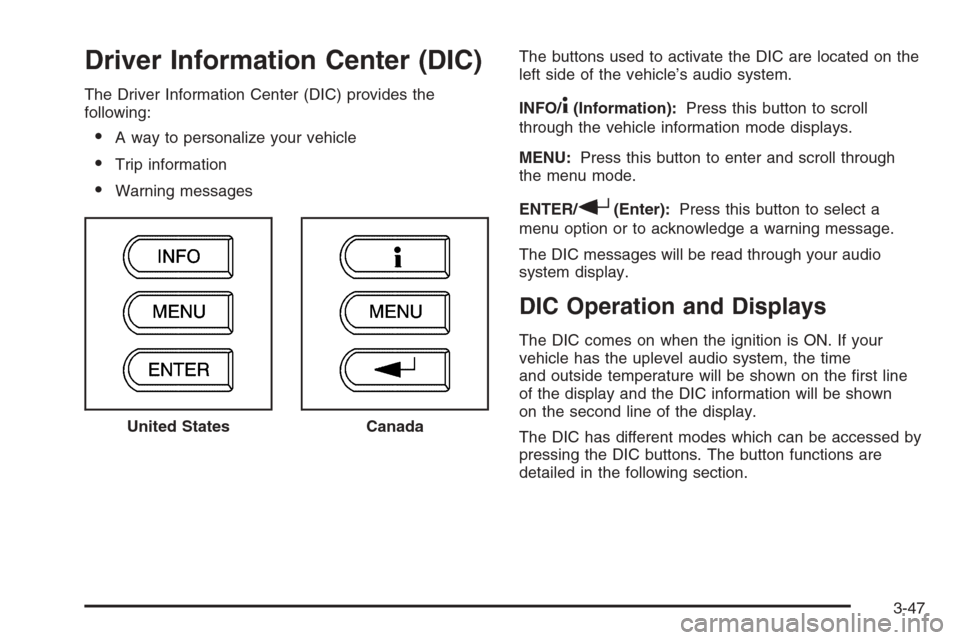
Warning messagesThe buttons used to activate the DIC are located on the
left side of the vehicle’s audio system.
INFO/
4(Information):Press this button to scroll
through the vehicle information mode displays.
MENU:Press this button to enter and scroll through
the menu mode.
ENTER/
r(Enter):Press this button to select a
menu option or to acknowledge a warning message.
The DIC messages will be read through your audio
system display.
DIC Operation and Displays
The DIC comes on when the ignition is ON. If your
vehicle has the uplevel audio system, the time
and outside temperature will be shown on the rst line
of the display and the DIC information will be shown
on the second line of the display.
The DIC has different modes which can be accessed by
pressing the DIC buttons. The button functions are
detailed in the following section. United States
Canada
3-47
Page 180 of 442
Information Mode
INFO/4(Information):Press this button to scroll
through the vehicle information mode displays in
the following order:
TRIP A
TRIP B
FUEL RANGE (Fuel Range Until Empty)
ECON (Average Fuel Economy)
AV SPEED (Average Vehicle Speed)
OIL LIFE (Engine Oil Life System)
TRIP A or TRIP B:Press the information button
until TRIP A or TRIP B is displayed. This shows the
current distance traveled since the last reset for each
trip odometer in either miles (mi) or kilometers (km).
Both odometers can be used at the same time. Each trip
odometer can be reset to zero separately by pressing
and holding the enter button for a few seconds while
the desired trip odometer is displayed.
FUEL RANGE:Press the information button until
FUEL RANGE is displayed. This shows the remaining
distance you can drive without refueling. It is based
on fuel economy and the fuel remaining in the tank.The fuel economy data used to determine fuel range is an
average of recent driving conditions. As your driving
conditions change, this data is gradually updated. Fuel
range cannot be reset.
ECON (Economy):Press the information button until
ECON is displayed. Average fuel economy is how
many miles per gallon (mpg) or liters per 100 kilometers
(L/100 km) your vehicle is getting based on current
and past driving conditions.
Press and hold the enter button while ECON is
displayed to reset the average fuel economy. Average
fuel economy will then be calculated starting from
that point. If the average fuel economy is not reset, it
will be continually updated each time you drive.
AV (Average) SPEED:Press the information button
until AV SPEED is displayed. This shows the vehicle’s
average speed in miles per hour (mph) or kilometers per
hour (km/h).
Press and hold the enter button while AV SPEED is
displayed to reset the average vehicle speed.
OIL LIFE:Press the information button until OIL LIFE is
displayed. The engine oil life system shows an
estimate of the oil’s remaining useful life. It will show
100% when the system is reset after an oil change.
It will alert you to change your oil on a schedule
consistent with your driving conditions.
3-48
Page 181 of 442
Always reset the engine oil life system after an oil
change. SeeEngine Oil Life System on page 5-20.
In addition to the engine oil life system monitoring the oil
life, additional maintenance is recommended in the
Maintenance Schedule in this manual. SeeScheduled
Maintenance on page 6-4andEngine Oil on page 5-17.
Personalization
MENU:Press this button while the vehicle is in ON
to scroll through each of the personalization options
in the following order. If the vehicle is moving faster
than 2 mph (3 km/h), the personalization menu options
are not available, except for the UNITS option. All of
the personalization options may not be available
on your vehicle. Only the options available will be
displayed on your DIC.
Units Selection (English/Metric)
Oil Life Reset
Remote Start Capability
Horn Chirp During Remote Keyless Entry Locking
Horn Chirp During Remote Keyless Entry Unlocking
Exterior Light Flash During Remote Keyless
Entry Locking or Unlocking
Delayed Locking
Automatic Vehicle Unlocking: Specic Doors
Automatic Vehicle Unlocking: When Key is Off or
When Shift To Park
Exterior Perimeter Lighting During Remote Keyless
Entry Unlock
Select Language: (English, French, Spanish or
German)
When the desired option is reached, press the enter
button to toggle between the modes of that option.
To make a selection, press the MENU button again.
If no selection is made within 10 seconds, the display
will revert back to the previous information displayed.
The MENU mode is exited when the information button
is pressed, a 10 second time period has elapsed,
the ignition is turned to OFF, or the end of the MENU
list is reached.
SeeDIC Vehicle Personalization on page 3-52for
more information on the personalization options.
Enter
ENTER/r(Enter):Press this button to reset certain
functions and to turn off or acknowledge messages
on the DIC display. This button also toggles through
the options available in each personalization menu.
3-49
Page 182 of 442
DIC Warnings and Messages
These messages will appear if there is a problem
detected in one of your vehicle’s systems.
Any message will clear when the vehicle’s condition
is no longer present. To acknowledge a message and
clear it from the display, press any of the three DIC
buttons. The warning message will come back on
the next time the vehicle is turned off and back on
if the condition is still present. With most messages,
a warning chime will sound when the message is
displayed. Your vehicle may have other warning
messages.
AUTO (Automatic) LIGHTS OFF:This message will
display if the automatic headlamp system is disabled
with the headlamp switch.
AUTO (Automatic) LIGHTS ON:This message will
display if the automatic headlamp system is enabled
with the headlamp switch.
BRAKE FLUID:This message will display to inform the
driver that the brake uid level is low while the ignition
is in ON. Have the brake system serviced by your
GM dealer as soon as possible.CHANGE OIL SOON:This message will display when
the life of the engine oil has expired and it should be
changed.
When you acknowledge the CHANGE OIL SOON
message by clearing it from the display, you still must
reset the engine oil life system separately. SeeEngine
Oil Life System on page 5-20,Engine Oil on page 5-17,
andScheduled Maintenance on page 6-4for more
information.
CHECK GAS CAP:This message will display if the
gas cap has not been fully tightened. You should
recheck your gas cap to make sure that it is on properly.
A few driving trips with the cap properly installed
should turn the message off.
DOOR AJAR:This message will display if one or more
of the vehicle’s doors are not closed properly. When
this message displays, you should make sure that the
door is closed completely.
ENGINE DISABLED:This message will display if the
starting of the engine is disabled. Have your vehicle
serviced immediately by your GM dealer.
3-50
Page 183 of 442
ENG (Engine) PWR (Power) REDUCED:This
message will display to inform you that the vehicle has
reduced engine power to avoid damaging the engine.
Reduced engine power can affect the vehicle’s ability
to accelerate. If this message is on, but there is no
reduction in performance, proceed to your destination.
The performance may be reduced the next time the
vehicle is driven. The vehicle may be driven at a reduced
speed while this message is on, but acceleration and
speed may be reduced. Anytime this message stays on,
the vehicle should be taken to your GM dealer for service
as soon as possible.
GATE AJAR:If your vehicle has a liftgate, this
message will display when the liftgate of your vehicle
is not closed completely. You should make sure that
the liftgate is closed completely. SeeLiftgate (MAXX)
on page 2-16for more information.
ICE POSSIBLE:This message will display when the
outside air temperature is cold enough to create icy
road conditions.
KEY FOB BATT (Battery) LOW:This message will
display if the remote keyless entry transmitter battery is
low. You should replace the battery in the transmitter.
See “Battery Replacement” underRemote Keyless Entry
System Operation on page 2-6.
LOW COOLANT:This message will display when there
is a low level of engine coolant. Have the cooling system
serviced by your GM dealer as soon as possible.LOW FUEL:This message will display when your
vehicle is low on fuel. You should rell the fuel tank as
soon as possible. You will also see a low fuel warning
light on the instrument panel cluster. SeeFuel on
page 5-5andFilling the Tank on page 5-8.
LOW WASHER FLUID:This message will display
when your vehicle is low on windshield washer uid.
You should rell the windshield washer uid reservoir
as soon as possible. See “Adding Washer Fluid”
underWindshield Washer Fluid on page 5-38.
POWER STEERING:This message will display if a
problem has been detected with the electric power
steering, if equipped. Have your vehicle serviced
immediately by your GM dealer.
PUSH PARK PEDAL:This message is displayed if
the parking brake is left engaged. SeeParking Brake
on page 2-33for more information.
SERVICE AIR BAG:There is a problem with the
airbag system when this message appears. Have your
vehicle serviced immediately by your GM dealer.
TRUNK AJAR:If your vehicle has a trunk, this
message will display when the trunk lid of your vehicle
is not closed completely. You should make sure
that the trunk lid is closed completely. SeeTrunk
(Sedan) on page 2-15for more information.
3-51
Page 184 of 442
DIC Vehicle Personalization
The following personalization options may appear on
your vehicle’s audio display by pressing the MENU
button:
UNITS:When UNITS appears on the display, press the
enter button to move between METRIC or ENGLISH.
When you have made your choice, press the MENU
button to record your selection. The initial setting from
the factory is English for the United States and metric
for Canada.
If you choose English, all information will be displayed
in English units. For example, distance in miles (mi) and
fuel economy in miles per gallon (mpg) is displayed.
If you choose metric, all information will be displayed in
metric units. For example, distance in kilometers
(km) and fuel economy in liters per 100 kilometers
(L/100 km) is displayed.
The unit measurement will also change the trip
odometer, temperature, and average fuel economy
displays.
OIL LIFE RESET:When this option is displayed, you
can reset the engine oil life system. To reset the system,
seeEngine Oil Life System on page 5-20.
REMOTE START:If your vehicle has this feature, the
remote start option can be enabled or disabled.When REMOTE START appears on the display, press
the enter button to move between OFF and ON.
When you have made your choice, press the MENU
button to record your selection. The initial setting from
the factory is ON.
LOCK HORN:If your vehicle has remote keyless entry,
this option which allows the vehicle’s horn to chirp
every time the lock button on the remote keyless entry
transmitter is pressed, can be enabled or disabled.
When LOCK HORN appears on the display, press the
enter button to move between ON and OFF. When
you have made your choice, press the MENU button to
record your selection. The initial setting from the
factory is OFF.
UNLOCK HORN:If your vehicle has remote keyless
entry, this option which allows the vehicle’s horn to chirp
every time the unlock button on the remote keyless
entry transmitter is pressed, can be enabled or disabled.
When UNLOCK HORN appears on the display, press
the enter button to move between ON and OFF.
When you have made your choice, press the MENU
button to record your selection. The initial setting from
the factory is OFF.
LIGHT FLASH:If your vehicle has remote keyless entry,
this option which allows the vehicle’s exterior perimeter
lighting to ash every time the lock or unlock button on
the remote keyless entry transmitter is pressed, can be
enabled or disabled.
3-52
Page 185 of 442
When LIGHT FLASH appears on the display, press the
enter button to move between OFF and ON. When you
have made your choice, press the MENU button to record
your selection. The initial setting from the factory is ON.
DELAY LOCK:The delayed locking option, which
delays the actual locking of the vehicle, can be enabled
or disabled. When DELAY LOCK appears on the
display, press the enter button to move between OFF
and ON. When you have made your choice, press
the MENU button to record your selection. The initial
setting from the factory is ON.
AUTO UNLK (Unlock):The automatic door unlocking
option, which allows the vehicle to automatically
unlock certain doors can be enabled or disabled. When
AUTO UNLK appears on the display, press the enter
button to move between ALL, DRIVER, or NONE. When
you have made your choice, press and the MENU
button to record your selection. The initial setting from
the factory is ALL. SeeProgrammable Automatic
Door Locks on page 2-13for more information.
UNLK (Unlock):This screen displays only if DRIVER
or ALL is selected for the AUTO UNLK option. This
option determines when the automatic door unlocking
will occur, when either the key is turned to OFF or
the vehicle is shifted into PARK (P). When UNLK
appears on the display, press the enter button to
move between KEY OFF and SHIFT TO P (Park).When you have made your choice, press the MENU
button to record your selection. The initial setting from
the factory is SHIFT TO P (Park). SeeProgrammable
Automatic Door Locks on page 2-13for more
information.
EXT (Exterior) LIGHTS:If your vehicle has remote
keyless entry, this option, which allows the vehicle’s
exterior perimeter lighting to turn on each time the
unlock button on the remote keyless entry transmitter
is pressed, can be enabled or disabled. When
EXT LIGHTS appears on the display, press the enter
button to move between ON and OFF. When you have
made your choice, press the MENU button to record
your selection. The initial setting from the factory is ON.
LANGUAGE:To select your choice of language,
press the enter button to move between the optional
languages.
The languages are ENGLISH, FRENCH, SPANISH,
and GERMAN.
Choosing a language will display all of the information
on the DIC in the desired language.
When you have made your choice, press the MENU
button for at least one second to record your selection.
The initial setting from the factory is ENGLISH.
3-53
Page 187 of 442
Notice:Before adding any sound equipment to
your vehicle, such as an audio system, CD player,
CB radio, mobile telephone, or two-way radio,
make sure that it can be added by checking with
your dealer. Also, check federal rules covering
mobile radio and telephone units. If sound
equipment can be added, it is very important to do
it properly. Added sound equipment may interfere
with the operation of your vehicle’s engine, radio,
or other systems, and even damage them. Your
vehicle’s systems may interfere with the operation
of sound equipment that has been added.
Your vehicle has a feature called Retained Accessory
Power (RAP). With RAP, the audio system can be
played even after the ignition is turned off. See
Retained Accessory Power (RAP) on page 2-24for
more information.
Setting the Time for Radios without
Radio Data Systems (RDS)
To set the hour, press the clock button. The clock
symbol will appear on the display and the hour number
will ash. Then turn the ADJ knob to increase or to
decrease. To set the minutes, press the clock button
again. The minute numbers will ash. Then turn the
ADJ knob to increase or to decrease. The time can be
set with the ignition on or off.
Setting the Time for Radios with
Radio Data Systems (RDS)
To set the hour, press the clock button. The clock
symbol will appear on the display and the hour number
will ash. Then turn the ADJ knob to increase or to
decrease. To set the minutes, press the clock button
again. The minute numbers will ash. Then turn the
ADJ knob to increase or to decrease. The time can be
set with the ignition on or off.
To synchronize the time with an FM station broadcasting
Radio Data System (RDS) information, press and
hold the clock button to enter the clock set mode,
then press and hold the clock button for three seconds
until UPDATED appears on the display. If the time
is not available from the station, NO UPDATE will
appear on the display.
RDS time is broadcast once a minute. After tuning to
an RDS broadcast station, it may take a few minutes for
the time to update.
3-55