2006 CHEVROLET KODIAK ignition
[x] Cancel search: ignitionPage 179 of 398

Radio with CD
Playing the Radio
PWR (Power):Press this knob to turn the system on
and off.
VOL (Volume):Turn this knob to increase or to
decrease the volume.
RCL (Recall):Press this knob to switch the display
between the radio station frequency and the time. When
the ignition is off, press this knob to display the time.
Finding a Station
AM FM:Press this button to switch between FM1,
FM2, and AM. The display will show the selection.
TUNE:Turn this knob to select radio stations.
oSEEKp:Press the right or the left arrow to go to
the next or to the previous station and stay there.
To scan stations, press and hold either SEEK arrow for
two seconds until you hear a beep. The radio will go
to a station, play for a few seconds, then go on to
the next station. Press either SEEK arrow again to stop
scanning.
To scan preset stations, press and hold either SEEK
arrow for more than four seconds until you hear
two beeps. The radio will go to the first preset station
stored on the pushbuttons, play for a few seconds, then
go on to the next preset station. Press either SEEK
arrow again to stop scanning presets.
The radio will only seek and scan stations, with a strong
signal, that are in the selected band.
3-59
Page 182 of 398

Playing a CD
Insert a CD partway into the slot, label side up. The
player will pull it in and the CD should begin playing.
CD will appear on the display. If you want to insert a CD
with the ignition off, first press the eject button or the
RCL knob.
If you insert a CD with the radio off and the ignition on,
it will start to play.
If the ignition or radio is turned off, with a CD in the
player, it will stay in the player. When the ignition
or radio is turned on, the CD will start playing where it
stopped, if it was the last selected audio source.
As each new track starts to play, the track number will
appear on the display.
The CD player can play the smaller 3 inch (8 cm)
single CDs with an adapter ring. Full-size CDs and the
smaller CDs are loaded in the same manner.If playing a CD-R, the sound quality may be reduced
due to CD-R quality, the method of recording, the quality
of the music that has been recorded, and the way the
CD-R has been handled. There may be an increase
in skipping, difficulty in finding tracks, and/or difficulty in
loading and ejecting. If these problems occur, check
the bottom surface of the CD. If the surface of the CD is
damaged, such as cracked, broken, or scratched, the
CD will not play properly. If the surface of the CD
is soiled, seeCare of Your CDs on page 3-66for more
information.
If there is no apparent damage, try a known good CD.
Do not add any label to a CD, it could get caught in the
CD player. If a CD is recorded on a personal computer
and a description label is needed, try labeling the top of
the recorded CD with a marking pen instead.
Notice:If you add any label to a CD, insert more
than one CD into the slot at a time, or attempt
to play scratched or damaged CDs, you could
damage the CD player. When using the CD player,
use only CDs in good condition without any
label, load one CD at a time, and keep the CD player
and the loading slot free of foreign materials,
liquids, and debris.
If an error appears on the display, see “CD Messages”
later in this section.
3-62
Page 183 of 398

1 PREV (Previous):Press this pushbutton to go to the
beginning of the current track if more than eight seconds
have played. The track number will appear on the display.
If this pushbutton is held or pressed more than once, the
player will continue moving backward through the CD.
2 NEXT:Press this pushbutton to go to the next track.
The track number will appear on the display. If this
pushbutton is held or pressed more than once,
the player will continue moving forward through the CD.
3 REV (Reverse):Press and hold this pushbutton to
reverse quickly within a track. Release this pushbutton
to play the passage. The elapsed time of the track
will appear on the display.
4 FWD (Forward):Press and hold this pushbutton to
advance quickly within a track. Release this pushbutton
to play the passage. The elapsed time of the track
will appear on the display.
5 RDM (Random):Press this pushbutton to hear the
tracks in random, rather than sequential, order. RND will
appear on the display. Press RDM again to turn off
random play. OFF will appear on the display.6 RPT (Repeat):Press this pushbutton once to hear a
track over again. RPT will appear on the display.
The current track will continue to repeat. Press RPT
again to turn off repeat play. OFF will appear on
the display.
oSEEKp:Press the right or the left arrow to go to
the next or to the previous track. The track number
will appear on the display. If either arrow is held
or pressed more than once, the player will continue
moving backward or forward through the CD.
RCL (Recall):Press this knob to see the current track
number or how long the current track has been
playing.
AM FM:Press this button to listen to the radio when a
CD is playing. The inactive CD will remain safely
inside the radio for future listening.
CD:Press this button to play a CD when listening to
the radio. CD will appear on the display if a CD is
loaded.
Z(Eject):Press this button to eject a CD. Eject may
be activated with either the ignition or radio off. CDs
may be loaded with the ignition and radio off if this
button is pressed first.
3-63
Page 186 of 398

The cut tape detection feature of the cassette tape
player may identify the cleaning cassette as a damaged
tape. To prevent the cleaning cassette from being
ejected, use the following steps:
1. Turn the ignition on.
2. Turn the radio off.
3. Press and hold the TAPE button for two seconds
until the radio produces one beep. CAS will flash
on the display for five seconds.
4. Insert the scrubbing action cleaning cassette.
5. Eject the cleaning cassette after the manufacturer’s
recommended cleaning time.
After the cleaning cassette is ejected, the cut tape
detection feature will be active again.
A non-scrubbing action, wet-type cleaner which uses a
cassette with a fabric belt to clean the tape head
can be used. This type of cleaning cassette will not
eject on its own. A non-scrubbing action cleaner may not
clean as thoroughly as the scrubbing type cleaner.
The use of a non-scrubbing action, dry-type cleaning
cassette is not recommended.After the player is cleaned, press and hold the eject
button for three seconds to reset the CLN indicator. The
radio will display --- to show the indicator was reset.
Cassettes are subject to wear and the sound quality may
degrade over time. Always make sure the cassette
tape is in good condition before the tape player
is serviced.
Care of Your CDs
Handle CDs carefully. Store them in their original cases
or other protective cases and away from direct
sunlight and dust. The CD player scans the bottom
surface of the disc. If the surface of a CD is damaged,
such as cracked, broken, or scratched, the CD will
not play properly or not at all. If the surface of a CD is
soiled, take a soft, lint free cloth or dampen a clean, soft
cloth in a mild, neutral detergent solution mixed with
water, and clean it. Make sure the wiping process starts
from the center to the edge.
Do not touch the bottom side of a CD while handling it;
this could damage the surface. Pick up CDs by
grasping the outer edges or the edge of the hole and
the outer edge.
3-66
Page 187 of 398

Care of the CD Player
The use of CD lens cleaners for CD players is not
advised, due to the risk of contaminating the internal
lens of the CD optics with lubricants.
Fixed Mast Antenna
The fixed mast antenna can withstand most vehicle
washes without being damaged. If the mast should ever
become slightly bent, straighten it out by hand. If the
mast is badly bent, replace it.
Check occasionally to make sure the mast is still
tightened to the fender. If tightening is required, tighten
by hand, then with a wrench one quarter turn.
Chime Level Adjustment
The radio is used to adjust the vehicle’s chime level. To
change the volume level of the chime, press and
hold pushbutton 6 with the ignition on and the radio
power off. The volume level will change from the normal
level to loud, and HI will appear on the radio display.
To change back to the default or normal setting, press
and hold pushbutton 6 again. The volume level will
change from the loud level to normal, and LO will appear
on the radio display. Each time the chime volume is
changed, three chimes will sound as an example of the
new volume selected. Removing the radio and not
replacing it with a factory radio or chime module will
disable vehicle chimes.
3-67
Page 214 of 398

Hill and Mountain Roads
Driving on steep hills or mountains is different from
driving in flat or rolling terrain.
Here are some tips that can make your drive through
steep country safer:
•Keep the vehicle in good shape. Check all fluid
levels and also the brakes, tires, cooling system,
and transmission. These parts can work hard
on mountain roads.
{CAUTION:
If you do not shift down, your brakes could get
so hot that they would not work well. You
would then have poor braking or even none
going down a hill. You could crash. Shift down
to let your engine assist your brakes on a
steep downhill slope.
{CAUTION:
Coasting downhill in NEUTRAL (N) or with the
ignition off is dangerous. Your brakes will have
to do all the work of slowing down. They could
get so hot that they would not work well. You
would then have poor braking or even none
going down a hill. You could crash. Always
have your engine running and your vehicle in
gear when you go downhill.
4-26
Page 245 of 398

Running Out of Fuel
If the diesel engine stalls and you think that you have
run out of fuel, do this to restart your engine:
{CAUTION:
Diesel fuel is ammable. It could start a re if it
gets on hot engine parts. You could be burned.
Do not let too much fuel ow from the air bleed
valve, and wipe up any spilled fuel with a cloth.
1. If you are parked on a level surface, add at least
2 gallons (7.6 liters) of fuel. However, if you are
parked on a slope, you may need to add up
to 5 gallons (18.9 liters) of fuel.
2. Follow the fuel priming procedure earlier in this
section to prime the fuel filter.3. Close the air bleed valve.
4. Turn the ignition key to START for 10 to 15 seconds
at a time until your engine starts. If the engine tries
to run, but does not run smoothly, increase the
rpm a little using the accelerator pedal. This will help
force air through the system.
Your check engine light may come on if the vehicle has
run out of fuel. This light may stay on for a few drive
cycles after the condition is corrected, but will eventually
clear itself.
5-17
Page 246 of 398
Fuel Filter Replacement
If you want to change the diesel engine fuel filter
yourself, here is how to do it:
{CAUTION:
Diesel fuel is ammable. It could start a re if
something ignites it, and you could be burned.
Do not let it get on hot engine parts, and keep
matches or other ignition sources away.
First, drain any water from the filter by following the
water draining procedure earlier in this section.
Your vehicle’s engine should be off until the end of this
procedure.If your vehicle has the 6.6L engine, the fuel filter is
located in the engine compartment on the driver’s side
of the vehicle. If your vehicle has either the 7.2L or
7.8L engine, the fuel filters are located in the engine
compartment on the driver’s side of the vehicle, and on
the driver’s side frame rail in front of the fuel tank.
1. Apply the parking brake.
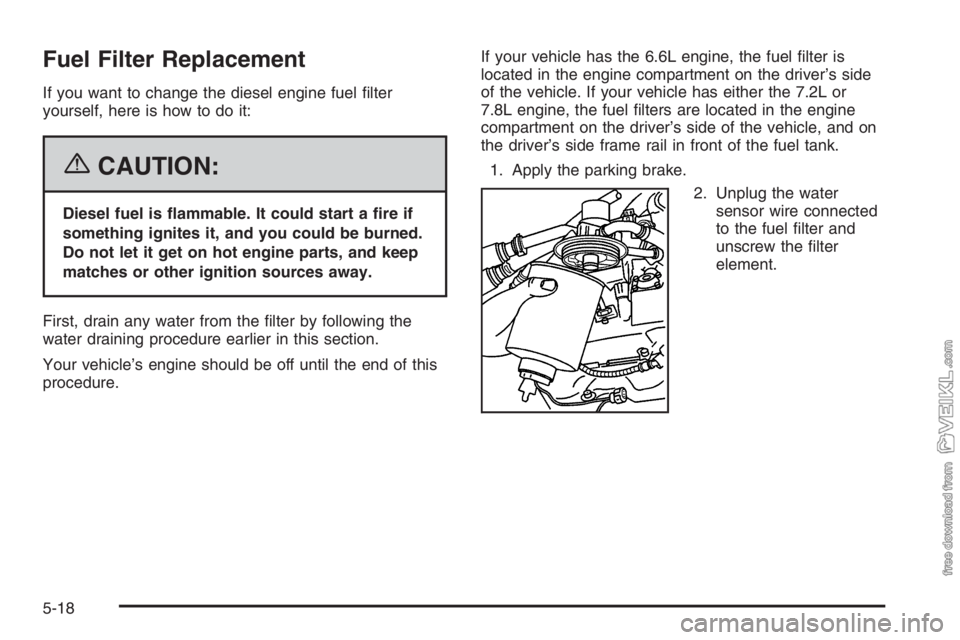
2. Unplug the water
sensor wire connected
to the fuel filter and
unscrew the filter
element.
5-18