2006 CHEVROLET IMPALA light
[x] Cancel search: lightPage 156 of 394

Emissions Inspection and Maintenance
Programs
Some state/provincial and local governments have or
may begin programs to inspect the emission control
equipment on your vehicle. Failure to pass this
inspection could prevent you from getting a vehicle
registration.
Here are some things you need to know to help your
vehicle pass an inspection:
Your vehicle will not pass this inspection if the check
engine light is on or not working properly.
Your vehicle will not pass this inspection if the OBD
(on-board diagnostic) system determines that critical
emission control systems have not been completely
diagnosed by the system. The vehicle would be
considered not ready for inspection. This can happen if
you have recently replaced your battery or if your
battery has run down. The diagnostic system is
designed to evaluate critical emission control systems
during normal driving. This may take several days
of routine driving. If you have done this and your vehicle
still does not pass the inspection for lack of OBD
system readiness, your dealer can prepare the vehicle
for inspection.
Oil Pressure Light
{CAUTION:
Do not keep driving if the oil pressure is low. If
you do, your engine can become so hot that it
catches re. You or others could be burned.
Check your oil as soon as possible and have
your vehicle serviced.
Notice:Lack of proper engine oil maintenance may
damage the engine. The repairs would not be
covered by your warranty. Always follow the
maintenance schedule in this manual for changing
engine oil.
3-36
Page 157 of 394

This light tells you there
could be a problem with
the engine oil pressure.
The light goes on when you turn your key to RUN or
START. It goes off once you start your engine. That is a
check to be sure the light works. If it does not come
on, be sure to have it xed so it will be there to warn you
if something goes wrong.
When the light comes on and stays on, it means that oil is
not owing through your engine properly. You could be
low on oil and you might have some other system
problem.Security Light
For information
regarding this light, see
Theft-Deterrent Systems
on page 2-17.
Fog Lamp Light
The fog lamp light will
come on when the fog
lamps are in use.
The light will go out when the fog lamps are turned off.
SeeFog Lamps on page 3-15for more information.
3-37
Page 158 of 394
Cruise Control Light
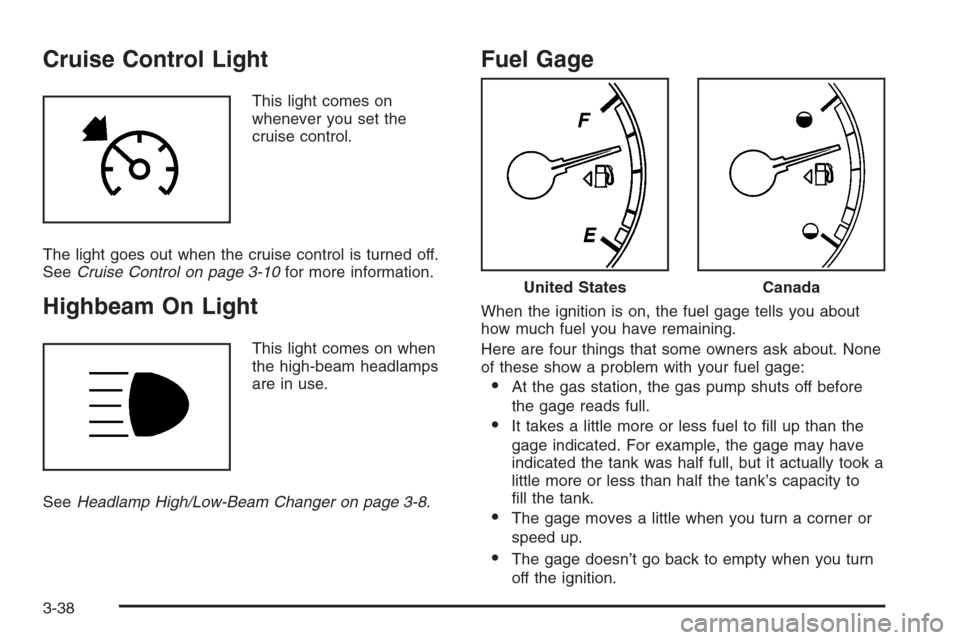
This light comes on
whenever you set the
cruise control.
The light goes out when the cruise control is turned off.
SeeCruise Control on page 3-10for more information.
Highbeam On Light
This light comes on when
the high-beam headlamps
are in use.
SeeHeadlamp High/Low-Beam Changer on page 3-8.
Fuel Gage
When the ignition is on, the fuel gage tells you about
how much fuel you have remaining.
Here are four things that some owners ask about. None
of these show a problem with your fuel gage:
At the gas station, the gas pump shuts off before
the gage reads full.
It takes a little more or less fuel to ll up than the
gage indicated. For example, the gage may have
indicated the tank was half full, but it actually took a
little more or less than half the tank’s capacity to
ll the tank.
The gage moves a little when you turn a corner or
speed up.
The gage doesn’t go back to empty when you turn
off the ignition.
United StatesCanada
3-38
Page 166 of 394

AUTOMATIC LIGHT CONTROL OFF
This message will display when the automatic
headlamps are turned off. SeeDaytime Running Lamps
(DRL)/Automatic Headlamp System on page 3-14for
more information.
AUTOMATIC LIGHT CONTROL ON
This message will display when the automatic
headlamps are turned on. SeeDaytime Running Lamps
(DRL)/Automatic Headlamp System on page 3-14for
more information.
CHANGE ENGINE OIL SOON
This message will display when service is required for
the vehicle. See your GM dealer. SeeEngine Oil
on page 5-17andScheduled Maintenance on page 6-4
for more information.
Acknowledging the CHANGE ENGINE OIL SOON
message will not reset the OIL LIFE REMAINING. That
must be done at the OIL LIFE screen under the
vehicle information menu. See “Oil Life” underDIC
Operation and Displays on page 3-39andEngine Oil
Life System on page 5-20.
CHECK TIRE PRESSURE
If your vehicle has a Tire Pressure Monitor (TPM)
system, this message will display when the tire pressure
in one of the tires needs to be checked. This message
will also display LEFT FRONT, RIGHT FRONT,
LEFT REAR, or RIGHT REAR to indicate which tire
needs to be checked. You can receive more than one
tire pressure message at a time. To read the other
messages that may have been sent at the same time,
press the set/reset button. If a tire pressure message
appears on the DIC, stop as soon as you can. Have the
tire pressures checked and set to those shown on
your Tire Loading Information Label. SeeTires
on page 5-54,Loading Your Vehicle on page 4-29, and
Ination - Tire Pressure on page 5-60. The DIC
display also shows the tire pressure values for the front
and rear tires by pressing the vehicle information
button. SeeDIC Operation and Displays on page 3-39.
If the tire pressure is low, the low tire pressure
warning light will come on. SeeTire Pressure Light
on page 3-33.
DRIVER DOOR OPEN
This message will display when the driver’s door is not
closed properly. When this message appears, you
should make sure that the driver’s door is closed
completely.
3-46
Page 168 of 394

ERROR
This message will display when viewing the odometer or
trip odometers if there is a problem with the instrument
panel cluster. See your GM dealer for service.
FUEL LEVEL LOW
This message will display when your vehicle is low on
fuel. You should rell the fuel tank as soon as possible.
SeeFuel Gage on page 3-38andFilling the Tank on
page 5-8for more information.
HOOD OPEN
If your vehicle has the remote start feature, this
message will display when the hood is not closed
properly. When this message appears, you should make
sure that the hood is closed completely. SeeHood
Release on page 5-11.
ICE POSSIBLE DRIVE WITH CARE
This message will display when the outside air
temperature is cold enough to create icy road conditions.
Adjust your driving accordingly.
LEFT REAR DOOR OPEN
This message will display when the driver’s side rear
door is not closed properly. When this message
appears, you should make sure that the driver’s side
rear door is closed completely.
OIL PRESSURE LOW STOP ENGINE
Notice:If you drive your vehicle while the engine
oil pressure is low, severe engine damage may
occur. If a low oil pressure warning appears on the
Driver Information Center (DIC), stop the vehicle
as soon as possible. Do not drive the vehicle until
the cause of the low oil pressure is corrected.
SeeEngine Oil on page 5-17for more information.
This message will display when the vehicle’s engine
oil pressure is low. The oil pressure light will also appear
on the instrument panel cluster. SeeOil Pressure
Light on page 3-36.
Stop the vehicle immediately, as engine damage can
result from driving a vehicle with low oil pressure. Have
the vehicle serviced by your GM dealer as soon as
possible when this message is displayed.
3-48
Page 169 of 394

PASSENGER DOOR OPEN
This message will display when the front passenger’s
door is not closed properly. When this message
appears, you should make sure that the front
passenger’s door is closed completely.
REMOTE KEY LEARNING ACTIVE
This message will display while you are matching a
remote keyless entry transmitter to your vehicle.
See “Matching Transmitter(s) to Your Vehicle” under
Remote Keyless Entry System Operation on page 2-4
andDIC Operation and Displays on page 3-39for
more information.
REPLACE BATTERY IN REMOTE KEY
This message will display when the battery in the remote
keyless entry transmitter needs to be replaced. To
replace the battery, see “Battery Replacement” under
Remote Keyless Entry System Operation on page 2-4.
RIGHT REAR DOOR OPEN
This message will display when the passenger’s side
rear door is not closed properly. When this message
appears, you should make sure that the passenger’s
side rear door is closed completely.
SERVICE A/C (Air Conditioning)
SYSTEM
This message will display when the electronic sensors
that control the air conditioning and heating systems are
no longer working. Have the climate control system
serviced by your GM dealer if you notice a drop
in heating and air conditioning efficiency.
SERVICE AIR BAG
This message will display when there is a problem with
the airbag system. Have your vehicle serviced by
your GM dealer immediately. SeeAirbag Readiness
Light on page 3-27for more information.
SERVICE BATTERY CHARGING
SYSTEM
This message will display when there is a problem with
the generator and battery charging systems. Driving
with this problem could drain your battery. Turn off all
unnecessary accessories. Stop and turn off the
vehicle as soon as it is safe to do so. Have the
electrical system checked by your GM dealer
immediately.
3-49
Page 170 of 394

SERVICE BRAKE SYSTEM
This message will display when service is required on
the brake system. Have the brake system serviced
by your GM dealer as soon as possible. The brake
system warning light will also appear on the instrument
panel cluster when this message appears on the
DIC. SeeBrake System Warning Light on page 3-30.
SERVICE POWER STEERING
This message will display when a problem is detected
with the power steering system. When this message
is displayed, you may notice that the effort required to
steer the vehicle increases or feels heavier, but you will
still be able to steer the vehicle. Have your vehicle
serviced by your GM dealer immediately.
SERVICE THEFT SYSTEM
This message will display when there is a problem
with the theft-deterrent system programmed in the key.
A fault has been detected in the system which means
that the system is disabled and it is not protecting
the vehicle. The vehicle usually restarts; however,
you may want to take the vehicle to your GM dealer
before turning off the engine. SeePASS-Key
®III+
Operation on page 2-19for more information.
SERVICE TIRE MONITOR SYSTEM
If your vehicle has a Tire Pressure Monitor (TPM)
system, this message will display if a part on the system
is not working properly. If you drive your vehicle while
any of the four sensors are missing or inoperable,
the warning will come on in about 10 minutes. A sensor
would be missing, for example, if you put different
wheels on your vehicle without transferring the sensors.
If the warning comes on and stays on, there may be
a problem with the TPM. See your GM dealer.
SERVICE TRACTION CONTROL
If your vehicle has the traction control system, this
message will display when the system is not functioning
properly. A warning light will also appear on the
instrument panel cluster. SeeTraction Control System
(TCS) Warning Light on page 3-32. SeeTraction Control
System (TCS) on page 4-9for more information.
Have the traction control system serviced by your
GM dealer as soon as possible.
SERVICE TRANSMISSION
This message will display when there is a problem with
the transaxle. See your GM dealer for service.
3-50
Page 174 of 394
AUTO DOOR UNLOCK
This feature allows you to select whether or not to turn
off the automatic door unlocking feature. It also
allows you to select which doors and when the doors
will automatically unlock. SeeProgrammable Automatic
Door Unlock on page 2-11for more information.
Press the customization button until AUTO DOOR
UNLOCK appears on the DIC display. Press the
set/reset button to access the settings for this feature.
Then press the customization button to scroll through
the following choices:
OFF:None of the doors will automatically unlock.
DRIVER AT KEY OUT:Only the driver’s door will
unlock when the key is taken out of the ignition.
DRIVER IN PARK:Only the driver’s door will unlock
when the vehicle is shifted into PARK (P).
ALL AT KEY OUT:All of the doors will unlock when
the key is taken out of the ignition.
ALL IN PARK (default):All of the doors will unlock
when the vehicle is shifted into PARK (P).NO CHANGE:No change will be made to this feature.
The current setting will remain.
Select one of the available choices and press the set/
reset button while it is displayed on the DIC to select it.
REMOTE DOOR LOCK
This feature allows you to select the type of feedback
you will receive when locking the vehicle with the
Remote Keyless Entry (RKE) transmitter. You will not
receive feedback when locking the vehicle with the RKE
transmitter if any of the doors are open. SeeRemote
Keyless Entry System Operation on page 2-4for
more information.
Press the customization button until REMOTE DOOR
LOCK appears on the DIC display. Press the set/reset
button to access the settings for this feature. Then
press the customization button to scroll through
the following choices:
HORN & LIGHTS OFF:There will be no feedback
when you press the lock button on the RKE transmitter.
3-54