2006 CHEVROLET IMPALA display
[x] Cancel search: displayPage 200 of 394
ZEJECT:Press the CD eject button to eject
CD-R(s). To eject the CD-R that is currently playing,
press and release this button. You will hear a beep and
Ejecting Disc will be displayed. Once the disc is
ejected, Remove Disc will appear on display. The CD-R
can be removed. If the CD-R is not removed, after
several seconds, the CD-R will be automatically pulled
back into the player and begin playing. For the
Six-Disc CD player, press and hold the eject button for
two seconds to eject all discs.
f(Tune):Turn this knob to select MP3 les on the
CD-R currently playing.
©SEEK¨:Press the left SEEK arrow to go to the
start of the current MP3 le, if more than ten seconds
have played. Press the right SEEK arrow to go to
the next MP3 le. If either SEEK arrow is held or
pressed multiple times, the player will continue moving
backward or forward through MP3 les on the CD.
Sc(Previous Folder):Press the pushbutton
positioned under the Folder label to go to the rst track
in the previous folder.
cT(Next Folder):Press the pushbutton positioned
under the Folder label to go to the rst track in the
next folder.
sREV (Reverse):Press and hold this button to
reverse playback quickly within an MP3 le. You
will hear sound at a reduced volume. Release this button
to resume playing the le. The elapsed time of the le
will appear on the display.
\FWD (Fast Forward):Press and hold this button
to advance playback quickly within an MP3 le. You
will hear sound at a reduced volume. Release this button
to resume playing the le. The elapsed time of the le
will appear on the display.
RDM (Random):With random, you can listen to MP3
les on the CD-R in random, rather than sequential
order, on one CD-R or all discs in a six-disc CD player.
To use random, do one of the following:
1. To play MP3 les from the CD-R you are listening
to in random order, press the pushbutton positioned
under the RDM label until Random Current Disc
is displayed. Press the same pushbutton again to
turn off random play.
2. To play songs from all CDs loaded in a six-disc
CD player in random order, press the pushbutton
positioned under the RDM label until Randomize
All Discs is displayed. Press the same pushbutton
again to turn off random play.
3-80
Page 201 of 394
h(Music Navigator):Use the music navigator
feature to play MP3 les on the CD-R in order by artist
or album. Press the pushbutton located below the
music navigator label. The player will scan the disc to
sort the les by artist and album ID3 tag information. It
may take several minutes to scan the disc depending
on the number of MP3 les recorded to the CD-R. The
radio may begin playing while it is scanning the disc
in the background. When the scan is nished, the CD-R
will begin playing again.
Once the disc has been scanned, the player will default
to playing MP3 les in order by artist. The current
artist playing is shown on the second line of the display
between the arrows. Once all songs by that artist are
played, the player will move to the next artist in
alphabetic order on the CD-R and begin playing MP3
les by that artist. If you want to listen to MP3 les
by another artist, press the pushbutton located below
either arrow button. You will go to the next or previous
artist in alphabetic order. Continue pressing either
button until the desired artist is displayed.To change from playback by artist to playback by album,
press the pushbutton located below the Sort By label.
From the sort screen, push one of the buttons below the
album button. Press the pushbutton below the back label
to return to the main music navigator screen. Now the
album name is displayed on the second line between the
arrows and songs from the current album will begin to
play. Once all songs from that album are played, the
player will move to the next album in alphabetic order on
the CD-R and begin playing MP3 les from that album.
To exit music navigator mode, press the pushbutton
below the Back label to return to normal MP3 playback.
BAND:Press this button to listen to the radio while a
CD is playing. The CD will remain safely inside the radio
for future listening.
CD/AUX (CD/Auxiliary):Press this button to play a
CD while listening to the radio. The CD icon and
a message showing disc and/or track number will
appear on the display while a CD is in the player. Press
this button again and the system will automatically
search for an auxiliary input device such as a portable
audio player. If a portable audio player is not connected,
“no input device found” will be displayed.
3-81
Page 202 of 394
CD Messages
CHECK DISC:If this message appears on the display
and/or the CD comes out, it could be for one of the
following reasons:
It is very hot. When the temperature returns to
normal, the CD should play.
You are driving on a very rough road. When the
road becomes smoother, the CD should play.
The CD is dirty, scratched, wet, or upside down.
The air is very humid. If so, wait about an hour and
try again.
There may have been a problem while burning
the CD.
The label may be caught in the CD player.
If the CD is not playing correctly, for any other reason,
try a known good CD.
If any error occurs repeatedly or if an error cannot be
corrected, contact your dealer. If the radio displays
an error message, write it down and provide it to your
dealer while reporting the problem.
Using the Auxiliary Input Jack
Your radio system has an auxiliary input jack located on
the lower right side of the faceplate. This is not an
audio output; do not plug the headphone set into the
front auxiliary input jack. You can however, connect an
external audio device such as an iPod, laptop
computer, MP3 player, CD changer, or cassette tape
player, etc. to the auxiliary input jack for use as another
source for audio listening.
To use a portable audio player, connect a 3.5 mm
(1/8 inch) cable to the radio’s front auxiliary input jack.
When a device is connected, press the radio CD/AUX
button to begin playing audio from the device over
the car speakers.
O(Power/Volume):Turn this knob clockwise or
counterclockwise to increase or decrease the volume of
the portable player. You may need to do additional
volume adjustments from the portable device if
the volume does not go loud or soft enough.
BAND:Press this button to listen to the radio while a
portable audio device is playing. The portable audio
device will continue playing, so you may want to stop it
or turn it off.
3-82
Page 203 of 394
CD/AUX (CD/Auxiliary):Press this button to play a
CD while a portable audio device is playing. Press this
button again and the system will begin playing audio
from the connected portable audio player. If a portable
audio player is not connected, “no input device
found” will be displayed.
Theft-Deterrent Feature
THEFTLOCK®is designed to discourage theft of your
vehicle’s radio. The feature works automatically by
learning a portion of the Vehicle Identication Number
(VIN). If the radio is moved to a different vehicle, it does
not operate and LOCKED displays.
With THEFTLOCK
®activated, the radio cannot
operate if stolen.
Audio Steering Wheel Controls
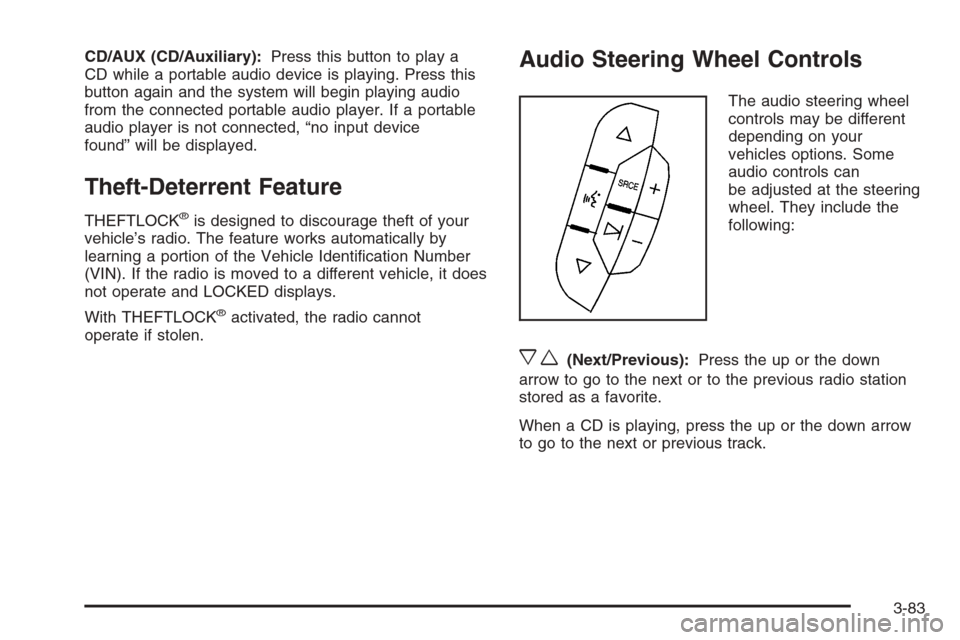
The audio steering wheel
controls may be different
depending on your
vehicles options. Some
audio controls can
be adjusted at the steering
wheel. They include the
following:
xw(Next/Previous):Press the up or the down
arrow to go to the next or to the previous radio station
stored as a favorite.
When a CD is playing, press the up or the down arrow
to go to the next or previous track.
3-83
Page 205 of 394
XM™ Satellite Radio Service
XM™ Satellite Radio Service gives digital radio
reception from coast-to-coast in the 48 contiguous
United States, and in Canada (if available). Just as with
FM, tall buildings or hills can interfere with satellite
radio signals, causing the sound to fade in and out.
In addition, traveling or standing under heavy foliage,
bridges, garages, or tunnels may cause loss of the XM™
signal for a period of time. The radio may display NO
SIGNAL to indicate interference.
Care of Your CDs
Handle CDs carefully. Store them in their original cases
or other protective cases and away from direct
sunlight and dust. The CD player scans the bottom
surface of the disc. If the surface of a CD is damaged,
such as cracked, broken, or scratched, the CD will
not play properly or not at all. If the surface of a CD is
soiled, take a soft, lint free cloth or dampen a clean, soft
cloth in a mild, neutral detergent solution mixed with
water, and clean it. Make sure the wiping process starts
from the center to the edge.Do not touch the bottom side of a CD while handling it;
this could damage the surface. Pick up CDs by
grasping the outer edges or the edge of the hole and
the outer edge.
Care of the CD Player
Do not use CD lens cleaners for CD players because
the lens of the CD optics can become contaminated by
lubricants.
Backglass Antenna
The AM-FM antenna is integrated with the rear window
defogger, located in the rear window. Make sure that the
inside surface of the rear window is not scratched and
that the lines on the glass are not damaged. If the inside
surface is damaged, it could interfere with radio
reception. Also, for proper radio reception, the antenna
connector at the top-center of the rear window needs to
be properly attached to the post on the glass.
Notice:Do not apply aftermarket glass tinting with
metallic lm. The metallic lm in some tinting
materials will interfere with or distort the incoming
radio reception. Any damage caused to your
backglass antenna due to metallic tinting materials
will not be covered by your warranty.
3-85
Page 257 of 394
{CAUTION:
If you spill fuel and then something ignites it,
you could be badly burned. Fuel can spray out
on you if you open the fuel cap too quickly.
This spray can happen if your tank is nearly
full, and is more likely in hot weather. Open
the fuel cap slowly and wait for any hiss noise
to stop. Then unscrew the cap all the way.
Be careful not to spill fuel. Do not top off or overll the
tank and wait a few seconds after you have nished
pumping before removing the nozzle. Clean fuel
from painted surfaces as soon as possible. See
Washing Your Vehicle on page 5-87.
When replacing the fuel cap, turn it clockwise until it
clicks. Make sure the cap is fully installed. The
diagnostic system can determine if the fuel cap has
been left off or improperly installed. This would allow fuel
to evaporate into the atmosphere. SeeMalfunction
Indicator Lamp on page 3-34.The TIGHTEN GAS CAP message will be displayed on
the Driver Information Center (DIC) if the fuel cap is
not properly installed. SeeDIC Warnings and Messages
on page 3-45for more information.
{CAUTION:
If a re starts while you are refueling, do not
remove the nozzle. Shut off the ow of fuel
by shutting off the pump or by notifying the
station attendant. Leave the area immediately.
Notice:If you need a new fuel cap, be sure to get
the right type. Your dealer can get one for you.
If you get the wrong type, it may not t properly.
This may cause your malfunction indicator lamp
to light and may damage your fuel tank and
emissions system. SeeMalfunction Indicator
Lamp on page 3-34.
5-9
Page 269 of 394

How to Reset the Engine Oil Life
System
The Engine Oil Life System calculates when to change
your engine oil and lter based on vehicle use.
Anytime your oil is changed, reset the system so it
can calculate when the next oil change is required.
If a situation occurs where you change your oil prior
to a CHANGE ENGINE OIL SOON message being
turned on, reset the system.
Always reset the engine oil life to 100% after every oil
change. It will not reset itself. To reset the Engine
Oil Life System, do the following:
1. Display the OIL LIFE REMAINING on the DIC.
2. Press and hold the SET/RESET button on the
DIC for more than ve seconds. The oil life will
change to 100%.
If the CHANGE ENGINE OIL SOON message comes
back on when you start your vehicle, the Engine Oil
Life System has not reset. Repeat the procedure.
What to Do with Used Oil
Used engine oil contains certain elements that may be
unhealthy for your skin and could even cause cancer.
Do not let used oil stay on your skin for very long. Clean
your skin and nails with soap and water, or a good
hand cleaner. Wash or properly dispose of clothing or
rags containing used engine oil. See the manufacturer’s
warnings about the use and disposal of oil products.
Used oil can be a threat to the environment. If you
change your own oil, be sure to drain all the oil from
the lter before disposal. Never dispose of oil by putting
it in the trash, pouring it on the ground, into sewers,
or into streams or bodies of water. Instead, recycle it by
taking it to a place that collects used oil. If you have
a problem properly disposing of used oil, ask your
dealer, a service station, or a local recycling center
for help.
5-21
Page 277 of 394
Engine Overheating
There is a coolant temperature gage and a warning light
on the instrument panel that indicate an overheated
engine condition. SeeEngine Coolant Temperature
Gage on page 3-33andEngine Coolant Temperature
Warning Light on page 3-32.
In addition, you will nd an ENGINE OVERHEATED
IDLE ENGINE and an ENGINE OVERHEATED STOP
ENGINE message displayed on the vehicle’s Driver
Information Center (DIC). SeeDIC Warnings and
Messages on page 3-45for more information.
If Steam Is Coming From Your Engine
{CAUTION:
Steam from an overheated engine can burn
you badly, even if you just open the hood.
Stay away from the engine if you see or hear
steam coming from it. Turn it off and get
everyone away from the vehicle until it cools
down. Wait until there is no sign of steam
or coolant before you open the hood.
CAUTION: (Continued)
CAUTION: (Continued)
If you keep driving when the vehicles engine
is overheated, the liquids in it can catch re.
You or others could be badly burned. Stop
your engine if it overheats, and get out of the
vehicle until the engine is cool.
SeeOverheated Engine Protection Operating
Mode on page 5-31for information on driving
to a safe place in an emergency.
Notice:If your engine catches re because you
keep driving with no coolant, your vehicle can
be badly damaged. The costly repairs would not be
covered by your warranty. SeeOverheated Engine
Protection Operating Mode on page 5-31for
information on driving to a safe place in an
emergency.
5-29