2006 CHEVROLET EQUINOX phone
[x] Cancel search: phonePage 71 of 382

Adding Equipment to Your
Airbag-Equipped Vehicle
Q:Is there anything I might add to the front or
sides of the vehicle that could keep the
airbags from working properly?
A:Yes. If you add things that change your vehicle’s
frame, bumper system, height, front end or side
sheet metal, they may keep the airbag system from
working properly. Also, the airbag system may
not work properly if you relocate any of the airbag
sensors. If you have any questions about this,
you should contact Customer Assistance before you
modify your vehicle. The phone numbers and
addresses for Customer Assistance are in Step Two
of the Customer Satisfaction Procedure in this
manual. SeeCustomer Satisfaction Procedure on
page 7-2.
Q:Because I have a disability, I have to get my
vehicle modied. How can I nd out whether
this will affect my airbag system?
A:Changing or moving any parts of the front seats,
safety belts, the airbag sensing and diagnostic
module, steering wheel, instrument panel, ceiling
headliner, ceiling and pillar garnish trim,
roof-mounted airbag modules, or airbag wiring
can affect the operation of the airbag system.
If you have questions, call Customer Assistance.
The phone numbers and addresses for Customer
Assistance are in Step Two of the Customer
Satisfaction Procedure in this manual. See
Customer Satisfaction Procedure on page 7-2.
1-65
Page 108 of 382
OnStar®Virtual Advisor
Your vehicle may have Virtual Advisor. It is a feature of
OnStar®Personal Calling that uses minutes to access
weather, local traffic reports, and stock quotes.
By pressing the phone button and giving a few simple
voice commands, you can browse through the
various topics. Customize your information prole at
www.myonstar.com. See the OnStar
®User’s Guide for
more information.
OnStar®Steering Wheel Controls
0
:For vehicles equipped with a Talk/Mute button,
it can be used to interact with OnStar®. SeeAudio
Steering Wheel Controls on page 3-81,Radio with
CD (Base Level) on page 3-40orRadio with CD (MP3)
on page 3-51orRadio with Six-Disc CD on page 3-67
for more information.
When calling into voice mail systems, or to dial directory
numbers, press this button once, wait for the response,
say the number(s) to be dialed, wait for the number(s)
to be repeated and then say “dial”. See the OnStar
®
User’s Guide for more information.
Storage Areas
Glove Box
To open the glove box, pull the handle to the left and pull
the glove box door down until it stops and is fully open.
Cupholder(s)
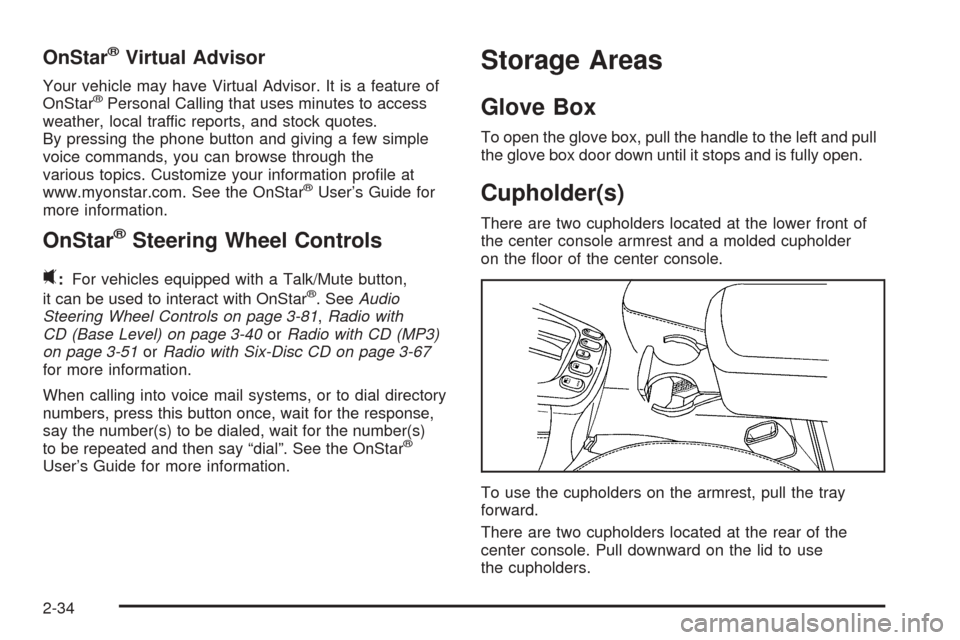
There are two cupholders located at the lower front of
the center console armrest and a molded cupholder
on the oor of the center console.
To use the cupholders on the armrest, pull the tray
forward.
There are two cupholders located at the rear of the
center console. Pull downward on the lid to use
the cupholders.
2-34
Page 133 of 382
Battery Run-Down Protection
Your vehicle has a battery saver feature designed to
protect your vehicle’s battery.
When any interior lamp is left on and the ignition is
turned off, the battery rundown protection system will
automatically turn the lamp off after 20 minutes. This will
avoid draining the battery. If the radio is on, it will turn
off after 10 minutes or if any door on the vehicle is
opened. SeeRetained Accessory Power (RAP)
on page 2-16.
Accessory Power Outlet(s)
The accessory power outlets can be used to connect
electrical equipment such as a cellular phone or
CB radio.
The accessory power outlets are located in front of the
center console storage area, at the rear of the center
console, and in the rear cargo area.
To use the outlets, remove the cover. When not in use,
always cover the outlet with the protective cap.
Notice:Leaving electrical equipment on for
extended periods will drain the battery. Always turn
off electrical equipment when not in use and do
not plug in equipment that exceeds the maximum
amperage rating.Certain electrical accessories may not be compatible
with the accessory power outlets and could result
in blown vehicle or adapter fuses. If you experience a
problem, see your dealer for additional information
on the accessory power outlet.
Notice:Adding any electrical equipment to your
vehicle may damage it or keep other components
from working as they should. The repairs would not
be covered by your warranty. Do not use equipment
exceeding maximum amperage rating of
20 amperes. Check with your retailer before
adding electrical equipment.
When adding electrical equipment, be sure to follow the
installation instructions included with the equipment.
Notice:Improper use of the power outlet can cause
damage not covered by your warranty. Do not
hang any type of accessory or accessory bracket
from the plug because the power outlets are
designed for accessory power plugs only.
The accessory power outlets can use equipment with a
maximum amperage rating up to 14. However, at
14 amperage, there is a potential to drain the battery.
Extended use of the auxiliary power outlets or large
current draws may drain the battery and/or shorten
battery life.
3-17
Page 155 of 382
Notice:Before adding any sound equipment to
your vehicle, such as an audio system, CD player,
CB radio, mobile telephone, or two-way radio, make
sure that it can be added by checking with your
dealer. Also, check federal rules covering mobile
radio and telephone units. If sound equipment can
be added, it is very important to do it properly.
Added sound equipment may interfere with
the operation of your vehicle’s engine, radio, or
other systems, and even damage them. Your
vehicle’s systems may interfere with the operation
of sound equipment that has been added.
Notice:The chime signals related to safety belts,
parking brake, and other functions of your vehicle
operate through the radio/entertainment system.
If that equipment is replaced or additional equipment
is added to your vehicle, the chimes may not
work. Make sure that replacement or additional
equipment is compatible with your vehicle before
installing it. SeeAccessories and Modifications
on page 5-3.
Your vehicle has a feature called Retained Accessory
Power (RAP). With RAP, the audio system can be
played even after the ignition is turned off. SeeRetained
Accessory Power (RAP) on page 2-16for more
information.Setting the Time
To set the hour, press the clock button. The clock
symbol will appear on the audio display and the hour
number will ash. Then turn the ADJ knob to increase or
to decrease the hour. To set the minutes, press the
clock button again. The minute numbers will ash. Then
turn the ADJ knob to increase or to decrease the
minutes. The time can be set with the ignition on or off.
To synchronize the time with an FM station broadcasting
Radio Data System (RDS) information, press and
release the clock button to enter the clock set mode,
then press and hold the clock button for three seconds
until UPDATED appears on the display. If the time
is not available from the station, NO TIME UPDATE will
appear on the display.
RDS time is broadcast once a minute. After tuning to an
RDS broadcast station, it may take a few minutes for
the time to update.
3-39
Page 161 of 382
RDS Messages
ALERT!:Alert warns of local or national emergencies.
When an alert announcement comes on the current
radio station, ALERT! will appear on the display. You will
hear the announcement, even if the volume is low or
a CD is playing. If a CD is playing, play will stop during
the announcement. Alert announcements cannot be
turned off.
ALERT! will not be affected by tests of the emergency
broadcast system. This feature is not supported by
all RDS stations.
MSG (Message):If the current station has a message,
MSG will appear on the display. Press this button to
see the message. The message may display the artist,
song title, call in phone numbers, etc.
If the entire message is not displayed, parts of the
message will appear every three seconds. To scroll
through the message, press and release the MSG
button. A new group of words will appear on the display
after every press of the button. Once the complete
message has been displayed, MSG will disappear from
the display until another new message is received.The last message can be displayed by pressing the
MSG button. You can view the last message until a new
message is received or a different station is tuned to.
When a message is not available from a station,
NO MESSAGE AVAIL will appear on the display.
Radio Messages
CALIBRATE:The audio system has been calibrated for
your vehicle from the factory. If CALIBRATE appears
on the display, it means that the radio has not been
congured properly for your vehicle and must be
returned to the dealer for service.
LOCKED:This message is displayed when the
THEFTLOCK
®system has locked up. Take the vehicle
to the dealer for service.
If any error occurs repeatedly or if an error cannot be
corrected, contact your dealer.
3-45
Page 172 of 382
RDS Messages
ALERT!:Alert warns of local or national emergencies.
When an alert announcement comes on the current
radio station, ALERT! will appear on the display. You will
hear the announcement, even if the volume is low or
a CD is playing. If a CD is playing, play will stop during
the announcement. Alert announcements cannot be
turned off.
ALERT! will not be affected by tests of the emergency
broadcast system. This feature is not supported by
all RDS stations.
MSG (Message):If the current station has a message,
MSG will appear on the display. Press this button to
see the message. The message may display the artist,
song title, call in phone numbers, etc.
If the entire message is not displayed, parts of the
message will appear every three seconds. To scroll
through the message, press and release the MSG
button. A new group of words will appear on the display
after every press of this button. Once the complete
message has been displayed, MSG will disappear from
the display until another new message is received.The last message can be displayed by pressing the
MSG button. You can view the last message until a new
message is received or a different station is tuned to.
When a message is not available from a station,
NO MESSAGE AVAIL will appear on the display
Radio Messages
CALIBRATE:The audio system has been calibrated for
your vehicle from the factory. If CALIBRATE appears
on the display it means that the radio has not been
congured properly for your vehicle and it must
be returned to the dealer for service.
LOCKED:This message is displayed when the
THEFTLOCK
®system has locked up. Take your vehicle
to the dealer for service.
If any error occurs repeatedly or if an error cannot be
corrected, contact your dealer.
3-56
Page 188 of 382
RDS Messages
ALERT!:Alert warns of local or national emergencies.
When an alert announcement comes on the current
radio station, ALERT! will appear on the display. You will
hear the announcement, even if the volume is low or
a CD is playing. If a CD is playing, play will stop during
the announcement. Alert announcements cannot be
turned off.
ALERT! will not be affected by tests of the emergency
broadcast system. This feature is not supported by
all RDS stations.
MSG (Message):If the current station has a message,
MSG will appear on the display. Press this button to
see the message. The message may display the artist,
song title, call in phone numbers, etc.
If the entire message is not displayed, parts of the
message will appear every three seconds. To scroll
through the message, press and release the MSG
button. A new group of words will appear on the display
after every press of this button. Once the complete
message has been displayed, MSG will disappear from
the display until another new message is received.The last message can be displayed by pressing the
MSG button. You can view the last message until a new
message is received or a different station is tuned to.
When a message is not available from a station,
NO MESSAGE AVAIL will appear on the display.
Radio Messages
CALIBRATE:The audio system has been calibrated for
your vehicle from the factory. If CALIBRATE appears
on the display it means that the radio has not been
congured properly for the vehicle and it must be
returned to the dealer for service.
LOCKED:This message is displayed when the
THEFTLOCK
®system has locked up. Take your vehicle
to the dealer for service.
If any error occurs repeatedly or if an error cannot be
corrected, contact your dealer.
3-72
Page 198 of 382
0(Mute/Voice Recognition):Press and release this
button to silence the system. Press and release this
button again, or any other radio button, to turn the
sound on.
Press and hold this button for two seconds to interact
with the OnStar
®system. See theOnStar®System
on page 2-32in this manual.
SRCE (Source):Press this button to switch between
listening to a CD and a remote device. The inactive CD
will remain safely inside the radio for future listening.
Radio Reception
You may experience frequency interference and static
during normal radio reception if items such as cellphone
chargers, vehicle convenience accessories, and external
electronic devices are plugged into the accessory power
outlet. If there is interference or static, unplug the item
from the accessory power outlet.
AM
The range for most AM stations is greater than for FM,
especially at night. The longer range can cause
station frequencies to interfere with each other. For
better radio reception, most AM radio stations will boost
the power levels during the day, and then reduce
these levels during the night. Static can also occur when
things like storms and power lines interfere with radio
reception. When this happens, try reducing the treble on
your radio.
FM Stereo
FM stereo will give the best sound, but FM signals will
reach only about 10 to 40 miles (16 to 65 km). Tall
buildings or hills can interfere with FM signals, causing
the sound to fade in and out.
3-82