2006 CHEVROLET CORVETTE transmission
[x] Cancel search: transmissionPage 95 of 426

Parking Brake
The parking brake lever is located to the right of the
center console.
To set the parking brake, hold the brake pedal down.
Pull the parking brake lever up. If the ignition is on,
the brake system warning light will come on.
To release the parking brake, hold the brake pedal
down. Then push the release button in as you move
the parking brake lever all the way down.
Notice:Driving with the parking brake on can
overheat the brake system and cause premature
wear or damage to brake system parts. Verify that
the parking brake is fully released and the brake
warning light is off before driving.
Shifting Into Park (P)
(Automatic Transmission)
{CAUTION:
It can be dangerous to get out of your vehicle
if the shift lever is not fully in PARK (P) with
the parking brake rmly set. Your vehicle can
roll. If you have left the engine running, the
vehicle can move suddenly. You or others
could be injured. To be sure your vehicle will
not move, even when you are on fairly level
ground, use the steps that follow.
1. Hold the brake pedal down with your right foot and
set the parking brake.
2. Move the shift lever into PARK (P) by holding in the
button on the lever and pushing the lever all the
way toward the front of the vehicle.
3. Press the ACC button (ignition switch) to turn the
engine off.
2-33
Page 96 of 426
Leaving Your Vehicle With the Engine
Running (Automatic Transmission)
{CAUTION:
It can be dangerous to leave your vehicle with
the engine running. Your vehicle could move
suddenly if the shift lever is not fully in
PARK (P) with the parking brake rmly set.
And, if you leave the vehicle with the engine
running, it could overheat and even catch re.
You or others could be injured. Do not leave
your vehicle with the engine running.
If you have to leave your vehicle with the engine running,
be sure your vehicle is in PARK (P) and your parking
brake is rmly set before you leave it. After you have
moved the shift lever into PARK (P), hold down the
regular brake pedal. See if you can move the shift lever
away from PARK (P) without rst pulling it toward you. If
you can, it means that the shift lever was not fully locked
into PARK (P).
Torque Lock (Automatic Transmission)
If you are parking on a hill and you do not shift your
transmission into PARK (P) properly, the weight of the
vehicle may put too much force on the parking pawl in the
transmission. You may nd it difficult to pull the shift lever
out of PARK (P). This is called “torque lock.” To prevent
torque lock, set the parking brake and then shift into
PARK (P) properly before you leave the driver’s seat.
To nd out how, see “Shifting Into PARK (P)” listed
previously in this section.
When you are ready to drive, move the shift lever out of
PARK (P) before you release the parking brake.
If torque lock does occur, you may need to have another
vehicle push yours a little uphill to take some of the
pressure from the transmission parking pawl, so you can
pull the shift lever out of PARK (P).
2-34
Page 97 of 426
Shifting Out of Park (P)
(Automatic Transmission)
Your vehicle has an automatic transmission shift lock
control system which locks the shift lever in PARK (P)
when the ignition is off. In addition, you have to fully
apply your regular brake before you can shift from
PARK (P) when the ignition is on. SeeAutomatic
Transmission Operation on page 2-26.
If you cannot shift out of PARK (P), ease pressure on
the shift lever and push the shift lever all the way
into PARK (P) and release the shift lever button as you
maintain brake application. Then press the shift lever
button and move the shift lever into the gear you wish.
If you ever hold the brake pedal down but still cannot
shift out of PARK (P), try this:
1. Put the vehicle in accessory power mode.
2. Apply and hold the brake until the end of Step 4.
3. Shift to NEUTRAL (N).
4. Start the engine and then shift to the drive gear
you want.
5. Have your vehicle inspected by your dealer as soon
as possible.
Parking Your Vehicle
(Manual Transmission)
Before you get out of your vehicle, move the shift lever
into REVERSE (R) and rmly apply the parking brake.
Once the shift lever has been placed into REVERSE (R)
with the clutch pedal pressed in, you can turn the ignition
off and release the clutch.
2-35
Page 99 of 426
Running the Engine While Parked
It is better not to park with the engine running. But if you
ever have to, here are some things to know.
{CAUTION:
Idling the engine with the climate control
system off could allow dangerous exhaust
into your vehicle. See the earlier caution under
Engine Exhaust on page 2-36.
Also, idling in a closed-in place can let deadly
carbon monoxide (CO) into your vehicle even if
the climate control fan is at the highest setting.
One place this can happen is a garage.
Exhaust — with CO — can come in easily.
NEVER park in a garage with the engine
running.
Another closed-in place can be a blizzard. See
Winter Driving on page 4-28.
{CAUTION:
It can be dangerous to get out of your vehicle
if the shift lever is not fully in PARK (P) with
the parking brake rmly set. Your vehicle can
roll. Do not leave your vehicle when the engine
is running unless you have to. If you have left
the engine running, the vehicle can move
suddenly. You or others could be injured. To
be sure your vehicle will not move, even when
you are on fairly level ground, always set your
parking brake and move the shift lever to
PARK (P).
Follow the proper steps to be sure your vehicle will not
move. SeeShifting Into Park (P) (Automatic
Transmission) on page 2-33.
2-37
Page 109 of 426
The Universal Home Remote transmitter operates on a
radio frequency subject to Federal Communications
Commission (FCC) Rules and with Industry Canada.
This device complies with Part 15 of the FCC Rules.
Operation is subject to the following two conditions:
1. This device may not cause harmful interference.
2. This device must accept any interference received,
including interference that may cause undesired
operation.
This device complies with RSS-210 of Industry Canada.
Operation is subject to the following two conditions:
1. This device may not cause harmful interference.
2. This device must accept any interference received,
including interference that may cause undesired
operation of the device.
Changes or modications to this system by other than
an authorized service facility could void authorization to
use this equipment.Universal Home Remote System
Operation
Do not use the Universal Home Remote with any garage
door opener that does not have the stop and reverse
feature. This includes any garage door opener model
manufactured before April 1, 1982. If you have a newer
garage door opener with rolling codes, please be sure to
follow Steps 6 through 8 to complete the programming of
your Universal Home Remote Transmitter.
Read the instructions completely before attempting to
program the Universal Home Remote. Because of
the steps involved, it may be helpful to have another
person available to assist you in the programming steps.
Keep the original hand-held transmitter for use in other
vehicles as well as for future Universal Home Remote
programming. It is also recommended that upon the sale
of the vehicle, the programmed Universal Home Remote
buttons should be erased for security purposes. See
“Erasing Universal Home Remote Buttons” later in this
section or, for assistance, seeCustomer Assistance
Offices on page 7-4.
Be sure that people and objects are clear of the garage
door or gate operator you are programming. When
programming a garage door, it is advised to park
outside of the garage.
It is recommended that a new battery be installed in
your hand-held transmitter for quicker and more
accurate transmission of the radio-frequency signal.
2-47
Page 111 of 426
6. Locate in the garage, the garage door opener
receiver (motor-head unit). Locate the “Learn”
or “Smart” button. This can usually be found
where the hanging antenna wire is attached to
the motor-head unit.
7. Firmly press and release the “Learn” or “Smart”
button. The name and color of the button may
vary by manufacturer.
You will have 30 seconds to start Step 8.
8. Return to the vehicle. Firmly press and hold the
programmed Universal Home Remote button for
two seconds, then release. Repeat the press/hold/
release sequence a second time, and depending on
the brand of the garage door opener, or other rolling
code device, repeat this sequence a third time to
complete the programming.
The Universal Home Remote should now activate
your rolling-code equipped device.
To program the remaining two Universal Home Remote
buttons, begin with Step 2 of “Programming Universal
Home Remote.” You do not want to repeat Step 1,
as this will erase all previous programming from
the Universal Home Remote buttons.Gate Operator and Canadian
Programming
Canadian radio-frequency laws require transmitter
signals to time out or quit after several seconds of
transmission. This may not be long enough for Universal
Home Remote to pick up the signal during programming.
Similarly, some U.S. gate operators are manufactured
to time out in the same manner.
If you live in Canada, or you are having difficulty
programming a gate operator or garage door opener
by using the “Programming Universal Home Remote”
procedures, regardless of where you live, replace Step 3
under “Programming Universal Home Remote” with the
following:
Continue to press and hold the Universal Home Remote
button while you press and release every two seconds
(cycle) the hand-held transmitter button until the
frequency signal has been successfully accepted by the
Universal Home Remote. The Universal Home Remote
indicator light will ash slowly at rst and then rapidly.
Proceed with Step 4 under “Programming Universal
Home Remote” to complete.
2-49
Page 118 of 426
Notice:If you drop or rest a roof panel on its edges,
the roof panel, paint and/or weatherstripping may be
damaged. Always place the roof panel in the stowage
receivers after removing it from the vehicle.
1. Park on a level surface and set the parking brake.
Shift an automatic transmission into PARK (P).
Shift a manual transmission into NEUTRAL.
2. Make sure the ignition is turned to OFF.
3. Lower both sun visors.
4. Open the rear hatch and remove any items that may
interfere with proper storage of the roof panel.
5. Lower the windows.
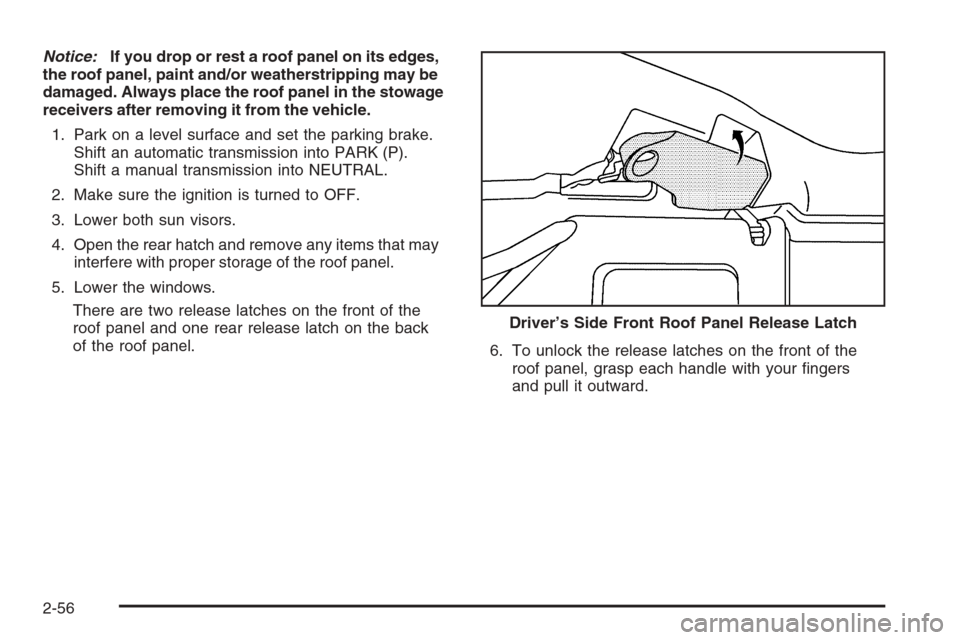
There are two release latches on the front of the
roof panel and one rear release latch on the back
of the roof panel.
6. To unlock the release latches on the front of the
roof panel, grasp each handle with your ngers
and pull it outward. Driver’s Side Front Roof Panel Release Latch
2-56
Page 121 of 426
Installing the Roof Panel
{CAUTION:
An improperly attached roof panel may fall into
or y off the vehicle. You or others could be
injured. After installing the roof panel, always
check that it is rmly attached by pushing up on
the underside of the panel. Check now and then
to be sure the roof panel is rmly in place.
Notice:If you drop or rest a roof panel on its edges,
the roof panel, paint and/or weatherstripping may be
damaged. Always place the roof panel in the stowage
receivers after removing it from the vehicle.
In most cases, it makes it easier if two people re-install
the roof panel.
1. Park on a level surface and set the parking brake.
Shift an automatic transmission into PARK (P).
Shift a manual transmission into NEUTRAL.
2. Check that the front release latches and the rear
release latch on the vehicle’s roof opening are in
their opened positions before attempting to install
the roof panel.3. If the roof panel is stored in the rear storage area of
the vehicle, grasp the rear edge of the roof panel with
both hands and gently lift it up and remove it from the
storage area.
4. Carefully place the roof panel over the top of the
vehicle.
5. Position the rear edge of the roof panel to the
weatherstrip on the back of the roof opening.
Then align and t the pins at the rear of the roof
panel inside the openings in the rear overhead
weatherstrip. Gently lower the front edge of the roof
panel to the front of the roof opening.
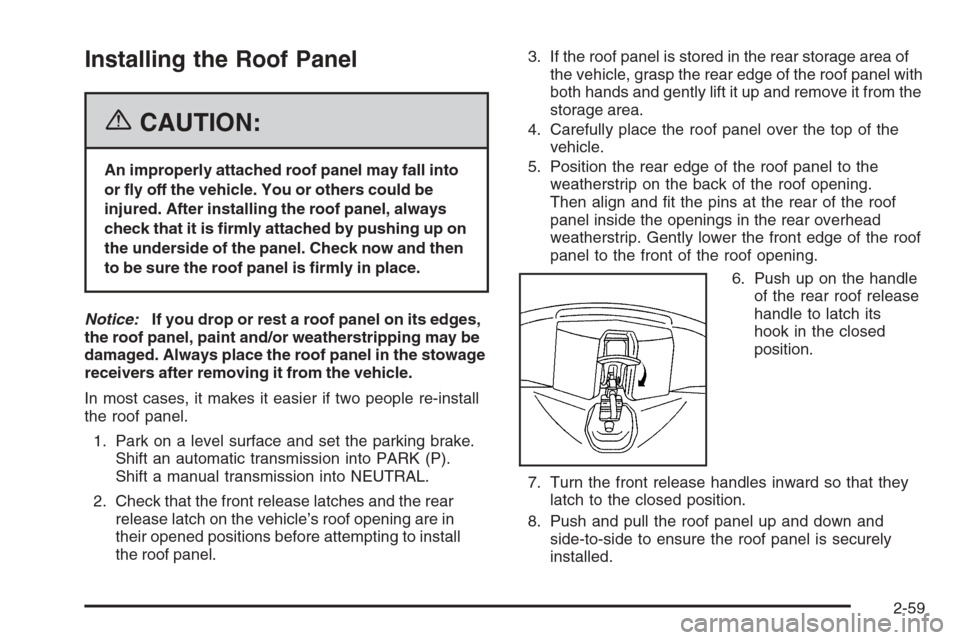
6. Push up on the handle
of the rear roof release
handle to latch its
hook in the closed
position.
7. Turn the front release handles inward so that they
latch to the closed position.
8. Push and pull the roof panel up and down and
side-to-side to ensure the roof panel is securely
installed.
2-59