2006 CHEVROLET AVALANCHE light
[x] Cancel search: lightPage 187 of 532

Exterior Cargo Lamps
You can use the cargo lamp if you need more light in
the cargo area of your vehicle or in the top-box storage
units. Some vehicles will only have a cargo lamp in
the passenger side top box.
Press the button, with this
symbol to turn the cargo
lamps on or off.
The cargo lamps symbol light will come on in the
instrument panel cluster when the cargo lamps are on
and the ignition key is turned to run.
Instrument Panel Brightness
The thumbwheel for this feature is located next to the
exterior lamps control.
D(Instrument Panel Lights):Turn the thumbwheel
up or down to brighten or dim the instrument panel
lights and the radio display. This will only work if
the headlamps or parking lamps are on.
To turn on the dome lamps, with the vehicle doors
closed, turn the thumbwheel all the way up.
Dome Lamps
The dome lamps will come on when you open a door or
the midgate, if equipped, and will turn off when all
doors or midgate are closed.
You can also turn the dome lamps on by turning the
thumbwheel, located next to the exterior lamp control,
all the way up. In this position, the dome lamps will
remain on whether a door is opened or closed.
3-19
Page 188 of 532
Dome Lamp Override
E(Dome Lamp Override):You can use the dome
override button, located below the exterior lamps control,
to set the dome lamps to come on automatically when
a door is opened, or to remain off. To turn the lamps off,
press the button into the in position. With the button
in this position, the dome lamps will remain off when the
doors are open. To return the lamps to automatic
operation, press the button again and return it to the out
position. With the button in this position, the dome
lamps will come on when you open a door.
Entry/Exit Lighting
Your vehicle has an illuminated entry/exit feature.
When a door is opened or the key is removed from the
ignition, the dome lamps will come on if the dome
override button is in the out position.
Reading Lamps
If your vehicle has reading lamps, press the button
located next to the lamp to turn it on or off. The lamps
can be adjusted to shine in a desired direction.
Your vehicle may also have reading lamps in other
locations. To turn each one on or off, press the button
located next to the lamp. The lamps cannot be adjusted.
Battery Run-Down Protection
This feature shuts off the dome lamps if they are left on
for more than 10 minutes when the ignition is in LOCK.
This will help prevent the battery from running down.
3-20
Page 189 of 532
Accessory Power Outlet(s)
Your vehicle may have two accessory power outlets
located on the instrument panel.
Your vehicle may also have an outlet on the back of the
center console above the cupholder door.
Notice:Adding any electrical equipment to your
vehicle may damage it or keep other components
from working as they should. The repairs would not
be covered by your warranty. Do not use equipment
exceeding maximum amperage rating of 20 amperes.
Check with your dealer before adding electrical
equipment.
Certain power accessory plugs may not be compatible
to the accessory power outlets and could result in
blown vehicle or adapter fuses. If you experience a
problem, see your dealer for additional information on
the accessory power plugs.
Notice:Improper use of the power outlet can cause
damage not covered by your warranty. Do not
hang any type of accessory or accessory bracket
from the plug because the power outlets are
designed for accessory power plugs only.
Ashtray(s) and Cigarette Lighter
If your vehicle has this feature it is located in the center
console or on the instrument panel. Pull up on the
ashtray door to open it if it is in the console or pull the
door open it if it is on the instrument panel.
Notice:If you put papers, pins, or other ammable
items in the ashtray, hot cigarettes or other
smoking materials could ignite them and possibly
damage your vehicle. Never put ammable items in
the ashtray.
To remove the ashtray, pull it out from the console or
from the slide out door. To reinstall the ashtray,
slide it back to the original position.
To use the cigarette lighter, if the vehicle has one, push
it in all the way, and let go. When it is ready for use,
it will pop back out by itself.
Do not use the lighter to plug in accessory devices. Use
the power outlets provided.
Notice:Holding a cigarette lighter in while it is
heating will not allow the lighter to back away from
the heating element when it is hot. Damage from
overheating may occur to the lighter or heating
element, or a fuse could be blown. Do not hold a
cigarette lighter in while it is heating.
3-21
Page 190 of 532
Climate Controls
Dual Climate Control System
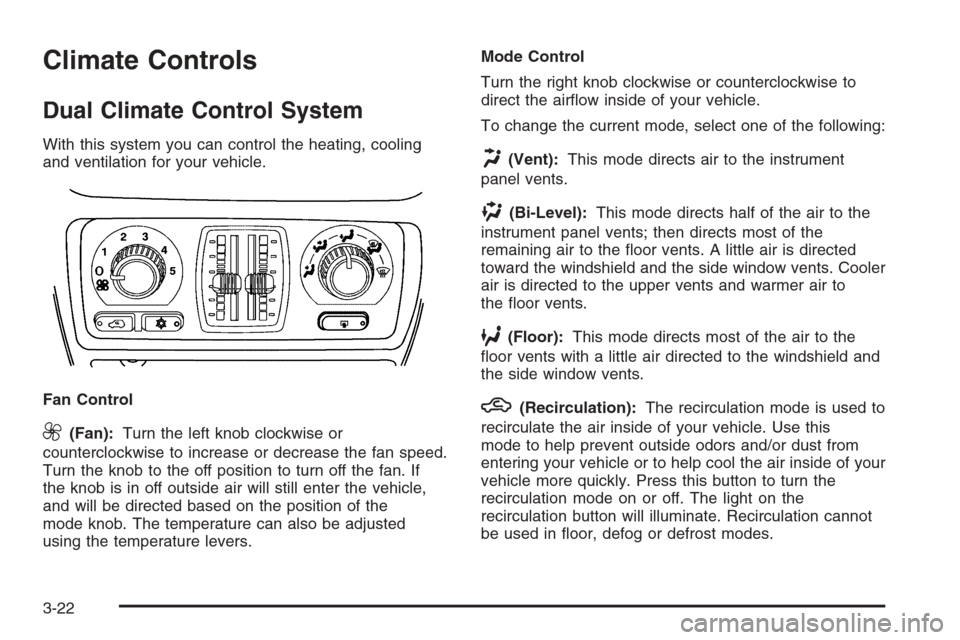
With this system you can control the heating, cooling
and ventilation for your vehicle.
Fan Control
9(Fan):Turn the left knob clockwise or
counterclockwise to increase or decrease the fan speed.
Turn the knob to the off position to turn off the fan. If
the knob is in off outside air will still enter the vehicle,
and will be directed based on the position of the
mode knob. The temperature can also be adjusted
using the temperature levers.Mode Control
Turn the right knob clockwise or counterclockwise to
direct the airow inside of your vehicle.
To change the current mode, select one of the following:
H(Vent):This mode directs air to the instrument
panel vents.
)(Bi-Level):This mode directs half of the air to the
instrument panel vents; then directs most of the
remaining air to the oor vents. A little air is directed
toward the windshield and the side window vents. Cooler
air is directed to the upper vents and warmer air to
the oor vents.
6(Floor):This mode directs most of the air to the
oor vents with a little air directed to the windshield and
the side window vents.
h(Recirculation):The recirculation mode is used to
recirculate the air inside of your vehicle. Use this
mode to help prevent outside odors and/or dust from
entering your vehicle or to help cool the air inside of your
vehicle more quickly. Press this button to turn the
recirculation mode on or off. The light on the
recirculation button will illuminate. Recirculation cannot
be used in oor, defog or defrost modes.
3-22
Page 191 of 532
An indicator on the button will light up, ash three times
and turn off when recirculation is selected in these
modes. The air-conditioning compressor will also come
on when this mode is activated. While in recirculation
mode the windows may fog when the weather is
cold and damp. To clear the fog, select either the defog
or defrost mode and increase fan speed.
Temperature Control
Driver’s Side:The lever on the left side of the climate
control panel is used to raise or lower the temperature
on the driver’s side of the vehicle. This lever also adjusts
the temperature to the center console outlets (if
equipped).
Passenger’s Side:The lever on the right side of the
climate control panel is used to raise or lower the
temperature on the passenger’s side of the vehicle.
#(Air Conditioning):Press this button to turn
the air-conditioning system on or off. When the button is
pressed, an indicator light will come on and the
system will begin to cool and dehumidify the air inside
of your vehicle. You may notice a slight change in
engine performance when the air conditioning
compressor shuts off and turns on again. This is
normal.
Defogging and Defrosting
There are two modes to choose from to clear fog or
frost from your windshield. Use the defog mode to clear
the windows of fog or moisture and warm the
passengers. Use the defrost mode to remove fog or
frost from the windshield more quickly.
Turn the right knob clockwise or counterclockwise to
select one of the following modes:
-(Defog):This mode directs the air to the oor
outlets, windshield and the side window vents. The air
conditioning compressor will run automatically to
dehumidify the air to prevent window fogging. The
recirculation mode cannot be selected while in the
defog mode.
1(Defrost):This mode directs most of the air to the
windshield and the side window vents, with only a
little air directed to the oor vents. The air conditioning
compressor will run automatically to dehumidify the
air to prevent window fogging. The recirculation mode
cannot be selected while in defrost mode.
3-23
Page 192 of 532
Rear Window Defogger
If your vehicle has a rear defogger, the lines you see on
the rear window warm the glass. The rear window
defogger uses a warming grid to remove fog from the
rear window.
<(Rear):Press this button to turn the rear window
defogger on or off. An indicator light in the button
will come on to let you know that the rear window
defogger is activated.
The rear window defogger will automatically turn off
several minutes after the button is pressed. Pressing the
button while the defogger is running can also turn off
the defogger.
If your vehicle is equipped with heated mirrors this
button will activate them.
Notice:Do not use anything sharp on the inside of
the rear window. If you do, you could cut or
damage the warming grid, and the repairs would not
be covered by your warranty. Do not attach a
temporary vehicle license, tape, a decal or anything
similar to the defogger grid.
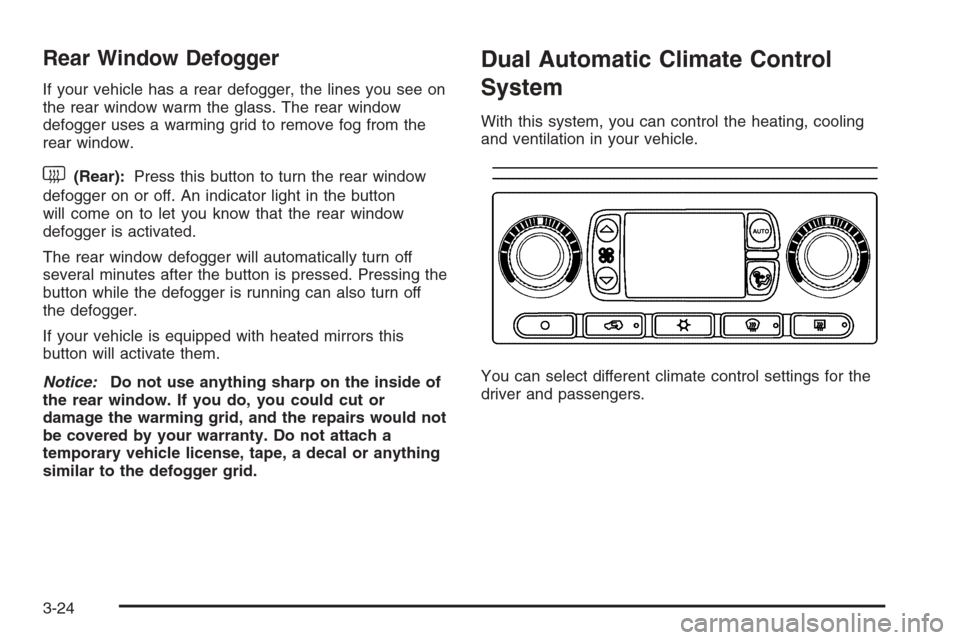
Dual Automatic Climate Control
System
With this system, you can control the heating, cooling
and ventilation in your vehicle.
You can select different climate control settings for the
driver and passengers.
3-24
Page 194 of 532

If the driver’s and passenger’s temperature
settings are not the same, the opposite side
temperature setting will be displayed for an
additional ve seconds. To make the passenger’s
temperature the same as the driver’s press and hold
the AUTO button for about four seconds.
When auto is selected, the air conditioning operation
and air inlet will be automatically controlled. The
air conditioning compressor will run when the
outside temperature is over about 40°F (4°C). The
air inlet will normally be set to outside air. If it’s
hot outside, the air inlet may automatically switch to
recirculate inside air to help quickly cool down
your vehicle. The light on the button will illuminate
in recirculation.
2. Set the driver’s and passenger’s temperature.
To nd your comfort setting, start with a 74°F (23°C)
temperature setting and allow about 20 minutes
for the system to regulate. Turn the driver’s or
passenger’s side temperature knob to adjust the
temperature setting as necessary. If you choose the
temperature setting of 60°F (15°C) the system
will remain at the maximum cooling setting. If you
choose the temperature setting of 90°F (32°C)
the system will remain at the maximum heat setting.
Choosing either maximum setting will not cause
the vehicle to heat or cool any faster.Be careful not to cover the sensor located on the
top of the instrument panel near the windshield. This
sensor regulates air temperature based on sun
load, and also turns on your headlamps.
To avoid blowing cold air in cold weather, the
system will delay turning on the fan until warm air is
available. The length of delay depends on the
engine coolant temperature. Pressing the fan switch
will override this delay and change the fan to a
selected speed.
9(Off):Press this button to turn off the entire climate
control system. Outside air will still enter the vehicle,
and will be directed to the oor. This direction can
be changed by pressing the mode button. The
temperature can also be adjusted using either
temperature knob. Press the up or down arrows on the
fan switch, the defrost button, the AUTO button, or
the air conditioning button to turn the system on when it
is off.
3-26
Page 195 of 532

Manual Operation
You may manually adjust the air delivery mode or
fan speed.
w9x(Fan):The switch with the fan symbol allows
you to manually adjust the fan speed. Press the up
arrow to increase fan speed and the down arrow
to decrease fan speed.
Pressing this button when the system is off will turn the
system on.
C(Mode):Press this button to manually change the
direction of the airow in your vehicle. Repeatedly press
the button until the desired mode appears on the
display.
If you press the mode button to select an air delivery
mode, the display will change to show you the selected
air mode delivery. The display will then show the
current status of the system. When the system is turned
off, the display will go blank after displaying the
current status of the system.
H(Panel):This setting will deliver air to the instrument
panel outlets.
)(Bi-Level):This setting will deliver warmer air to
the oor and cooler air to the instrument panel outlets.
6(Floor):This setting will deliver air to the oor
outlets.
-(Defog):See “Defogging and Defrosting” later in
this section.
@(Recirculation):Press this button to limit the
amount of outside air entering your vehicle. The light on
the recirculation button will glow. This is helpful when
you are trying to limit odors entering your vehicle and for
maximum air conditioning performance in hot weather.
Press this button again to allow outside air to enter
the vehicle. The light on the recirculation button will
go off.
Pressing this button also cancels the auto recirculation
feature. To resume the auto recirculation function,
press the AUTO button. Each time the vehicle is started,
the system will revert to the auto recirculation function.
If you select recirculation while in defrost, defog or
oor, the light in the button will ash and then go out to
let you know that this is not allowed. This is normal
and helps to prevent fogging.
When the weather is cool or damp, operating the
system in recirculation for extended periods of time may
cause fogging of the vehicle’s windows. To clear the
fog, select either defog or front defrost.
3-27