2006 CHEVROLET AVALANCHE service
[x] Cancel search: servicePage 102 of 532

Testing the Alarm
The alarm can be tested by following these steps:
1. From inside the vehicle, lower the driver’s window
and open the driver’s door.
2. Activate the system by locking the doors with the
power door lock switch while the door is open, or
with the remote keyless entry transmitter.
3. Get out of the vehicle, close the door and wait for
the security light to go out.
4. Then reach in through the window, unlock the door
with the manual door lock and open the door. This
should set off the alarm.
While the alarm is set, the power door unlock switch is
not operational.
If the alarm does not sound when it should but the
headlamps ash, check to see if the horn works. The
horn fuse may be blown. To replace the fuse, see
Instrument Panel Fuse Block on page 5-114and
Underhood Fuse Block on page 5-117.
If the alarm does not sound or the headlamps do not
ash, the vehicle should be serviced by your dealer.
Passlock®
Your vehicle is equipped with the Passlock®
theft-deterrent system.
Passlock
®is a passive theft-deterrent system. Passlock®
enables fuel if the ignition lock cylinder is turned with
a valid key. If a correct key is not used or the ignition
lock cylinder is tampered with, the fuel system is
disabled and the vehicle will not start.
During normal operation, the security light will turn off
approximately ve seconds after the key is turned
to RUN.
If the engine stalls and the security light ashes, wait
about 10 minutes until the light stops ashing before
trying to restart the engine. Remember to release
the key from START as soon as the engine starts.
If the engine does not start after three tries, the vehicle
needs service.
If the engine is running and the security light comes on,
you will be able to restart the engine if you turn the engine
off. However, your Passlock
®system is not working
properly and must be serviced by your dealer. Your
vehicle is not protected by Passlock
®at this time. You
may also want to check the fuse. SeeFuses and Circuit
Breakers on page 5-113. See your dealer for service.
In an emergency, call the Roadside Assistance Center.
SeeRoadside Assistance Program on page 7-5.
2-26
Page 104 of 532
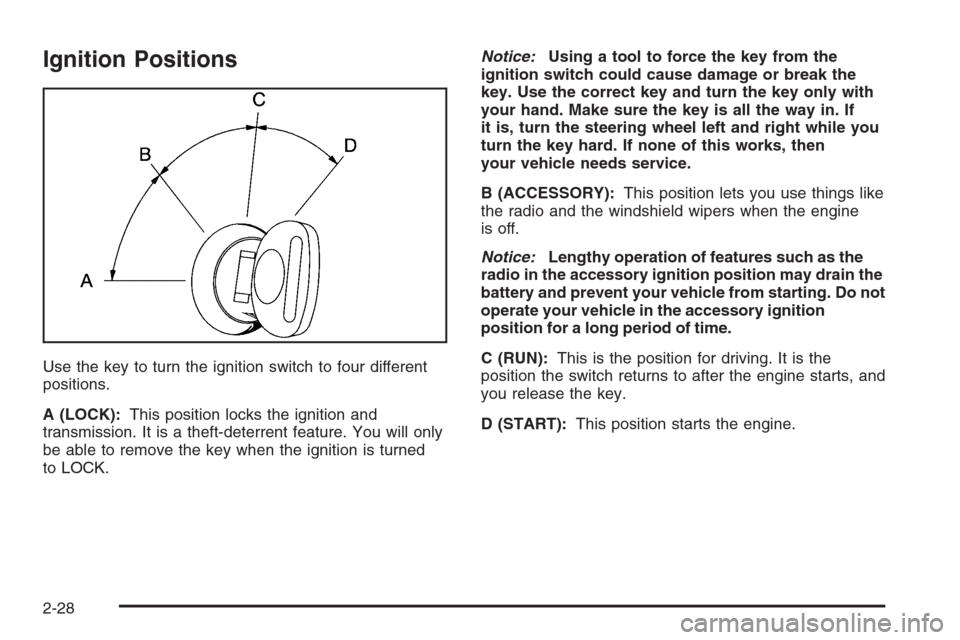
Ignition Positions
Use the key to turn the ignition switch to four different
positions.
A (LOCK):This position locks the ignition and
transmission. It is a theft-deterrent feature. You will only
be able to remove the key when the ignition is turned
to LOCK.Notice:Using a tool to force the key from the
ignition switch could cause damage or break the
key. Use the correct key and turn the key only with
your hand. Make sure the key is all the way in. If
it is, turn the steering wheel left and right while you
turn the key hard. If none of this works, then
your vehicle needs service.
B (ACCESSORY):This position lets you use things like
the radio and the windshield wipers when the engine
is off.
Notice:Lengthy operation of features such as the
radio in the accessory ignition position may drain the
battery and prevent your vehicle from starting. Do not
operate your vehicle in the accessory ignition
position for a long period of time.
C (RUN):This is the position for driving. It is the
position the switch returns to after the engine starts, and
you release the key.
D (START):This position starts the engine.
2-28
Page 113 of 532

Indicator lights in the button show which setting you are
in. The indicator lights will come on briey when you
turn on the ignition and one will stay on. If the lights do
not come on, you should take your vehicle to your
dealer for service. An indicator light will ash while
shifting the transfer case. It will remain illuminated when
the shift is complete. If for some reason the transfer
case cannot make a requested shift, it will return to the
last chosen setting.
If the SERVICE 4WD message stays on, you should
take your vehicle to your dealer for service. See “Service
4WD message” underDIC Warnings and Messages
on page 3-53.
Shifting Into Four-Wheel High or AUTO
4WD (Automatic Four-Wheel Drive)
Press and release the Four-Wheel High or AUTO 4WD
button. This can be done at any speed, except when
shifting from Four-Wheel Low, and the indicator light will
ash while shifting. It will remain on when the shift is
completed.
Shifting Into Two-Wheel High
Press and release the Two-Wheel High button. This can
be done at any speed, except when shifting from
Four-Wheel Low.
Shifting Into Four-Wheel Low
To shift to the Four-Wheel Low position, the ignition
must be in RUN and the vehicle must be stopped
or moving less than 3 mph (5 km/h) with the
transmission in NEUTRAL (N). The preferred method for
shifting into four-wheel low is to have your vehicle
moving 1 to 2 mph (1.6 to 3.2 km/h). Press and release
the Four-Wheel Low button. You must wait for the
four-wheel low indicator light to stop ashing and remain
on before shifting your transmission in gear.
Notice:Shifting the transmission into gear before
the Four-Wheel Low indicator light has stopped
ashing could damage the transfer case. To
help avoid damaging your vehicle, always wait for
the Four-Wheel Low indicator light to stop ashing
before shifting the transmission into gear.
It is typical for your vehicle to exhibit signicant
engagement noise and bump when shifting between
Four-Wheel Low and Four-Wheel High ranges or from
NEUTRAL with the engine running.
If the Four-Wheel Low button is pressed when your
vehicle is in gear and/or moving, the Four-Wheel Low
indicator light will ash for 30 seconds and not complete
the shift unless your vehicle is moving less than
3 mph (5 km/h) and the transmission is in NEUTRAL (N).
After 30 seconds the transfer case will shift to
Four-Wheel High mode.
2-37
Page 121 of 532
{CAUTION:
It can be dangerous to get out of your vehicle
if the shift lever is not fully in PARK (P) with
the parking brake rmly set. Your vehicle can
roll. Do not leave your vehicle when the engine
is running unless you have to. If you have left
the engine running, the vehicle can move
suddenly. You or others could be injured. To
be sure your vehicle will not move, even when
you are on fairly level ground, always set your
parking brake and move the shift lever to
PARK (P).
{CAUTION:
Four-wheel drive vehicles with the transfer
case in NEUTRAL will allow the vehicle to roll,
even if your shift lever is in PARK (P). So, be
sure the transfer case is in a drive gear — not
in NEUTRAL. Always set your parking brake.Follow the proper steps to be sure your vehicle will not
move. SeeShifting Into Park (P) on page 2-41.
If you are pulling a trailer, seeTowing a Trailer on
page 4-62.
Mirrors
Automatic Dimming Rearview Mirror
with OnStar
®and Compass
Your vehicle may have an automatic-dimming rearview
mirror with a compass and the OnStar®system.
There are three additional buttons for the OnStar
®
system. See your dealer for more information on the
system and how to subscribe to OnStar®. SeeOnStar®
System on page 2-57for more information about the
services OnStar®provides.
2-45
Page 123 of 532

To adjust for compass variance, do the following:
1. Find your current location and variance zone
number on the map.
2. Press and hold the on/off button for six seconds.
Release the button when ZONE is displayed. The
number shown is the current zone number.3. Scroll through the zone numbers that appear in the
compass/temperature window on the mirror by
pressing the on/off button. Once you nd your zone
number, release the button. After about four
seconds, the mirror will return to the compass
display, and the new zone number will be set.
Automatic Dimming Rearview Mirror
with OnStar
®, Compass and
Temperature Display
Your vehicle may have this feature. When on, the
automatic dimming mirror dims to the proper level to
minimize glare from lights behind you after dark.
The mirror has a dual display in the upper right corner
of the mirror face that shows the compass reading
and the outside temperature.
Control buttons for the OnStar
®system, if equipped, are
at the bottom of the mirror. SeeOnStar®System on
page 2-57for more information about the services
OnStar
®provides.
P(On/Off):This is the on/off button.
2-47
Page 133 of 532

Outside Automatic Dimming Mirror
with Curb View Assist
Your vehicle may have this feature.
The driver’s outside mirror will adjust for the glare of the
headlamps behind you. SeeAutomatic Dimming
Rearview Mirror with OnStar
®, Compass and
Temperature Display on page 2-47.
Your vehicle’s mirrors will also be capable of performing
the curb view assist mirror function. This feature will
cause the passenger’s and/or driver’s mirror to tilt to a
preselected position when the vehicle is in
REVERSE (R). This feature may be useful in allowing
you to view the curb when you are parallel parking.
When the vehicle is shifted out of REVERSE (R) and a
short delay has occurred, the passenger’s and/or
driver’s mirror will return to its original position.
To change the preselected tilt position, adjust the
mirrors to the desired position while the vehicle is in
REVERSE (R). When the vehicle is shifted out of
REVERSE (R), this new position is saved in memory as
the tilt position.This feature can be enabled/disabled through the Driver
Information Center. SeeDIC Vehicle Customization
on page 3-64for more information.
OnStar®System
OnStar®uses global positioning system (GPS) satellite
technology, wireless communications, and live
advisors to provide you with a wide range of safety,
security, information, and convenience services. If your
airbags deploy, the system is designed to make an
automatic call to OnStar
®Emergency where we
can request emergency services be sent to your
location. If you lock your keys in the car, call OnStar
®at
1-888-4-ONSTAR and they can send a signal to
unlock your doors. if you need roadside assistance,
press the OnStar
®button and they will get you the help
you need.
2-57
Page 134 of 532
A complete OnStar®User’s Guide and the Terms and
Conditions of the OnStar®Subscription Service
Agreement are included in the vehicle’s glove box
literature. For more information, visit www.onstar.com or
www.onstar.ca. Contact OnStar
®at 1-888-4-ONSTAR
(1-888-466-7827), or press the OnStar®button to speak
to an OnStar®advisor 24 hours a day, 7 days a week.
Terms and conditions of the Subscription Service
Agreement can be found at www.onstar.com or
www.onstar.ca.
OnStar®Services
For new vehicles equipped with OnStar®, the Safe and
Sound plan is included for one year from the date of
purchase. The OnStar
®subscription can be extended
beyond the rst year, or upgraded to the Directions and
Connections
®Plan to meet your needs. For more
information, press the OnStar®button to speak with an
advisor.
Safe and Sound Plan
Automatic Notication of Airbag Deployment
Emergency Services
Roadside Assistance
Stolen Vehicle Tracking
AccidentAssist
Remote Door Unlock/Vehicle Alert
Remote Diagnostics
Directions and Connections®Plan
All Safe and Sound Plan Services
Driving Directions
RideAssist
Information and Convenience Services
OnStar®Hands-Free Calling
OnStar®Hands-Free Calling allows OnStar®subscribers
to make and receive calls using voice commands at
the touch of a button. Hands-Free Calling is fully
integrated into the vehicle, and may be used with
Pre-Paid Packages or linked to a cell phone through
OnStar
®Shared Minutes Plan. To nd out more, refer to
the OnStar®User’s Guide in the vehicle’s glove box,
visit www.onstar.com or www.onstar.ca, or speak
with an OnStar
®advisor by pressing the OnStar®button
or calling 1-888-4-ONSTAR (1-888-466-7827).
2-58
Page 136 of 532

This device complies with RSS-210 of Industry Canada.
Operation is subject to the following two conditions:
1. This device may not cause interference.
2. This device must accept any interference received,
including interference that may cause undesired
operation of the device.
Changes and modications to this system by other than
an authorized service facility could void authorization
to use this equipment.
Universal Home Remote System
Operation
Do not use the Universal Home Remote with any
garage door opener that does not have the stop and
reverse feature. This includes any garage door opener
model manufactured before April 1, 1982. If you
have a newer garage door opener with rolling codes,
please be sure to follow Steps 6 through 8 to complete
the programming of your Universal Home Remote
Transmitter.
Read the instructions completely before attempting to
program the Universal Home Remote. Because of
the steps involved, it may be helpful to have another
person available to assist you in the programming steps.Keep the original hand-held transmitter for use in other
vehicles as well as for future Universal Home Remote
programming. It is also recommended that upon the sale
of the vehicle, the programmed Universal Home
Remote buttons should be erased for security purposes.
See “Erasing Universal Home Remote Buttons” later
in this section or, for assistance, seeCustomer
Assistance Offices on page 7-4.
Be sure that people and objects are clear of the garage
door or gate operator you are programming. When
programming a garage door, it is advised to park outside
of the garage.
It is recommended that a new battery be installed in
your hand-held transmitter for quicker and more
accurate transmission of the radio-frequency signal.
Programming Universal Home Remote
Follow these steps to program up to three channels:
1. Press and hold down the two outside Universal
Home Remote buttons, releasing only when the
Universal Home Remote indicator light begins
to ash, after 20 seconds. Do not hold down the
buttons for longer than 30 seconds and do not
repeat this step to program a second and/or third
hand-held transmitter to the remaining two Universal
Home Remote buttons.
2-60