2006 CHEVROLET AVALANCHE brake light
[x] Cancel search: brake lightPage 206 of 532
Readings in the low warning zone may occur when a
large number of electrical accessories are operating in
the vehicle and the engine is left at an idle for an
extended period. This condition is normal since the
charging system is not able to provide full power
at engine idle. As engine speeds are increased, this
condition should correct itself as higher engine speeds
allow the charging system to create maximum power.
You can only drive for a short time with the reading
in either warning zone. If you must drive, turn off
all unnecessary accessories.
Readings in either warning zone indicate a possible
problem in the electrical system. Have the vehicle
serviced as soon as possible.
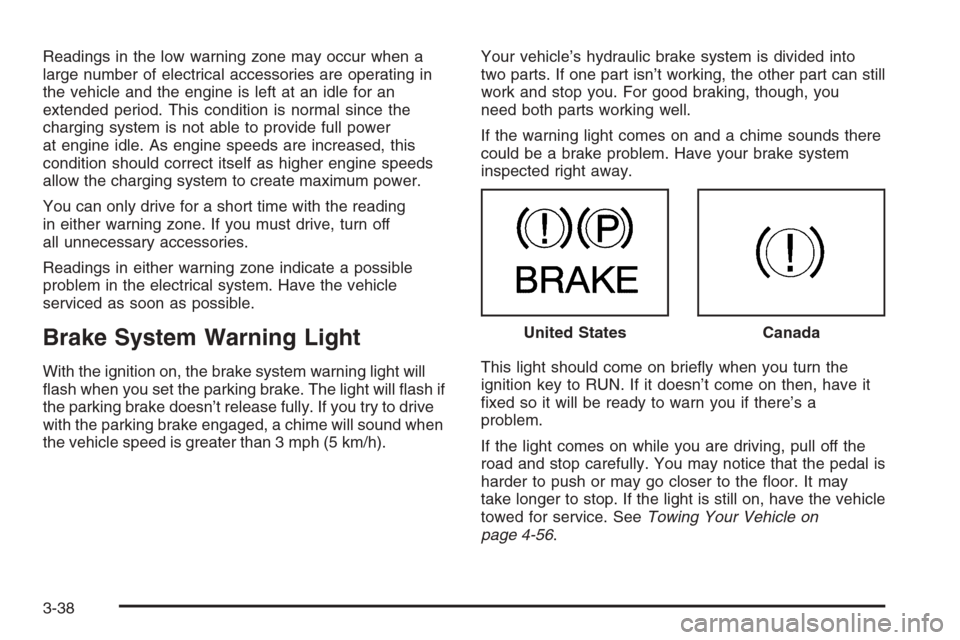
Brake System Warning Light
With the ignition on, the brake system warning light will
ash when you set the parking brake. The light will ash if
the parking brake doesn’t release fully. If you try to drive
with the parking brake engaged, a chime will sound when
the vehicle speed is greater than 3 mph (5 km/h).Your vehicle’s hydraulic brake system is divided into
two parts. If one part isn’t working, the other part can still
work and stop you. For good braking, though, you
need both parts working well.
If the warning light comes on and a chime sounds there
could be a brake problem. Have your brake system
inspected right away.
This light should come on briey when you turn the
ignition key to RUN. If it doesn’t come on then, have it
xed so it will be ready to warn you if there’s a
problem.
If the light comes on while you are driving, pull off the
road and stop carefully. You may notice that the pedal is
harder to push or may go closer to the oor. It may
take longer to stop. If the light is still on, have the vehicle
towed for service. SeeTowing Your Vehicle on
page 4-56. United States
Canada
3-38
Page 207 of 532

{CAUTION:
Your brake system may not be working
properly if the brake system warning light is
on. Driving with the brake system warning light
on can lead to an accident. If the light is still
on after you have pulled off the road and
stopped carefully, have the vehicle towed for
service.
Anti-Lock Brake System Warning
Light
With the anti-lock brake
system, this light will come
on when you start your
engine and may stay on for
several seconds.
That’s normal. If the light does not come on then, have
it xed so it will be ready to warn you if there is a
problem.If the light stays on, or comes on when you are driving,
your vehicle needs service. You will also hear a
chime sound when the light is on steady. If the regular
brake system warning light is not on, you still have
brakes, but you do not have anti-lock brakes. If
the regular brake system warning light is also on you do
not have anti-lock brakes and there is a problem with
your regular brakes. In addition to both lights, you
will also hear a chime sound on the rst occurrence of a
problem and each time the vehicle is shut off and
then restarted. SeeBrake System Warning Light on
page 3-38.
The anti-lock brake system warning light should come
on briey when you turn the ignition key to RUN. If
the light does not come on then, have it xed so it will
be ready to warn you if there is a problem.
3-39
Page 228 of 532

SERVICE AIR BAG
If there is a problem with the airbag system, this
message will be displayed on the DIC. Have your
GM dealer inspect the system for problems. SeeAirbag
Readiness Light on page 3-34andAirbag System on
page 1-54for more information. Pressing any of the
four DIC buttons will clear the message from the
DIC display. If your vehicle does not have the four DIC
buttons, pressing the trip odometer reset stem will
clear the message from the DIC display.
SERVICE BRAKE SYSTEM
If a problem occurs with the brake system, this message
will appear on the DIC. If this message appears, stop
as soon as possible and turn off the vehicle. Restart the
vehicle and check for the message on the DIC display.
If the message is still displayed or appears again
when you begin driving, the brake system needs service.
See your GM dealer. Pressing any of the four DIC
buttons will clear the message from the DIC display.
If your vehicle does not have the four DIC buttons,
pressing the trip odometer reset stem will clear
the message from the DIC display.
SERVICE CHARGING SYSTEM
On some vehicles, if there is a problem with the battery
charging system, this message will appear on the
DIC. Under certain conditions, the charging system light
may also turn on in the instrument panel cluster. See
Charging System Light on page 3-37. The battery
will not be charging at an optimal rate and the vehicle
will lose the ability to enter the fuel economy mode. The
vehicle is safe to drive, however you should have the
electrical system checked by your GM dealer. Pressing
any of the four DIC buttons will clear the message
from the DIC display. If your vehicle does not have the
four DIC buttons, pressing the trip odometer reset
stem will clear the message from the DIC display.
SERVICE STABILITY
If you ever see the SERVICE STABILITY message, it
means there may be a problem with your StabiliTrak®
system. If you see this message, try to reset the system.
Stop; turn off the engine; then start the engine again.
If the SERVICE STABILITY message still comes
on, it means there is a problem. You should see your
GM dealer for service. The vehicle is safe to drive,
however, you do not have the benet of StabiliTrak
®,so
reduce your speed and drive accordingly.
For more information on the StabiliTrak
®system, see
StabiliTrak®System on page 4-9.
3-60
Page 229 of 532

SERVICE TIRE MONITOR
This message will be displayed if any of the tire monitor
sensors have malfunctioned, if the tire monitor sensors
have not been programmed or if the recommended
tire pressures are not programmed. See your GM dealer
for service. Pressing any of the four DIC buttons will
clear the message from the DIC display. If your vehicle
does not have the four DIC buttons, pressing the trip
odometer reset stem will clear the message from
the DIC display.
STABILITY SYS (System) ACTIVE
You may see the STABILITY SYS ACTIVE message on
the DIC. It means that an advanced computer-controlled
system has come on to help your vehicle continue to
go in the direction in which you are steering.
For more information on the StabiliTrak
®system, see
StabiliTrak®System on page 4-9.
STABILITY SYS (System) DISABLED
The STABILITY SYS DISABLED message will turn on
when you press the StabiliTrak®button or when the
stability control has been automatically disabled. There
are four conditions that can cause this message to
appear.
One condition is overheating, which could occur if
StabiliTrak®activates continuously for an extended
period of time.
The message will also be displayed if the brake
system warning light is on. SeeBrake System
Warning Light on page 3-38.
The message could be displayed if the stability
system takes longer than usual to complete its
diagnostic checks due to driving conditions.
Also, if an engine or vehicle related problem has
been detected, and the vehicle needs service,
the message will appear. See your GM dealer.
The message will turn off as soon as the conditions that
caused the message to be displayed are no longer
present.
For more information on the StabiliTrak
®system, see
StabiliTrak®System on page 4-9.
3-61
Page 230 of 532

TIGHTEN FUEL CAP
If the vehicle’s fuel cap is not tightened properly this
message may appear along with the check engine light
on the instrument panel. SeeMalfunction Indicator
Lamp on page 3-43. Reinstall the fuel cap, making sure
to fully install the cap. SeeFilling the Tank on
page 5-9. The diagnostic system can determine if the
fuel cap has been left off or improperly installed. A loose
or missing fuel cap will allow fuel to evaporate into
the atmosphere. A few driving trips with the cap properly
installed should turn the light and message off.
TRACTION ACTIVE
When the traction control system has detected that any
of the vehicle’s wheels are slipping, the traction
control system will activate and this message will appear
on the DIC. SeeStabiliTrak
®System on page 4-9for
more information.
TRACTION SYS (System) LIMITED
If the brake traction control system activates constantly
or if the brakes have heated up due to high-speed
braking, brake traction control will be disabled and the
TRACTION SYS LIMITED message will be displayed.
The system will return to normal operation after the
brakes have cooled. SeeStabiliTrak
®System on
page 4-9for more information.
TRANS (Transmission) HOT IDLE
ENGINE
Notice:If you drive your vehicle while the
transmission uid is overheating and the
transmission temperature warning is displayed on
the instrument panel cluster and/or DIC, you
can damage the transmission. This could lead to
costly repairs that would not be covered by
your warranty. Do not drive your vehicle with
overheated transmission uid or while the
transmission temperature warning is displayed.
If the transmission uid gets hot, this message
will appear on the DIC along with a continuous chime.
Driving with the transmission uid temperature high
can cause damage to the vehicle. Stop the vehicle and
let it idle to allow the transmission to cool. This
message will clear and the chime will stop when the
uid temperature reaches a safe level. See
Transmission Temperature Gage on page 3-41.
3-62
Page 290 of 532
Braking
SeeBrake System Warning Light on page 3-38.
Braking action involves perception time and
reaction time.
First, you have to decide to push on the brake pedal.
That is perception time. Then you have to bring up your
foot and do it. That is reaction time.
Average reaction time is about three-fourths of a
second. But that is only an average. It might be less
with one driver and as long as two or three seconds or
more with another. Age, physical condition, alertness,
coordination, and eyesight all play a part. So do alcohol,
drugs, and frustration. But even in three-fourths of a
second, a vehicle moving at 60 mph (100 km/h) travels
66 feet (20 m). That could be a lot of distance in an
emergency, so keeping enough space between
your vehicle and others is important.
And, of course, actual stopping distances vary greatly
with the surface of the road, whether it is pavement
or gravel; the condition of the road, whether it is
wet, dry, or icy; tire tread; the condition of your brakes;
the weight of the vehicle; and the amount of brake
force applied.Avoid needless heavy braking. Some people drive in
spurts — heavy acceleration followed by heavy
braking — rather than keeping pace with traffic. This is
a mistake. Your brakes may not have time to cool
between hard stops. Your brakes will wear out much
faster if you do a lot of heavy braking. If you keep pace
with the traffic and allow realistic following distances,
you will eliminate a lot of unnecessary braking.
That means better braking and longer brake life.
If your engine ever stops while you are driving, brake
normally but do not pump your brakes. If you do,
the pedal may get harder to push down. If your engine
stops, you will still have some power brake assist.
But you will use it when you brake. Once the power
assist is used up, it may take longer to stop and
the brake pedal will be harder to push.
Adding non-GM accessories can affect your vehicle’s
performance. SeeAccessories and Modications
on page 5-3.
4-6
Page 291 of 532

Anti-Lock Brake System (ABS)
Your vehicle has the Anti-Lock Brake System (ABS), an
advanced electronic braking system that will help
prevent a braking skid.
When you start your engine and begin to drive away,
ABS will check itself. You may hear a momentary motor
or clicking noise while this test is going on. This is
normal.
If there is a problem with
ABS, this warning light will
stay on. SeeAnti-Lock
Brake System Warning
Light on page 3-39.
Along with ABS, your vehicle has a Dynamic Rear
Proportioning (DRP) system. If there is a DRP problem,
both the brake and ABS warning lights will come on
accompanied by a 10-second chime. The lights
and chime will come on each time the ignition is turned
on until the problem is repaired. See your dealer for
service.Let us say the road is wet and you are driving safely.
Suddenly, an animal jumps out in front of you. You slam
on the brakes and continue braking. Here is what
happens with ABS:
A computer senses that wheels are slowing down. If
one of the wheels is about to stop rolling, the computer
will separately work the brakes at each front wheel
and at both rear wheels.
4-7
Page 294 of 532

When the system is turned off, the traction off light will
illuminate, and the STABILITY SYS DISABLED
message will appear on the DIC to warn the driver that
both the stability system and part of the traction
control system are disabled. Your vehicle will still have
brake-traction control when StabiliTrak
®is off, but
will not be able to use the engine speed management
system. See “Traction Control Operation” next for
more information.
When the StabiliTrak
®system has been turned off you
may still hear system noises as a result of the
brake-traction control coming on.
To limit wheel spin and realize the full benets of the
stability enhancement system, you should normally
leave StabiliTrak
®on, but it may be necessary to turn
the system off if your vehicle is stuck in sand, mud,
ice or snow, and you want to “rock” your vehicle
to attempt to free it. It may also be necessary to turn off
the system when driving in extreme off-road conditions
where high wheel spin is required. SeeIf Your Vehicle is
Stuck in Sand, Mud, Ice, or Snow on page 4-44.
Traction Control Operation
The traction control system is part of the StabiliTrak®
system. Traction control limits wheel spin by reducing
engine power to the wheels (engine speed
management) and by applying brakes to each individual
wheel (brake-traction control) as necessary.
The traction control system is enabled automatically
when you start your vehicle, and it will activate
and display the TRACTION ACTIVE message in the
Driver Information Center (DIC) if it senses that any of
the wheels are spinning or beginning to lose traction
while driving. If you turn off StabiliTrak
®, only the
brake-traction control portion of traction control will work.
The engine speed management will be disabled. In
this state, engine power is not reduced automatically
and the driven wheels can spin more freely. This
can cause the brake-traction control to activate
constantly. For more information on the traction active
message, seeDIC Warnings and Messages on
page 3-53.
Notice:If the traction off light comes on due to
heavy braking and/or because the traction control
system has been continuously active, do not
allow the wheel(s) of one axle to spin excessively. If
you do, you may be causing damage to the
transfer case. This could lead to costly repairs not
covered by your warranty.
4-10