2006 CADILLAC DTS spare wheel
[x] Cancel search: spare wheelPage 377 of 450

Removing the Flat Tire and
Installing the Spare Tire
1. For models having aluminum wheels with a center
wheel cover, use the at end of the wheel wrench
to gently pry the wheel covers off. Be careful
not to scratch the aluminum wheel edge and do not
try to remove it with your hands. Then loosen the
wheel nuts with the wheel wrench. Do not remove
them yet.2. For models with exposed lug nuts, loosen
them using the wheel wrench. Do not remove
them yet.
5-75
Page 380 of 450
8. Remove all wheel nuts and take off the at tire.
{CAUTION:
Rust or dirt on the wheel, or on the parts to
which it is fastened, can make the wheel nuts
become loose after a time. The wheel could
come off and cause an accident. When you
change a wheel, remove any rust or dirt from
the places where the wheel attaches to the
vehicle. In an emergency, you can use a cloth
or a paper towel to do this; but be sure to use
a scraper or wire brush later, if needed, to get
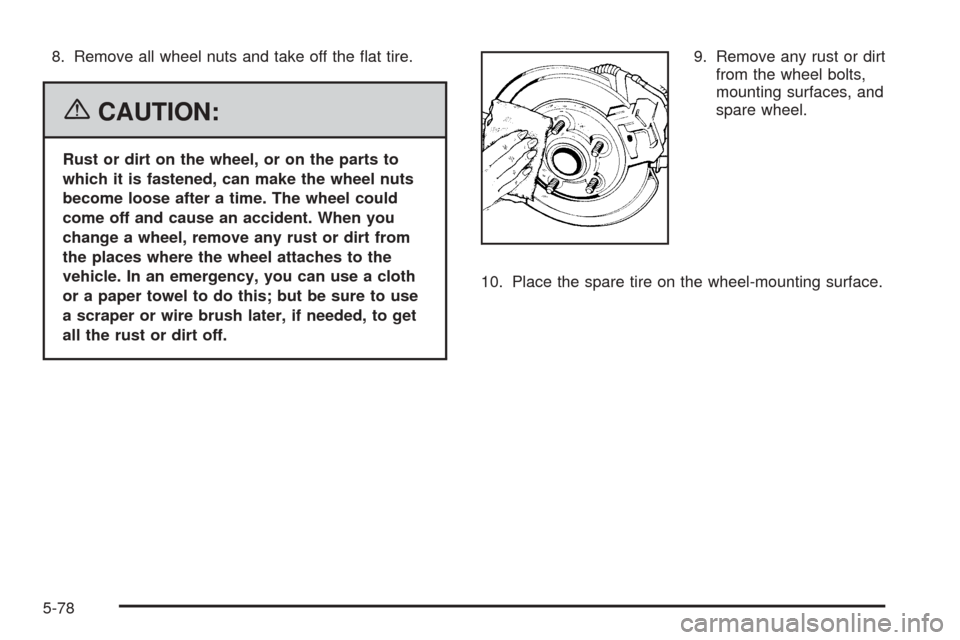
all the rust or dirt off.9. Remove any rust or dirt
from the wheel bolts,
mounting surfaces, and
spare wheel.
10. Place the spare tire on the wheel-mounting surface.
5-78
Page 382 of 450

{CAUTION:
Incorrect wheel nuts or improperly tightened
wheel nuts can cause the wheel to come loose
and even come off. This could lead to an
accident. Be sure to use the correct wheel
nuts. If you have to replace them, be sure to
get new GM original equipment wheel nuts.
Stop somewhere as soon as you can and have
the nuts tightened with a torque wrench to the
proper torque specication. SeeCapacities
and Specifications on page 5-101for wheel nut
torque specication.
Notice:Improperly tightened wheel nuts can lead
to brake pulsation and rotor damage. To avoid
expensive brake repairs, evenly tighten the wheel
nuts in the proper sequence and to the proper
torque specication. SeeCapacities and
Specifications on page 5-101for the wheel nut
torque specication.13. Tighten the wheel nuts rmly in a crisscross
sequence as shown.
If your vehicle is equipped with wheel nut covers,
screw the nut covers on with your ngers, then
tighten one-quarter turn with the wheel wrench.
Notice:Wheel covers will not t on your compact
spare. If you try to put a wheel cover on the compact
spare, you could damage the cover or the spare.
Do not try to put a wheel cover on your compact spare
tire, if equipped. It will not t. Store the wheel cover
and lug nut caps in the trunk until you have the at tire
repaired or replaced.5-Wheel Nuts
8-Wheel Nuts
5-80
Page 383 of 450

Storing a Flat or Spare Tire
and Tools
{CAUTION:
Storing a jack, a tire, or other equipment in the
passenger compartment of the vehicle could
cause injury. In a sudden stop or collision,
loose equipment could strike someone. Store
all these in the proper place.
After you have put the spare tire on your vehicle, you
will need to store the at tire in your trunk.
Store the at tire as far forward in the trunk as possible.
Store the jack and wheel wrench in their compartment
in the trunk. For storage, the jack must be raised
until the screw end is ush with the edge of the jack.
The compact spare is for temporary use only. Replace
the compact spare tire with a full-size tire as soon
as you can.A. Cover
B. Wing Nut
C. Retainer
D. Jack and Wheel WrenchE. Jack Container
F. Spare Tire
G. Bolt
1. Open the trunk. SeeTrunk on page 2-13
2. Reinstall the spare tire (F) with the valve stem up,
and line up the wheel nut hole with the bolt (G) or
wheel center and place on the compartment oor.
5-81
Page 384 of 450

3. Insert the jack container (E) into the spare tire (F).
Then insert the jack and wheel wrench (D) into the
center of the compact spare tire making sure to
line up the wheel nut hole with the bolt (G) on the
compartment oor.
4. Secure the tire and wheel with the retainer (C) and
then the wing nut (B).
5. Reinstall the compact spare tire cover (A).
Spare Tire
Compact Spare Tire
Your vehicle may have a compact spare tire.
Although the compact spare tire was fully inated
when the vehicle was new, it can lose air after a time.
Check the ination pressure regularly. It should be
60 psi (420 kPa).
After installing the compact spare on the vehicle, stop
as soon as possible and make sure the spare tire
is correctly inated. The compact spare is made to
perform well at speeds up to 65 mph (105 km/h)
for distances up to 3,000 miles (5 000 km), so you can
nish your trip and have the full-size tire repaired or
replaced at your convenience. Of course, it is best
to replace the spare with a full-size tire as soon as
possible. The spare tire will last longer and be in good
shape in case it is needed again.Notice:When the compact spare is installed, do
not take your vehicle through an automatic car wash
with guide rails. The compact spare can get
caught on the rails. That can damage the tire and
wheel, and maybe other parts of your vehicle.
Do not use the compact spare on other vehicles.
And do not mix the compact spare tire or wheel with
other wheels or tires. They will not t. Keep the
spare tire and its wheel together.
Notice:Tire chains will not t your compact spare.
Using them can damage your vehicle and can
damage the chains too. Do not use tire chains on
your compact spare.
Spare Tire
Your vehicle may have a spare tire, which, when
new, was fully inated. A spare tire may lose air over
time, so check its ination pressure regularly. See
Ination - Tire Pressure on page 5-56andLoading Your
Vehicle on page 4-31for information regarding proper tire
ination and loading your vehicle. For instructions
on how to remove, install or store a spare tire, see
Removing the Flat Tire and Installing the Spare Tire
on page 5-75.
5-82
Page 385 of 450

After installing the spare tire on your vehicle, you should
stop as soon as possible and make sure the spare is
correctly inated. Have the damaged or at road tire
repaired or replaced as soon as you can and installed
back onto your vehicle. This way, a spare tire will be
available in case you need it again.
Your vehicle may have a different size spare tire
than the road tire originally installed on your vehicle.
This spare tire was developed for use on your vehicle,
so it is all right to drive on it.
If your vehicle has a spare tire that does not match your
vehicle’s original road tires and wheels in size and
type, do not include the spare in the tire rotation.
Appearance Care
Cleaning the Inside of Your Vehicle
Your vehicle’s interior will continue to look its best if
it is cleaned often. Although not always visible, dust and
dirt can accumulate on your upholstery. Dirt can
damage carpet, fabric, leather, and plastic surfaces.
Regular vacuuming is recommended to remove particles
from your upholstery. It is important to keep your
upholstery from becoming and remaining heavily soiled.
Soils should be removed as quickly as possible. Your
vehicle’s interior may experience extremes of heat
that could cause stains to set rapidly.Lighter colored interiors may require more frequent
cleaning. Use care because newspapers and garments
that transfer color to your home furnishings may also
transfer color to your vehicle’s interior.
When cleaning your vehicle’s interior, only use cleaners
specically designed for the surfaces being cleaned.
Permanent damage may result from using cleaners on
surfaces for which they were not intended. Use glass
cleaner only on glass. Remove any accidental over-spray
from other surfaces immediately. To prevent over-spray,
apply cleaner directly to the cleaning cloth.
Notice:If you use abrasive cleaners when cleaning
glass surfaces on your vehicle, you could scratch
the glass and/or cause damage to the integrated
radio antenna and the rear window defogger. When
cleaning the glass on your vehicle, use only a
soft cloth and glass cleaner.
Many cleaners contain solvents that may become
concentrated in your vehicle’s breathing space. Before
using cleaners, read and adhere to all safety
instructions on the label. While cleaning your vehicle’s
interior, maintain adequate ventilation by opening
your vehicle’s doors and windows.
Dust may be removed from small buttons and knobs
using a small brush with soft bristles.
Your GM dealer has a product for cleaning your
vehicle’s glass. Should it become necessary, you can
also obtain a product from your GM dealer to remove
odors from your vehicle’s upholstery.
5-83
Page 448 of 450

Seats (cont.)
Power Lumbar, Rear...................................... 1-8
Power Reclining Seatbacks............................. 1-4
Power Seats................................................. 1-2
Securing a Child Restraint
Center Front Seat Position............................1-50
Rear Seat Position......................................1-48
Right Front Seat Position..............................1-51
Security Light.................................................3-69
Service........................................................... 5-3
Accessories and Modications......................... 5-3
Adding Equipment to the Outside
of Your Vehicle.......................................... 5-5
California Proposition 65 Warning.................... 5-3
Doing Your Own Work................................... 5-4
Engine Soon Light.......................................3-66
Publications Ordering Information...................7-14
Servicing Your Airbag-Equipped Vehicle...............1-70
Setting the Time...................................3-98, 3-100
Sheet Metal Damage.......................................5-89
Shifting Into Park (P).......................................2-30
Shifting Out of Park (P)...................................2-32
Shoulder Belt Height Adjuster...........................1-21
Signals, Turn and Lane-Change.......................... 3-8
Spare Tire.....................................................5-82
Installing....................................................5-75
Removing...................................................5-73
Storing.......................................................5-81
Specications, Capacities...............................5-101Speedometer..................................................3-57
StabiliTrak®System.........................................4-10
StabiliTrak®Indicator Light................................3-64
Starting Your Engine.......................................2-24
Steering........................................................4-11
Steering Wheel Controls, Audio.......................3-122
Steering Wheel Controls, Memory.....................2-52
Steering Wheel, Heated..................................... 3-7
Steering Wheel, Power Tilt Wheel and
Telescopic Steering Column............................ 3-7
Steering Wheel, Tilt Wheel................................. 3-6
Storage Areas
Center Console Storage Area........................2-50
Center Flex Storage Unit..............................2-50
Coinholder(s)..............................................2-49
Convenience Net.........................................2-50
Cupholder(s)...............................................2-49
Glove Box..................................................2-49
Rear Seat Armrest.......................................2-50
Stuck in Sand, Mud, Ice, or Snow.....................4-30
Sun Visors.....................................................2-18
Sunroof.........................................................2-51
T
Tachometer....................................................3-57
TCS Warning Light..........................................3-64
Telescopic Steering Column, Power Tilt Wheel........ 3-7
12
Page 449 of 450

Theft-Deterrent, Radio....................................3-121
Theft-Deterrent Systems...................................2-19
Content Theft-Deterrent................................2-19
PASS-Key
®III+...........................................2-21
PASS-Key®III+ Operation.............................2-21
Tilt Wheel........................................................ 3-6
Tires.............................................................5-49
Aluminum or Chrome-Plated Wheels,
Cleaning.................................................5-88
Buying New Tires........................................5-65
Chains.......................................................5-70
Changing a Flat Tire....................................5-72
Cleaning....................................................5-88
Different Size..............................................5-66
If a Tire Goes Flat.......................................5-71
Ination - Tire Pressure................................5-56
Inspection and Rotation................................5-63
Installing the Spare Tire................................5-75
Pressure Monitor System..............................5-59
Removing the Flat Tire.................................5-75
Removing the Spare Tire and Tools...............5-73
Spare Tire..................................................5-82
Storing a Flat or Spare Tire and Tools............5-81
Tire Sidewall Labeling..................................5-50
Tire Terminology and Denitions....................5-53
Uniform Tire Quality Grading.........................5-67
Wheel Alignment and Tire Balance.................5-69
Wheel Replacement.....................................5-69
When It Is Time for New Tires......................5-64Towing
Recreational Vehicle.....................................4-37
Towing a Trailer..........................................4-38
Your Vehicle...............................................4-37
Traction
Control System (TCS).................................... 4-9
Control System Warning Light.......................3-64
Magnetic Ride Control..................................4-10
StabiliTrak
®System.....................................4-10
Transaxle
Fluid, Automatic...........................................5-19
Transaxle Operation, Automatic.........................2-26
Trunk............................................................2-13
Turn and Lane-Change Signals.......................... 3-8
Turn Signal/Multifunction Lever........................... 3-8
U
Ultrasonic Front and Rear Parking
Assist (UFRPA)...........................................3-38
Understanding Radio Reception.......................3-123
Uniform Tire Quality Grading............................5-67
Universal Home Remote System.......................2-45
Operation...................................................2-46
13