2006 BMW X5 4.4I lock
[x] Cancel search: lockPage 58 of 202

58n
Transporting children safelyInstalling child-restraint systems
Follow the child-restraint system
manufacturer's instructions when
selecting, installing and using child-
restraint systems. Otherwise the degree
of protection can be reduced.<
Commercially available child restraint
systems are designed for securing with
a lap belt or with the lap belt section
of a three-point belt. Incorrectly or
improperly installed child restraint sys-
tems can increase the risk of injury for
children. Always follow the instructions
for installing the system exactly.
On front passenger seat:
Before mounting a child restraint
system on the front passenger
seat, make sure that the front and side
airbag on the front passenger side are
deactivated, as otherwise there is an
increased risk of injury if the airbags are
triggered.<
Before mounting a universal child-
restraint system, move the front pas-
senger seat into the highest position to
achieve the best possible belt routing.
Do not change this seat height.
Child-restraint system securityAll rear safety belts and the safety belt
for the front passenger can be locked to
prevent them from being pulled out,
enabling them to be used for securing
child restraint systems.
Locking safety belt:
1. Secure child restraint system with
the belt
2. Pull out belt webbing completely
3. Allow belt webbing to be pulled in
and pull taut against child restraint
system. The safety belt is locked.
Unlocking safety belt:
1. Open belt buckle
2. Remove child restraint system
3. Allow belt webbing to be pulled in
completely530us104
Child restraint system with tether
strapThere are three additional mounting
points for child restraint systems with a
tether strap, refer to arrows.530us037
Page 60 of 202

60n
Transporting children safelyRemove cover panels by pulling them
toward the front.
To remount, simply slide into place.On trips
If the rear is equipped with side
airbags, make sure that children
do not lean out of the child's seat
towards the door panels. Otherwise
severe injuries can be caused if the side
airbags are triggered.<
Child-safety locks of rear doors:
Slide down the safety lever on the rear
doors:
The door can now be opened from the
outside only.
Safety switch for power windows:
Always press the safety switch for the
power windows, refer to page40, when
children are riding in the rear of the
vehicle.530de226
Page 61 of 202

61n
OverviewControlsMaintenanceRepairsDataIndex
Vehicle Memory, Key Memory How the system functions You have probably frequently wished
that you could configure individual
functions of your vehicle meet your own
personal requirements. In developing
your vehicle, BMW has included several
user-defined functions in the vehicle's
design. Your BMW Sports Activity Vehi-
cle center can make these settings for
you.
There are vehicle and person-related
adjustments: Vehicle Memory and Key
Memory. You can have up to four differ-
ent basic positions configured for four
different persons. The only requirement
is that each person uses his or her own
remote control key.
When your vehicle is unlocked with the
remote control, the vehicle recognizes
the individual user by means of a data
exchange with the key, and makes
adjustments accordingly.
In order for you to distinguish between
the master keys with remote control,
color-coded decals are supplied
together with the keys.
What the system can doYour BMW Sports Activity Vehicle cen-
ter can provide you with details on the
capabilities of the Vehicle Memory and
Key Memory systems.
You will see this symbol through-
out the Owner's Manual. It is to
remind you at appropriate places of the
settings that are available to you.<
Following configuration of the
memory functions, vehicle opera-
tion may differ from the description in
the Owner's Manual. Should you want
to sell your BMW some day, please
remember to have the memory func-
tions reset to the default state.<
Examples for Vehicle Memory:
>Various signals that can serve as
acknowledgment for locking and
unlocking the vehicle, refer to
pages31, 33
>Deactivating/activating the Pathway
lighting function, refer to page100.
Examples for Key Memory:
>Automatic adjustment of the driver's
seat, exterior mirror and steering
wheel with settings stored in the
memory for the individual driver when
the vehicle is unlocked, refer to
page51
>Calling up customized settings for
the automatic climate control when
unlocking the vehicle, refer to
page109.
Page 62 of 202

62n
Ignition lock Starting engine Ignition key positions 0 Steering lock engaged
1Steering lock disengaged
2 Ignition on
3Starting engineSteering lock engaged The key can only be inserted or
removed in this position.
After removing the key, turn the steer-
ing wheel slightly to the left or right until
you hear the lock engage.
If the key is not removed, an acoustic
signal sounds after the driver's door is
opened.390de010
Automatic transmission:
Only move the selector lever from
position P with the engine running.
To turn the key back to position 0 or to
remove it, first place the selector lever
in position P: interlock.<
Steering lock disengaged Slightly moving the steering often
makes it easier to turn the key from 0
to 1.
Individual electrical devices are ready
for operation. Starting engine
Manual transmission:
Depress the clutch when starting
the engine. If you do not, a lock pre-
vents the engine from starting.<
Before starting >Engage the handbrake
>Be sure that the gearshift lever is in
Neutral or the selector lever in Park if
the vehicle is equipped with an auto-
matic transmission
>Depress the clutch.
If the clutch is not depressed, the
engine cannot be started
>Press the footbrake with an auto-
matic transmission.
Do not run the engine in closed
rooms, otherwise the inhalation of
toxic exhaust gases can cause uncon-
sciousness and death. The exhaust
gases contain carbon monoxide, an
odorless and colorless, but highly toxic
gas.
Never leave an unattended vehicle with
the engine running, as such a vehicle
represents a potential safety hazard.
To prevent the vehicle from rolling,
always select neutral or the position P
and engage the handbrake before leav-
ing the vehicle with the engine run-
ning.<
When starting the engine, do not press
the accelerator pedal.
Page 63 of 202

OverviewControlsMaintenanceRepairsDataIndex
63n
Starting engine Switching off engineDo not allow the engine to warm up by
leaving it running while the vehicle
remains stationary. Instead, begin to
drive immediately at a moderate engine
speed.
X5 3.0i:
Do not end the starting procedure too
soon, but do not continue for longer
than approx. 20 seconds. Release the
ignition key immediately as soon as the
engine starts.
X5 4.4i, 4.8is:
Your BMW is equipped with the conve-
nience starting feature. With this fea-
ture, it is sufficient to turn the ignition
key only briefly to position 3 'Start
engine' and to let go of it right away.
The starter actuation continues to oper-
ate automatically for a certain period of
time and is stopped automatically as
soon as the engine has started.
The automatic starting mode will not
operate or will be canceled if the bat-
tery voltage is insufficient. The engine
can be jump started, refer to page174.Should the engine fail to start on the
first attempt, if it is very hot or cold, for
instance:
>Press the accelerator pedal halfway
down while engaging the starter.
Cold starts at altitudes above 3,300 ft/
1,000 meters and at very low tempera-
tures, from approx. +57/–156:
>For the initial starting attempt, allow
the starter to remain engaged some-
what longer, approx. 10 seconds.
Engine idle speed is controlled by the
engine computer system. Increased
speeds at startup are normal and
should decrease as the engine warms
up. If engine speed does not decrease,
service is required.
To prevent the battery from being
drained, always switch off electrical
devices that are not in use. Switch the
ignition off when the vehicle is not
being driven.
Extended starting attempts, char-
acterized by excessively frequent
or long periods with the starter
engaged, can lead to damage of the
catalytic converter.<
Manual transmission:
1. Turn the ignition key to position 1
or 0
2. Shift into first gear or reverse.
Automatic transmission:
1. Shift into selector lever position P
2. Turn the ignition key to position 1
or 0.
Do not remove the ignition key
when the vehicle is moving, other-
wise, the steering could lock.
When leaving the vehicle, always
remove the ignition key and lock the
steering.
Manual transmission:
Always engage the handbrake when
parking on slopes and inclined sur-
faces. Even placing the gearshift lever
in 1st gear or reverse may not provide
adequate resistance to rolling.
Automatic transmission:
Place the selector lever in the P posi-
tion.<
Automatic transmission:
The vehicle must be stationary and the
selector lever in Park before you can
remove the ignition key.
Page 64 of 202
64n
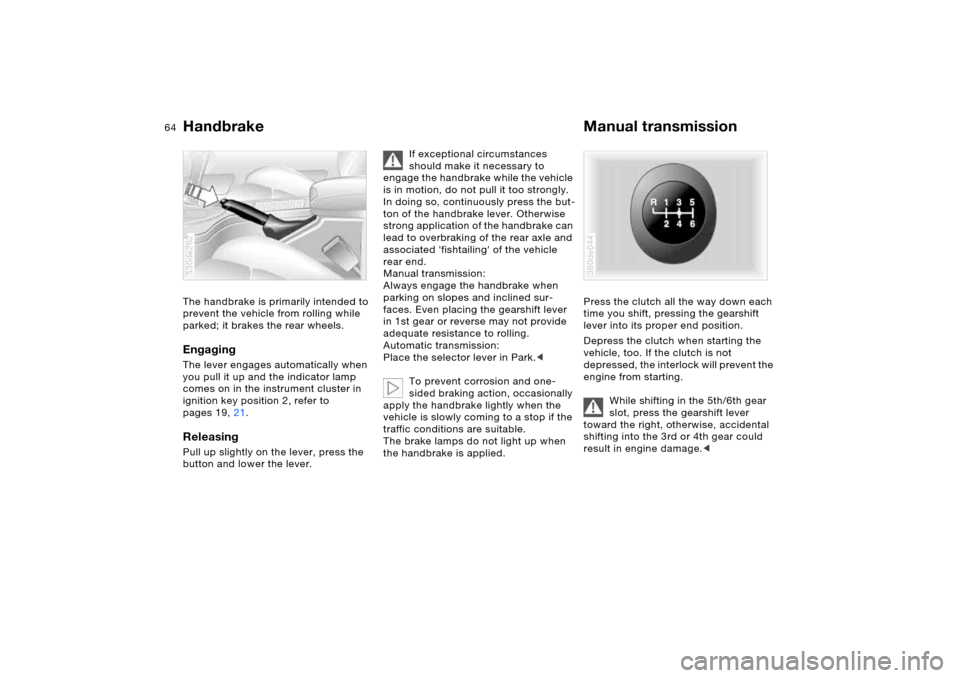
Handbrake Manual transmissionThe handbrake is primarily intended to
prevent the vehicle from rolling while
parked; it brakes the rear wheels.EngagingThe lever engages automatically when
you pull it up and the indicator lamp
comes on in the instrument cluster in
ignition key position 2, refer to
pages 19, 21.Releasing Pull up slightly on the lever, press the
button and lower the lever. 530de262
If exceptional circumstances
should make it necessary to
engage the handbrake while the vehicle
is in motion, do not pull it too strongly.
In doing so, continuously press the but-
ton of the handbrake lever. Otherwise
strong application of the handbrake can
lead to overbraking of the rear axle and
associated 'fishtailing' of the vehicle
rear end.
Manual transmission:
Always engage the handbrake when
parking on slopes and inclined sur-
faces. Even placing the gearshift lever
in 1st gear or reverse may not provide
adequate resistance to rolling.
Automatic transmission:
Place the selector lever in Park.<
To prevent corrosion and one-
sided braking action, occasionally
apply the handbrake lightly when the
vehicle is slowly coming to a stop if the
traffic conditions are suitable.
The brake lamps do not light up when
the handbrake is applied.
Press the clutch all the way down each
time you shift, pressing the gearshift
lever into its proper end position.
Depress the clutch when starting the
vehicle, too. If the clutch is not
depressed, the interlock will prevent the
engine from starting.
While shifting in the 5th/6th gear
slot, press the gearshift lever
toward the right, otherwise, accidental
shifting into the 3rd or 4th gear could
result in engine damage.< 380de044
Page 66 of 202

66n
Automatic transmission with Steptronic
*
Range selection >The selector lever can be moved out
of the P position with the ignition
switched on or the engine running:
interlock
>With the vehicle stationary, press the
footbrake before shifting out of P
or N, otherwise, the selector lever is
blocked: shiftlock.
Keep the brake pedal pressed down
until you start off. The vehicle will oth-
erwise creep when a drive position is
engaged.A lock prevents accidentally shifting
into the selector lever positions R
and P. To deactivate the lock, press
the button on the front of the selector
lever knob, refer to arrow.
P Park Select only when the vehicle is station-
ary. The transmission locks to prevent
the rear wheels from turning.R Reverse Select only when the vehicle is station-
ary. N Neutral, idle For example, engage in automatic car
washes. The vehicle can roll.530de263
D Drive, automatic driving
positionThis position is designed for driving
under all normal operating conditions.
All forward gears are available. Kick-down The kick-down mode provides maxi-
mum acceleration.
Depress the accelerator pedal past the
increased resistance point at the full-
throttle position.
Page 77 of 202

77n
OverviewControlsMaintenanceRepairsDataIndex
Check Control Graphic display
*
The following alerts or status messages
are displayed with icons as of ignition
key position 2 until the defects are cor-
rected:
1 Check low beams
2 Add washer fluid, goes out after
approx. 1 minute
3Door open
4 Tailgate open
5 Check brake and tail lamps. A defec-
tive center brake lamp is indicated by
the upper symbol.
When you open the door after stopping,
a warning signal sounds without a
visual indicator for:
>LIGHTS ON
>KEY IN IGNITION LOCK. 390de121
Alphanumeric display
*
Text messages are used to alert the
driver to system malfunctions as of igni-
tion key position 2. The alert is accom-
panied by an acoustic signal.
1 Status messages symbol
2Display
3CHECK button
Messages concerning system defects
are differentiated based on two priori-
ties: 530de254
Priority 1
These defects are immediately indi-
cated by an acoustic signal and a flash-
ing warning symbol 1. Simultaneous
defects will be displayed consecutively.
These status messages remain on the
display until the defects are corrected.
They cannot be deleted by pressing the
CHECK button 3:
>RELEASE PARKINGBRAKE
>COOLANT TEMPERATURE
Temperature too high. Stop the vehi-
cle immediately and switch off the
engine, refer to pages76 and154
>STOP! ENGINE OILPRESS
Oil pressure too low. Stop the vehicle
immediately and switch off the
engine, refer to pages19 and152