2006 BMW X3 3.0I mode
[x] Cancel search: modePage 47 of 133

Reference
At a glance
Controls
Driving tips
Mobility
45
5.Press button2 to confirm the time.
The set time is transferred to the display of the
radio or displayed in the instrument cluster.
Display mode
Ignition key in position 0 or removed:
Press button1.
The time and display of the miles/kilometers
appear for a few seconds.
Computer*
Mode selection
As of ignition key position 1, you can call up
information from the computer using the com-
puter button in the turn signal lever.
A new function appears each time you briefly
press the computer button.
The following information is displayed in the
sequence indicated:
>Time
>Outside temperature
>Average fuel consumption
>Cruising range
>Average speed
As of ignition key position 1, the last active set-
ting is displayed.
If you wish, you can display the following
functions in a different unit of measure.<
Outside temperature
Changing unit of measure 7/6
During the display, hold down the button in the
turn signal lever until the display changes.
Outside temperature warning
If the outside temperature falls below approx.
+37.57/+36, the computer switches auto-
matically to the outside temperature display.
In addition, an acoustic signal sounds and the
display flashes for a short time. There is an
increased risk of icy conditions.
After an outside temperature warning has
been issued, the display returns to the
previous setting. You can have this activated/
deactivated.<
Ice can also occur at temperatures
greater than +37,57/+36. For this rea-
son, drive carefully on bridges and shaded
roadways, for example. Otherwise, there is an
increased risk of accidents.<
Clock
12 or 24 hour mode
If your vehicle is equipped with a computer, you
can have the time displayed in the 12 or 24 hour
mode.
Page 49 of 133

Reference
At a glance
Controls
Driving tips
Mobility
47
Technology for comfort, convenience and
safety
PDC Park Distance Control*
The concept
PDC provides extra safety and convenience
during parking maneuvers. Audible signals indi-
cate that you are approaching an object in front
of or behind your vehicle. To measure the dis-
tance, there are four ultrasonic sensors in each
bumper.
An acoustic signal begins to sound when the
front sensors and the rear corner sensors are
within approx. 2 ft/60 cm of an obstacle and
when the rear middle sensors are within approx.
5 ft/1,50 m of an obstacle.
PDC is a parking aid that can indicate
objects when they are approached
slowly, as is usually the case when parking.
Avoid approaching objects too fast; otherwise,
the system may give warning of physical obsta-
cles too late.<
If you are driving with a trailer, the rear sensors
cannot take any meaningful measurements.
Consequently, they do not switch on.
Automatic mode
In ignition key position 2, the system is auto-
matically activated after approx. one second
each time you shift into reverse or move the
selector-lever into position R. Wait for this short
time span before moving.
You can have a signal tone programmed
into the system to verify that the PDC is
active.<
Activating manual mode
In ignition key position 2, press the button; the
LED lights up.
Deactivating manual mode
Press the button again, the LED goes out.
The system is automatically deactivated once
the vehicle travels approx. 160 ft/50 m or
exceeds a speed of roughly 20 mph/30 km/h;
the LED goes out. You can reactivate the sys-
tem manually as needed.
Signal tones
An intermittent tone from a rear speaker signals
the distance to an object behind the vehicle as
you approach it.
An intermittent tone from a speaker beneath
the dashboard signals the distance to an object
in front of the vehicle as you approach it.
As the distance between vehicle and object
decreases, the intervals between the tones
become shorter. The signal tone becomes con-
tinuous once the distance to the nearest object
falls to below roughly 1 ft/30 cm.
An intermittent tone is interrupted after approx.
3seconds:
>if y o u r e m a in i n f ro n t o f a n o b j e c t t ha t is o n ly
detected by one of the corner sensors
>if you are moving parallel to a wall
Page 52 of 133

Technology for comfort, convenience and safety
50
Activating system
Press the button; the LED lights up.
The LED flashes when the brakes are applied
automatically.
Deactivating system
Press the button again; the LED goes out.
HDC is deactivated immediately above approx.
35 mph/60 km/h and after approx. 10 seconds
when the ignition is switched off.
Using HDC
With manual transmission:
Use HDC in first gear and in reverse, because in
the higher gears the engine's braking action
diminishes.
With automatic transmission:
You can use HDC in every drive position.
Malfunction
If the LED in the button goes out in the HDC
mode or fails to light up when the button is
pressed:
HDC is temporarily not available, because the
brake temperature is too high.
Malfunction in vehicle stability control
systems
The warning lamp lights up yellow. DBC
Dynamic Brake Control is malfunction-
ing. Have the system checked as soon
as possible.
Display of the previously described mal-
function on Canadian models.If one of the malfunctions described
below occurs, proceed cautiously and
defensively. When driving on poor roads, avoid
using the full throttle or kick-down positions of
the accelerator as well as heavy and panic brak-
ing. Otherwise, the drive train may be damaged
or accidents can occur.<
The red brake warning lamp lights up
together with the warning lamps for
ABS and DSC/xDrive. In addition, a
warning signal sounds. ABS, DSC, HDC
and xDrive have failed. It is then possi-
ble to exert driving force only via the
rear axle. If the brake warning lamp
lights up yellow in the described combi-
nation, the EBV Electronic brake-force distribu-
tion is still available. Have the system checked
as soon as possible.
Display of the previously described mal-
function on Canadian models.
The warning lamp lights up continu-
ously and a warning signal sounds:
DSC or the xDrive all-wheel system has
failed.
The stabilizing interventions of DSC or the all-
wheel drive system xDrive are no longer avail-
able. It is then possible to exert driving force
only via the rear axle. Have the system checked
as soon as possible.
Flat Tire Monitor FTM*
The concept
The Flat Tire Monitor keeps track of the infla-
tion pressures in the four mounted tires as you
drive. The system triggers an alert whenever
the inflation pressure in one tire drops signifi-
cantly in relation to the pressure in another tire.
When a loss of pressure occurs, the rolling
radius changes and with it, the rotational speed
Page 61 of 133
Reference
At a glance
Controls
Driving tips
Mobility
59
Air conditioner
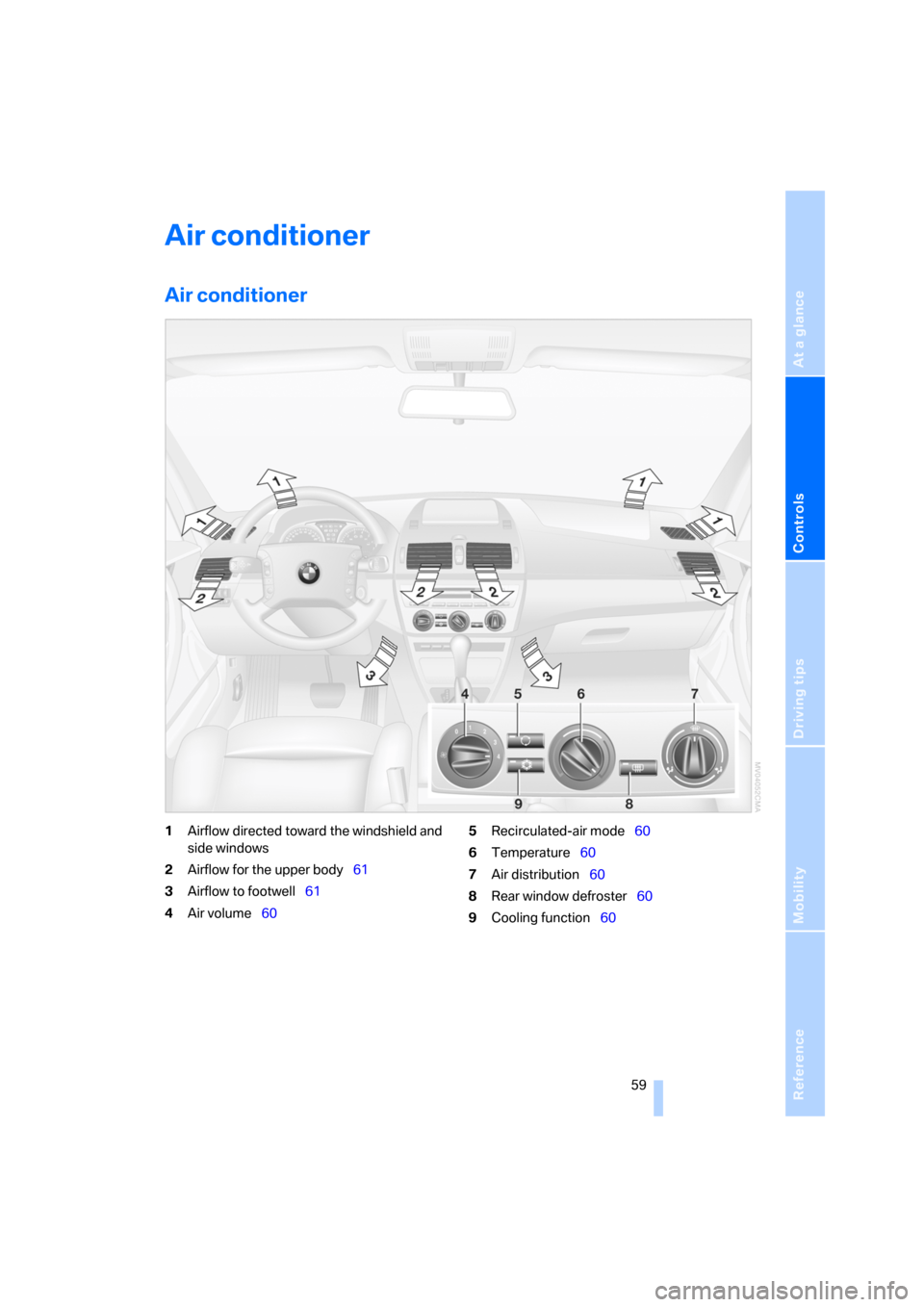
Air conditioner
1Airflow directed toward the windshield and
side windows
2Airflow for the upper body61
3Airflow to footwell61
4Air volume605Recirculated-air mode60
6Temperature60
7Air distribution60
8Rear window defroster60
9Cooling function60
Page 62 of 133

Air conditioner
60
Air volume
You can vary the air volume in
steps 1 through 4. The heating or
cooling output is more effective
with a higher air volume.
Switching system on/off
Turn air volume rotary switch to 0. The blower
and air conditioning system are completely
switched off, the air flow is shut off.
To switch on the air conditioning system, set an
arbitrary air volume.
Temperature
To increase the temperature, turn
to the right, toward red.
For a lower temperature, turn the
rotary switch counterclockwise
toward blue.
Air distribution
You can direct air to flow onto the
windows , toward the upper
body and into the footwell .
Intermediate settings are possible.
Rear window defroster
The rear window heating switches
off automatically after a certain
amount of time.
Switching cooling function on/off
When the air conditioning is on, the
air is cooled, dehumidified, and
then reheated depending on the
temperature setting.
Depending on the weather, the windshield may
fog over briefly when the engine is started.
Recirculated-air mode
You can respond to unpleasant
odors outside the vehicle by tem-
porarily suspending the supply of
outside air. The system then recirculates the air
currently within the vehicle.
If condensation starts to form on the
inside window surfaces during operation
in the recirculated-air mode, you should switch
it off and increase the air supply as needed.
The recirculated-air mode should not be used
over a sustained period of time; otherwise, the
air quality inside the vehicle will steadily deteri-
orate.<
Defrosting windows and removing
condensation
1.Air volume 1 at level 4.
2.Temperature 2 toward right, red.
3.Air distribution 3 in position .
4.Deactivate recirculated-air mode 5.
5.Switch on the rear window heating 4 to
defrost the rear window.
Page 64 of 133

Air conditioner
62
Automatic climate control*
1Airflow directed toward the windshield and
side windows
2Airflow for the upper body64
3Airflow to footwell64
4Manually varying air distribution63
5Adjusting temperature63
6Temperature display63,
Air volume63
7Manually varying air volume638Defrosting windows and removing
condensation63
9Rear window defroster64
10Switching cooling function on/off63
11Outside air/AUC Automatic recirculated-air
control/recirculated-air mode63
12AUTO program63
Page 65 of 133

Reference
At a glance
Controls
Driving tips
Mobility
63
A congenial climate
For almost all conditions, the AUTO pro-
gram12 offers the optimal air distribution and
air volume, refer to AUTO program below. You
need only select an interior temperature that
you find pleasant.
The following sections contain more detailed
information on the available setting options.
Your vehicle has been designed to auto-
matically select your personal climate-
control settings whenever you unlock the doors
using your individually programmed remote
control.<
AUTO program
The AUTO program handles the
adjustment of air distribution to the
windshield and side windows, in
the direction of the upper body, and in the foot-
well. It also adapts your instructions for the air
volume and temperature to outside influences
throughout the year, e.g. solar radiation or win-
dow condensation.
The cooling is switched on automatically along
with the AUTO program.
Manually switching air distribution on/
off
You can direct air to flow onto the
windows , toward the upper
body and into the footwell .
You can reactivate the automatic
air distribution mode by selecting
the AUTO button.
Temperature
Set the desired temperature.
The automatic climate control
assures that this temperature is
reached as quickly as possible any
time of year, using maximum cool-
ing or heating capacity as needed, and then
keeps this temperature constant.When you change between different tem-
perature settings in rapid succession, the
system does not have enough time to achieve
the desired temperature.<
Manually adjusting air volume
By pressing the lower button, you
can reduce the air volume. You can
increase it by pressing the upper
button.
You can reactivate the automatic
air volume mode by pressing the AUTO button.
Switching system on/off
At the lowest fan speed, press the lower button
to turn off the automatic climate control com-
pletely. All displays disappear.
Press any button to turn the automatic climate
control back on again.
Defrosting windows and removing
condensation
This program quickly removes ice
and condensation from the wind-
shield and front door windows.
Switching cooling function on/off
When the air conditioning is on, the
air is cooled, dehumidified, and
then reheated depending on the
temperature setting. Depending on the
weather, the windshield may fog over briefly
when the engine is started.
The cooling function is automatically switched
on along with the AUTO program. It is only pos-
sible to cool the passenger compartment with
the engine running.
AUC Automatic Recirculated-air
Control/recirculated air mode
You can set the desired operating
mode by pressing the button
repeatedly:
>LEDs off: outside air continuously flows into
the vehicle.
Page 66 of 133

Air conditioner
64 >Left LED on, AUC mode: a sensor detects
pollutants in the outside air. The system
suspends the supply of outside air as
needed and recirculates the air currently
within the vehicle. As soon as the concen-
tration of pollutants in the outside air has
decreased sufficiently, the system switches
automatically back to supplying outside air.
>Right LED on, recirculated-air mode: the
outside air supply into the vehicle is shut off
continuously. The system then recirculates
the air currently within the vehicle.
If condensation starts to form on the
inside window surfaces during operation
in the recirculated-air mode, you should switch
it off and increase the air supply as needed.
The recirculated-air mode should not be used
over a sustained period of time; otherwise, the
air quality inside the vehicle will steadily deteri-
orate.<
Rear window defroster
The rear window heating switches
off automatically after a certain
amount of time.
Ventilation
1Knurled wheels for opening and closing the
air vents through an infinitely variable range
2Levers for changing airflow direction
3Knurled wheel for more or less cool air from
the air vents for the upper body region
Ventilation for cooling
Adjust the vents to direct the flow of cool air in
your direction, for instance, if the interior has
become too warm.
Draft-free ventilation
Set the vent outlets so that the air flows past
you and is not directed straight at you.
Microfilter/activated-charcoal filter*
The microfilter removes dust and pollen from
the incoming outside air. The activated-char-
coal filter provides additional protection by fil-
tering gaseous pollutants from the outside air.
This combined filter is replaced when mainte-
nance is performed by your BMW Sports Activ-
ity Vehicle Center. A substantial reduction in
air supply indicates that the filter should be
replaced before normal maintenance.