2006 BMW M5 belt
[x] Cancel search: beltPage 82 of 231

Technology for comfort, convenience and safety
80
Operational readiness of airbag system
From radio readiness, refer to page53, the
warning lamp lights up briefly, indicating the
operational readiness of the entire airbag sys-
tem and the safety belt tensioners.
Airbag system malfunction
>Warning lamp does not light up from radio
readiness.
>Warning lamp lights up continuously.
Have the airbag system checked immedi-
ately in case of a malfunction, otherwise
there is a danger that the airbag system may not
respond in the expected manner in an accident
despite an impact of corresponding intensity.<
Head-Up Display*
The concept
With the Head-Up Display important informa-
tion is projected into the driver's field of view,
e.g. navigation instructions. This enables you to
take in this information without looking away
from the road.
Switching on/off
With the engine running or the ignition switched
on:
Press the button to activate or deactivate the
Head-Up Display.
Selecting displays
iDrive, for explanation of principle, refer to
page16.
1.Press the button.
This opens the start menu.
2.Press the controller to open the menu.
3.Select "Display settings" and press the
controller.
4.Select "Head-Up Display" and press the
controller.
Page 100 of 231
Practical interior accessories
98
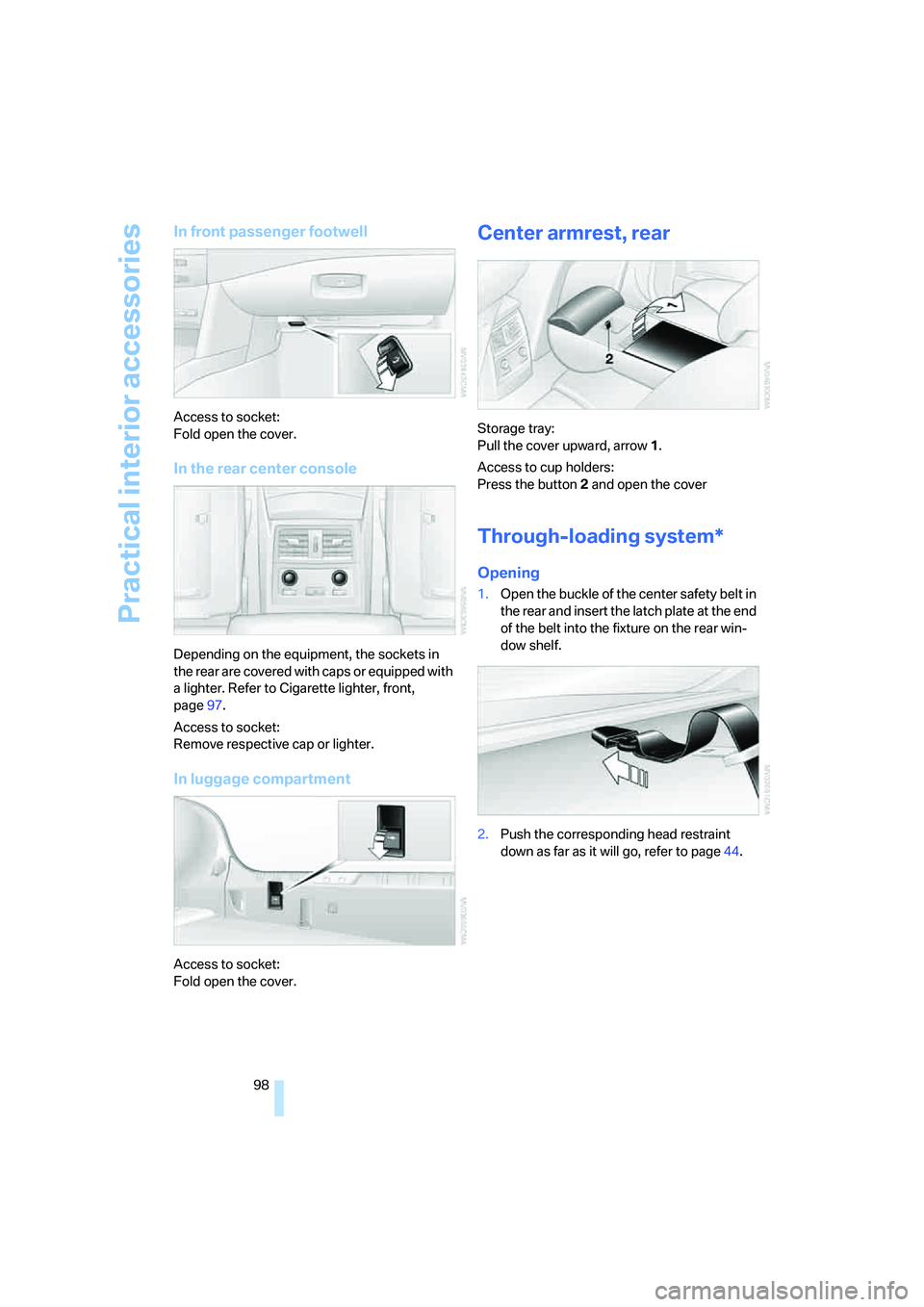
In front passenger footwell
Access to socket:
Fold open the cover.
In the rear center console
Depending on the equipment, the sockets in
the rear are covered with caps or equipped with
a lighter. Refer to Cigarette lighter, front,
page97.
Access to socket:
Remove respective cap or lighter.
In luggage compartment
Access to socket:
Fold open the cover.
Center armrest, rear
Storage tray:
Pull the cover upward, arrow1.
Access to cup holders:
Press the button2 and open the cover
Through-loading system*
Opening
1.Open the buckle of the center safety belt in
the rear and insert the latch plate at the end
of the belt into the fixture on the rear win-
dow shelf.
2.Push the corresponding head restraint
down as far as it will go, refer to page44.
Page 101 of 231
Controls
99Reference
At a glance
Driving tips
Communications
Navigation
Entertainment
Mobility
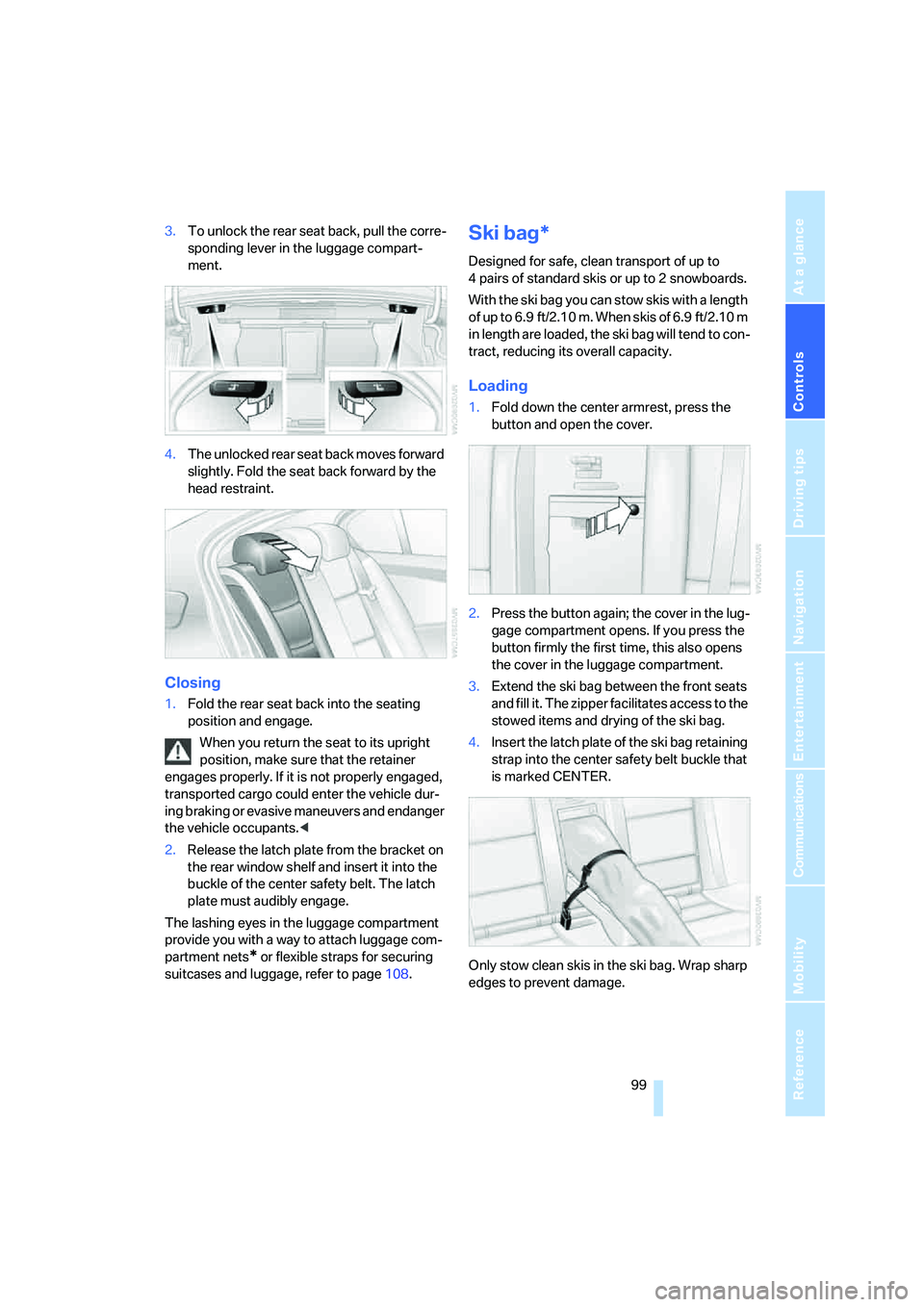
3.To unlock the rear seat back, pull the corre-
sponding lever in the luggage compart-
ment.
4.The unlocked rear seat back moves forward
slightly. Fold the seat back forward by the
head restraint.
Closing
1.Fold the rear seat back into the seating
position and engage.
When you return the seat to its upright
position, make sure that the retainer
engages properly. If it is not properly engaged,
transported cargo could enter the vehicle dur-
ing braking or evasive maneuvers and endanger
the vehicle occupants.<
2.Release the latch plate from the bracket on
the rear window shelf and insert it into the
buckle of the center safety belt. The latch
plate must audibly engage.
The lashing eyes in the luggage compartment
provide you with a way to attach luggage com-
partment nets
* or flexible straps for securing
suitcases and luggage, refer to page108.
Ski bag*
Designed for safe, clean transport of up to
4 pairs of standard skis or up to 2 snowboards.
With the ski bag you can stow skis with a length
o f u p t o 6 . 9 f t / 2 . 1 0 m . W h e n s k i s o f 6 . 9 f t / 2 . 1 0 m
in length are loaded, the ski bag will tend to con-
tract, reducing its overall capacity.
Loading
1.Fold down the center armrest, press the
button and open the cover.
2.Press the button again; the cover in the lug-
gage compartment opens. If you press the
button firmly the first time, this also opens
the cover in the luggage compartment.
3.Extend the ski bag between the front seats
and fill it. The zipper facilitates access to the
stowed items and drying of the ski bag.
4.Insert the latch plate of the ski bag retaining
strap into the center safety belt buckle that
is marked CENTER.
Only stow clean skis in the ski bag. Wrap sharp
edges to prevent damage.
Page 109 of 231

Driving tips
107Reference
At a glance
Controls
Communications
Navigation
Entertainment
Mobility
Determining loading limit
1.Locate the following statement on your
vehicle's placard
*:
The combined weight of occupants
and cargo should never exceed
XXX lbs. or YYY kg. Otherwise, this could
damage the vehicle and produce unstable
vehicle operating conditions.<
2.Determine the combined weight of the
driver and passengers that will be riding in
your vehicle.
3.Subtract the combined weight of the driver
and passengers from XXX lbs. or YYY kg.
4.The resulting figure equals the available
amount of cargo and luggage load capacity.
For example, if the XXX amount equals
1,400 lbs. and there will be five 150-lb. pas-
sengers in your vehicle, the amount of avail-
able cargo and luggage load capacity is
650 lbs.:
1,400 lbs. minus 750 lbs. = 650 lbs.
5.Determine the combined weight of luggage
and cargo being loaded on the vehicle. That
weight may not safely exceed the available
cargo and luggage load capacity calculated
in step 4.
6.If your vehicle will be towing a trailer, part of
the load from your trailer will be transferred
to your vehicle. Consult the manual for
transporting a trailer to determine how this
may reduce the available cargo and luggage
load capacity of your vehicle.
Load
The permissible load is the total of the weight of
occupants and cargo/luggage. The greater the
weight of occupants, the less cargo/luggage
can be transported.
Stowing cargo
>Load heavy cargo as far forward and as low
as possible, placing it directly behind the
seat back.
>Cover sharp edges and corners.
>For very heavy cargo when the rear seat is
not occupied, secure each safety belt in the
opposite buckle.
>Do not pile objects higher than the top edge
of the backrest.
Page 179 of 231
Mobility
177Reference
At a glance
Controls
Driving tips
Communications
Navigation
Entertainment
Observe all national and local maximum speed
limits, otherwise violations of the law could
occur.
Tire identification marks
Knowledge of the labeling on the side of the tire
makes it easier to identify and choose the right
tires.
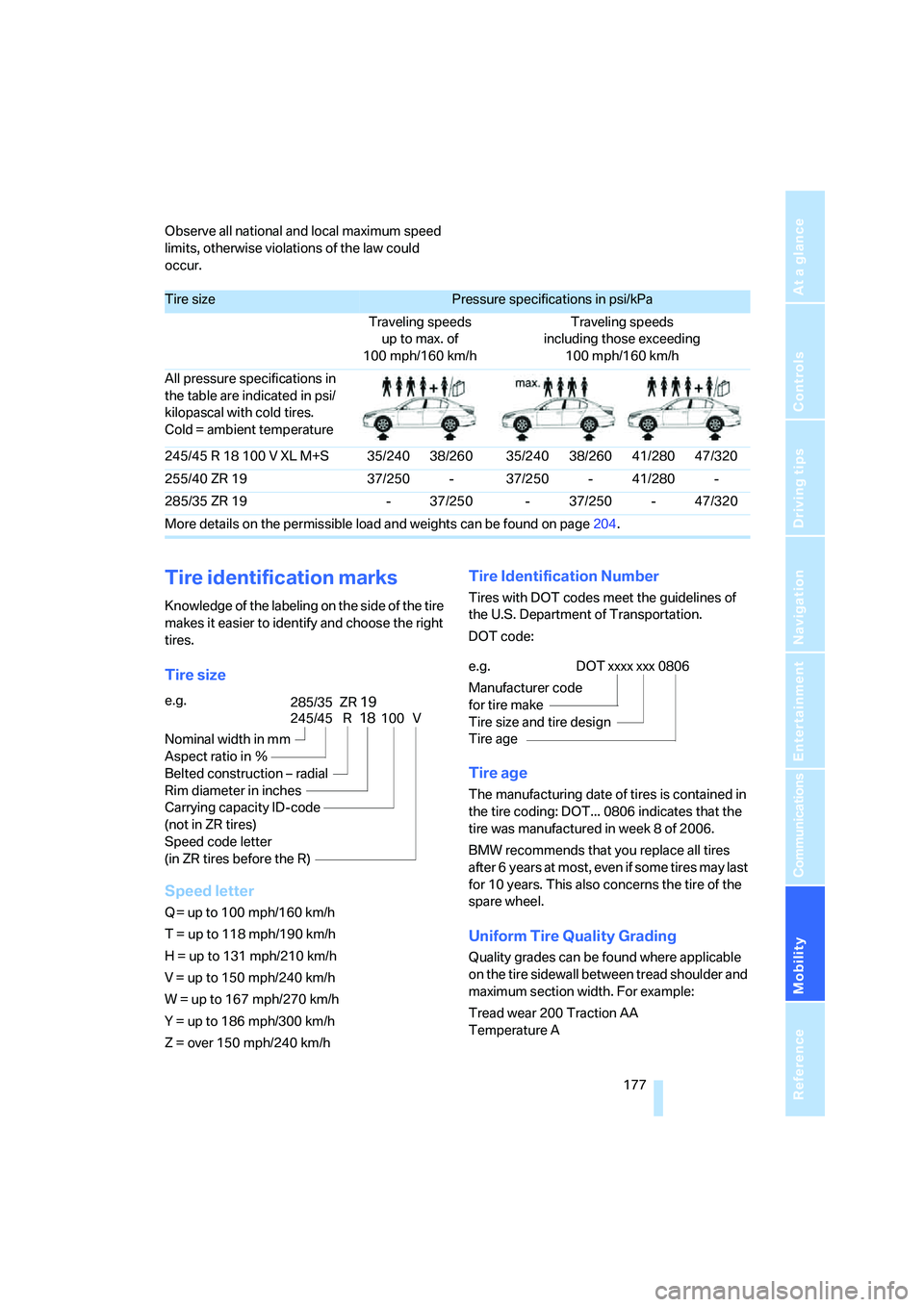
Tire size
Speed letter
Q = up to 100 mph/160 km/h
T = up to 118 mph/190 km/h
H = up to 131 mph/210 km/h
V = up to 150 mph/240 km/h
W = up to 167 mph/270 km/h
Y = up to 186 mph/300 km/h
Z = over 150 mph/240 km/h
Tire Identification Number
Tires with DOT codes meet the guidelines of
the U.S. Department of Transportation.
DOT code:
Tire age
The manufacturing date of tires is contained in
the tire coding: DOT... 0806 indicates that the
tire was manufactured in week 8 of 2006.
BMW recommends that you replace all tires
after 6 years at most, even if some tires may last
for 10 years. This also concerns the tire of the
spare wheel.
Uniform Tire Quality Grading
Quality grades can be found where applicable
on the tire sidewall between tread shoulder and
maximum section width. For example:
Tread wear 200 Traction AA
Temperature A
Tire sizePressure specifications in psi/kPa
Traveling speeds
up to max. of
100 mph/160 km/hTraveling speeds
including those exceeding
100 mph/160 km/h
All pressure specifications in
the table are indicated in psi/
kilopascal with cold tires.
Cold = ambient temperature
245/45 R 18 100 V XL M+S 35/240 38/260 35/240 38/260 41/280 47/320
255/40 ZR 19 37/250 - 37/250 - 41/280 -
285/35 ZR 19 - 37/250 - 37/250 - 47/320
More details on the permissible load and weights can be found on page204.
e.g.
Nominal width in mm
Aspect ratio in Ξ
Belted construction – radial
Rim diameter in inches
Carrying capacity ID-code
(not in ZR tires)
Speed code letter
(in ZR tires before the R)
245/45 R18100 V
285/35 ZR19
e.g.
Manufacturer code
for tire make
Tire size and tire design
Tire ageDOT xxxx xxx 0806
Page 195 of 231
Mobility
193Reference
At a glance
Controls
Driving tips
Communications
Navigation
Entertainment
engage a driving position with the selector
lever.
Have all vehicle occupants get out of the vehicle
and ensure that they remain outside the imme-
diate area in a safe place, such as behind a
guardrail.
If a warning triangle
* or portable hazard warning
lamp is required, set it up on the roadside at an
appropriate distance from the rear of the vehi-
cle. Comply with all safety guidelines and regu-
lations.
Change the wheel only on a level, firm surface
which is not slippery. The vehicle or the jack
could slip to the side if you attempt to raise the
vehicle on a soft or slippery surface such as
snow, ice, tiles, etc.
Position the jack on a firm support surface.
Do not use a wooden block or similar object as a
support base for the jack, as this would prevent
it from extending to its full support height and
reduce its load-carrying capacity.
To avoid serious or fatal injury: never lie under
the vehicle, and never start the engine while it is
supported by the jack.<
What you will need
To avoid rattling noises later on, note the posi-
tions of the tools before removing them, then
return them to their initial positions after com-
pleting work.
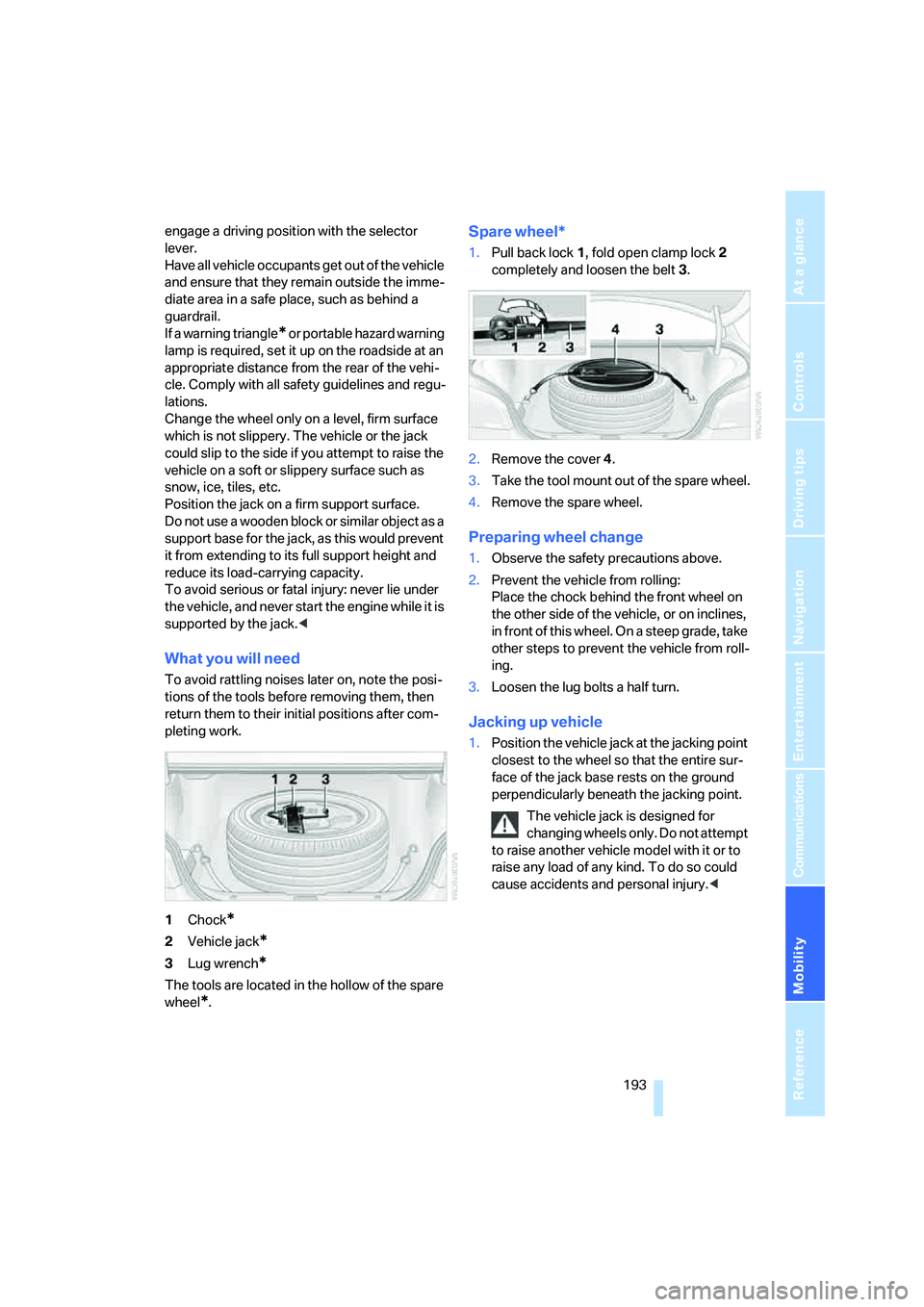
1Chock
*
2Vehicle jack*
3Lug wrench*
The tools are located in the hollow of the spare
wheel
*.
Spare wheel*
1.Pull back lock1, fold open clamp lock2
completely and loosen the belt3.
2.Remove the cover4.
3.Take the tool mount out of the spare wheel.
4.Remove the spare wheel.
Preparing wheel change
1.Observe the safety precautions above.
2.Prevent the vehicle from rolling:
Place the chock behind the front wheel on
the other side of the vehicle, or on inclines,
in front of this wheel. On a steep grade, take
other steps to prevent the vehicle from roll-
ing.
3.Loosen the lug bolts a half turn.
Jacking up vehicle
1.Position the vehicle jack at the jacking point
closest to the wheel so that the entire sur-
face of the jack base rests on the ground
perpendicularly beneath the jacking point.
The vehicle jack is designed for
changing wheels only. Do not attempt
to raise another vehicle model with it or to
raise any load of any kind. To do so could
cause accidents and personal injury.<
Page 196 of 231

Replacing components
194 2.Guide the jack head into the rectangular
recess of the jacking point when cranking
up, refer to illustration detail.
3.Jack the vehicle up until the wheel you are
changing is raised from the ground.
Mounting a wheel
1.Unscrew the lug bolts and remove the
wheel.
2.Remove accumulations of mud or dirt from
the mounting surfaces of the wheel and
hub. Also clean the lug bolts.
3.Position the new wheel or spare wheel.
Secure the wheel by screwing at least two
lug bolts into opposite bolt holes.
When you mount wheels other than Genu-
ine BMW light-alloy wheels, different lug
bolts may also be required.
4.Screw in the remaining lug bolts. Tighten all
the bolts securely in a diagonal pattern.
5.Lower the vehicle and remove the jack from
beneath the vehicle.
After mounting
1.Tighten the lug bolts in a diagonal pattern.
To ensure safety, always have the
lug bolts checked with a calibrated
torque wrench as soon as possible to
ensure that they are tightened to the speci-
fied torque. The tightening torque is
88.5 lb ft/120 Nm.<
2.Check and correct the tire inflation pressure
at the earliest opportunity.
Protect valve stems and valve stem
seal caps against dirt and contamina-tion. Dirt in valve stems is a frequent source
of gradual air loss.<
3.Initialize the Flat Tire Monitor, refer to
page77, and the Sequential Manual Trans-
mission, refer to After changing wheels/
tires on page180.
4.Replace the damaged tire as soon as possi-
ble and have the new wheel/tire balanced.
Stowing wheel and tools
1.Lay the wheel in the tool mounting.
2.Lay the cover on the mounting.
3.Center the wheel and cover relative to the
lashing eyes5.
4.Hook the belt into the lashing eyes.
5.Completely open the tensioning lock.
6.Thread the belt3 through the axis6 of the
tensioning lock without twisting it and ten-
sion it by hand.
7.Tighten the belt firmly with the tensioning
lock by opening and closing the lock several
times.
8.Fold the tensioning lock closed and stow
the protruding belt end.
Driving with spare wheel
With certain wheel-and-tire combinations
the size of the spare wheel differs from
that of the other wheels. The spare wheel is
equivalent to them in all load and speed ranges.
However, to restore the original state, the nor-
mal wheel should be remounted as soon as
possible.<
Page 213 of 231

Reference 211
At a glance
Controls
Driving tips
Communications
Navigation
Entertainment
Mobility
Audio132
– controls132
– switching on/off132
– tone control133
– volume133
"Audio", refer to Tone
control133
"Audio Aux"132,151
– on external audio device151
Audio device, external96
Automatic
– air distribution88
– air volume88
– headlamp control83
– service notification168
– steering wheel adjustment,
refer to Easy entry/exit47
– storing stations137
Automatically switching
between high beams and
low beams, refer to High-
beam assistant84
Automatic car washes106
– also refer to Caring for your
vehicle brochure
Automatic climate control87
– automatic air distribution88
– switching off90
Automatic closing of doors,
refer to Automatic soft
closing33
Automatic curb monitor46
Automatic lighting
– refer to Automatic headlamp
control83
– refer to Daytime running
lamps84
– refer to High-beam
assistant84
– refer to Interior lamps86
– refer to Pathway lighting83
Automatic low-beam function,
refer to High-beam
assistant84
"Automatic programs"88
Automatic recirculated-air
control AUC90
Automatic soft closing33
Automatic station search137"Automatic ventilation"91
AUTO program for automatic
climate control88
"Autostore" on the
radio136,138
AUX-In
– connection96
– refer to External audio
device151
Average fuel consumption64
– setting the units72
Average speed, refer to
Computer63
"Avoid ferries" for navigation
system123
"Avoid highways" for
navigation system123
Avoiding freeways for
navigation122
Avoiding unintentional
alarms35
"Avoid tollroads" for
navigation system123
Axle loads, refer to
Weights204
"A - Z"160
B
Backrest contour, refer to
Lumbar support41
Backrests, refer to Seats40
Backrest width41
Back seats, refer to Rear seats
Backup lamps, replacing
bulbs189
"Balance", refer to Tone
control134
Balance, refer to Tone
control134
Band-aids, refer to First-aid
kit196
Bass, refer to Tone
control133
"Bass", tone control134
Battery, refer to Vehicle
battery195
– jump starting197Battery disposal
– remote control with comfort
access37
– vehicle battery195
Battery replacement, remote
control with comfort
access37
Being towed198
Belts, refer to Safety belts44
Beverage holder, refer to Cup
holders96
Blower, refer to Air volume89
"BMW Assist"169
BMW Assist167
– enabling167
– services offered168
"BMW Contact"162
"BMW Contact
Numbers"162
BMW homepage4
BMW maintenance
system186
"BMW Service"169
"BMW Service settings"168
BMW website4
Bottle holder, refer to Cup
holders96
Brake Assistant, refer to DBC
Dynamic Brake Control74
Brake fluid185
– warning lamp185
Brake force display78
Brake lamps
– brake force display78
– replacing bulbs189
Brake pads185
– breaking-in104
Brake rotors106
Brakes
– ABS Antilock Brake
System74
– brake fluid
185
– brake force display78
– brake pads185
– breaking-in104
– handbrake55
– warning lamps13