Page 39 of 170

39
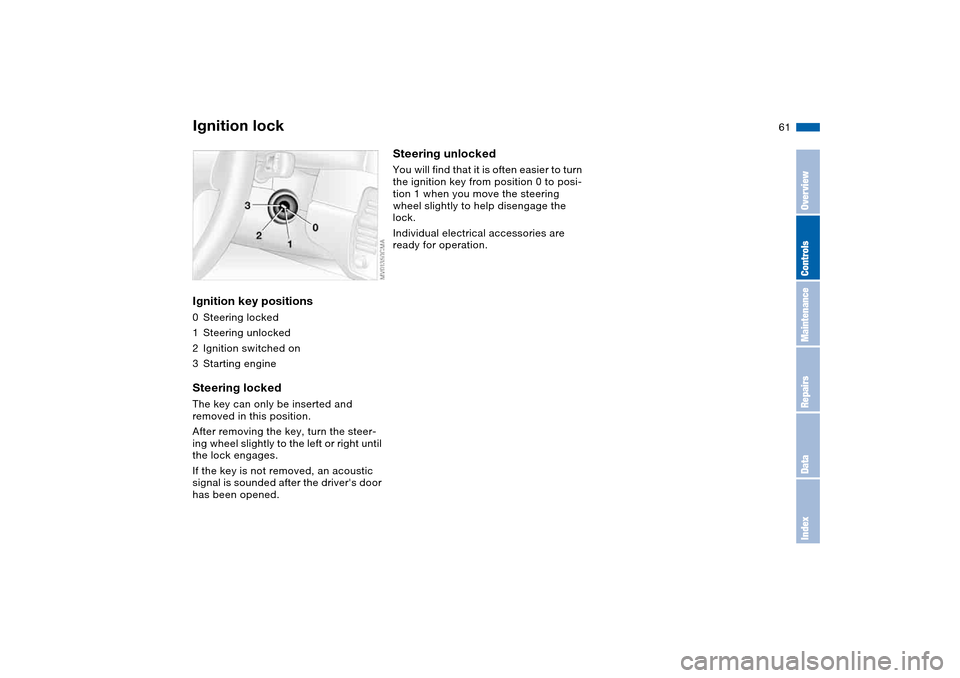
Electric power windowsTo open and close windowsWith the ignition key in position 1 or
higher
>Press the switch until you feel resis-
tance: the window retracts, or
respectively the tilt-out window
moves outward; it remains in motion
for as long as you maintain pressure
on the switch
>Press the switch briefly past the pres-
sure point: the window moves auto-
matically. Pressing the switch again
stops the opening cycle.
You can close the window in the same
manner by pulling the switch. The tilt-
out window does not close automati-
cally.
You can still operate the power win-
dows for up to 15 minutes as long as
no one has opened and again closed
one of the doors.
When leaving the vehicle, always
remove the ignition key from the
lock and remember to close the doors
to prevent children from operating the
power windows and injuring them-
selves, etc.<
For convenience operation via the
remote control or the door lock, refer to
page 32 or 30.Trap protectionThe front windows are each equipped
with a contact strip located on the
upper inside of the window frame. If
pressure is exerted against this contact
strip while the window is being raised,
the system will respond by stopping the
window and then retracting it a small
distance.
Despite trap protection, always be
careful to ensure that the closing
path of the window is not obstructed.
Some types of objects, for instance
very thin objects, might fail to trigger
the contact strip in some situations.
If the switch is pulled and held beyond
the resistance point, this trap protection
is overridden.<
OverviewControlsMaintenanceRepairsDataIndex
Page 40 of 170
40
Glass sunroof, electric*
Watch the glass sunroof while it is
closing, to avoid any injuries.
When leaving the vehicle, always take
the ignition key with you and close the
doors, since children could otherwise
operate the sunroof and injure them-
selves.<
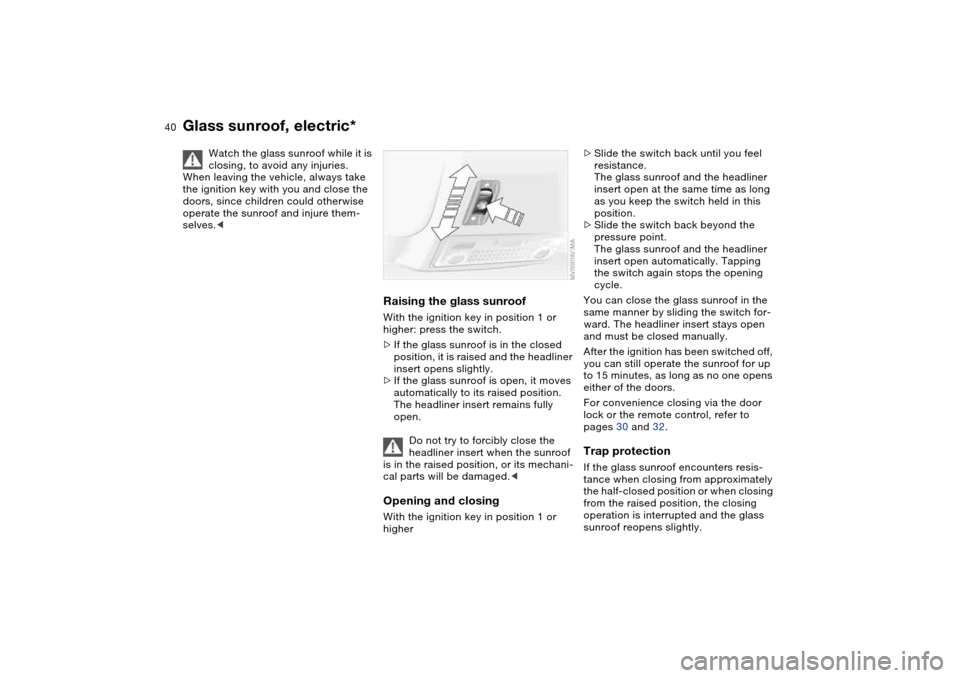
Raising the glass sunroofWith the ignition key in position 1 or
higher: press the switch.
>If the glass sunroof is in the closed
position, it is raised and the headliner
insert opens slightly.
>If the glass sunroof is open, it moves
automatically to its raised position.
The headliner insert remains fully
open.
Do not try to forcibly close the
headliner insert when the sunroof
is in the raised position, or its mechani-
cal parts will be damaged.
higher
>Slide the switch back until you feel
resistance.
The glass sunroof and the headliner
insert open at the same time as long
as you keep the switch held in this
position.
>Slide the switch back beyond the
pressure point.
The glass sunroof and the headliner
insert open automatically. Tapping
the switch again stops the opening
cycle.
You can close the glass sunroof in the
same manner by sliding the switch for-
ward. The headliner insert stays open
and must be closed manually.
After the ignition has been switched off,
you can still operate the sunroof for up
to 15 minutes, as long as no one opens
either of the doors.
For convenience closing via the door
lock or the remote control, refer to
pages 30 and 32.Trap protectionIf the glass sunroof encounters resis-
tance when closing from approximately
the half-closed position or when closing
from the raised position, the closing
operation is interrupted and the glass
sunroof reopens slightly.
Page 46 of 170
46
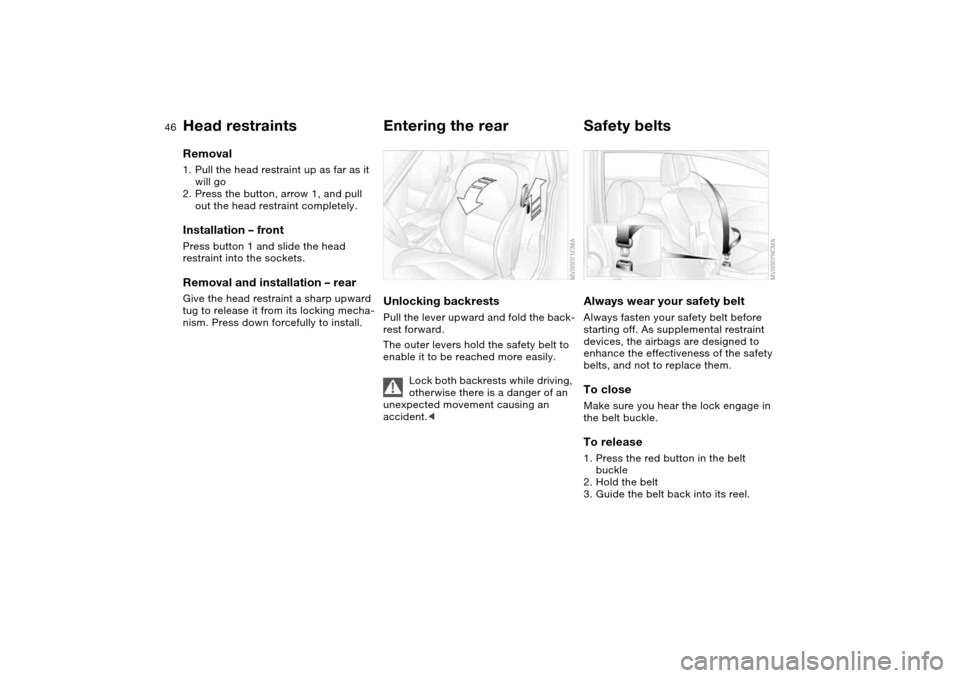
Removal1. Pull the head restraint up as far as it
will go
2. Press the button, arrow 1, and pull
out the head restraint completely.Installation – frontPress button 1 and slide the head
restraint into the sockets.Removal and installation – rearGive the head restraint a sharp upward
tug to release it from its locking mecha-
nism. Press down forcefully to install.
Entering the rearUnlocking backrestsPull the lever upward and fold the back-
rest forward.
The outer levers hold the safety belt to
enable it to be reached more easily.
Lock both backrests while driving,
otherwise there is a danger of an
unexpected movement causing an
accident.<
Safety beltsAlways wear your safety beltAlways fasten your safety belt before
starting off. As supplemental restraint
devices, the airbags are designed to
enhance the effectiveness of the safety
belts, and not to replace them.To closeMake sure you hear the lock engage in
the belt buckle.To release1. Press the red button in the belt
buckle
2. Hold the belt
3. Guide the belt back into its reel.
Head restraints
Page 48 of 170
48
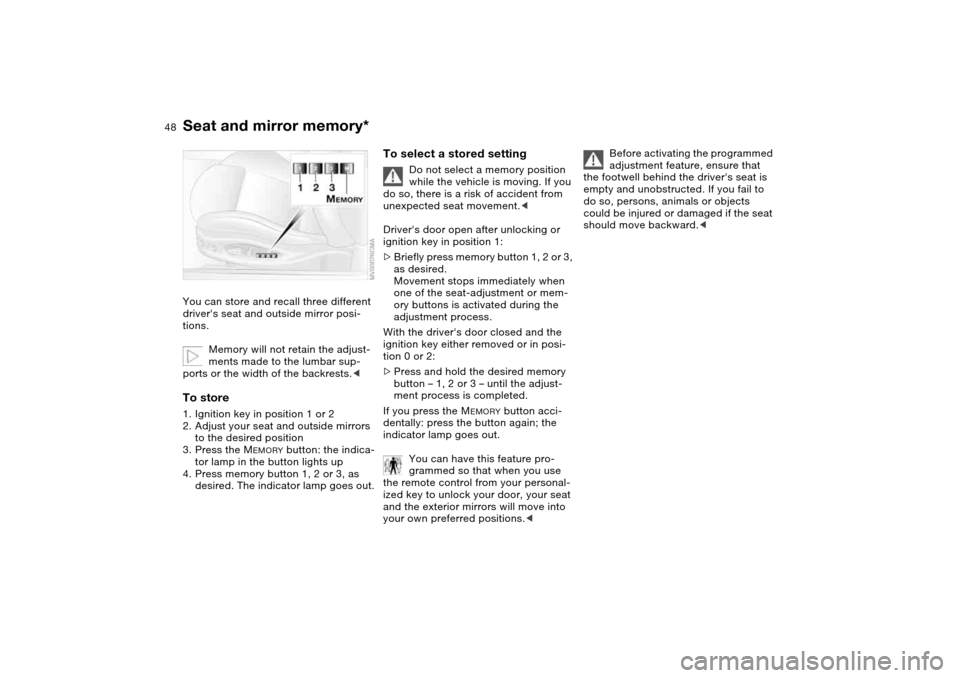
Seat and mirror memory*You can store and recall three different
driver's seat and outside mirror posi-
tions.
Memory will not retain the adjust-
ments made to the lumbar sup-
ports or the width of the backrests.
2. Adjust your seat and outside mirrors
to the desired position
3. Press the M
EMORY
button: the indica-
tor lamp in the button lights up
4. Press memory button 1, 2 or 3, as
desired. The indicator lamp goes out.
To select a stored setting
Do not select a memory position
while the vehicle is moving. If you
do so, there is a risk of accident from
unexpected seat movement.<
Driver's door open after unlocking or
ignition key in position 1:
>Briefly press memory button 1, 2 or 3,
as desired.
Movement stops immediately when
one of the seat-adjustment or mem-
ory buttons is activated during the
adjustment process.
With the driver's door closed and the
ignition key either removed or in posi-
tion 0 or 2:
>Press and hold the desired memory
button – 1, 2 or 3 – until the adjust-
ment process is completed.
If you press the M
EMORY
button acci-
dentally: press the button again; the
indicator lamp goes out.
You can have this feature pro-
grammed so that when you use
the remote control from your personal-
ized key to unlock your door, your seat
and the exterior mirrors will move into
your own preferred positions.<
Before activating the programmed
adjustment feature, ensure that
the footwell behind the driver's seat is
empty and unobstructed. If you fail to
do so, persons, animals or objects
could be injured or damaged if the seat
should move backward.<
Page 51 of 170
51
Steering wheelTo adjust
Never attempt to adjust the steer-
ing wheel while driving the vehicle
– it could respond with unexpected
movement, posing a potential accident
hazard.<
1. Push the locking lever downward
2. Adjust steering column reach and
height for your selected seating posi-
tion
3. Pull the lever back up.
OverviewControlsMaintenanceRepairsDataIndex
Page 57 of 170

57
Child seat securityAll of the rear belt retractors and the
front passenger's safety belt can be
locked for mounting and securing child-
restraint systems.
A label with the appropriate instructions
for this is located in the immediate
vicinity of the buckle latch of each
safety belt.To lock the safety beltExtract the entire length of the belt from
the inertia reel mechanism. Allow the
reel to retract the belt somewhat and
engage the buckle, then tighten the belt
against the child-restraint system. The
retraction mechanism is now locked.
The belt cannot be extracted further.
Always observe the installation instruc-
tions provided by the manufacturer of
the child-restraint system.To unlock the safety belt Release the safety belt, remove the
child seat and retract the safety belt to
its end position on the belt retractor.
LATCH child-restraint mounting
systemLATCH: Lower Anchors and Tether for
CHildren
The left and right rear seats are both
equipped with a LATCH child-restraint
mounting system.
Transporting children safely
OverviewControlsMaintenanceRepairsDataIndex
Page 59 of 170

59
Vehicle Memory, Key MemoryHow the system functionsYou have probably frequently wished
that you could configure individual
functions of your vehicles to reflect your
own personal requirements. In engi-
neering your vehicle, BMW has pro-
vided for a number of options for per-
sonal adjustment that can be
programmed into your vehicle at your
BMW center.
The available configuration data fall into
two categories, according to whether
their primary orientation is the vehicle –
Vehicle Memory – or the individual –
Key Memory. You can have up to four
different basic settings adjusted for four
different persons. The only require-
ment is that each person uses his or her
own remote control key.
When your vehicle is unlocked with the
remote control, the vehicle recognizes
the individual user by means of a data
exchange with the key, and makes
adjustments accordingly.
Distinguishing between keysIn order for you to distinguish between
different keys, colored decals are sup-
plied together with the keys.What the system can doYour BMW center can provide you with
details on the possibilities that the Vehi-
cle and Key Memory systems offer:
You will see this symbol through-
out the Owner's Manual. It is to
remind you at appropriate places of the
settings that are available to you.<
Examples for Vehicle Memory:
>Various signals that can serve as
acknowledgment for locking and
unlocking the vehicle, refer to
page 29
>Activates/deactivates the 'Follow me
home' lamps function, refer to
page 87
>Activates/deactivates daytime driv-
ing lamps, refer to page 87
>Sets the units of measure for display-
ing time, outside temperature, dis-
tance traveled and fuel consumption
in the instrument cluster
>When you shift into Reverse, an
acoustic signal indicates that PDC
has been activated, refer to page 81
>Switches on rear window defroster
automatically, refer to page 93
>Activates/deactivates various alarm
system functions, refer to page 38
>After giving an ice warning, the
onboard computer display returns to
the previous setting, refer to page 79.
Examples for Key Memory:
>Locks the vehicle automatically after
you start off, refer to page 33
>Automatically moves the seat and
outside mirror into position for the
programmed driver when unlocking
the vehicle, refer to page 48
>Automatic tilting of the passenger-
side mirror, refer to Automatic curb
monitor, page 49
OverviewControlsMaintenanceRepairsDataIndex
Page 61 of 170
61 Driving
Ignition lockIgnition key positions0Steering locked
1Steering unlocked
2Ignition switched on
3Starting engineSteering lockedThe key can only be inserted and
removed in this position.
After removing the key, turn the steer-
ing wheel slightly to the left or right until
the lock engages.
If the key is not removed, an acoustic
signal is sounded after the driver's door
has been opened.
Steering unlockedYou will find that it is often easier to turn
the ignition key from position 0 to posi-
tion 1 when you move the steering
wheel slightly to help disengage the
lock.
Individual electrical accessories are
ready for operation.
OverviewControlsMaintenanceRepairsDataIndex