2006 BMW M3 COUPE warning light
[x] Cancel search: warning lightPage 76 of 170

76
Fuel gaugeOnce the indicator lamp stays on con-
tinuously, there are still approx.
2 gallons/8 liters of fuel in the fuel tank.
Fuel tank capacity approx. 16.6 gal./
63 liters.
If the tilt of the vehicle varies – when
you are driving in mountainous areas,
for example – the needle may fluctuate
slightly.
Fill the fuel tank before it is com-
pletely empty. Driving to the last
drop of fuel can prevent the engine
from operating properly and result in
damage.<
When you switch on the ignition, the
indicator lamp lights up briefly as an
operation check.
Engine coolant temperature gaugeBlueThe engine is still cold. Drive at moder-
ate engine and vehicle speeds.Between the blue and red zonesNormal operating range. The needle
may rise as far as the edge of the red
sector during normal operation.RedWhen you switch on the ignition, the
warning lamp comes on briefly as an
operation check.
If the lamp comes on while operating
the vehicle: the engine has overheated.
Switch off the engine immediately and
allow it to cool down.
To check the coolant level, refer to
page 124.
Page 81 of 170

81 Technology for safety and driving convenience
Park Distance Control (PDC)*The conceptPDC assists you when you back into a
parking space. Acoustic signals alert
you to the momentary distance to an
object behind your vehicle. To do this,
four ultrasonic sensors in the rear
bumper measure the distance to the
nearest object. The range for the sen-
sors located at both rear corners ends
approx. 2 ft/60 cm behind the bumpers.
The range for the two middle sensors is
slightly less than 5 ft/1.50 m.
PDC is a parking aid that can
identify objects if they are
approached slowly, as is generally the
case when parking. Avoid driving
towards objects rapidly; due to underly-
ing physical principles, the system may
otherwise alert you too late for you to
take evasive steps.<
The system starts to operate automati-
cally approx. one second after you shift
into Reverse or move the selector lever
into the R position with the ignition key
in position 2.
Let this short period elapse before
driving backwards.<
PDC is deactivated when you shift back
out of Reverse.
You can have a signal set to con-
firm that the PDC has been acti-
vated. The signal then sounds when
you shift into Reverse or move the
selector lever into the R position.
intervals. As the distance between vehi-
cle and object decreases, the intervals
between the tones become shorter. A
continuous tone indicates the pres-
ence of an object less than 1 ft/30 cm
away.
The warning signal is canceled after
approx. three seconds if the distance to
the object remains constant during this
time – if you are moving parallel to
a wall, for instance.
System malfunctions will be indicated
by a continuous high-pitched tone
when the system is activated the first
time. Please have your BMW center
resolve the problem.
PDC does not replace the driver's
personal responsibility for evaluat-
ing the distance between the vehicle
and any objects. Even when sensors
are involved, there is a blind spot in
which objects cannot be detected. This
applies especially in those cases where
the system approaches the physical
limits of ultrasonic measurement, as
occurs with tow bars and trailer cou-
plings, and in the vicinity of thin or
wedge-shaped objects. Moreover, low
objects that have already been
detected – such as a curb edge – can
disappear out of the detection range of
the sensors before a continuous tone
sounds.
Loud sources of sound from outside or
inside the vehicle could drown out the
PDC signal tone.<
Keep the sensors clean and free
of ice or snow in order to ensure
that they will continue to operate effec-
tively.
Do not apply high pressure spray to the
sensors for a prolonged period of time.
Always maintain a distance of more
than 4 in/10 cm.<
OverviewControlsMaintenanceRepairsDataIndex
Page 83 of 170

83
Activating M Track modeTap the button; the indicator lamp
comes on and stays on.Deactivating M Track modePress the button again; the indicator
lamp goes out.
To deactivate DSCPress the DSC button; the DSC indica-
tor lamp lights up continuously. DSC
and M Track mode are off.
When better traction is required, it is
beneficial to deactivate the system in
the following situations:
>When rocking the vehicle or starting
off in deep snow or on loose surfaces
>When driving with snow chains.
To maintain vehicle stability,
always drive with the system
switched on whenever possible.
Flat Tire MonitorThe conceptAs you drive, the Flat Tire Monitor
keeps track of pressure levels in all four
tires. The system alerts you whenever
the inflation pressure of a tire falls sig-
nificantly below the pressure of another
tire.
In the event of tire pressure loss, the
rolling radius of the tire changes, and
thereby the rotational speed of the
wheel. This change is detected, and a
flat tire warning is issued to the driver.Functional requirementsTo ensure a reliable flat tire warning,
the system must be initialized with the
correct tire inflation pressures.
Initialize the system immediately
after you have corrected a tire
inflation pressure, or changed the tire
or wheel.
vide you with advance warning of
sudden and severe tire damage caused
by external factors and does not detect
the balanced and very gradual pressure
loss that takes place in all four tires
over an extended period of time.<
Dynamic Stability Control (DSC)
OverviewControlsMaintenanceRepairsDataIndex
Page 84 of 170

84
The system could issue a false warning
or function in a delayed manner in the
following situations:
>System was not initialized
>You are driving on a snow-covered or
slippery road surface
>Performance-oriented driving: slip at
the drive wheels, high levels of lateral
acceleration
>You are driving with snow chainsInitializing the system
The initialization is completed
while you are driving, and can be
interrupted at any time. Initialization is
automatically continued when you con-
tinue driving. When driving with snow
chains, do not initialize the system.<
1. Before driving off, start the engine
but do not start driving
2. Press the button as long as you need
to, but no more than 8 seconds, until
the indicator lamp in the instrument
cluster lights up in yellow for several
seconds
3. Drive off. Initialization is completed
during the drive without any feed-
back issued.
When driving with snow chains,
do not initialize the system.<
To activate/deactivate the systemThe system is automatically activated in
ignition key position 2 and conse-
quently is on whenever the vehicle is
operated.
To deactivate the system: tap the but-
ton, the indicator lamp will light up yel-
low.
To activate the system: tap the button
again; the indicator lamp goes out.
Deactivate the system when snow
chains are mounted, since false warn-
ings and undetected losses in pressure
are possible under these kinds of con-
ditions.
Flat Tire Monitor
Page 87 of 170

87 Lamps
Parking lamps/Low beamsParking lamps
The front, rear and side vehicle
lighting is switched on. You can
use this to signal the position of
the vehicle when it is parked. For light-
ing on one side for parking as an addi-
tional feature refer to page 88.
Low beams
When you switch the ignition off
with the low-beam headlamps
on, only the parking lamps will
remain on.
Follow me home lampsWhen you activate the headlamp
flasher after parking the vehicle and
switching off the lights, the low beams
will come on for a brief period.
You can also have this function
deactivated.<
LIGHTS ON warningWhenever you open the driver's door
after having turned the ignition key to
position 0, you will hear an acoustic
signal for a few seconds to remind you
that the lamps have not been switched
off.Daytime driving lamps*If you desire, the light switch can be left
in the low-beam position: when the
ignition is switched off, the external
lighting is also switched off.
When required, switch on the parking
lamps as usual as described under
Parking lamps.
You can have the activation set-
tings for the daytime driving lamps
programmed on your vehicle.
tion the system automatically
responds to changes in ambient
light, for example in tunnels, at dusk
and when it is raining or snowing, by
switching the low beams on or off.
The low-beam headlamps remain
on, regardless of the ambient
light, when you switch on the fog
lamps.<
Automatic headlamp control can-
not serve as a substitute for your
personal judgement in determining
when the lamps should be switched on.
For example, the sensors are not able
to detect fog. In such situations switch
on the lamp manually, as otherwise a
safety hazard will result.<
You can have the sensitivity of
your vehicle's automatic head-
lamp control adjusted.<
OverviewControlsMaintenanceRepairsDataIndex
Page 145 of 170
145
Towing and tow-starting the vehicle
Always observe all applicable
towing laws and regulations.<
Using the towing eyeletThe screw-in towing eyelet is stored in
the luggage compartment under the
floor panel and must remain with the
vehicle at all times. It can be attached
at the front or rear of your BMW.
Observe the following instruc-
tions in order to avoid damaging
the towing eyelet or the vehicle: use
only the towing eyelet supplied with the
vehicle, and screw it in firmly until it
stops. Use the towing eyelet for towing
on paved roads only. Avoid subjecting
the towing eyelet to lateral loads, e.g.
do not lift the vehicle using the towing
eyelet.<
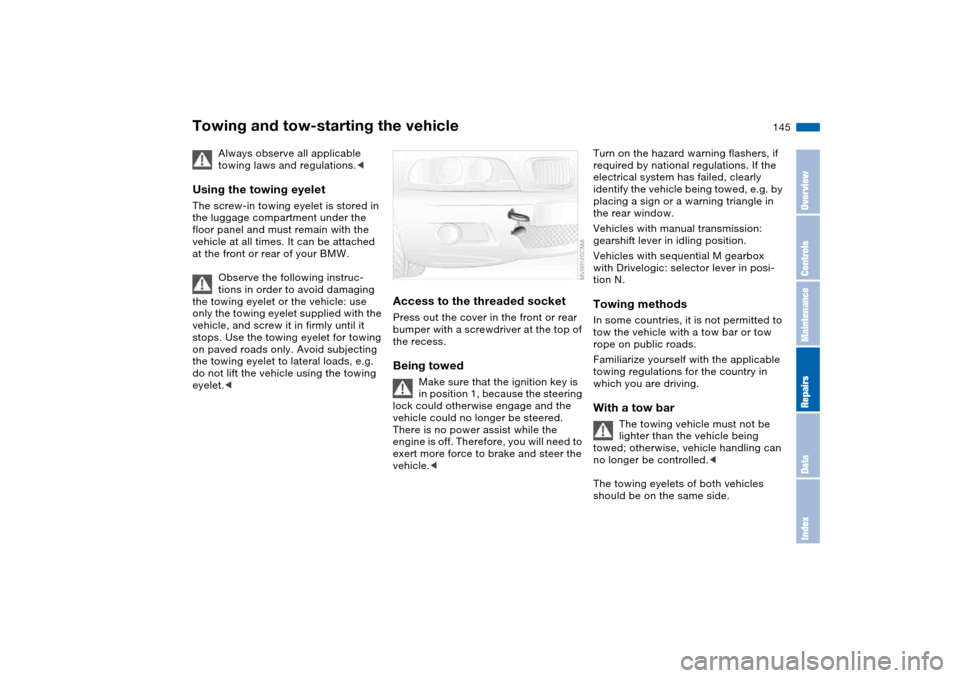
Access to the threaded socketPress out the cover in the front or rear
bumper with a screwdriver at the top of
the recess.Being towed
Make sure that the ignition key is
in position 1, because the steering
lock could otherwise engage and the
vehicle could no longer be steered.
There is no power assist while the
engine is off. Therefore, you will need to
exert more force to brake and steer the
vehicle.<
Turn on the hazard warning flashers, if
required by national regulations. If the
electrical system has failed, clearly
identify the vehicle being towed, e.g. by
placing a sign or a warning triangle in
the rear window.
Vehicles with manual transmission:
gearshift lever in idling position.
Vehicles with sequential M gearbox
with Drivelogic: selector lever in posi-
tion N.Towing methodsIn some countries, it is not permitted to
tow the vehicle with a tow bar or tow
rope on public roads.
Familiarize yourself with the applicable
towing regulations for the country in
which you are driving.With a tow bar
The towing vehicle must not be
lighter than the vehicle being
towed; otherwise, vehicle handling can
no longer be controlled.<
The towing eyelets of both vehicles
should be on the same side.
OverviewControlsMaintenanceRepairsDataIndex
Page 157 of 170

Everything from A to Z
157
Blower
automatic climate
control 92
BMW Maintenance
System 126
BMW sports seat 44
Bore, refer to Engine
data 150
Bottle holders, see Bever-
age holders 96, 97
Brake fluid 125
indicator lamp 18, 125
level 125
Brake force display 86
Brake lamps
bulb replacement 135
indicator lamp, defective
lamp 77
Brake lamps, refer to Brake
force display 86
Brake pads
brake fluid level 18, 125
breaking in 108
Brake rotors
breaking in 108
Brake system
brake pads, indicator
lamp 19
Brake wear warning
indicator lamp 19Brakes
ABS 111
brake fluid 125
brake force display 86
brake pads 110
breaking in 108
driving notes 109
indicator/warning
lamp 18, 19
parking brake 64
Break-in procedures 108
Bridging, refer to Jump-
starting 143
Bulb replacement 133
Bulb replacement, refer to
Lamps and bulbs 133
Buttons in steering wheel 22
C
California Proposition 65
warning 6
Can holders, see Beverage
holders 96, 97
Capacities 153
Car battery 140
Car care, refer to the Caring
for your vehicle brochure
Car keys, refer to Keys 28
Car phone hookup
microphone 97
Car radio, refer to the
Owner's Manual for RadioCar telephone, refer to the
separate Owner's Manual
Car vacuum cleaner, con-
necting 98
Car wash, refer to the Caring
for your vehicle brochure
Caring for headlamp cov-
ers, refer to the Caring for
your vehicle brochure 133
Carpet care, refer to the
Caring for your vehicle
brochure
Cassette operation, refer to
the Owner's Manual for
Radio/Onboard Computer
CBC Cornering Brake Con-
trol 111
warning lamp 19
CD changer, refer to the
Owner's Manual for
Radio/Onboard Computer
CD operation, refer to the
Owner's Manual for
Radio/Onboard Computer
Center high-mount brake
lamp
bulb replacement 136
Central locking system 28
button 33
passenger
compartment 33
Charge indicator lamp 18Check Control 77
Check Gas Cap
indicator lamp 19
Child seats, refer to Child-
restraint systems 55
Child-restraint systems 55
Cigarette lighter 98
Cleaning chrome parts, refer
to the Caring for your vehi-
cle brochure
Cleaning light alloy wheels,
refer to the Caring for your
vehicle brochure
Cleaning the vehicle, refer to
the Caring for your vehicle
brochure
Cleaning windshield 73
Clock 78
12-/24-hour mode 78
setting, refer also to the
Owner's Manual for
Radio/Onboard Computer
Closing
from inside 33
from outside 29
Clothes hooks 99
Clutch
breaking in 108
Cockpit 14
Code, refer to the Owner's
Manual for Radio/Onboard
Computer
OverviewControlsMaintenanceRepairsDataIndex
Page 158 of 170

Everything from A to ZCoin box 96
Cold start, refer to Starting
the engine 62
Compact disc operation,
refer to the Owner's Man-
ual for Radio/Onboard
Computer
Compartments 96
Compression ratio, refer to
Engine data 150
Computer 79
Condensation, refer to Air
conditioning mode 92
Configuring settings, refer to
Vehicle Memory, Key
Memory 59
Connecting a vacuum
cleaner, refer to Power
socket 98
Consumption, refer to Aver-
age fuel consumption 80
Control elements, refer to
Cockpit 14
Convenience operation
from outside 32
glass sunroof 30
windows 30
Coolant 124
indicator lamp 19, 76
level 124
temperature gauge 76Coolant water, refer to Cool-
ant 124
Cooling, refer to Tempera-
ture 92
Copyright 4
Cornering Brake Control
(CBC) 111
warning lamp 19
Cruise control 73
indicator lamp 20
Cup holders, see Beverage
holders 96, 97
Curb weight, refer to
Weights 152
Cylinders, refer to Engine
data 150
D
Dashboard, refer to
Cockpit 14
Data
capacities 153
dimensions 151
engine 150
weights 152
Daytime driving lamps 87
DBC Dynamic Brake
Control 111
warning lamp 19
Deep water, refer to Driving
through water 109Defrost position, refer to
Defrosting windows 92
Defrosting and demisting
windows
automatic climate
control 92
Defrosting windows 92
Defrosting windshield, refer
to Defrosting windows 92
Demisting windows
automatic climate
control 92
Differential
breaking in 108
Digital clock 78
Dimensions 151
Dipstick, engine oil 122
Displacement, refer to
Engine data 150
Display lighting, refer to
Instrument lighting 88
Displays, refer to Instrument
cluster 16
Disposal
oil 123
vehicle battery 141
Distance warning, refer to
Park Distance Control
(PDC) 81
Divided rear backrest 100
Door key 28
Door lock 32Doors
emergency operation 32
Draft-free ventilation 93
Drivelogic 69
Driving light, refer to Parking
lamps/Low beams 87
Driving notes 109
Driving through water, deep
water 109
Dry air, refer to Air condi-
tioning mode 92
DSC Dynamic Stability Con-
trol 82
indicator lamp 19, 82
Dynamic Brake Control
(DBC) 111
warning lamp 19
Dynamic Stability Control
(DSC) 19, 82
Dynamic Stability Control
DSC
M Track mode 82
E
Easy entry, refer to Entering
the rear 46
Electric glass sunroof 40
Electric power windows 39
Electrical accessories, fail-
ure 141