2006 BMW 745Li memory
[x] Cancel search: memoryPage 113 of 247
Controls
111Reference
At a glance
Driving tips
Communications
Navigation
Entertainment
Mobility
Practical interior accessories
Integrated universal remote
control*
The concept
The integrated universal remote control can
replace as many as three hand-held transmit-
ters for various remote-controlled accessories,
such as door openers and house alarm sys-
tems. The integrated universal remote control
registers and stores signals from the original
hand-held transmitters.
The signal of an original hand-held transmitter
can be programmed into one of the three mem-
ory buttons1. Then the respective devices can
be actuated using the programmed memory
buttons. The LED2 flashes to confirm trans-
mission of the signal.
Should you sell your vehicle one day, be sure to
delete the stored programs beforehand for your
security, refer to page112.
To prevent possible damage or injury,
during programming or before each use
of the programmed device by the integrated
universal remote control, always inspect the
immediate area to make certain that no people,
animals or objects are within the swiveling and
movement range of the device. Also, comply
with the safety precautions of the original hand-
held transmitter.<
Checking compatibility
If you see this symbol on the packaging
or in the manual supplied with the orig-
inal hand-held transmitter, it is safe to
assume that it is compatible with the integrated
universal remote control.
If you have additional questions, please contact
your BMW center or call: 1-800-355-3515.
Information is also provided on the Internet at:
www.bmwusa.com or
www.homelink.com.
HomeLink is a registered trademark of
Johnson Controls, Inc.
Programming
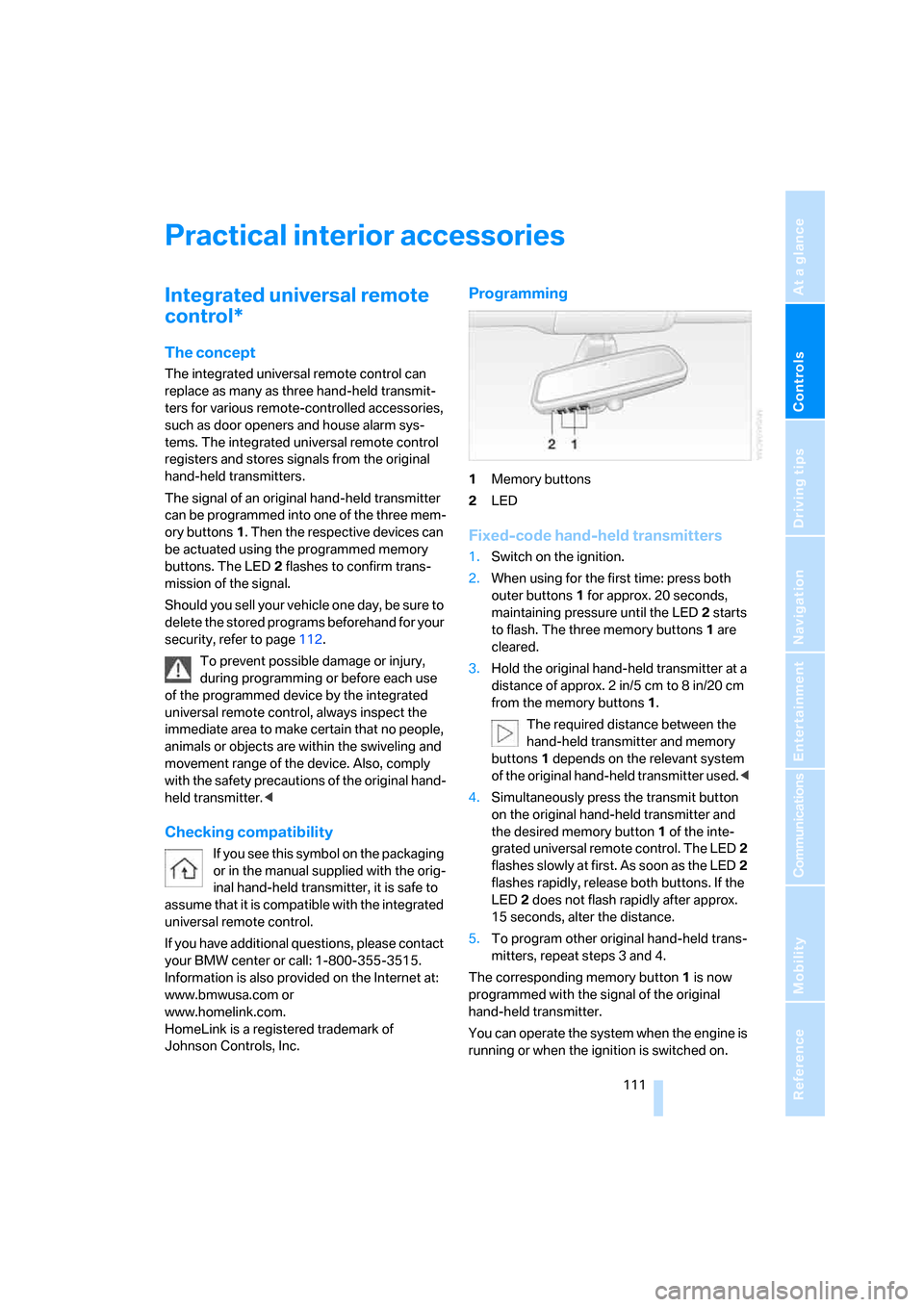
1Memory buttons
2LED
Fixed-code hand-held transmitters
1.Switch on the ignition.
2.When using for the first time: press both
outer buttons1 for approx. 20 seconds,
maintaining pressure until the LED2 starts
to flash. The three memory buttons1 are
cleared.
3.Hold the original hand-held transmitter at a
distance of approx. 2in/5cm to 8in/20cm
from the memory buttons1.
The required distance between the
hand-held transmitter and memory
buttons1 depends on the relevant system
of the original hand-held transmitter used.<
4.Simultaneously press the transmit button
on the original hand-held transmitter and
the desired memory button1 of the inte-
grated universal remote control. The LED2
flashes slowly at first. As soon as the LED2
flashes rapidly, release both buttons. If the
LED2 does not flash rapidly after approx.
15 seconds, alter the distance.
5.To program other original hand-held trans-
mitters, repeat steps 3 and 4.
The corresponding memory button1 is now
programmed with the signal of the original
hand-held transmitter.
You can operate the system when the engine is
running or when the ignition is switched on.
Page 114 of 247
Practical interior accessories
112 If the device cannot be operated after
repeated programming, check whether
the original hand-held transmitter uses an alter-
nating-code system. To do so, either read the
instructions of the original hand-held transmit-
ter or press and hold down the programmed
memory button1 of the integrated universal
remote control. If the LED2 on the integrated
universal remote control flashes rapidly for a
short time and then remains lit for approx.
2 seconds, then this indicates that the original
hand-held transmitter is equipped with an alter-
nating-code system. In the case of an alternat-
ing-code system, program the memory but-
tons1 as described in the Alternating-code
transmitters section below.<
Alternating-code transmitters
Consult the operating instructions of the unit
you wish to set when programming the univer-
sal remote control. You will find information
there on the possibilities for synchronization.
When programming hand-held transmitters
that employ an alternating code, please follow
the supplementary instructions below:
Programming will be easier with the aid of
a second person.<
1.Park your vehicle within the range of the
remote-controlled device.
2.Program the integrated universal remote
control as described above in the Fixed-
code hand-held transmitters section.
3.Locate the button on the receiver of the
device you want to set up, e.g. on the upper
section of its motor.
4.Press the button on the receiver of the
device you want to set up. After step 4, you
have approx. 30 seconds for step 5.
5.Press the programmable memory button1
on the integrated universal remote control
three times.
The corresponding memory button1 is now
programmed with the signal of the original
hand-held transmitter.
If you have any additional questions,
please contact your BMW center.<
Clearing memory buttons
Press both outer buttons1 for approx. 20 sec-
onds, maintaining pressure until the LED2
starts to flash:
All of the memory buttons have been cleared.
It is not possible to clear individual memory
buttons1.
Roller sun blinds*
Rear window blind
Briefly press the button on the driver's door with
the ignition in radio ready state or higher.
Roller sun blinds for rear side windows
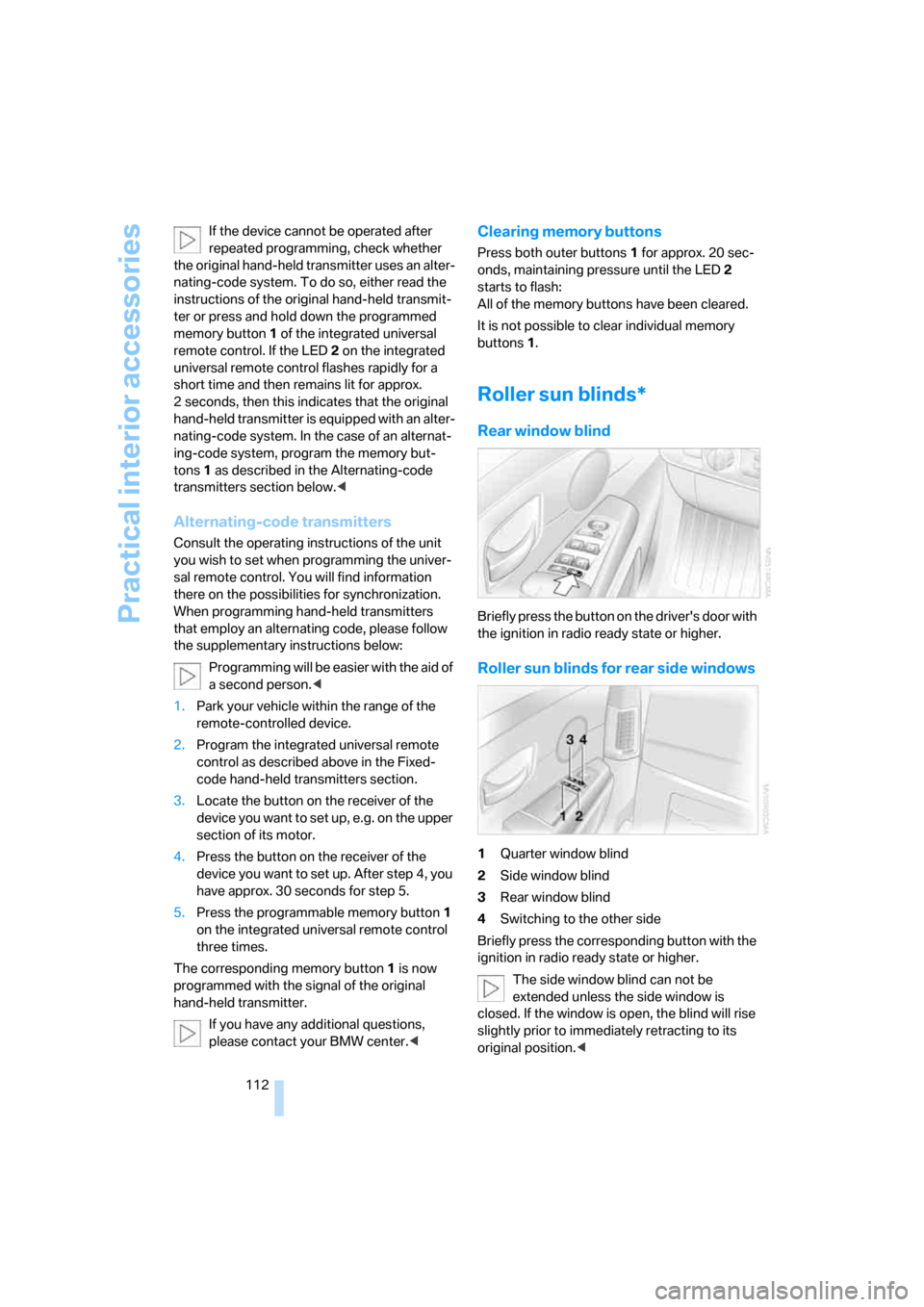
1Quarter window blind
2Side window blind
3Rear window blind
4Switching to the other side
Briefly press the corresponding button with the
ignition in radio ready state or higher.
The side window blind can not be
extended unless the side window is
closed. If the window is open, the blind will rise
slightly prior to immediately retracting to its
original position.<
Page 160 of 247
Radio
158
Storing a station
You can also manually store stations in the
"Autostore list" if this selection has been made
before storing.
iDrive, for principle details, refer to page16.
1.Press the button to open the start
menu.
2.Move the controller toward "Entertain-
ment".
3.Select "FM" or "AM" and press the control-
ler.
4.Choose the selection criterion and press
the controller.
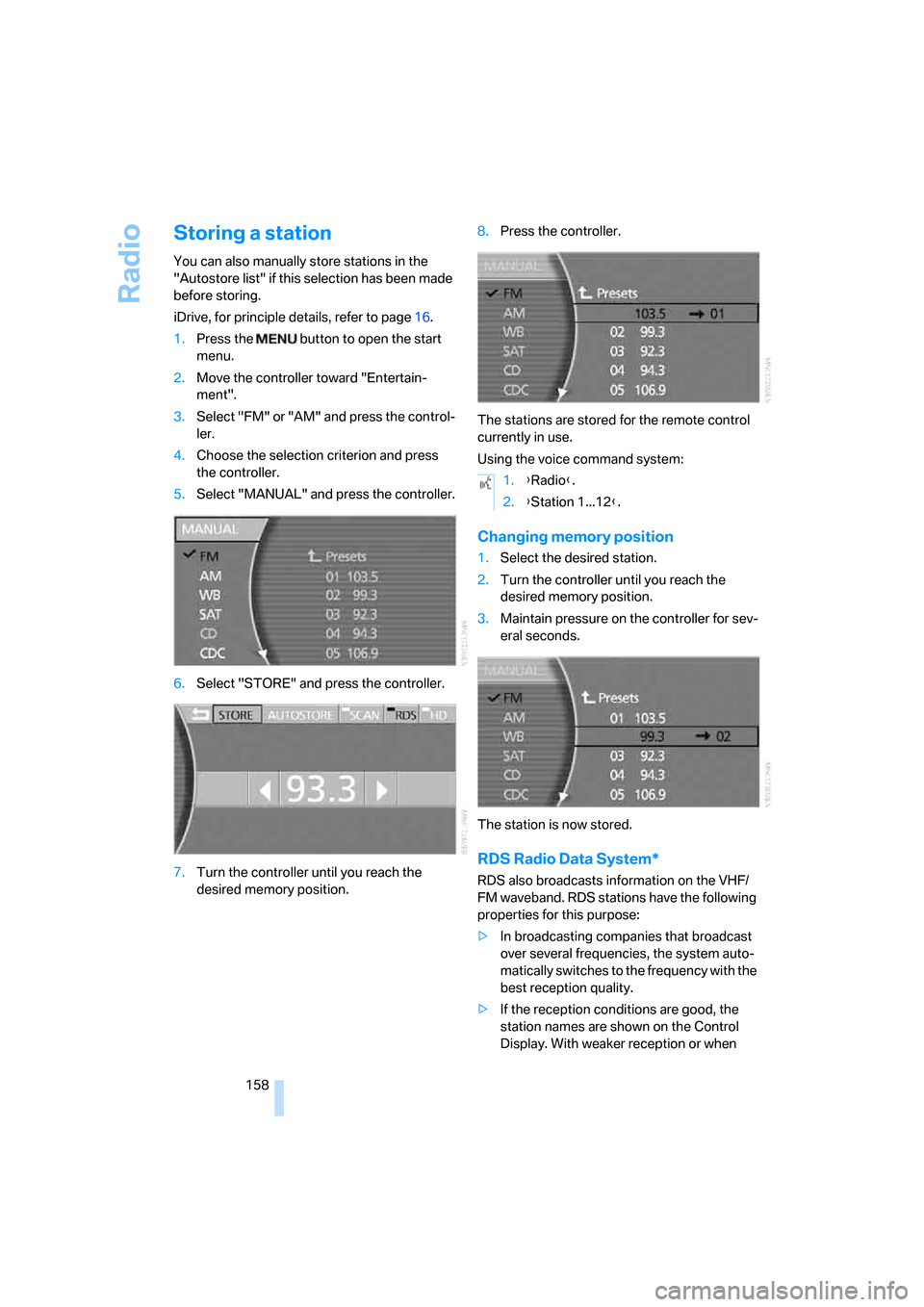
5.Select "MANUAL" and press the controller.
6.Select "STORE" and press the controller.
7.Turn the controller until you reach the
desired memory position.8.Press the controller.
The stations are stored for the remote control
currently in use.
Using the voice command system:
Changing memory position
1.Select the desired station.
2.Turn the controller until you reach the
desired memory position.
3.Maintain pressure on the controller for sev-
eral seconds.
The station is now stored.
RDS Radio Data System*
RDS also broadcasts information on the VHF/
FM waveband. RDS stations have the following
properties for this purpose:
>In broadcasting companies that broadcast
over several frequencies, the system auto-
matically switches to the frequency with the
best reception quality.
>If the reception conditions are good, the
station names are shown on the Control
Display. With weaker reception or when
1.{Radio}.
2.{Station 1...12}.
Page 163 of 247

Navigation
Entertainment
Driving tips
161Reference
At a glance
Controls
Communications
Mobility
near trees, mountains or other sources of radio
interference.
Reception is usually possible again as soon as
the signal is available again.<
Storing a station
1.Select "SAT" and press the controller.
2.Select "Channels" and press the controller.
3.Select the desired station.
4.Select "STORE" and press the controller.
The list of stored stations appears in the
display.
5.Select the desired station.
6.Turn the controller until you reach the
desired memory position.
7.Maintain pressure on the controller for sev-
eral seconds.
High Definition Radio*
Many stations transmit both analog and digital
signals. You can receive these stations digitally
and in improved sound quality.
Activating and deactivating digital
radio reception
iDrive, for principle details, refer to page16.
1.Press the button to open the start
menu.
2.Move the controller toward "Entertain-
ment".
3.Select "FM" or "AM" and press the control-
ler.
4.Select "MANUAL" and press the controller.
5.Select "HD" and press the controller.
The reception of digital stations is activated.
"HD" is shown in the status line when a station
is received digitally.
With some stations the digital signals are not
transmitted simultaneously with the analog sig-
nals. If you are in an area in which the selected
station is not continuously received digitally,
playback switches between analog and digital
reception. This can result in repetitions or inter-
ruptions. In this case it may be advisable to
deactivate digital radio reception.
Displaying additional information
With the digital stations, additional information
on the current track is displayed, e.g. the name
of the album or the artist.
Select the channel currently being played and
press the controller.
"HD" must be shown in the status line
and a digital station received.<
Page 213 of 247

Mobility
211Reference
At a glance
Controls
Driving tips
Communications
Navigation
Entertainment
After mounting
1.Tighten the lug bolts in a diagonal pattern.
To ensure safety, always have the
lug bolts checked with a calibrated
torque wrench as soon as possible to
ensure that they are tightened to the speci-
fied torque. The tightening torque is
100lbft/140Nm.<
2.Reverse the removal sequence when stor-
ing the wheel and tools in the vehicle.
3.Check and correct the tire inflation pressure
at the earliest opportunity.
Protect valve stems and valve stem
seal caps from dirt and contamina-
tion. Dirt in valve stems is a frequent source
of gradual air loss.<
4.Reinitialize the Flat Tire Monitor, refer to
page90, or reset the Tire Pressure Monitor,
refer to page92.
5.Replace the damaged tire as soon as possi-
ble and have the new wheel/tire balanced.
Driving with spare tire
On certain wheel-tire combinations, the
size of the spare tire differs from that of
the rest of the tires. The spare tire is fully capa-
ble of running in all load and speed ranges.
However, to recreate the original conditions,
the tire should be replaced as soon as possi-
ble.<
Vehicle battery
Maintenance
The battery is 100 % maintenance-free, i.e., the
electrolyte will last for the life of the battery
when the vehicle is operated in a temperate cli-
mate. Your BMW center will be happy to advise
you on all questions concerning the battery.
Charging battery
Charge the battery in the vehicle only via the
terminals in the engine compartment and with
the engine off. Connections, refer to Jump
starting on page213.
Battery switch
Before storing the vehicle for an extended
period of several weeks or more, slide the bat-
tery switch located behind the trim panel on the
right side of the luggage compartment to OFF.
This reduces the current flow from the battery
for the period during which the vehicle remains
parked. A message is shown on the Info Dis-
play. Please take note of the supplementary
information provided on the Control Display.
Disposal
Have old batteries disposed of following
replacement at your BMW center or bring
them to a collection point. Maintain the battery
in an upright position for transport and storage.
Always secure the battery to prevent it from tip-
ping over during transport.<
Power failure
After a temporary interruption in electrical
power, the functioning of some equipment may
be limited and must be reinitialized. Individual
settings are also lost and must be updated
again:
>Seat, mirror, and steering wheel memory
The positions must be stored again, refer to
page46.
>Time and date
These must be reset, refer to page84.
>Radio
Stations must be stored again, refer to
page158.
>Navigation system
You must wait until it becomes operational
again, refer to Inserting navigation CDs/
DVDs on page130.
Page 230 of 247

Everything from A to Z
228 Creating voice address
book141
Cruise control67,69
– refer to Programmable
cruise control67
Cruising range77
Cup holders115
Curb weight, refer to
Weights220
Current consumption, refer to
Energy Control77
Currentness of the Owner's
Manual5
Current position
– displaying146
– storing139
Cursor for navigation, refer to
Selecting destination via
map134
"Curve mode", BMW Night
Vision98
Customizing settings, refer to
Key Memory31
D
Data218
– dimensions219
– engine218
– filling capacities221
– weights220
Date84
– display format84
– displaying84
– setting85
"Date", setting date85
Daytime running lamps99
DBC Dynamic Brake
Control87
"DEACTIV.", BMW Assist189
Deactivating front passenger
airbags54
Defroster, rear window107
Defrosting position, refer to
Defrosting windows106
Defrosting windows106Defrosting windows and
removing condensation106
Defrosting windshield, refer to
Defrosting windows106
"DELETE", navigation140
Deleting address book140
Deleting destination list138
Deleting the entire list184
Destination for navigation131
– selecting using voice141
– selecting via information135
Destinations recently driven
to137
"Dest. input", navigation131
"Dest. list", navigation137
Dialed numbers, refer to
Redialing183
Diamond button52
Digital clock75
Dimensions219
Directional indicators, refer to
Turn signals65
Direction instructions, refer to
Voice instructions145
Directory, refer to
– Address book138
– Phone book184
Displacement, refer to Engine
specifications218
Display, refer to iDrive16
Display elements, refer to Info
Display12
Display illumination, refer to
Instrument lighting101
Display information on track,
CD changer166
Displaying map view144
Display lighting, refer to
Instrument lighting101
Display of faults, refer to
Check Control80
Displays, refer to Info
Display12
Disposal
– battery of remote control39
– vehicle battery211Distance-adjusting cruise
control, refer to Active cruise
control69
Distance to destination77
– units of measure84
Distance to destination, refer
to Remaining distance77
Distance warning, refer to
PDC Park Distance
Control86
Door entry lighting, refer to
Interior lamps102
Door key, refer to Remote
control/key30
Door lock34
Doors
– unlocking and locking from
inside34
– unlocking and locking from
outside32
DOT Quality Grades197
Draft-free ventilation107
Driving lamps, refer to Parking
lamps/low beams99
Driving notes122
Driving route, refer to
Displaying route143
Driving stability control87
Driving tips, refer to Driving
notes122
Dry air, refer to Cooling
function107
DSC Dynamic Stability
Control87
– indicator lamp13
"DTC", vehicle88,89
DTC Dynamic Traction
Control88
– indicator lamp13
"DVD", DVD changer169
Page 233 of 247

Reference 231
At a glance
Controls
Driving tips
Communications
Navigation
Entertainment
Mobility
Head light, refer to Adaptive
Head Light100
Headphones22
Head restraints46
– front head restraints,
active47
– sitting safely43
Heated
– mirrors51
– seats49
Heated rear window, refer to
Rear window defroster107
Heated steering wheel52
Heater, windshield, refer to
Defrosting windows and
removing condensation106
Heating103
– exterior mirrors51
– residual heat106
– seats49
– steering wheel52
– windshield washer
nozzles66
Heating and ventilation103
Heating when parked, refer to
Residual heat106
Heavy cargo, refer to Stowing
cargo125
Height, refer to
Dimensions219
Height adjustment
– seats44
– steering wheel52
"Help"
– assistance window20
– menu navigation19
"Help text", assistance
window20
Help text on Control
Display20
"Hide map icons",
navigation137
"high", automatic climate
control105
High-beam assistant100
High beams100
– headlamp flasher100
– indicator lamp11High Definition Radio161
High temperatures122
Hills123
Holder for cups115
Home address
– selecting140
– storing140
Hood201
Horn11
Hour signal activation85
"House Number",
navigation134
Hydraulic brake assistant,
refer to DBC87
Hydroplaning123
I
ID3 tag, refer to Displaying
information on track166
iDrive16
– assistance window20
– automatic climate
control104
– changing date and time84
– changing language84
– changing settings84
– changing units of measure
and display format84
– confirming selection or
entry19
– controller16
– controls16
– displays, menus17
– menus17
– rear seat screen21
– selecting menu item19
– setting brightness85
– showing help text20
– start menu18
– status lines20
– symbols20
Ignition key30
Ignition lock57
Illuminated vanity mirror51
Imitation leather, refer to
Caring for your vehicle
brochure"Indep. ventil.", automatic
climate control109
Indicator/warning lamps12
– airbags95
– alarm system37
– DSC88
– DTC88
– Flat Tire Monitor91
– fog lamps101
– safety belt warning49
– Tire Pressure Monitor93
Individually programmable
buttons11,52
Individual settings, refer to
Key Memory31
Inflation pressure, refer to Tire
inflation pressure194
Inflation pressure monitoring,
refer to Flat Tire Monitor90
Inflation pressure monitoring,
refer to Tire Pressure
Monitor91
Info Display12
Info menu, refer to Assistance
window20
"Information",
navigation135,136
Information, navigation
– "On country"135
– "On dest."135
– "On location"135
– "On town/city"135
Information on travel direction,
refer to Voice
instructions145
Infrared windshield, refer to
Entry/pass tags126
"INITIALIZE", BMW
Assist186
Initializing BMW Assist186
Inserting navigation CD/
DVD130
Installation location
– CD changer164
– DVD changer168
– mobile phone, refer to
Inserting mobile phone179
– navigation drive130
Page 234 of 247

Everything from A to Z
232 Instructions, navigation
system, refer to Route
guidance by voice
instructions145
Instrument cluster, refer to
Info Display12
Instrument lighting101
Instrument panel, refer to
Cockpit10
– all around the steering
wheel10
– comfort features14
Integrated universal remote
control111
Interior lamps102
– switching on with remote
control33
Interior motion sensor38
– switching off38
Interior rearview mirror,
automatic dimming
feature123
Interlock, refer to Switching
off engine58
"INTERM. TIME",
stopwatch83
Interval Display, refer to
Service requirements78
J
Joystick, refer to iDrive16
Jump starting213
K
Keyless-Go, refer to Comfort
Access38
Keyless opening and closing,
refer to Comfort Access38
Key Memory31
Keys30
– adapter for spare key30
– key-related settings, refer to
Key Memory31
Kick-down63
Knock control193
L
Lamps and bulbs207
"Language", settings84
Lashing eyes, refer to
Securing cargo125
"Last", telephone184
"Last dest.", navigation137
LATCH child-restraint fixing
system55
Leather care, refer to Caring
for your vehicle brochure
LEDs light-emitting
diodes207
"Left", seat heating49
Length, refer to
Dimensions219
Level control system89
Light
– refer to High-beam
assistant100
– refer to Parking lamps/low
beams99
– refer to Roadside parking
lamps/low beams100
Light alloy wheels, care and
maintenance, refer to Caring
for your vehicle brochure
Light-emitting diodes
LEDs207
Lighter116
Lighter socket, refer to Power
socket116
Lighting
– of instruments101
– of vehicle99
Light switch99
"Limit"82
Limit, refer to Speed limit82
"Limited", rear seat screen22
Load, refer to Loading124
Loading
– securing cargo125
– vehicle124
"LOC.", navigation140
"Location",
navigation139,146,147Lock buttons in the doors,
refer to Locking34
Locking
– from inside34
– from outside33
Locking without key, refer to
Comfort Access38
Locking without remote
control, refer to Comfort
Access38
"LOGIC7", tone control154
Longlife oils, approved
oils203
Long wave, LW155
– High Definition Radio161
"low", automatic climate
control105
Low beams99
– automatic99
– indicator lamp, defective
lamp80
Lower back support, refer to
Lumbar support
adjustment45
Low-fuel warning light, refer to
Fuel gauge76
Lows, refer to Tone
adjustment153
Lug bolts
– refer to Preparing for a wheel
change210
– tightening torque, refer to
After mounting211
– wrench, refer to What you
will need209
Luggage compartment119
– capacity220
– Comfort Access39
– opening/closing, refer to
Luggage compartment
lid35
– opening from inside36
– opening from outside35
– opening with remote
control33