2006 BMW 650I COUPE&CONVERTIBLE horn
[x] Cancel search: hornPage 12 of 242
At a glance
11Reference
Controls
Driving tips
Communications
Navigation
Entertainment
Mobility
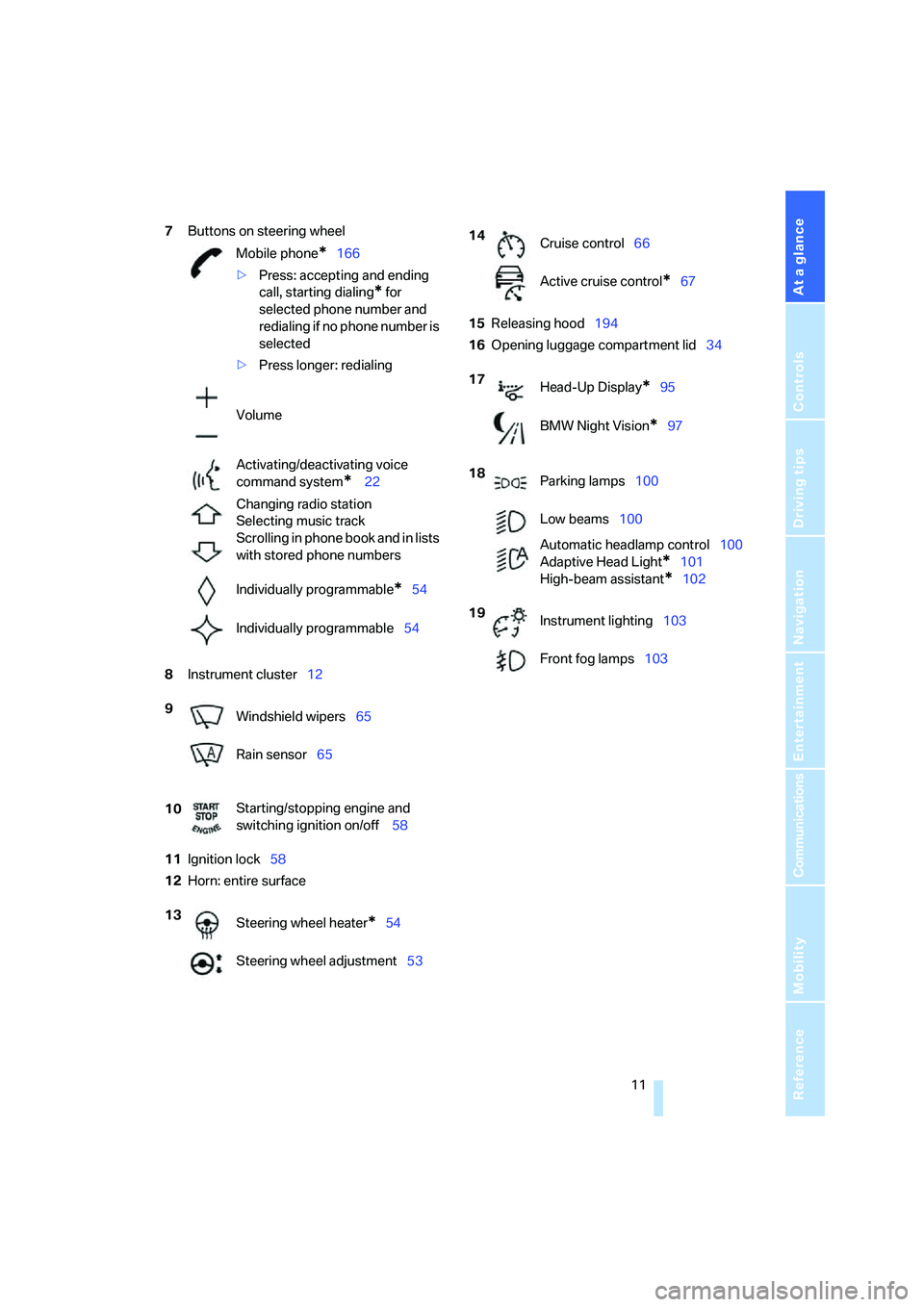
7Buttons on steering wheel
8Instrument cluster12
11Ignition lock58
12Horn: entire surface15Releasing hood194
16Opening luggage compartment lid34 Mobile phone
*166
>Press: accepting and ending
call, starting dialing
* for
selected phone number and
redialing if no phone number is
selected
>Press longer: redialing
Volume
Activating/deactivating voice
command system
* 22
Changing radio station
Selecting music track
Scrolling in phone book and in lists
with stored phone numbers
Individually programmable
*54
Individually programmable54
9
Windshield wipers65
Rain sensor65
10Starting/stopping engine and
switching ignition on/off 58
13
Steering wheel heater
*54
Steering wheel adjustment53
14
Cruise control66
Active cruise control
*67
17
Head-Up Display
*95
BMW Night Vision
*97
18
Parking lamps100
Low beams100
Automatic headlamp control100
Adaptive Head Light
*101
High-beam assistant
*102
19
Instrument lighting103
Front fog lamps103
Page 98 of 242
Controls
97Reference
At a glance
Driving tips
Communications
Navigation
Entertainment
Mobility
Only clean the cover of the Head-Up Dis-
play with a soft, lint-free cloth or with a
display cleaning cloth, otherwise damage may
result.<
BMW Night Vision*
The concept
BMW Night Vision is a driver assistance system
that is designed to provide enhanced vision for
certain objects at night. This can be especially
helpful for detecting people and larger animals.
When objects are detected, the driver may be
able to take appropriate action sooner. For
example, the driver may identify and detect the
presence of persons or animals in the road
ahead or off to the sides and can be more alert,
slow down or stop, blow the horn etc. The driver
can decide which actions are appropriate and
then react accordingly.
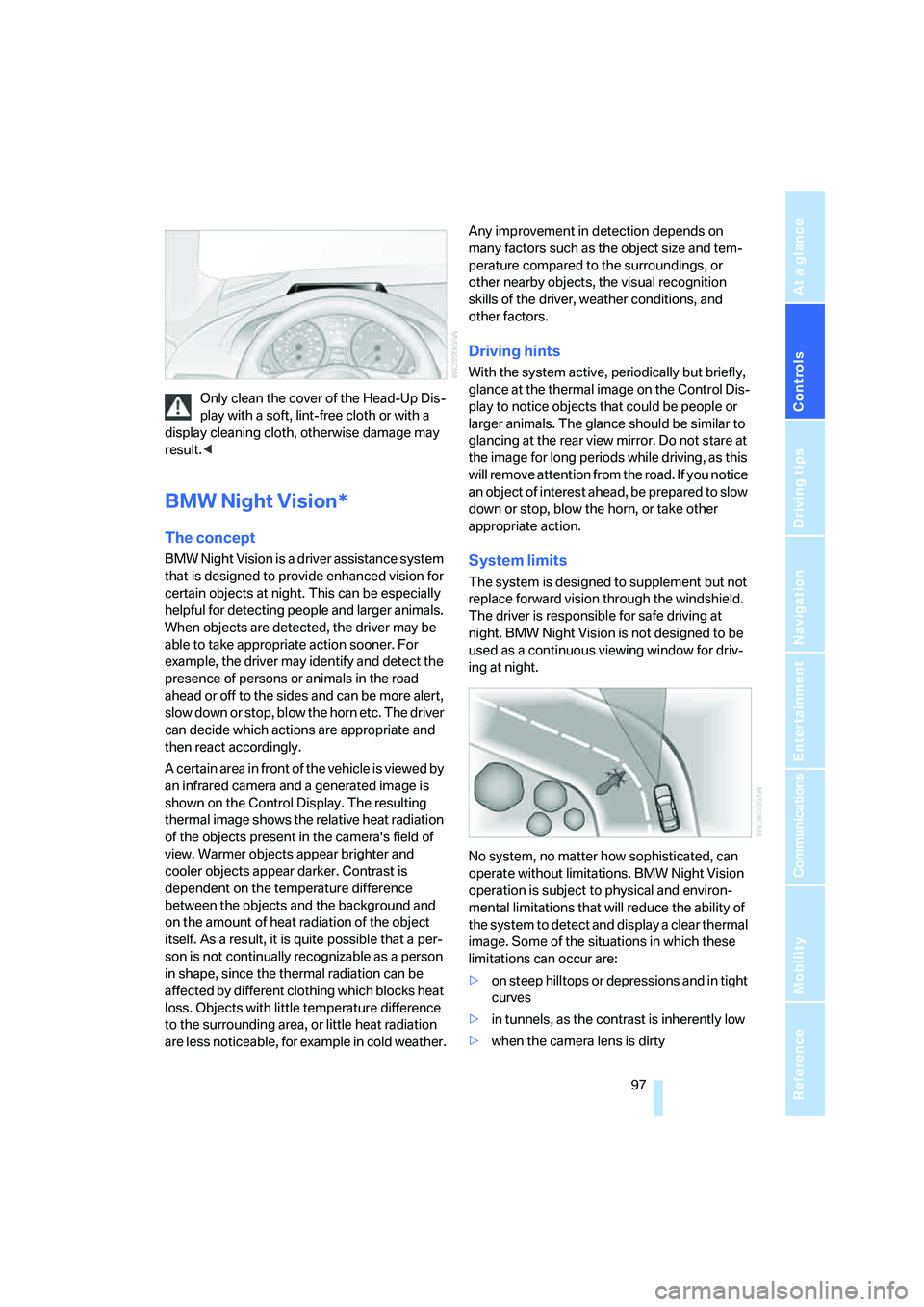
A certain area in front of the vehicle is viewed by
an infrared camera and a generated image is
shown on the Control Display. The resulting
thermal image shows the relative heat radiation
of the objects present in the camera's field of
view. Warmer objects appear brighter and
cooler objects appear darker. Contrast is
dependent on the temperature difference
between the objects and the background and
on the amount of heat radiation of the object
itself. As a result, it is quite possible that a per-
son is not continually recognizable as a person
in shape, since the thermal radiation can be
affected by different clothing which blocks heat
loss. Objects with little temperature difference
to the surrounding area, or little heat radiation
are less noticeable, for example in cold weather.Any improvement in detection depends on
many factors such as the object size and tem-
perature compared to the surroundings, or
other nearby objects, the visual recognition
skills of the driver, weather conditions, and
other factors.
Driving hints
With the system active, periodically but briefly,
glance at the thermal image on the Control Dis-
play to notice objects that could be people or
larger animals. The glance should be similar to
glancing at the rear view mirror. Do not stare at
the image for long periods while driving, as this
will remove attention from the road. If you notice
an object of interest ahead, be prepared to slow
down or stop, blow the horn, or take other
appropriate action.
System limits
The system is designed to supplement but not
replace forward vision through the windshield.
The driver is responsible for safe driving at
night. BMW Night Vision is not designed to be
used as a continuous viewing window for driv-
ing at night.
No system, no matter how sophisticated, can
operate without limitations. BMW Night Vision
operation is subject to physical and environ-
mental limitations that will reduce the ability of
the system to detect and display a clear thermal
image. Some of the situations in which these
limitations can occur are:
>on steep hilltops or depressions and in tight
curves
>in tunnels, as the contrast is inherently low
>when the camera lens is dirty
Page 230 of 242
Reference 229
At a glance
Controls
Driving tips
Communications
Navigation
Entertainment
Mobility
Headlamps
– care, refer to the Caring for
your vehicle brochure
– cleaning, refer to Wiper
system66
– replacing bulbs201
Head Light, refer to Adaptive
Head Light101
Head restraints
– front50
– removing50
– sitting safely47
"Head-Up Display"96
Head-Up Display95
Heated
– mirrors, refer to Automatic
functions53
– rear window106
– seats52
– steering wheel54
Heater105
Heating
– exterior mirrors53
– interior104
– rear window106
– residual heat107
– seats52
– steering wheel54
Heating with engine switched
off, refer to Residual
heat107
Heavy cargo, refer to Securing
cargo121
Height, refer to
Dimensions215
Height adjustment
– seats48
– steering wheel53
High-beam assistant102
High beams101
– headlamp flasher101
– indicator lamp13
– replacing bulbs202
High Definition Radio152
High water, refer to Driving
through water119
Hills119
"Home address" in
navigation134Homepage4
Hood194
Horn10
Hotel function33
– unlocking manually33
Hot exhaust system118
"Hour memo"83
"House number" for desti-
nation entry128
Hydraulic brake assistant,
refer to DBC Dynamic Brake
Control86
Hydroplaning119
– also refer to Minimum tread
depth191
I
IBOC, refer to High Definition
Radio152
Ice, refer to Outside temper-
ature warning74
ID3-Tag, refer to Information
about track159
iDrive16
– adjusting brightness83
– assistance window20
– changing date and time82
– changing language84
– changing menu page19
– changing settings82
– changing unit of measure
units and display form84
– controller16
– controls16
– displaying menus17
– selecting menu item19
– selecting or confirming
entry19
– start menu17
– status information20
– symbols18
Ignition58
– switched off58
– switched on58
Ignition key, refer to Keys/
remote control28
Ignition key position 1, refer to
Radio readiness58Ignition key position 2, refer to
Ignition on58
Ignition lock58
– starting engine with comfort
access37
Indicator/warning lamps
– active steering92
– airbags94
– DSC13,87
– DTC13,87
– Flat Tire Monitor89
– fog lamps13,103
– handbrake13,60
– safety belt warning52
– TPM Tire Pressure
Monitor91
Indicator and warning lamps,
overview13
Individually programmable
buttons on steering
wheel54
Individual settings, refer to
Personal Profile29
Inflation pressure, refer to Tire
inflation pressure188
Inflation pressure monitoring
– refer to Flat Tire Monitor88
– refer to Tire Pressure
Monitor89
Information
– on another location130
– on current position130
– on destination location130
"Information" for
navigation130
"Information on
destination"132
Initializing
– Flat Tire Monitor88
– radio, refer to Storing
stations150
– refer to Power failure204
– seat, mirror and steering
wheel memory49
– time and date82
"Input map"130
Installation location
– CD changer161
– navigation drive124
Page 236 of 242
Reference 235
At a glance
Controls
Driving tips
Communications
Navigation
Entertainment
Mobility
Settings
– BMW Night Vision98
– changing on Control
Display82
– clock, 12h/24h mode83
– configuring, refer to
Personal Profile29
Setting speed limit81
Setting time, refer to Prese-
lecting activation time108
"Set tire pressure"89
Shifting
– automatic transmission with
Steptronic62
– SMG Sequential Manual
Transmission62
Shifting paddles62
Shiftlock
– automatic transmission with
Steptronic62
– SMG Sequential Manual
Transmission61
Short commands of voice
command system218
"Short route" for
navigation135
Short route in navigation, refer
to Selecting route134
"Show current position"130
"Show destination
position"130
Side airbags92
Side markers, replacing
bulbs203
Side turn signals, replacing
bulbs203
Signal horn, refer to Horn10
Sill panel lighting, refer to
Interior lamps103
Sitting safely47
– with airbags47
– with head restraints47
– with safety belts47
Ski bag114
Sliding/tilt roof, refer to Glass
sunroof, electric with raise
function40
Slope assistant, refer to
Starting assistant119SMG Sequential Manual
Transmission61
– acceleration assistant64
– breaking-in118
– Dynamic Driving Control64
– gear display61
– kick-down62
– shiftlock61
– towing209
– tow-starting210
Snow chains193
Socket, refer to Connecting
electrical devices
114
Socket for Onboard
Diagnostics interface200
Socket for remote control,
refer to Ignition lock58
Soft closure aid, refer to
Automatic soft closing33
Song search with CD, refer to
Playing a track159
SOS, refer to Initiating an
emergency call206
Spare fuses205
Spare key28
– adapter28
Spare remote control28
Special oils, refer to Approved
engine oils196
Speed-dependent
volume146
Speed limit81
Speed limit warning, refer to
Speed limit81
Speedometer12
"Speed volume", tone
control146
Speed with winter tires193
Sport program
– automatic transmission with
Steptronic63
– refer to Dynamic Driving
Control64
Stability control, refer to
Driving stability control
systems86
"Star button"54
Start/Stop button58"Start" for stopwatch81
"Start guidance"128,136
Starting assistant119
Starting difficulties
– jump starting207
– refer to Special starting
conditions59
Starting engine59
Starting off on slopes, refer to
Starting assistant119
Start menu, iDrive17
"Start route guidance"130
"Start service"181
"State / Province" for desti-
nation entry126
"State inspection"78
Station, refer to Radio148
"Status"78
Status information on Control
Display20
Status of this Owner's Manual
at time of printing5
Steering wheel
– adjustment53
– automatic adjustment, refer
to Easy entry/exit
53
– buttons on steering
wheel11
– heating54
– lock58
– locking58
– memory49
– programmable buttons54
"Steering wheel buttons"54
Steering-wheel shift buttons,
refer to Shift paddles62
Steering with variable ratio,
refer to Active steering92
Steptronic, refer to Automatic
transmission with
Steptronic62
"Stop" for stopwatch82
"Stopwatch"81
Stopwatch81
Storage compartments112
"Store in address book" for
navigation132
"Store" on the radio150,155