2006 BMW 550I automatic transmission
[x] Cancel search: automatic transmissionPage 150 of 248
Navigation
Entertainment
Driving tips
149Reference
At a glance
Controls
Communications
Mobility
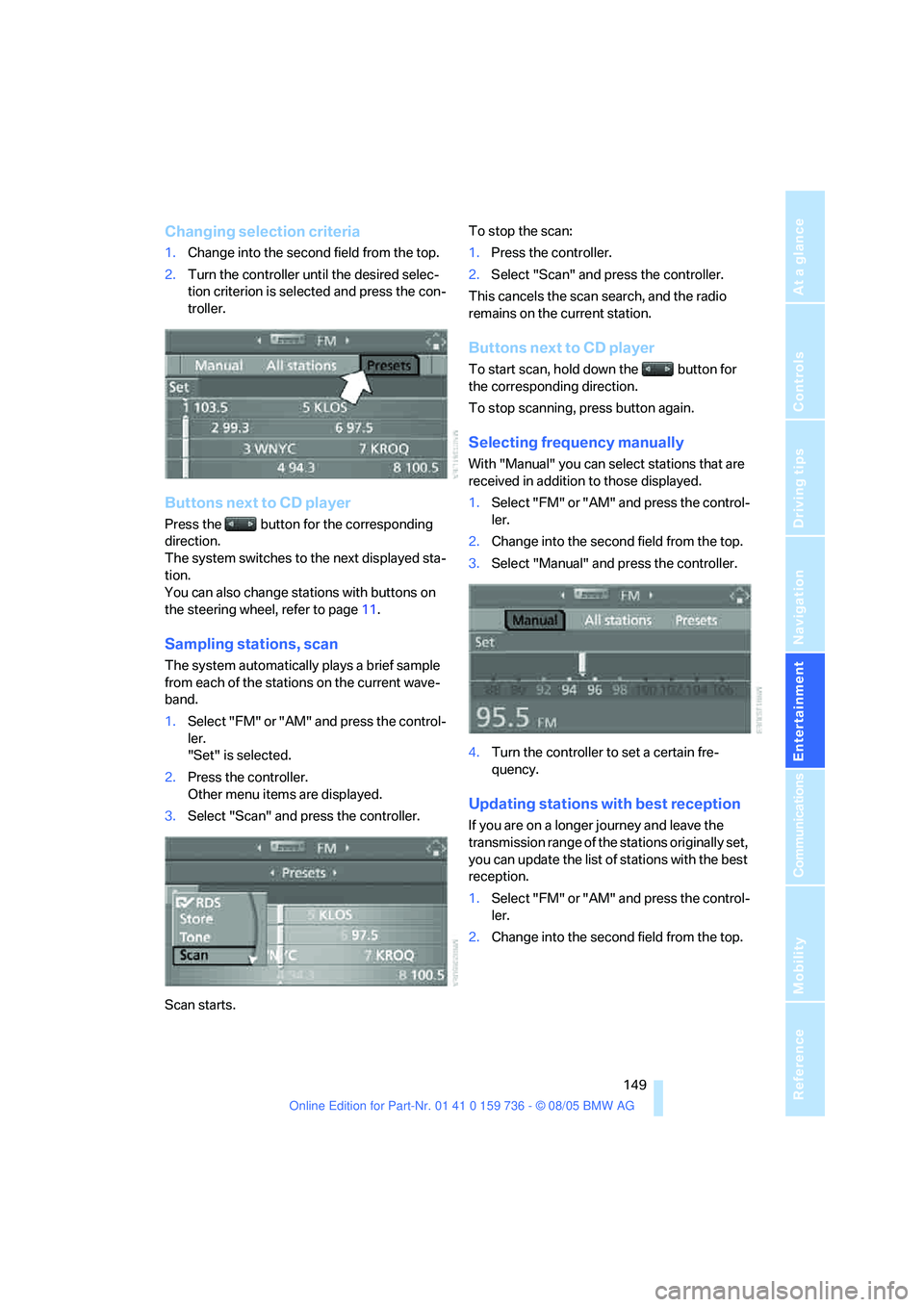
Changing selection criteria
1.Change into the second field from the top.
2.Turn the controller until the desired selec-
tion criterion is selected and press the con-
troller.
Buttons next to CD player
Press the button for the corresponding
direction.
The system switches to the next displayed sta-
tion.
You can also change stations with buttons on
the steering wheel, refer to page11.
Sampling stations, scan
The system automatically plays a brief sample
from each of the stations on the current wave-
band.
1.Select "FM" or "AM" and press the control-
ler.
"Set" is selected.
2.Press the controller.
Other menu items are displayed.
3.Select "Scan" and press the controller.
Scan starts.To stop the scan:
1.Press the controller.
2.Select "Scan" and press the controller.
This cancels the scan search, and the radio
remains on the current station.
Buttons next to CD player
To start scan, hold down the button for
the corresponding direction.
To stop scanning, press button again.
Selecting frequency manually
With "Manual" you can select stations that are
received in addition to those displayed.
1.Select "FM" or "AM" and press the control-
ler.
2.Change into the second field from the top.
3.Select "Manual" and press the controller.
4.Turn the controller to set a certain fre-
quency.
Updating stations with best reception
If you are on a longer journey and leave the
transmission range of the stations originally set,
you can update the list of stations with the best
reception.
1.Select "FM" or "AM" and press the control-
ler.
2.Change into the second field from the top.
Page 167 of 248
Telephoning
166
Telephoning
The concept
Your BMW is equipped with a full mobile phone
preparation package. After logging on a suitable
mobile phone on the vehicle once, you can
operate the mobile phone via iDrive, with the
buttons on the steering wheel and by voice.
A mobile phone that has been logged on once is
automatically detected again with the engine
running or the ignition switched on as soon as
it is in the vehicle interior. The logon data of up
to four mobile phones can be stored simulta-
neously. If several mobile phones are detected
simultaneously, the respective last mobile
phone logged on can be operated via the vehi-
cle.
Using a phone in your vehicle
Using the snap-in adapter*
The so-called snap-in adapter, a mobile phone
cradle, enables the battery to be charged and
the mobile phone to be connected to the exter-
nal antenna of your vehicle. This ensures
improved network reception and a consistent
voice reproduction quality. Ask your BMW cen-
ter which mobile phones snap-in adapters are
offered for.
BMW discourages the use of mobile
phones or other mobile communications
devices inside the vehicle without a direct con-
nection to an outside antenna. Otherwise, the
vehicle electronics and mobile communication
device can influence one another. In addition,
there is no assurance that the radiation which
results from transmission will be dissipated
from the vehicle interior.<
Avoid operating a mobile phone detected by
the vehicle with the keypad of the mobile
phone, otherwise malfunctions can occur.
For your safety
A car phone makes life more convenient in
many ways, and can even save lives in an emer-
gency. While you should consult your mobile
phone's separate owner's manual for a detailed
description of safety precautions and informa-
tion, we request that you direct your particular
attention to the following:
Only make entries when the traffic situa-
tion allows you to do so. Do not hold the
mobile phone in your hand while you are driving;
use the hands-free system instead. If you do
not observe this precaution, your being dis-
tracted can endanger vehicle occupants and
other road users.<
Suitable mobile phones
Ask your BMW center which mobile phones
with a Bluetooth interface are supported by the
mobile phone preparation package or which
mobile phones snap-in adapters are available
for. These mobile phones support the functions
described in this Owner's Manual with a certain
software version. Malfunctions can occur with
other mobile phones.
Care instructions
You can find what you need to know about car-
ing for your mobile phone in the separate Caring
for your vehicle brochure and in the mobile
phone owner's manual.
Operating options
You can operate the mobile phone* using:
>The steering wheel, refer to page11
>iDrive, refer to page16
>Voice commands, refer to page174
*
Page 180 of 248
179
Entertainment
Reference
At a glance
Controls
Driving tips Communications
Navigation
Mobility
TeleService , BMW Assist
TeleService
TeleService supports you when communicat-
ing with a BMW center. The built-in car phone
can be used to transmit data regarding the ser-
vice status of your vehicle or regarding legally
mandated inspections directly to your BMW
center. This is the same data that is also stored
for CBS Condition Based Service in the remove
control. Your BMW center can then contact
you, and you can make an appointment that
suits you while you are still on the road. Your
advantage here is that your BMW center can
prepare in advance for the required mainte-
nance work. The TeleService functions are
country-specific: the data regarding the service
status of your vehicle or regarding legally man-
dated inspections is transmitted on a country-
specific basis either automatically before they
fall due or during your calls to the BMW center.
Your BMW center will be glad to provide more
detailed information.
BMW Assist
BMW Assist provides you with other services in
addition to TeleService. For example, the posi-
tion data of your vehicle can be transferred to
the BMW Assist response center if an emer-
gency call
* has been initiated.
Many functions of BMW Assist depend on the
individually agreed contract. Data transmission,
e. g. of the CBS Condition Based Service, dif-
fers from country to country.
The contract of participation with BMW Assist
and the activation must be completed before
you can use BMW Assist.
When the contract expires, the car phone can
be deactivated by a BMW center without having
to visit a BMW center. Following deactivation of
the car phone, no emergency calls can be
made. The car phone can be reactivated after
signing a new contract with a BMW center.You can also use the services of BMW Assist via
the Internet. The range of services is continually
being expanded.
Requirements
You can use TeleService or BMW Assist when
the following requirements are met:
>The installed car phone is logged on to a
cellular telephone network. This network
must be capable of transmitting the ser-
vices.
>To transmit position data, the vehicle must
be able to determine the current position.
This can be displayed on the Control Dis-
play.
>For TeleService or BMW Assist to be acti-
vated and updated, the GPS signal must be
available.
>For BMW Assist: you have applied to your
BMW center or BMW Customer Support for
BMW Assist.
Enabling TeleService or BMW Assist
For you to be able to use the services of
TeleService or BMW Assist, these must be
enabled.
Requirements
>Make sure that the vehicle can determine its
current location. Reception is best when
you have an unobstructed view to the sky.
>Leave radio readiness switched on while
connecting to the system.
Enabling
iDrive, for principle details, refer to page16.
1.Press the button.
This opens the start menu.
2.Press the controller to open the menu.
**
Page 215 of 248
Giving and receiving assistance
214 Sedan:
It is located in the toolkit in the luggage com-
partment lid, refer to page203.
Sports Wagon:
It is located in the toolkit behind the left side
panel in the cargo area, refer to page203.
Use only the tow fitting provided with the
vehicle and screw it all the way in. Use the
tow fitting for towing only on roads. Avoid lateral
loading of the tow fitting, e.g. do not lift the vehi-
cle by the tow fitting. Otherwise damage to the
tow fitting and the vehicle can occur.<
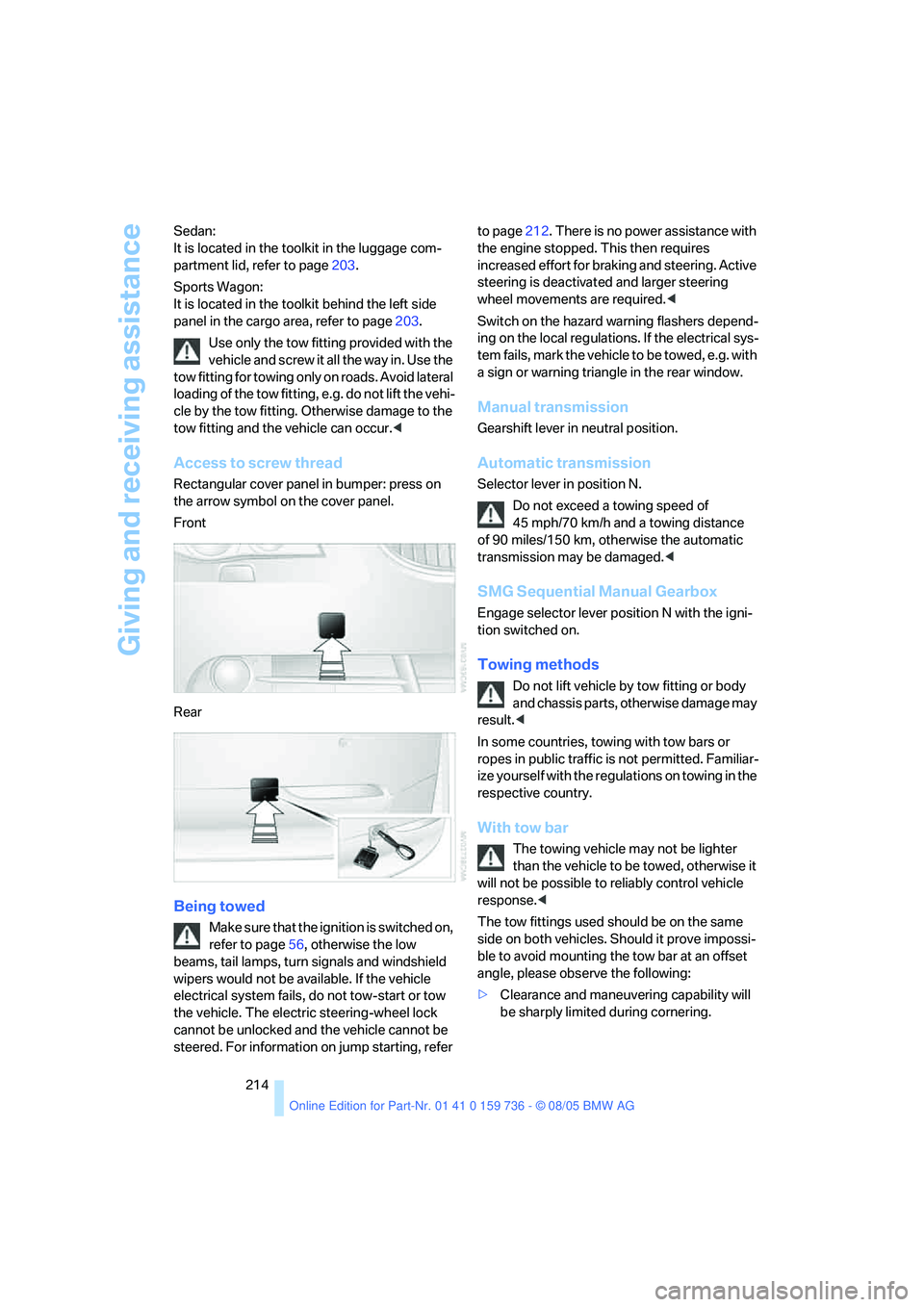
Access to screw thread
Rectangular cover panel in bumper: press on
the arrow symbol on the cover panel.
Front
Rear
Being towed
Make sure that the ignition is switched on,
refer to page56, otherwise the low
beams, tail lamps, turn signals and windshield
wipers would not be available. If the vehicle
electrical system fails, do not tow-start or tow
the vehicle. The electric steering-wheel lock
cannot be unlocked and the vehicle cannot be
steered. For information on jump starting, refer to page212. There is no power assistance with
the engine stopped. This then requires
increased effort for braking and steering. Active
steering is deactivated and larger steering
wheel movements are required.<
Switch on the hazard warning flashers depend-
ing on the local regulations. If the electrical sys-
tem fails, mark the vehicle to be towed, e.g. with
a sign or warning triangle in the rear window.
Manual transmission
Gearshift lever in neutral position.
Automatic transmission
Selector lever in position N.
Do not exceed a towing speed of
45 mph/70 km/h and a towing distance
of 90 miles/150 km, otherwise the automatic
transmission may be damaged.<
SMG Sequential Manual Gearbox
Engage selector lever position N with the igni-
tion switched on.
Towing methods
Do not lift vehicle by tow fitting or body
and chassis parts, otherwise damage may
result.<
In some countries, towing with tow bars or
ropes in public traffic is not permitted. Familiar-
ize yourself with the regulations on towing in the
respective country.
With tow bar
The towing vehicle may not be lighter
than the vehicle to be towed, otherwise it
will not be possible to reliably control vehicle
response.<
The tow fittings used should be on the same
side on both vehicles. Should it prove impossi-
ble to avoid mounting the tow bar at an offset
angle, please observe the following:
>Clearance and maneuvering capability will
be sharply limited during cornering.
Page 216 of 248
Mobility
215Reference
At a glance
Controls
Driving tips
Communications
Navigation
Entertainment
>When mounted at an angle, the tow bar will
exert lateral forces, tending to push the
vehicle sideways.
Only attach the tow bar to the tow fittings,
as attachment to other vehicle parts can
lead to damage.<
With tow rope
When starting off in the towing vehicle, make
sure that the tow rope is taut.
To avoid jerking and the associated
stresses on vehicle components when
towing, always use nylon ropes or nylon straps.
Only attach tow ropes to the tow fittings, as
attachment to other vehicle parts can lead to
damage.<
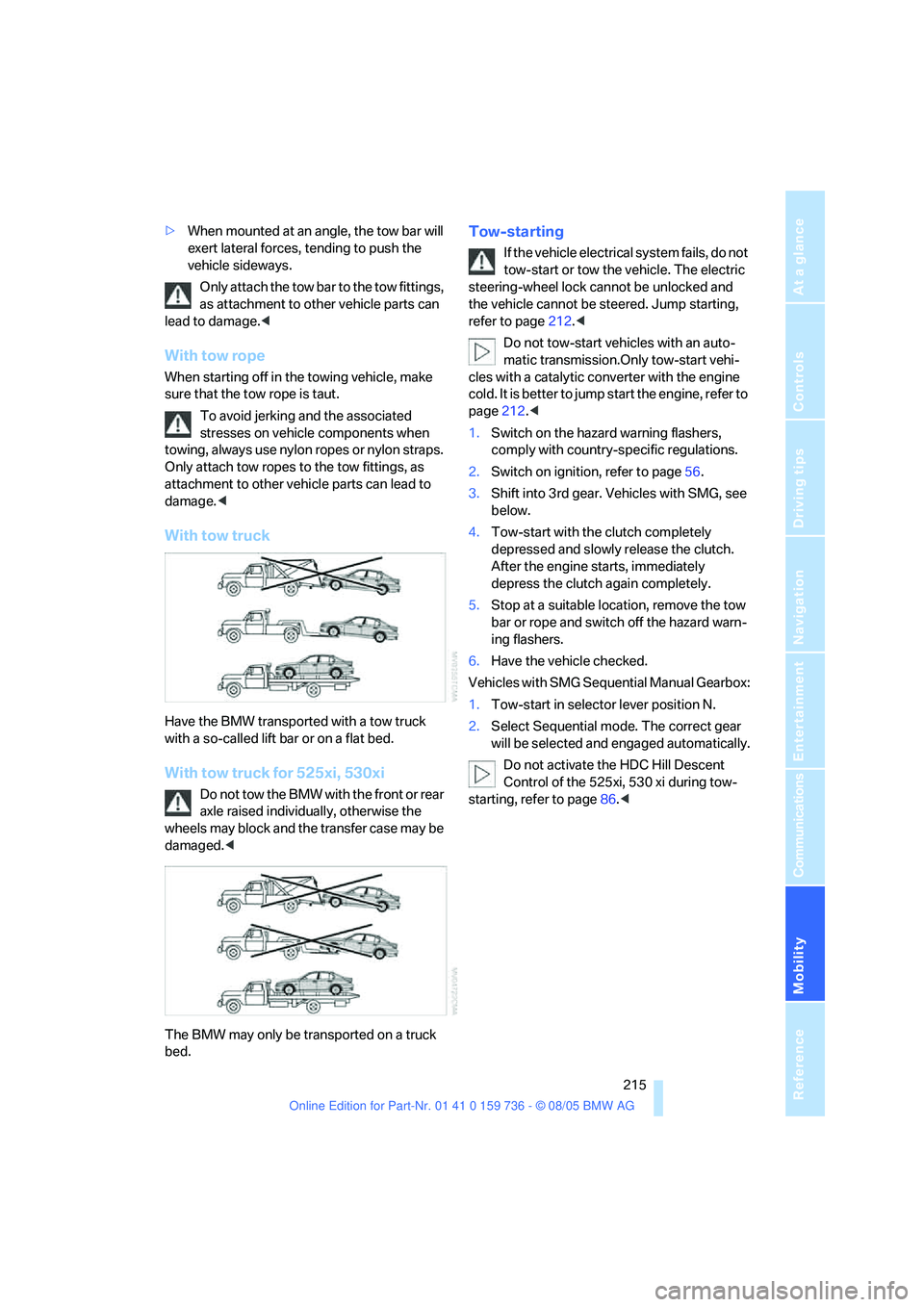
With tow truck
Have the BMW transported with a tow truck
with a so-called lift bar or on a flat bed.
With tow truck for 525xi, 530xi
Do not tow the BMW with the front or rear
axle raised individually, otherwise the
wheels may block and the transfer case may be
damaged.<
The BMW may only be transported on a truck
bed.
Tow-starting
If the vehicle electrical system fails, do not
tow-start or tow the vehicle. The electric
steering-wheel lock cannot be unlocked and
the vehicle cannot be steered. Jump starting,
refer to page212.<
Do not tow-start vehicles with an auto-
matic transmission.Only tow-start vehi-
cles with a catalytic converter with the engine
cold. It is better to jump start the engine, refer to
page212.<
1.Switch on the hazard warning flashers,
comply with country-specific regulations.
2.Switch on ignition, refer to page56.
3.Shift into 3rd gear. Vehicles with SMG, see
below.
4.Tow-start with the clutch completely
depressed and slowly release the clutch.
After the engine starts, immediately
depress the clutch again completely.
5.Stop at a suitable location, remove the tow
bar or rope and switch off the hazard warn-
ing flashers.
6.Have the vehicle checked.
Vehicles with SMG Sequential Manual Gearbox:
1.Tow-start in selector lever position N.
2.Select Sequential mode. The correct gear
will be selected and engaged automatically.
Do not activate the HDC Hill Descent
Control of the 525xi, 530 xi during tow-
starting, refer to page86.<
Page 222 of 248
Reference 221
At a glance
Controls
Driving tips
Communications
Navigation
Entertainment
Mobility
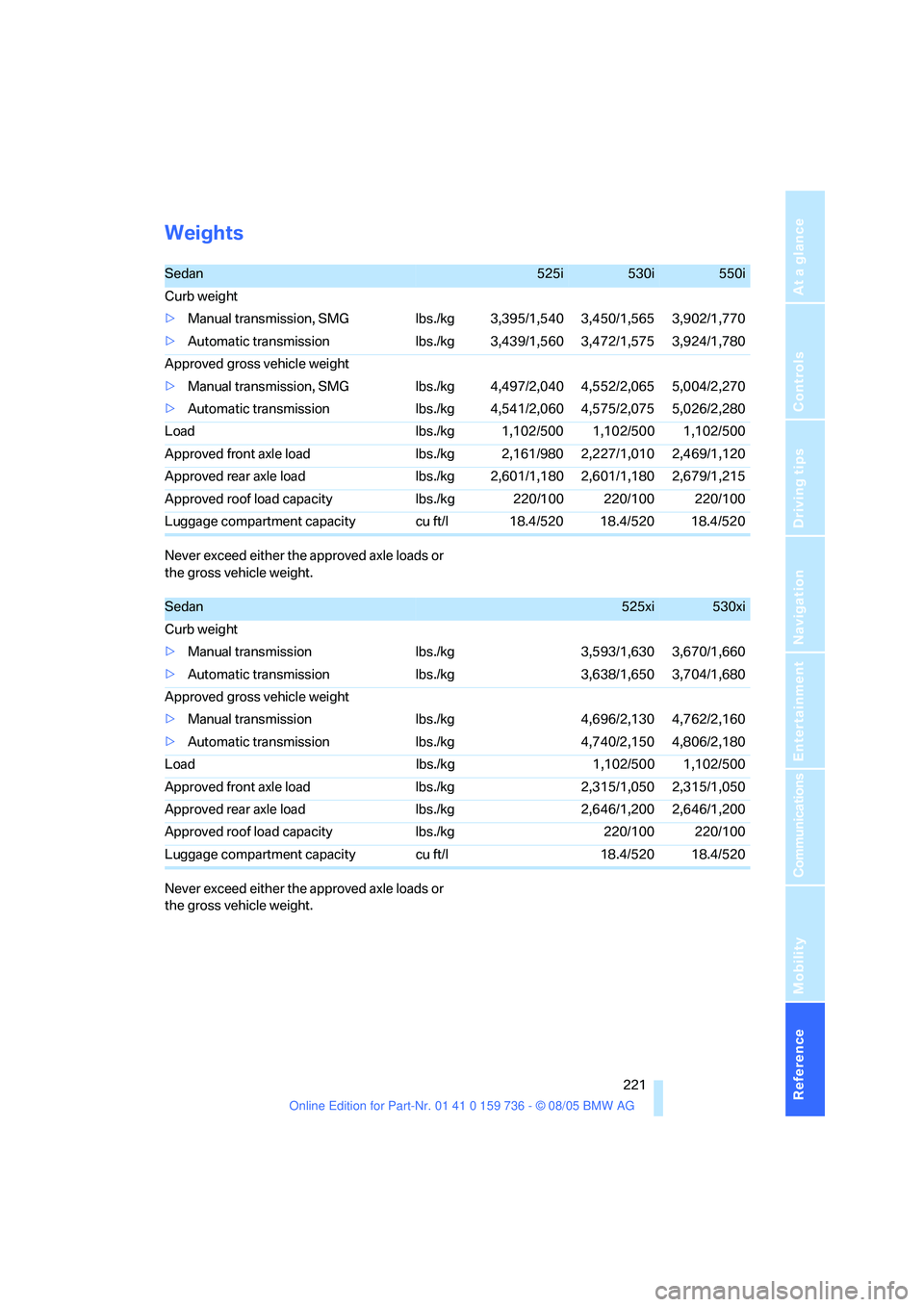
Weights
Never exceed either the approved axle loads or
the gross vehicle weight.
Never exceed either the approved axle loads or
the gross vehicle weight.
Sedan525i530i550i
Curb weight
>Manual transmission, SMG lbs./kg 3,395/1,540 3,450/1,565 3,902/1,770
>Automatic transmission lbs./kg 3,439/1,560 3,472/1,575 3,924/1,780
Approved gross vehicle weight
>Manual transmission, SMG lbs./kg 4,497/2,040 4,552/2,065 5,004/2,270
>Automatic transmission lbs./kg 4,541/2,060 4,575/2,075 5,026/2,280
Load lbs./kg 1,102/500 1,102/500 1,102/500
Approved front axle load lbs./kg 2,161/980 2,227/1,010 2,469/1,120
Approved rear axle load lbs./kg 2,601/1,180 2,601/1,180 2,679/1,215
Approved roof load capacity lbs./kg 220/100 220/100 220/100
Luggage compartment capacity cu ft/l 18.4/520 18.4/520 18.4/520
Sedan525xi530xi
Curb weight
>Manual transmission lbs./kg 3,593/1,630 3,670/1,660
>Automatic transmission lbs./kg 3,638/1,650 3,704/1,680
Approved gross vehicle weight
>Manual transmission lbs./kg 4,696/2,130 4,762/2,160
>Automatic transmission lbs./kg 4,740/2,150 4,806/2,180
Load lbs./kg 1,102/500 1,102/500
Approved front axle load lbs./kg 2,315/1,050 2,315/1,050
Approved rear axle load lbs./kg 2,646/1,200 2,646/1,200
Approved roof load capacity lbs./kg 220/100 220/100
Luggage compartment capacity cu ft/l 18.4/520 18.4/520
Page 223 of 248

Technical data
222 Never exceed either the approved axle loads or
the gross vehicle weight.
Capacities
Sports Wagon530xi
Curb weight
>Manual transmission lbs./kg 3,858/1,750
>Automatic transmission lbs./kg 3,891/1,765
Approved gross vehicle weight
>Manual transmission lbs./kg 5,049/2,290
>Automatic transmission lbs./kg 5,082/2,305
Load lbs./kg 1,190/540
Approved front axle load lbs./kg 2,381/1,080
Approved rear axle load lbs./kg 2,866/1,300
Approved roof load capacity lbs./kg 220/100
Luggage compartment capacity cu ft/l 17.7-58.3/500-1,650
Notes
Fuel tank gal/liters approx. 18.5/70 Fuel grade: page187
of that reserve gal/liters approx. 2.1/8
Window cleaning system For more details: page64
>Sedan quarts/liters approx. 3.2/3
>incl. headlamp washer system quarts/liters approx. 5.3/5
>Sports Wagon quarts/liters approx. 5.3/5
Engine with oil filter change BMW High Performance
Synthetic Oil.
Oil grades: page198 >525i/xi, 530i/xi quarts/liters 6.9/6.5
>550i quarts/liters 8.5/8.0
Page 229 of 248
Everything from A to Z
228 Approved gross vehicle
weight, refer to Weights221
Armrest, refer to Center
armrest, rear109
Arrival time
– refer to Computer74
– refer to Starting destination
guidance136
"Arrow display" during
navigation137
Ashtray
– front107
– rear108
Assist, refer to
BMW Assist179
Assistance systems, refer to
Driving stability control
systems84
Assistance window20
"Assist. window off"21
AUC Automatic recirculated-
air control101
Audio144
– controls144
– switching on/off144
– tone control145
– volume145
"Audio", refer to Tone
control145
Automatic
– air distribution99
– air volume99
– garage door opener104
– headlamp control94
– service notification180
– steering wheel adjustment,
refer to Easy entry/exit50
– storing stations149
– tailgate operation35
Automatically switching
between high beams and
low beams, refer to High-
beam assistant95
Automatic car washes118
– also refer to Caring for your
vehicle brochure
Automatic climate control98
– automatic air distribution99
– switching off101Automatic curb monitor50
Automatic lighting
– refer to Automatic headlamp
control94
– refer to Daytime driving
lamps94
– refer to High-beam
assistant95
– refer to Interior lamps97
– refer to Pathway lighting94
Automatic low-beam function,
refer to High-beam
assistant95
"Automatic programs"99
Automatic recirculated-air
control AUC101
Automatic station search149
Automatic transmission with
Steptronic61
– deactivating selector lever
interlock62
– interlock61
– kick-down61
– selector lever interlock61
– shiftlock61
– sport program62
– tow starting214
– tow-starting215
– with comfort access38
"Automatic ventilation"102
AUTO program for automatic
climate control99
"Autostore" on the
radio148,150
Average fuel consumption73
– setting the units81
Average speed, refer to
Computer73
"Avoid ferries" for
navigation135
"Avoid highways" for
navigation135
Avoiding freeways for
navigation135
Avoiding unintentional
alarms37
"Avoid tollroads" for
navigation135Axle loads, refer to
Weights221
"A - Z"172
B
Backrest contour, refer to
Lumbar support44
Backrests, refer to Seats44
Backrest width adjustment44
Backup lamps, refer to
Reverse gear59
– replacing bulbs205
"Balance", refer to Tone
control146
Balance, refer to Tone
control146
Band-aids, refer to First-aid
kit212
"Bass", refer to Tone
control146
Bass, refer to Tone
control145
Battery, refer to Vehicle
battery209
– jump starting212
Battery disposal
– remote control with comfort
access39
– vehicle battery209
Battery replacement, remote
control with comfort
access39
Being towed214
Belts, refer to Safety belts47
Beverage holder, refer to
Cup holders107
Blower, refer to Air
volume100
"BMW Assist"181
BMW Assist179
– enabling179
– services offered180
"BMW Contact"183
"BMW Contact
Numbers"183
BMW homepage4
BMW maintenance
system201