2006 BMW 530I TOURING key
[x] Cancel search: keyPage 178 of 259

Telephoning
176
Preparation with mobile phone
6.Additional operations must be carried out
on the mobile phone and differ depending
on the model, refer to the operating instruc-
tions of your mobile phone, e.g. find, con-
nect or link under Bluetooth device.
Logging on
Depending on your mobile phone, you will first
be requested consecutively via the display of
your mobile phone or the Control Display to
enter the Bluetooth passkey you specified.
Display on the Control Display if the Bluetooth
passkey can be entered with iDrive:
7.Select "Add device" and press the control-
ler.
8.Enter the Bluetooth passkey.
Depending on the mobile phone, approx.
30 seconds are available for entering the
Bluetooth passkey on the mobile phone
and on the Control Display.
9.Select "Confirm passkey" and press the
controller.
10.Wait a few seconds until the list of the
logged-on mobile phones is shown on the
Control Display and "Phone" is selected.To cancel the logon of the mobile phone on the
vehicle:
Select "Refuse connection" and press the con-
troller.
The next time you use the mobile phone in the
vehicle interior, it will be detected within a max-
imum of 2 minutes with the engine running or
the ignition switched on.
As soon as a mobile phone is detected by the
vehicle, the phone book entries stored on the
SIM card or on your mobile phone are trans-
ferred to your vehicle, refer to the operating
instructions of your mobile phone if necessary.
This transfer is dependent on your mobile
phone, refer to the operating instructions of
your mobile phone if necessary, and can take
several minutes.
Up to four mobile phones can be logged on
consecutively. If you log on a fifth mobile phone,
the logon data of the last mobile phone in the
list will be deleted, refer to below.
List of logged-on mobile phones
All mobile phones for which the vehicle has
stored the logon data can be displayed. If sev-
eral logged-on mobile phones are detected by
the vehicle simultaneously, you can operate the
mobile phone highest up in the list via the vehi-
cle.
You can change the order of the mobile phones
in the list. As long as a mobile phone is selected
in this list, the mobile phones cannot be oper-
ated via the vehicle.
iDrive, for explanation of principle, refer to
page16.
1.Press the button to open the start
menu.
2.Open the menu by pressing the controller.
3.Select "Communication settings" and
press the controller.
4.Select "Bluetooth" and press the controller.
5.Select "Phone" and press the controller.
Page 181 of 259

179
Entertainment
Reference
At a glance
Controls
Driving tips Communications
Navigation
Mobility
Receiving calls
If you have the phone number of the caller
stored in the phone book and the phone num-
ber has been transmitted, the name of the entry
is displayed.
Accepting a call
Select "Accept" and press the controller.
Rejecting a call
Select "Reject" and press the controller.
The caller is diverted to your mailbox if it has
been activated.
Calling
Dialing phone numbers
1.Select "Phone" and press the controller.
2.Select "Dial" and press the controller.
3.Enter the desired phone number by dialing
the individual digits and pressing the con-
troller.
Always enter the complete phone number
consisting of national dialing code, area
code, and phone number.
The letters correspond to the digits on the
keypad of the mobile phone.To delete an incorrect character:
Move the controller toward the right to
select , and press the controller.
4.Select "Dial number" and press the control-
ler.
Ending a call
1.Select the phone number and press the
controller.
2.Select "End call" and press the controller.
Dialing a phone number from phone
book or a phone number stored in a list
Phone numbers you have called, incoming calls
and the entries of the phone book are stored in
lists when the mobile phone is connected to the
vehicle via Bluetooth. If the caller is entered in
the phone book, the name of the entry is dis-
played instead of the phone number.
Page 184 of 259
Telephoning
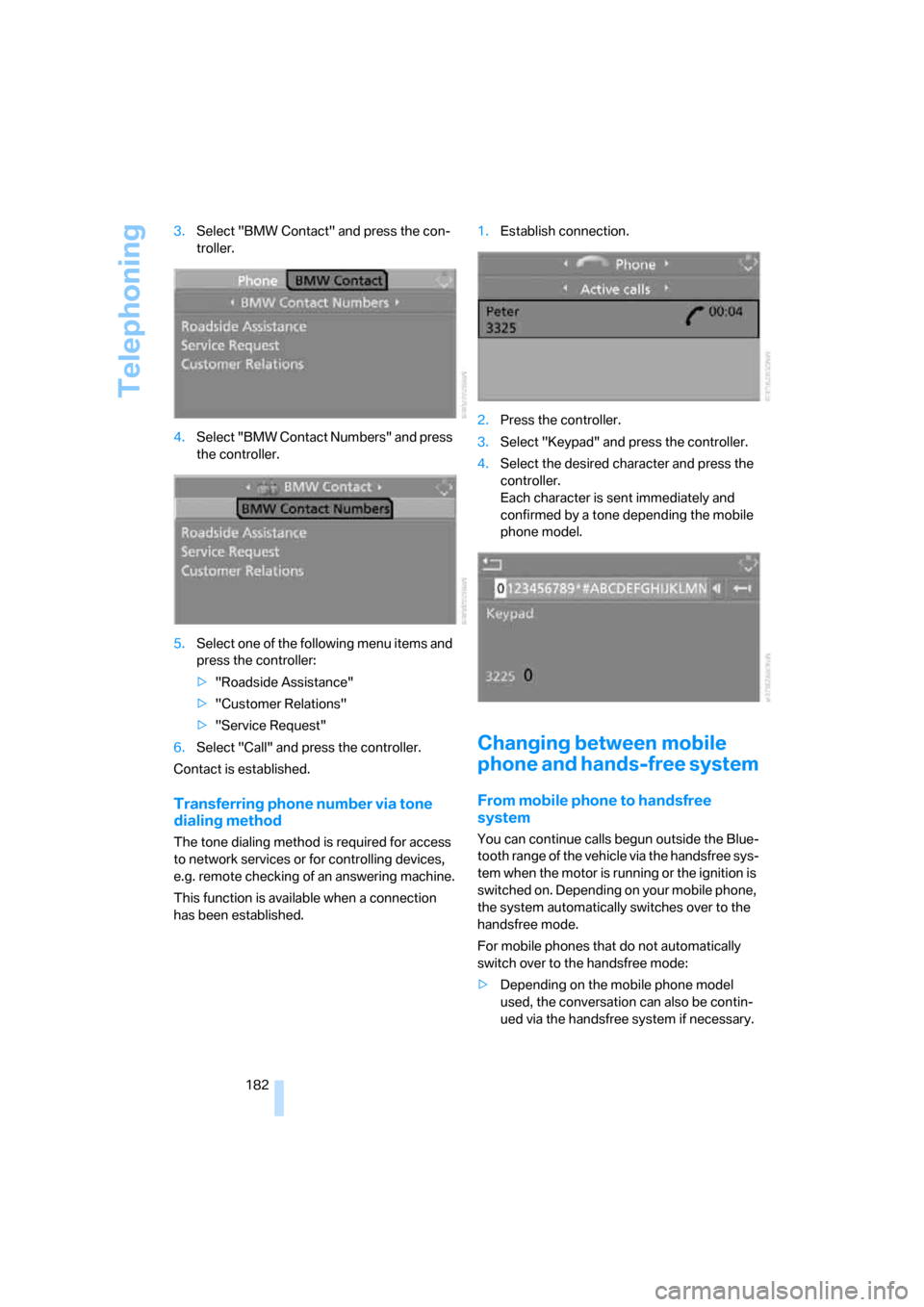
182 3.Select "BMW Contact" and press the con-
troller.
4.Select "BMW Contact Numbers" and press
the controller.
5.Select one of the following menu items and
press the controller:
>"Roadside Assistance"
>"Customer Relations"
>"Service Request"
6.Select "Call" and press the controller.
Contact is established.
Transferring phone number via tone
dialing method
The tone dialing method is required for access
to network services or for controlling devices,
e.g. remote checking of an answering machine.
This function is available when a connection
has been established.1.Establish connection.
2.Press the controller.
3.Select "Keypad" and press the controller.
4.Select the desired character
and press the
controller.
Each character is sent immediately and
confirmed by a tone depending the mobile
phone model.
Changing between mobile
phone and hands-free system
From mobile phone to handsfree
system
You can continue calls begun outside the Blue-
tooth range of the vehicle via the handsfree sys-
tem when the motor is running or the ignition is
switched on. Depending on your mobile phone,
the system automatically switches over to the
handsfree mode.
For mobile phones that do not automatically
switch over to the handsfree mode:
>Depending on the mobile phone model
used, the conversation can also be contin-
ued via the handsfree system if necessary.
Page 188 of 259
Telephoning
186
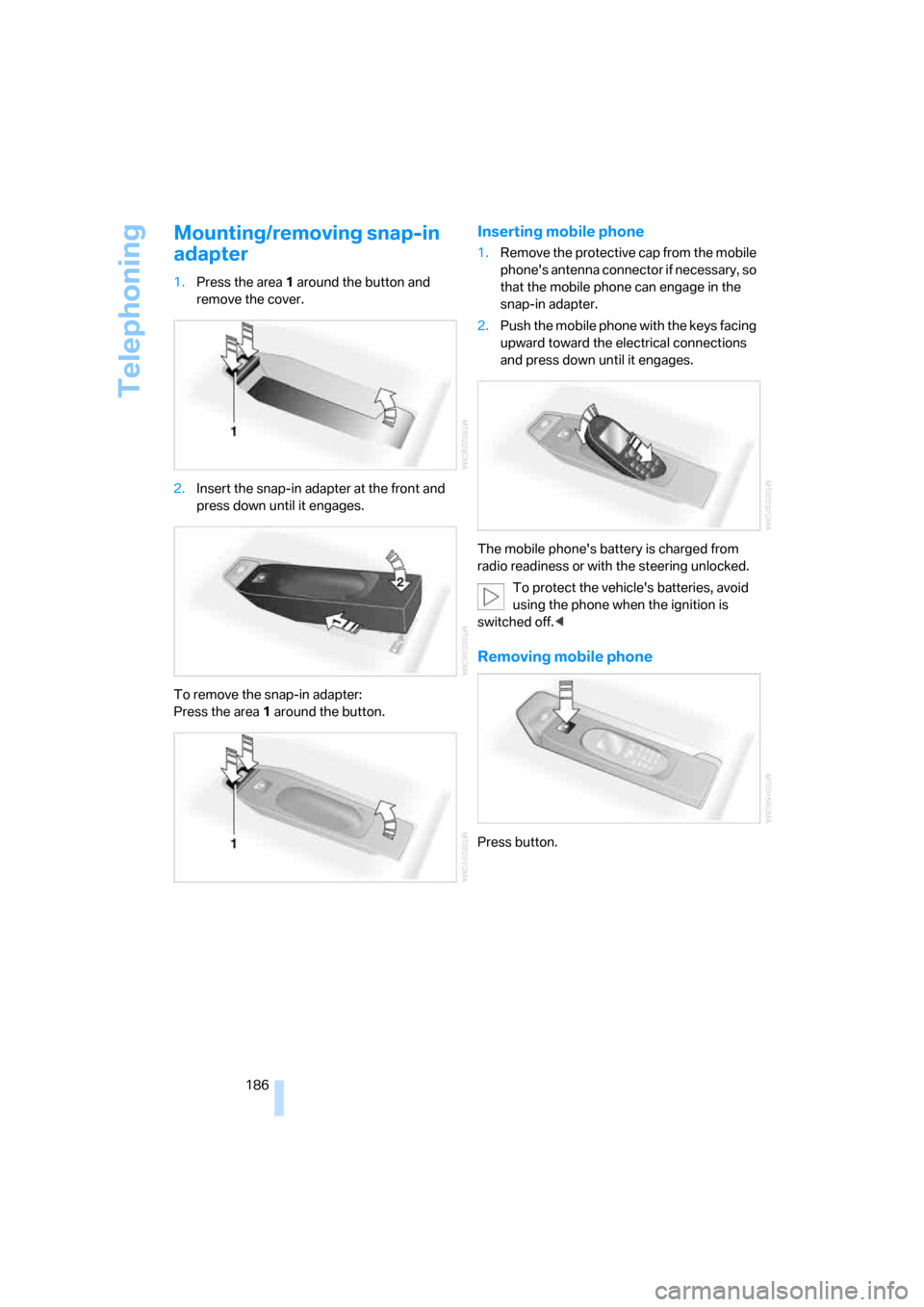
Mounting/removing snap-in
adapter
1.Press the area 1 around the button and
remove the cover.
2.Insert the snap-in adapter at the front and
press down until it engages.
To remove the snap-in adapter:
Press the area 1 around the button.
Inserting mobile phone
1.Remove the protective cap from the mobile
phone's antenna connector if necessary, so
that the mobile phone can engage in the
snap-in adapter.
2.Push the mobile phone with the keys facing
upward toward the electrical connections
and press down until it engages.
The mobile phone's battery is charged from
radio readiness or with the steering unlocked.
To protect the vehicle's batteries, avoid
using the phone when the ignition is
switched off.<
Removing mobile phone
Press button.
Page 238 of 259

Everything from A to Z
236
Everything from A to Z
Index
"..." Identifies Control Display
texts used to select
individual functions, and
indicates where to find them
in the text.
A
ABS Antilock Brake
System86
ACC, refer to Active cruise
control67
Acceleration assistant for
SMG Sequential Manual
Transmission63
Accessories6
Acoustic signal, refer to Check
Control79
Activated-charcoal filter109
"Activation time" for parked-
car ventilation109
Active cruise control67
– indicator lamp70
– radar sensor71
– selecting distance69
– warning lamps71
Active head restraints,
front49
Active seat51
Active seat ventilation51
Active steering93
– warning lamp94
Adapter for spare key28
Adaptive brake lamps, refer to
Brake force display94
Adaptive Head Light102
"Add digits" for mobile
phone180
"Address book" for navigation
system140Address for navigation
– deleting141
– entering133,136
– selecting141
– storing140
– storing current position140
"Add to address book"140
"Add to destination list"136
Adjusting active backrest
width47
Adjusting confirmation signals
for locking and unlocking31
Adjusting the tone during
audio operation, refer to
Tone control153
Adjusting thigh support46
Adjustment in audio mode
– front-to-rear154
– right/left balance154
"After door opened"48
"After unlocking"48
Airbags94
– sitting safely45
– warning lamp96
Air circulation, refer to Air
recirculation108
Air distribution
– automatic106
– manual107
Airing, refer to Ventilation108
Air recirculation
– AUC Automatic recircu-
lated-air control108
– recirculated-air mode108
"Air recirculation on / off"53
Air vent outlets of automatic
climate control105
Air vents105
– refer to Ventilation108
Air volume107
AKI, refer to Fuel quality195Alarm system37
– avoiding unintentional
alarms38
– interior motion sensor38
– switching off alarm38
– switching off tilt alarm
sensor and interior motion
sensor38
– tilt alarm sensor38
"All channels"163
"All doors"30
All-season tires, refer to
Winter tires202
"All stations", calling up with
radio156,159
All-wheel drive, refer to
xDrive87
Alterations, technical, refer to
For your own safety5
Altering stretch of road148
"AM", reception
range152,156
Antenna for mobile phone174
Antifreeze
– coolant207
– washer fluid66
Antilock Brake System
ABS86
Anti-theft alarm system, refer
to Alarm system37
Anti-theft system, refer to
Central locking system29
Approved axle loads, refer to
Weights229
Approved engine oils206
Approved gross vehicle
weight, refer to Weights229
Armrest, refer to Center
armrest, rear116
Around the center console14
Around the steering wheel10
Page 240 of 259
Everything from A to Z
238 BMW Assist187
– enabling187
– services offered188
"BMW Contact"182
"BMW Contact
Numbers"182
BMW homepage4
BMW maintenance
system209
BMW Night Vision98
– activating99
– cleaning camera100
– cleaning camera, refer to
Wiper system66
– deactivating99
– making settings99
"BMW Service"189
"BMW Service settings"188
BMW website4
Bottle holder, refer to Cup
holders114
Brake Assistant, refer to DBC
Dynamic Brake Control86
Brake fluid207
– warning lamp207
Brake force display94
Brake lamps
– brake force display94
– replacing bulbs213
Brake pads208
– breaking-in124
Brake rotors126
Brakes
– ABS Antilock Brake
System86
– brake fluid207
– brake force display94
– brake pads208
– breaking-in124
– handbrake60
– warning lamps13
Brake system124,207
– brake fluid level207
– brake pads124,208
– breaking-in124
– disk brakes126
– warning lamp207Braking
– CBC Cornering Brake
Control86
– DBC Dynamic Brake
Control86
– electronic brake-force
distribution86
– refer to Braking safely125
Braking safely125
Breakdown assistance189
Breakdown services, refer to
Roadside Assistance220
Breaking-in the clutch124
Breaking-in the
differential124
Break-in period124
"Brightness"83
– with BMW Night Vision100
Brightness of Control
Display83
Button for starting engine58
Buttons on steering wheel11
C
California Proposition 65
Warning6
"Call"180
Call
– accepting179
– displaying accepted180
– ending179
– in absence180
– starting179
Calling
– from phone book179
– from Top 8 list180
– redialing180
– refer to telephone operating
instructions
Can holder, refer to Cup
holders114
Capacities230
Capacity
– of cargo area229
– of luggage
compartment229
Car battery, refer to Vehicle
battery217Car care, refer to Caring for
your vehicle brochure
Car-care products, refer to
Caring for your vehicle
brochure
"Car Data"76
Care210
– refer to Caring for your
vehicle brochure
Cargo
– refer to Loading126
– securing128
– securing with ski bag120
Cargo area
– capacity229
– emergency operation, refer
to Opening manually36
– increasing117
– opening/closing, refer to
Tailgate35
– opening from inside35
– opening from outside35
– opening with remote
control31
Cargo area cover, refer to Roll-
up cover
Caring for artificial leather,
refer to Caring for your
vehicle brochure
Caring for leather, refer to
Caring for your vehicle
brochure
Caring for light-alloy wheels,
refer to Caring for your
vehicle brochure
Caring for the carpet, refer to
Caring for your vehicle
brochure
Caring for the vehicle finish,
refer to Caring for your
vehicle brochure
Car key, refer to Keys/remote
control28
Car phone174
– installation location, refer to
Center armrest113
– refer to Mobile phone174
– refer to separate operating
instructions
Page 243 of 259

Reference 241
At a glance
Controls
Driving tips
Communications
Navigation
Entertainment
Mobility
"Display"84
Display, refer to iDrive16
Display lighting, refer to
Instrument lighting104
"Display off"21
Displays, refer to Instrument
cluster12
"Display settings"82
Displays on the windshield,
refer to Head-Up Display96
Disposal
– battery of remote control
with comfort access40
– vehicle battery218
Distance, refer to
Computer76
Distance cruise control, refer
to Active cruise control67
"Distance to dest."76
Distance to destination, refer
to Computer76
Distance warning, refer to
PDC Park Distance
Control85
Divided rear seat back, refer to
Through-loading
system116
Door entry lighting104
Door key, refer to Keys/
remote control28
Door lock32
Door locking, acknowl-
edgment signals31
"Door locks"30
Doors
– manual operation32
– remote control30
DOT Quality Grades200
Draft-free ventilation108
Drinks holder, refer to Cup
holders114
Drive mode62
"Driver's door only"30
Driving lamps, refer to Parking
lamps/low beams101
Driving notes124
Driving route, refer to
Displaying route145Driving stability control
systems86
Driving through water125
Driving tips, refer to Driving
notes124
Dry air, refer to Cooling
function107
Drying the air, refer to Cooling
function107
DSC Dynamic Stability
Control86
– indicator lamp13,87
DTC Dynamic Traction
Control87
– activating87
– indicator lamp
13,87
DVD for navigation132
Dynamic Brake Control
DBC86
Dynamic Drive89
Dynamic Driving Control62
Dynamic Stability Control
DSC86
Dynamic Traction Control
DTC87
E
Easy entry/exit52
– backrest width47
Eject button, refer to Buttons
on CD player152
Electrical malfunction
– door lock32
– driver's door32
– fuel filler door194
– glass sunroof, electric42
– luggage compartment lid34
– panorama glass sunroof44
– tailgate36
Electric steering wheel
adjustment52
Electronic brake-force
distribution86
Electronic oil level check205
Emergency call219Emergency operation, refer to
Manual operation
– door lock32
– driver's door32
– fuel filler door194
– glass sunroof42
– luggage compartment lid34
– panorama glass sunroof44
– selector lever interlock,
automatic transmission64
– tailgate36
Emergency release for
luggage compartment lid in
luggage compartment34
Emergency services, refer to
Roadside Assistance220
"Emission inspect."78
"Enable services"188
"End call"179
"End Night Vision"100
Energy-conscious driving,
refer to Energy Control75
Energy Control75
Engine
– breaking-in124
– data226
– overheated, refer to Coolant
temperature74
– speed226
– starting59
– starting, comfort access38
– starting difficulties59
– switching off60
Engine compartment205
Engine coolant207
Engine oil
– adding206
– additives, refer to Approved
engine oils206
– approved engine oil206
– checking oil level205
– electronic oil level check205
"Engine oil level"206
Engine output, refer to Engine
data226
Engine overheating, refer to
Coolant temperature74
Engine speed226
Page 245 of 259

Reference 243
At a glance
Controls
Driving tips
Communications
Navigation
Entertainment
Mobility
Gear changes
– automatic transmission with
Steptronic63
– SMG Sequential Manual
Transmission62
Gear display
– automatic transmission with
Steptronic63
– SMG Sequential Manual
Transmission61
Gearshift lever, manual
transmission60
Gearshift lever positions,
manual transmission60
General driving notes124
Glass sunroof, electric41
– auto-remote operation from
outside32
– comfort operation with
comfort access39
– moving manually42
– remote control31
Glove compartment113
– lighting113
– rechargeable flashlight113
GPS navigation, refer to
Navigation system132
Grills, refer to Ventilation108
Grills of the automatic climate
control105
Gross vehicle weight, refer to
Weights229
H
Halogen lamps212
Handbrake60
– indicator lamp13,60
Hand lamp, refer to
Rechargeable flashlight113
Hands-free system, refer to
Microphone14
Hazard warning flashers15
HD, refer to High Definition
Radio160
"HDC"88
HDC Hill Descent Control88
"HDC on"88
"HDC on / off"53Head airbags94
Headlamp control,
automatic101
Headlamp flasher64
Headlamps101
– care, refer to Caring for your
vehicle brochure
– cleaning, refer to Wiper
system66
– replacing bulbs212
Head Light, refer to Adaptive
Head Light102
Head restraints48
– front head restraints,
active49
– sitting safely45
"Head-Up Display"97
Head-Up Display96
Heated
– mirrors51
– rear window107
– seats50
– steering wheel52
Heating105
– exterior mirrors51
– interior105
– rear window107
– residual heat108
– seats50
– steering wheel52
Heating with engine switched
off, refer to Residual
heat108
Heavy cargo, refer to Securing
cargo128
Height, refer to
Dimensions227
Height adjustment
– seats46
– steering wheel52
High-beam assistant103
High beams102
– headlamp flasher102
– indicator lamp13
– replacing bulbs212
High Definition Radio160
High water, refer to Driving
through water125
Hill Descent Control HDC88Hills126
Holder for cups114
"Home address" for
navigation system142
Homepage4
Hood204
Horn10
Hot exhaust system124
"Hour memo"83
"House number" for desti-
nation entry136
Hydraulic brake assistant,
refer to DBC Dynamic Brake
Control86
Hydroplaning125
I
IBOC, refer to High Definition
Radio160
Ice, refer to Outside temper-
ature warning74
ID3 tag, refer to Information on
track167
iDrive16
– assistance window20
– automatic climate control
with expanded scope106
– changing date and time82
– changing language84
– changing menu page19
– changing settings82
– changing units of measure
and display type84
– confirming selection or
entry19
– controller16
– controls16
– displays, menus17
– selecting menu item19
– setting brightness83
– start menu17
– status information20
– symbols18
Ignition58
– switched off58
– switched on58
Ignition key, refer to Keys/
remote control28