Page 210 of 263
2005 VOLVO XC90
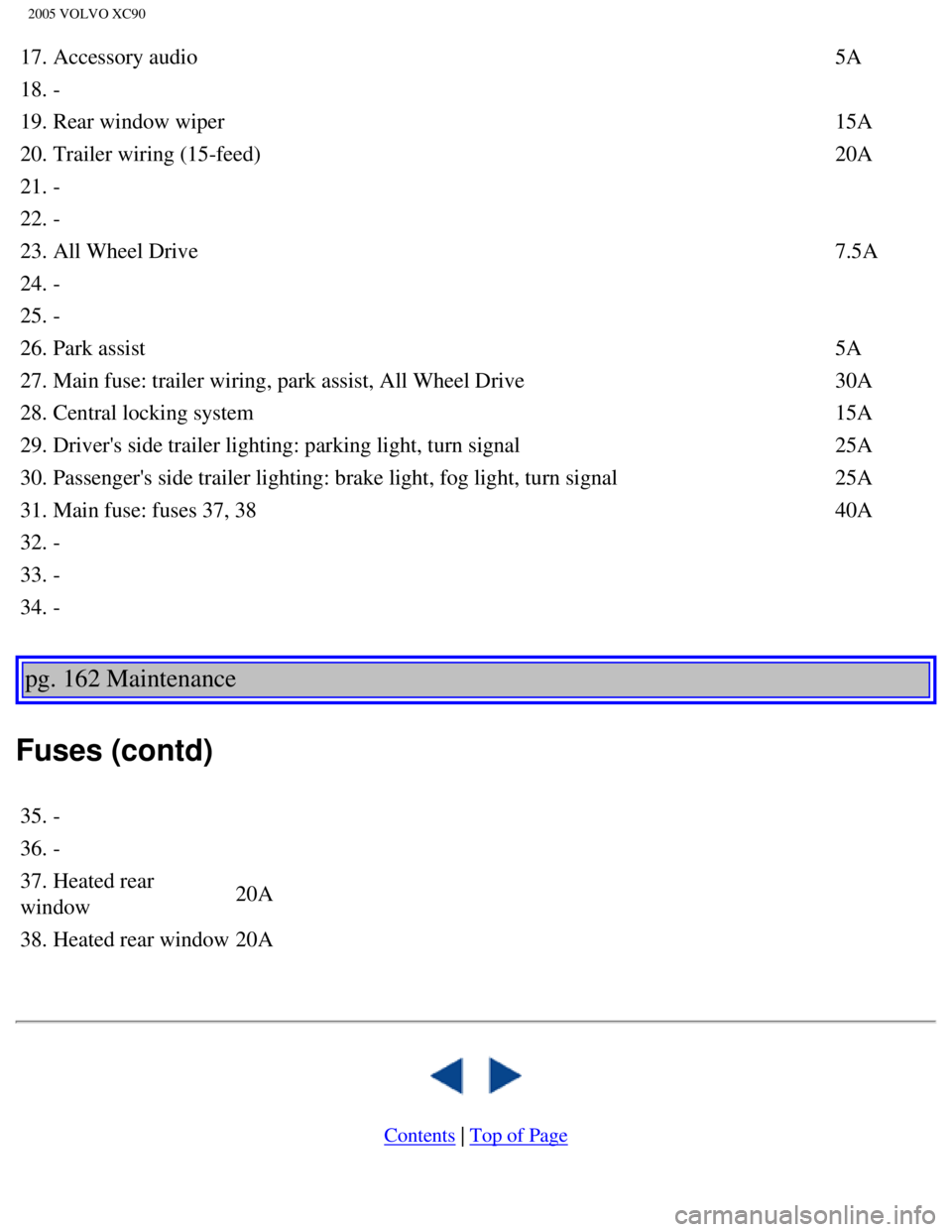
17. Accessory audio5A
18. -
19. Rear window wiper 15A
20. Trailer wiring (15-feed) 20A
21. -
22. -
23. All Wheel Drive 7.5A
24. -
25. -
26. Park assist 5A
27. Main fuse: trailer wiring, park assist, All Wheel Drive 30A
28. Central locking system 15A
29. Driver's side trailer lighting: parking light, turn signal 25A
30. Passenger's side trailer lighting: brake light, fog light, turn sign\
al 25A
31. Main fuse: fuses 37, 38 40A
32. -
33. -
34. -
pg. 162 Maintenance
Fuses (contd)
35. -
36. -
37. Heated rear
window 20A
38. Heated rear window 20A
Contents | Top of Page
file:///K|/ownersdocs/2005/2005_XC90/05xc90_09b.htm (25 of 25)12/30/20\
06 4:42:40 PM
Page 214 of 263
2005 VOLVO XC90
5-seat models 1160
lbs 525 kg
7-seat models 1210
lbs 550 kg
Permissible axle weight, front*
5-seat, 5-cyl, FWD 2710
lbs -
5-seat, 5-cyl, AWD 2820
lbs 1280 kg
5-seat, 6-cyl, AWD 2880
lbs 1310 kg
7-seat, 5-cyl, FWD 2710
lbs -
7-seat, 5-cyl, AWD 2820
lbs 1280 kg
7-seat, 6-cyl, AWD 2880
lbs 1310 kg
FWD = Front Wheel Drive
AWD = All Wheel Drive
* Permissible axle weight or gross vehicle weight must never be exceeded\
. Permissible axle weight, rear* USA Canada
5-seat, 5-cyl, FWD 3060 lbs -
5-seat, 5-cyl, AWD 3150 lbs 1430 kg
5-seat, 6-cyl, AWD 3150 lbs 1430 kg
7-seat, 5-cyl, FWD 3170 lbs -
7-seat, 5-cyl, AWD 3240 lbs 1470 kg
7-seat, 6-cyl, AWD 3240 lbs 1470 kg
Curb weight
5-seat, FWD 4310-4340
lbs -
5-seat, AWD 4440-4620
lbs 2030-2090 kg
7-seat, FWD 4450-4490
lbs -
7-seat, AWD 4590-4770
lbs 2085-2150 kg
file:///K|/ownersdocs/2005/2005_XC90/05xc90_10.htm (4 of 10)12/30/2006\
4:42:41 PM
Page 215 of 263

2005 VOLVO XC90
Max. roof load 220 lbs 100 kg
Trailer weight, w/o brakes 1700 lbs 750 kg
Trailer weight, with brakes See the table on
page 105
Max. tongue weight See the table on
page 105
pg. 166 Specifications
Dimensions
Dimensions
Length 188.9 in (479.8 cm)
Width 74.7 in (189.8 cm)
Height 70.2 in (178.4 cm)
Wheelbase 112.5 in (285.7 cm)
Front track 64.3 in (163.4 cm)
Rear track 63.9 (162.4 cm)
Turning
circle 39-40 ft. (11.9-12.3 m)
Cargo capacity
With optional 3rd row of seats folded down:
5-seat: 41.6 cu ft (1178 litres)
7-seat: 43.3 cu ft (1225 litres)
Behind 1st row of seats, with 2nd (and optional 3rd) row of seats fold\
ed down:
5-seat: 84.9 cu ft (2403 litres)
7-seat: 85.1 cu ft (2410 litres)
Behind 1st row of seats, with front passenger seat, 2nd row (and option\
al 3rd row) of seats folded
down:
5-seat: 92.0 cu ft (2606 litres)
7-seat: 93.2 cu ft (2640 litres)
pg. 167 Specifications
file:///K|/ownersdocs/2005/2005_XC90/05xc90_10.htm (5 of 10)12/30/2006\
4:42:41 PM
Page 217 of 263
2005 VOLVO XC90
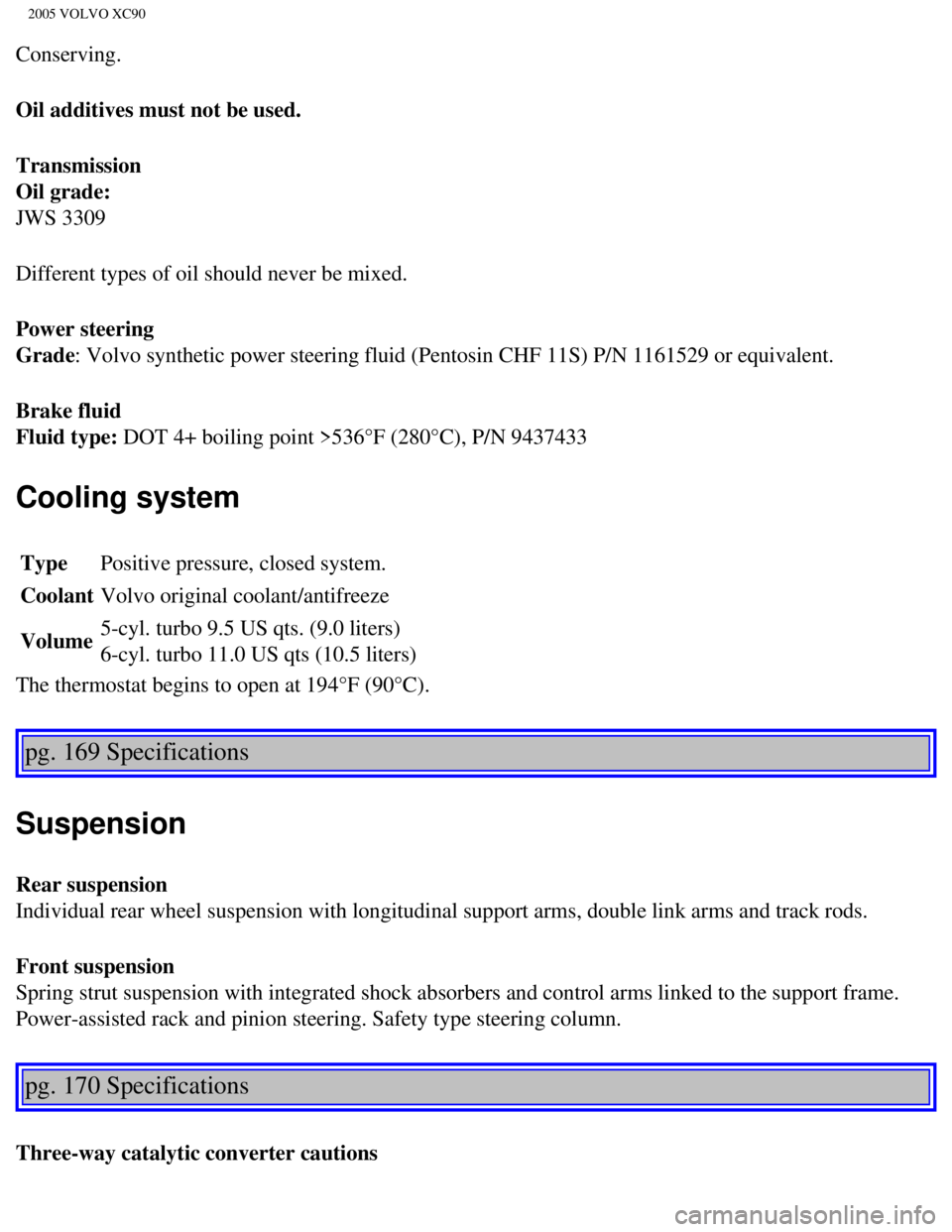
Conserving.
Oil additives must not be used.
Transmission
Oil grade:
JWS 3309
Different types of oil should never be mixed.
Power steering
Grade: Volvo synthetic power steering fluid (Pentosin CHF 11S) P/N 1161529 \
or equivalent.
Brake fluid
Fluid type: DOT 4+ boiling point >536°F (280°C), P/N 9437433
Cooling system
Type Positive pressure, closed system.
Coolant Volvo original coolant/antifreeze
Volume 5-cyl. turbo 9.5 US qts. (9.0 liters)
6-cyl. turbo 11.0 US qts (10.5 liters)
The thermostat begins to open at 194°F (90°C).
pg. 169 Specifications
Suspension
Rear suspension
Individual rear wheel suspension with longitudinal support arms, double \
link arms and track rods.
Front suspension
Spring strut suspension with integrated shock absorbers and control arms\
linked to the support frame.
Power-assisted rack and pinion steering. Safety type steering column.
pg. 170 Specifications
Three-way catalytic converter cautions
file:///K|/ownersdocs/2005/2005_XC90/05xc90_10.htm (7 of 10)12/30/2006\
4:42:41 PM
Page 223 of 263
2005 VOLVO XC90
Steering wheel keypad (option)
The four buttons on the steering wheel keypad can be used to control the\
audio system. The steering
wheel keypad can be used to adjust volume, shift between preset stations\
and change CD tracks.
l Press the or buttons briefly to search for a radio station, or to go to the next/pre\
vious
track on a CD
l Press and hold down these buttons to search within a track.
Display
The display (1) shows the currently selected function, menu selections\
, etc.
Clean the display with a dry, soft, lint-free cloth. Do not use cleaning\
agents.
Accessing and using menus
In menu mode, you can change settings and program new functions in the a\
udio system. The various
file:///K|/ownersdocs/2005/2005_XC90/05xc90_11a.htm (3 of 18)12/30/200\
6 4:42:43 PM
Page 227 of 263
 clockwise or counterclockwise to raise or lower the \
volume. The volume control is
electronic and has no end positio")
2005 VOLVO XC90
ignition is switched on again.
Volume control
Turn the knob (2) clockwise or counterclockwise to raise or lower the \
volume. The volume control is
electronic and has no end position. Volume can also be raised (+) or l\
owered (-) using the optional
steering wheel keypad.
Pause mode
If the volume is turned off, the CD player will go into pause mode. Re-a\
ctivate the player by turning up
the volume.
Selecting a sound source
A sound source can be selected either with the function buttons (3) - \
CD, AM/FM, or with the
SELECTOR control (4).
To select a sound source:
l Turn the SELECTOR control to choose FM1, FM2, AM, CD, CD changer (optio\
n)
l Press the AM/FM button repeatedly to choose between FM1, FM2, AM
l Press the CD button to change to the CD player or optional CD changer
The selected sound source will be shown in the display.
pg. 181 Audio
Sound settings
1. Press the SOUND button (1) repeatedly until you come to the setting\
that you wish to change. Choose
BASS, TREBLE, FADER, BALANCE, SUBWOOFER (option), CENTER (option) or\
SURROUND
file:///K|/ownersdocs/2005/2005_XC90/05xc90_11a.htm (7 of 18)12/30/200\
6 4:42:43 PM
Page 231 of 263
2005 VOLVO XC90
Station search
1. Choose radio mode AM/FM1/FM2 using the SELECTOR control (1) or the \
AM/FM button (2).
2. Press briefly on
or to search for the next strong station. The radio will search for the ne\
xt
audible station and then stop.
3. Press one of the buttons again to start a new search.
Manually search for a known frequency
1. Press and hold the
or button (or the corresponding buttons on the steering wheel
keypad). MAN will be shown in the display. The radio will slowly scroll\
in the desired direction and
then increase speed after a few seconds.
2. Release the button when the desired frequency is displayed.
3. If you need to adjust the frequency, press briefly on
or .
4. The manual search function is available for five seconds after you la\
st pressed the button.
pg. 185 Audio
file:///K|/ownersdocs/2005/2005_XC90/05xc90_11a.htm (11 of 18)12/30/20\
06 4:42:43 PM
Page 241 of 263
 or the CD button \
(2).
2. Insert a CD into the player.
CD Pause
To pause CD playback, turn the volume all the")
2005 VOLVO XC90
Starting the CD
1. Select the CD mode using the SELECTOR control (1) or the CD button \
(2).
2. Insert a CD into the player.
CD Pause
To pause CD playback, turn the volume all the way down. "CD paused" will\
be displayed. This will not
occur if someone in the rear seat is listening to the CD through the opt\
ional headphones.
Play will resume when the volume is turned up again.
Changing tracks
Press
to go to the next track or to go to the previous track. The track number is shown in the
display. If you have a keypad in the steering wheel, you can use the arr\
ow keys in the same way.
Searching within a track
Press and hold down
or to search within a track or the whole disc. The search continues as
long as the buttons are depressed. If you have a keypad in the steering \
wheel, you can use the arrow keys
in the same way.
Random play
This function plays the tracks on a CD in random order (shuffle).
1. Press the MENU button.
2. Select RANDOM and press ENTER.
3. RND is shown in the display as long as the function is activated.
4. Go into the menu and select RANDOM OFF to stop random play, or press \
EXIT.
file:///K|/ownersdocs/2005/2005_XC90/05xc90_11b.htm (3 of 11)12/30/200\
6 4:42:44 PM


The four buttons on the steering wheel keypad can be used to control the\
audio system. The steering
wheel keypad can be used to adjust volume, shift")
 or the \
AM/FM button (2).
2. Press briefly on
or to search for the next strong station. The radio wi")