Page 244 of 263
2005 VOLVO XC90
Changing tracks
Press
to go to the next track or to go to the previous track. The track number is shown in
the display. If you have a keypad in the steering wheel, you can use the\
arrow keys in the same way.
Searching within a track
Press and hold down
or to search within a track or the whole disc. The search continues as
long as the buttons are depressed. If you have a keypad in the steering \
wheel, you can use the arrow keys
in the same way.
pg. 194 Audio
CD changer (option) (contd)
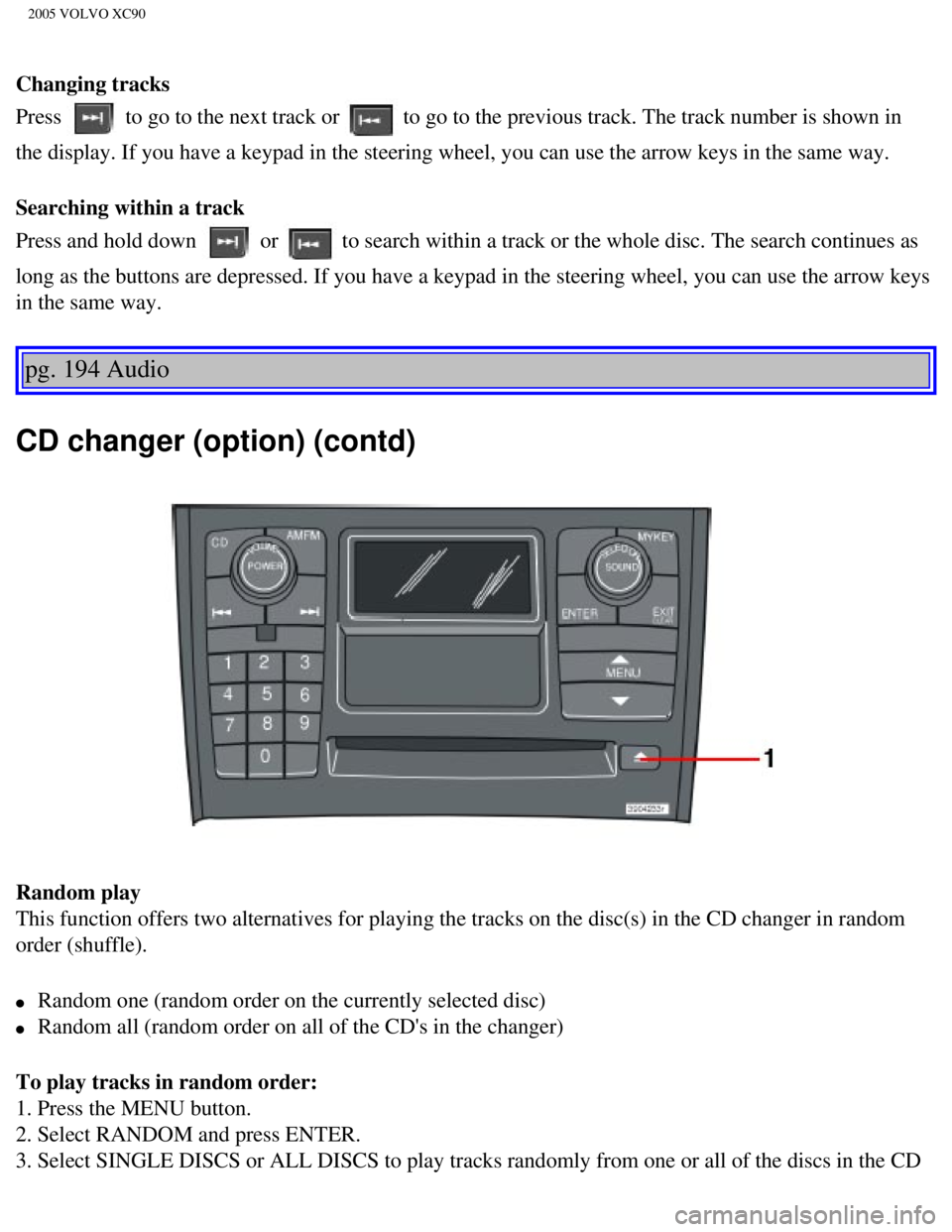
Random play
This function offers two alternatives for playing the tracks on the disc\
(s) in the CD changer in random
order (shuffle).
l Random one (random order on the currently selected disc)
l Random all (random order on all of the CD's in the changer)
To play tracks in random order:
1. Press the MENU button.
2. Select RANDOM and press ENTER.
3. Select SINGLE DISCS or ALL DISCS to play tracks randomly from one or \
all of the discs in the CD
file:///K|/ownersdocs/2005/2005_XC90/05xc90_11b.htm (6 of 11)12/30/200\
6 4:42:44 PM
Page 245 of 263

2005 VOLVO XC90
changer.
4. RND or RND ALL is shown in the display for as long as the function is\
activated.
NOTE: Press
to play the next randomly selected track. This can only be done on the \
currently
selected disc.
5. Press EXIT to stop random play.
Ejecting one disc
A short press on the EJECT button (1) will eject the CD that is currently playing. \
NOTE: For reasons of traffic safety, you have 12 seconds in which to remove th\
e ejected disc. After
that, the disc automatically reinserts into the player.
Ejecting all discs
A long press on the EJECT button (1) starts the EJECT ALL function.
The text EJECTING ALL will be displayed and the entire magazine will be \
emptied disc by disc.
NOTE:
- The EJECT ALL function can only be used while the vehicle is at a stan\
dstill and will be cancelled if
the vehicle begins to move.
- For reasons of traffic safety, you have 12 seconds in which to remove \
the ejected disc. After that, the
disc automatically reinserts into the player.
pg. 195 Audio
Audio systems - general information
Compact disc care
l Before using a new CD for the first time, remove any burrs in the center\
/outer edge by running the
stem of a pen or similar object around the hole/edge of the disc.
l Use CD standard EN 60908 discs only. Discs not meeting this standard may\
cause problems with
system (poor sound). CDR discs can cause listening problems due to the\
quality of the disc or recording
equipment used.
l Keep the discs clean. Wipe them with a soft, clean, lint-free cloth, wor\
king from the center outwards.
If necessary, dampen the cloth with a neutral soap solution. Dry thoroug\
hly before using.
l Never use cleaning spray or antistatic liquid. Use only cleaners specifi\
cally made for CD's.
l Use discs of the correct size only (3.5" discs should never be used). \
l Do not put tape or labels on the disc itself. They could become stuck in\
the player.
l Volvo does not recommend the use of plastic outer rings on the disc.
l Condensation may occur on discs/optical components of the changer in col\
d winter weather. The disc
file:///K|/ownersdocs/2005/2005_XC90/05xc90_11b.htm (7 of 11)12/30/200\
6 4:42:44 PM
Page 246 of 263

2005 VOLVO XC90
can be dried with a clean, lint-free cloth. Optical components in the CD\
changer may, however, take up
to one hour to dry off.
l Never attempt to play a disc which is damaged in any way.
l When not in use, the discs should be stored in their covers. Avoid stori\
ng discs in excessive heat,
direct sunlight or dusty locations.
pg. 196 Audio
HomeLink® Universal Transceiver
Hand-held transmitter
HomeLink® Universal Transceiver
HomeLink® is an advanced system that can be programmed to learn the c\
odes of three different remote
controlled-devices (e.g., garage door openers, remote lighting, entry d\
oor lock). HomeLink®'s sun visor-
mounted transceiver, powered by your vehicle's electrical system, may th\
en be used in place of your
hand-held remote controls.
NOTE: For your security, the HomeLink® Universal Transceiver is designed to\
not function if you lock
your vehicle from the outside.
Programming the transceiver
1. The ignition switch must be turned to the "accessory" position (II)\
before programming the
HomeLink® Universal Transceiver.
2. Begin by erasing all 3 factory default channels. Hold down the two ou\
tside buttons (buttons 1 and 3 in
the illustration) on the HomeLink® Universal Transceiver for about 2\
0 seconds, until HomeLink®'s
indicator light begins to flash. Then release the buttons.
file:///K|/ownersdocs/2005/2005_XC90/05xc90_11b.htm (8 of 11)12/30/200\
6 4:42:44 PM
Page 251 of 263
2005 VOLVO XC90
Auxiliary 12-volt sockets 43
Auxiliary lights
32
Average speed
39
AWD
96
B
Bass
181
Battery
138, 145, 171
Battery - replacing
147
Battery drain - avoiding
92
Battery maintenance
146
Belt check
139
Blower (fan)
53
Booster cushion, integrated
20
Brake system
28, 97
Bulbs, list of
149
Bulbs, replacing
150
C
Capacities
167
Capacity weight
120
Carbon Monoxide - Important Warning
87
Cargo capacity
166
Catalytic converter
170
CD changer
193
CD eject
192
CD Pause
191
CD player
191
Ceiling lighting
155
Center console - storage compartments
68
Central locking system - remote control
77
Changing coolant
139
Changing oil and oil filter
141
Check Engine warning light
29
file:///K|/ownersdocs/2005/2005_XC90/05xc90_12.htm (2 of 14)12/30/2006\
4:42:46 PM
