2005 VOLVO S80 warning
[x] Cancel search: warningPage 14 of 123
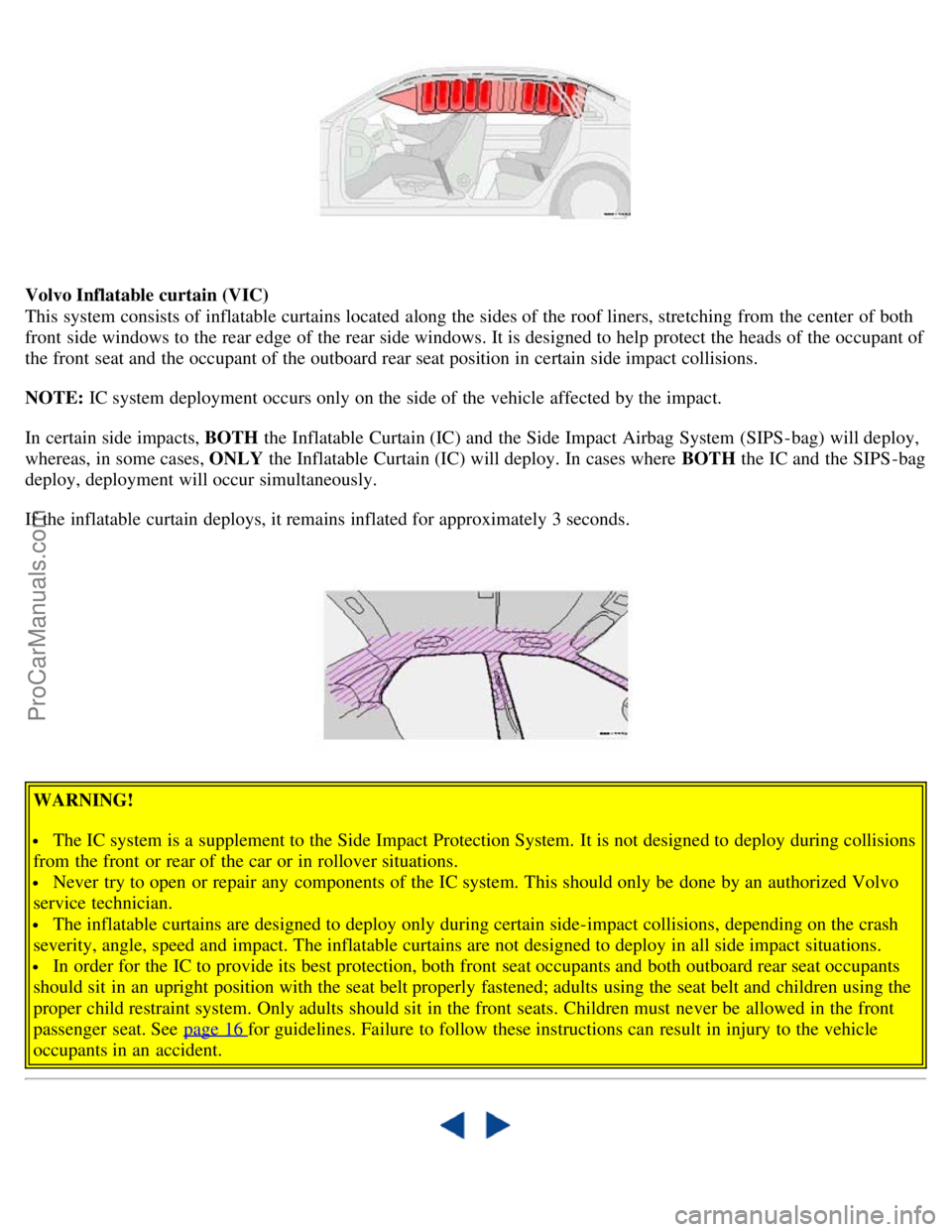
Volvo Inflatable curtain (VIC)
This system consists of inflatable curtains located along the sides of the roof liners, stretching from the center of both
front side windows to the rear edge of the rear side windows. It is designed to help protect the heads of the occupant of
the front seat and the occupant of the outboard rear seat position in certain side impact collisions.
NOTE: IC system deployment occurs only on the side of the vehicle affected by the impact.
In certain side impacts, BOTH the Inflatable Curtain (IC) and the Side Impact Airbag System (SIPS-bag) will deploy,
whereas, in some cases, ONLY the Inflatable Curtain (IC) will deploy. In cases where BOTH the IC and the SIPS -bag
deploy, deployment will occur simultaneously.
If the inflatable curtain deploys, it remains inflated for approximately 3 seconds.
WARNING!
The IC system is a supplement to the Side Impact Protection System. It is not designed to deploy during collisions
from the front or rear of the car or in rollover situations.
Never try to open or repair any components of the IC system. This should only be done by an authorized Volvo
service technician.
The inflatable curtains are designed to deploy only during certain side-impact collisions, depending on the crash
severity, angle, speed and impact. The inflatable curtains are not designed to deploy in all side impact situations.
In order for the IC to provide its best protection, both front seat occupants and both outboard rear seat occupants
should sit in an upright position with the seat belt properly fastened; adults using the seat belt and children using the
proper child restraint system. Only adults should sit in the front seats. Children must never be allowed in the front
passenger seat. See page 16
for guidelines. Failure to follow these instructions can result in injury to the vehicle
occupants in an accident.
ProCarManuals.com
Page 16 of 123
2 0 0 5
VOLVO S80
Chapter 2 - Instruments, switches and controls
pg. 23 Instruments, switches and controls
Interior24
Exterior25
Instruments26
Instrument panel27
Indicator and warning lights28
Text information window30
Switches in center console31
Trip computer32
Cruise control33
Light switch panel34
Manually unlocking the fuel filler door35
Turn signals36
Windshield wipers/washers37
Steering wheel adjustment/lock, ignition switch38
Warning flashers, heated mirrors/rear window, heated front seats39
Parking brake, auxiliary socket, ashtrays40
Electrically operated windows41
Rearview/sideview, vanity mirrors42
Power moonroof43
Sun visor, sun blinds44
pg. 24 Interior
ProCarManuals.com
Page 19 of 123

A
Temperature gauge27
Speedometer27
Odometer27
Trip odometer27
Warning lights27
Text window30
Tachometer27
Clock27
Ambient temperature sensor27
Fuel gauge27
B
Hazard warning flashers39
C
Audio system151
D
Electronic climate control47
Heated seats (option)39
Heated rear window/rearview mirrors39
E
Steering wheel adjustment38
Airbag4
Cruise control33
Windshield wipers/washer37
Turn signal lever36
Trip computer32
Audio system controls151
F
High/low beam headlights34
Parking lights34
Fog lights34
ProCarManuals.com
Page 20 of 123

Instrument panel lighting34
Button to unlock fuel filler door34
pg. 27 Instrument panel
1 Turn signals
2 Text window
3 Temperature gauge
The pointer should be approximately midway on the gauge when driving.
Do not drive the car if the warning light is on. The text window will provide you with additional information.
If the engine temperature remains high, check coolant level - see page 132
.
4 Trip odometer/reset button
The trip odometer is used for measuring shorter distances. The last digit indicates 1/10 mile/kilometer. Press the button
quickly to toggle between trip odometers 1 and 2. Hold in the button for more than 2 seconds to reset.
5 Odometer
6 Speedometer
7 General warning light (see page 28
).
8 High beam indicator light
9 Tachometer
Indicates engine speed in thousands of rpm. Do not drive for long with the needle in the red section. The engine has an
built-in function preventing too high an engine speed. When this function operates, you may discern some pulsation,
which is normal.
10 Gear and driving mode indicator
The currently selected driving mode is displayed here. If you use the Geartronic function on the automatic
transmission, the currently selected gear will be displayed.
11 Ambient temperature indicator
This sensor indicates the air temperature outside your car. A "snowflake" symbol in the text window is displayed when
the temperature is in the range of 23 - 36° F (-5 - +2° C).
Please note that this symbol does not indicate a fault with your car.
At low speeds or when the car is not moving, the temperature readings may be slightly higher than the actual ambient
temperature.
12 Clock/reset button
Turn the button to adjust the clock.
ProCarManuals.com
Page 21 of 123

13 Fuel gauge
The fuel tank holds approximately 21.1 US gal. (80 liters) on T6 models, or 18 US gal. (68 liters) on the S80 All
Wheel Drive and the S80 2.5T Front Wheel Drive.
A warning light in the gauge comes on there are approximately 1.8 US gal. (8 liters) of fuel remaining in the tank.
14 Indicator and warning lights
pg. 28 Indicator and warning lights
The indicator and warning lights described on pages 28 and 29 should never stay on when driving*
When the ignition key is turned, all of the warning lights in the lower right-hand side of the instrument panel should
go on to test the function of the bulbs. If a light does not go off after the engine has started, the system indicated
should be inspected.
NOTE: The parking brake reminder light will not go off until the parking brake has been fully released.
Warning lamp in the center of the instrument panel
This lamp lights up red or yellow depending on the severity of the fault that has been detected.
Yellow light: Follow the instructions shown in the text window.
Red light: Stop the car as soon as possible in a suitable location and read the message shown in the text window.
Supplemental Restraint System (SRS)
If the light comes on (or stays on after the vehicle has started), the SRS diagnostic system has detected a fault. Drive to
an authorized Volvo retailer for an inspection of the system. See the SRS section for more information.
BRAKE
Brake failure warning light
If the light comes on while driving or braking, stop immediately, open the hood and check the brake fluid level
in the reservoir. See page 138
for reservoir position and instructions.
Canadian models are equipped with this warning light:
Park
Brake
Parking brake reminder light
This light will be on when the parking brake (hand brake) is applied. The parking brake lever is situated between the
front seats.
ProCarManuals.com
Page 22 of 123

Canadian models are equipped with this warning light:
Oil pressure warning light
If the light comes on while driving, stop the car and then stop the engine immediately and check the engine oil
level . See page 137
. If the light stays on after restart, have the car towed to the nearest authorized Volvo retailer. After
hard driving, the light may come on occasionally when the engine is idling. This is normal, provided it goes off when
the engine speed is increased.
Generator warning light
If the light comes on while the engine is running, have the charging system checked.
* Rear fog light, if used, and trailer turn signal, if towing a trailer, will go on while driving.
pg. 29 Indicator and warning lights
Rear fog light
This light indicates that the rear fog light is on.
CHECK
ENGINE
Malfunction indicator lamp
On-Board Diagnostic II (OBDII): As you drive, a computer called "OBDII" monitors your car's engine, transmission,
electrical and emission systems. The CHECK ENGINE light will light up if the computer senses a condition that
potentially may need correcting. When this happens, please have your car checked by a Volvo retailer as soon as
possible.
A CHECK ENGINE light may have many causes. Sometimes, you may not notice a change in your car's behavior.
Even so, an uncorrected condition could hurt fuel economy, emission cleanliness, and driveability. Extended driving
without correcting the cause could even damage other components in your car.
Canadian models are equipped with this warning light:
NOTE : If the fuel filler cap is not closed tightly or if the engine is running when the car is refueled, the Malfunction
Indicator Lamp may indicate a fault. However, your vehicle's performance will not be affected. Use only Volvo
original or approved fuel filler caps.
Anti-lock Brake System ABS
If the warning light comes on, there is a malfunction of the ABS system (the standard braking system pwill however
function). The vehicle should be driven to a Volvo retailer for inspection. See page 19
for additional information.
Stability Traction Control (STC) system (option), or Dynamic Stability and Traction Control (DSTC) system
(option)
This indicator light will flash with STC or DSTC is actively working to stabilize the car. See pages 20-21
for more
detailed information.
ProCarManuals.com
Page 23 of 123
Turn signal indicator - trailer (certain models)
If you are towing a trailer, this light will flash simultaneously with the turn signals on the trailer. If the light does not
flash when signaling, neither the trailer's turn signals nor the car's turn signals are functioning.
Seat belt reminder
This symbol lights up to indicate that the driver has not fastened his/her seat belt.
Tire pressure warning light
See page 102
for more information on this function.
Contents | Top of Page
ProCarManuals.com
Page 32 of 123

It can also be adjusted as follows with the ignition off:
· Within 10 minutes after the driver's door has been unlocked from the outside and has been opened and remains open.
· Within 40 seconds, if the driver's door has just been closed.
· Within 40 seconds, if the driver's door has not been opened after the ignition has been switched off.
Passenger's seat:
The seat can only be adjusted if the ignition key is in position I, II or if the engine is running.
Electrically operated driver's seat controls
A Front edge of seat (raise/lower)
B Forward - rearward
C Rear edge of seat (raise/lower)
D Backrest tilt
WARNING!
Because the driver's seat can be adjusted with the ignition off, children should never be left unattended in the car.
Movement of the seat can be STOPPED at any time by pressing any button on the power seat control panel.
Do not adjust the seat while driving. The seat should be adjusted so that the brake pedal can be depressed fully. In
addition, position the seat as far rearward as comfort and control allow.
The seat rails on the floor must not be obstructed in any way when the seat is in motion.
Programming the driver's seat memory (option)*
Three different seating and door mirror positions can be stored in the driver seat's memory.
The following example explains how button 1 can be programmed.
Buttons 2 and 3 can be programmed in the same way.
To program (store) a seat position in button 1:
1. Move the seat to the desired position using the seat adjustment controls (see the previous page).
2. Press and hold down the MEM (memory) button.
3. With the MEM button depressed, press button 1 briefly to store the seat's current position.
ProCarManuals.com