Page 13 of 506
’05 TUNDRA_U (L/O 0408)
2
2005 TUNDRA from Aug. ’04 Prod. (OM34427U)
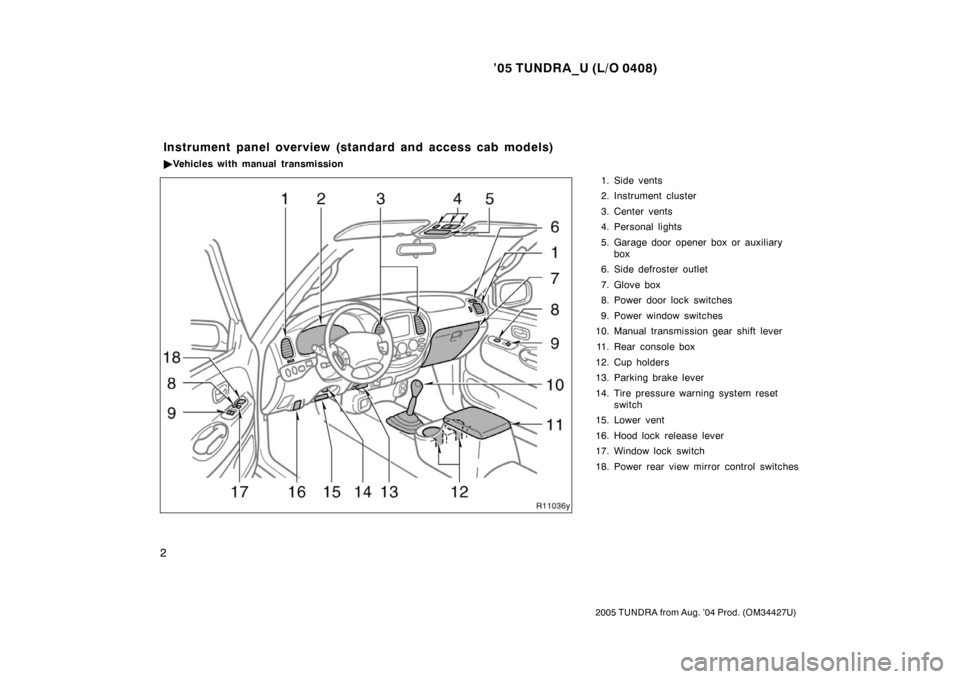
1. Side vents
2. Instrument cluster
3. Center vents
4. Personal lights
5. Garage door opener box or auxiliary
box
6. Side defroster outlet
7. Glove box
8. Power door lock switches
9. Power window switches
10. Manual transmission gear shift lever
11. Rear console box
12. Cup holders
13. Parking brake lever
14. Tire pressure warning system reset switch
15. Lower vent
16. Hood lock release lever
17. Window lock switch
18. Power rear view mirror control switches
Instrument panel overview (standard and access cab models)
� Vehicles with manual transmission
Page 14 of 506
’05 TUNDRA_U (L/O 0408)
3
2005 TUNDRA from Aug. ’04 Prod. (OM34427U)
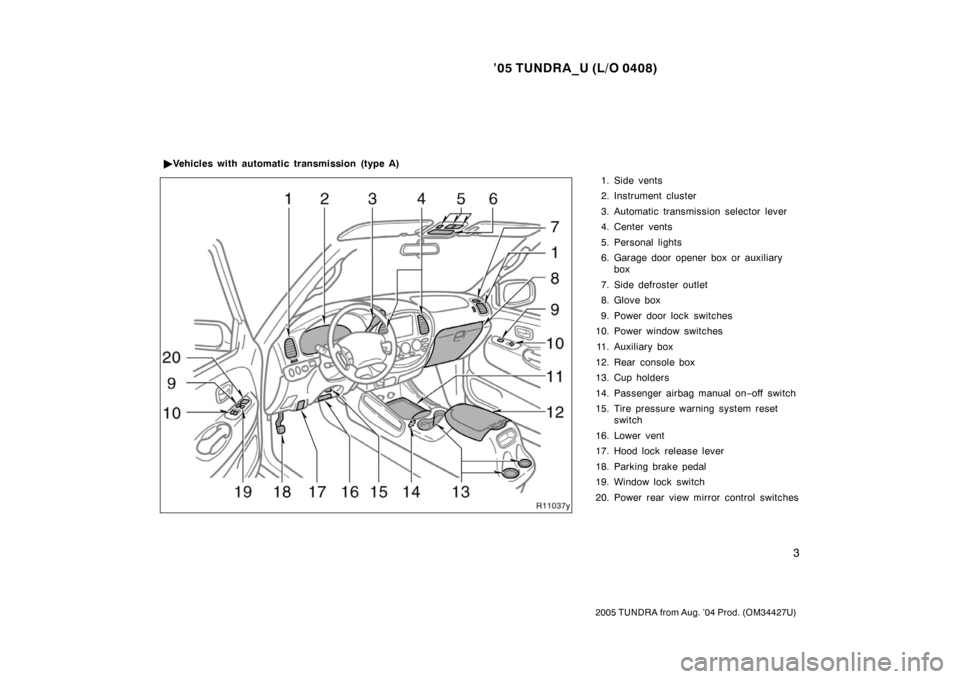
1. Side vents
2. Instrument cluster
3. Automatic transmission selector lever
4. Center vents
5. Personal lights
6. Garage door opener box or auxiliary
box
7. Side defroster outlet
8. Glove box
9. Power door lock switches
10. Power window switches
11. Auxiliary box
12. Rear console box
13. Cup holders
14. Passenger airbag manual on −off switch
15. Tire pressure warning system reset switch
16. Lower vent
17. Hood lock release lever
18. Parking brake pedal
19. Window lock switch
20. Power rear view mirror control switches
�
Vehicles with automatic transmission (type A)
Page 15 of 506
’05 TUNDRA_U (L/O 0408)
4
2005 TUNDRA from Aug. ’04 Prod. (OM34427U)
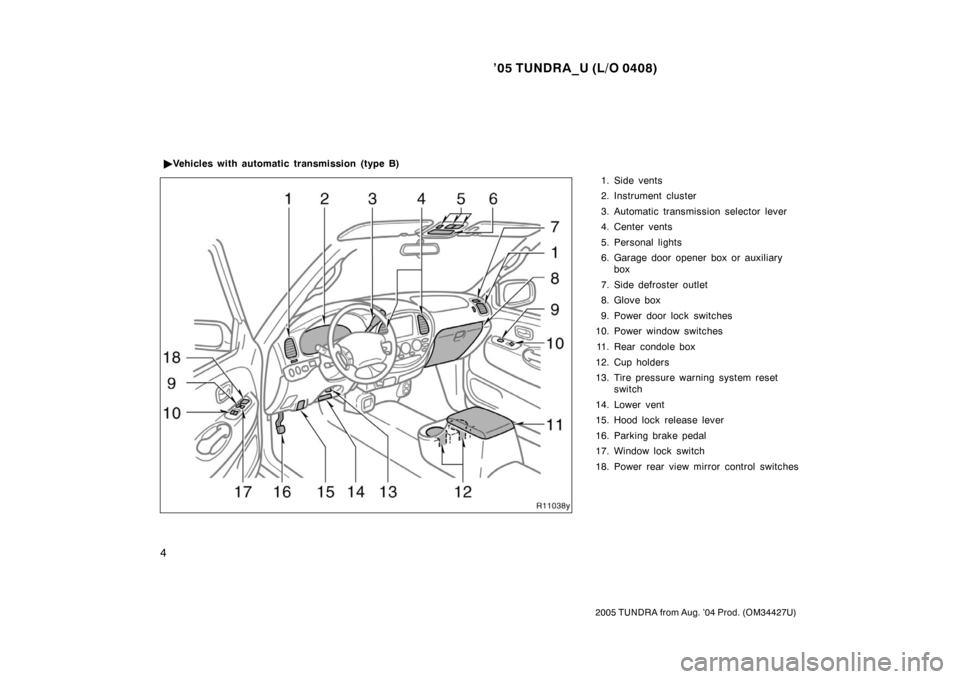
1. Side vents
2. Instrument cluster
3. Automatic transmission selector lever
4. Center vents
5. Personal lights
6. Garage door opener box or auxiliary
box
7. Side defroster outlet
8. Glove box
9. Power door lock switches
10. Power window switches
11. Rear condole box
12. Cup holders
13. Tire pressure warning system reset switch
14. Lower vent
15. Hood lock release lever
16. Parking brake pedal
17. Window lock switch
18. Power rear view mirror control switches
�
Vehicles with automatic transmission (type B)
Page 19 of 506
’05 TUNDRA_U (L/O 0408)
8
2005 TUNDRA from Aug. ’04 Prod. (OM34427U)
21. Hood lock release lever
22. Parking brake pedal
23. Window lock switch
Page 49 of 506
’05 TUNDRA_U (L/O 0408)
38
2005 TUNDRA from Aug. ’04 Prod. (OM34427U)
3. Slide the tailgate a little to the right
to unhook the left side.
To attach the tailgate, follow the removal
procedure in reverse order.
After closing the tailgate, try pulling it to-
ward you to make sure it is securely
closed.
We recommend you keep the tailgate
closed when not in use.
NOTICE
Make sure the support brackets are
securely latched on both side panels
when installing the tailgate.
LOCKING AND UNLOCKING WITH KEY
Insert the key into the keyhole and turn
it to lock or unlock the tailgate.
To lock: Turn the key clockwise.
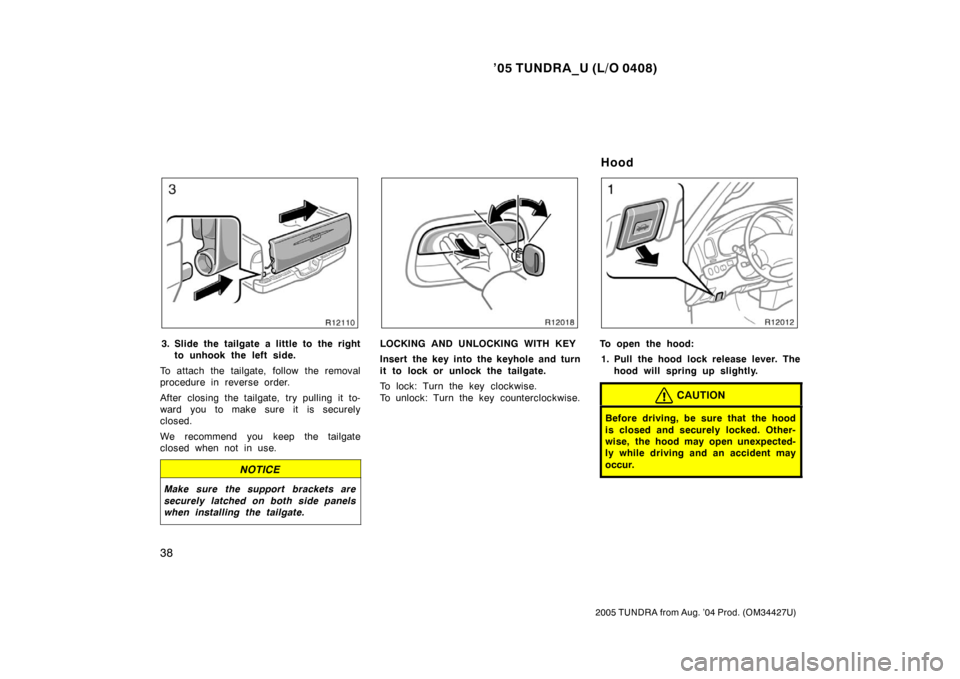
To unlock: Turn the key counterclockwise.To open the hood: 1. Pull the hood lock release lever. The hood will spring up slightly.
CAUTION
Before driving, be sure that the hood
is closed and securely locked. Other-
wise, the hood may open unexpected-
ly while driving and an accident may
occur.
Hood
Page 470 of 506
’05 TUNDRA_U (L/O 0408)
459
2005 TUNDRA from Aug. ’04 Prod. (OM34427U)
Light bulbsBulb
No.WTy p e
Vanity light—1.5E
Door courtesy
lights1943.4D
Glove box light—1.2D
Step light—1.4D
A: HB2 halogen bulbs
B: HB4 halogen bulbs
C: Wedge base bulbs (amber)
D: Wedge base bulbs (clear)
E: Double end bulbs
1. Open the hood. Unplug the connec-
tor. Remove the rubber cover.
If the connector is tight, wiggle it.2. Release the bulb retaining spring and remove the bulb. Install a new
bulb and the bulb retaining spring.
To install a bulb, align the tabs of the
bulb with the cutouts of the mounting
hole.
—Headlights