Page 78 of 152
68
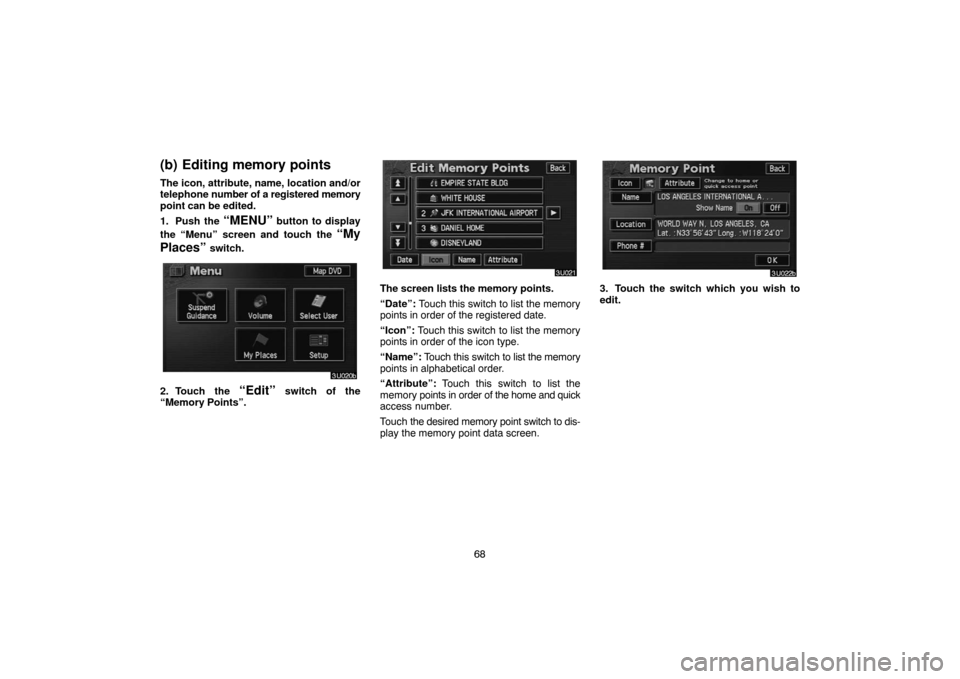
(b) Editing memory points
The icon, attribute, name, location and/or
telephone number of a registered memory
point can be edited.
1. Push the
“MENU” button to display
the “Menu” screen and touch the
“My
Places”
switch.
2. Touch the “Edit” switch of the
“Memory Points”.
The screen lists the memory points.
“Date”: Touch this switch to list the memory
points in order of the registered date.
“Icon”: Touch this switch to list the memory
points in order of the icon type.
“Name”: Touch this switch to list the memory
points in alphabetical order.
“Attribute”: Touch this switch to list the
memory points in order of the home and quick
access number.
Touch the desired memory point switch to dis-
play the memory point data screen.3. Touch the switch which you wish to
edit.
Page 82 of 152
72
�To change “Phone #” (telephone num-
ber)
Touch numeral keys.
When the entry has been completed, touch
the
“OK” switch on the screen.
The previous screen will be displayed.
(c) Deleting memory points
1. Push the “MENU” button to display
the “Menu” screen and touch the
“My
Places”
switch.
2. Touch the “Delete” switch of the
“Memory Points”.
3. Touch the corresponding switch. To
delete all memory points, touch the
“De-
lete All” switch.
For efficient memory point search, memory
points can be sorted by the
“Date”,
“Icon”, “Name” or “Attribute” switch.
To delete, touch the
“Yes” switch. To cancel
the deletion, touch the “No” switch.
Page 108 of 152
98
Replace engine coolant
Replace brake fluid
Replace ATF
Scheduled maintenance
Replace air filter
Personal event
(a) Register dealer
You can register the dealer name, staff,
location and phone number.
1. Touch the “Set Dealer” switch on
the “Maintenance” screen.
2. Enter the location of the dealer in the
same way as for destination input. (See
page 20.)
Page 109 of 152
99
After you input the dealer, the screen changes
and displays the map location of the dealer.
If it is OK, touch the
“Enter” switch.
The screen changes to “Edit Dealer” screen.
(See “(b) Edit dealer”.)
(b) Edit dealer
You can edit the dealer name, staff, loca-
tion and phone number.
1. Touch the
“Set Dealer” switch on
the “Maintenance” screen. The “Edit
Dealer” screen appears.
2. To edit, touch the corresponding
switch.
Page 110 of 152
100
�To edit “Dealer” or “Contact”
To input the name, touch the alphabet, nu-
meral and/or umlaut keys. You can input
up to 24 letters.
After inputting, touch the
“OK” switch at the
bottom right of the screen. The previous
screen will be displayed.
�To edit “Location”
Set the cursor to the desired point, and
touch the
“Enter” switch on the screen.
�To edit “Phone #” (telephone number)
Touch numeral keys.
After inputting, touch the
“OK” switch. The
previous screen will be displayed.
Page 149 of 152

139
Audio system operating hints
NOTICE
To ensure correct audio system opera-
tions:
�Be careful not to spill beverages over
the audio system.
�Do not put anything other than a
Compact Disc into the slot.
�Do not put anything other than an ap-
propriate disc into the DVD player.
�The use of a cellular phone inside or
near the vehicle may cause a noise
from the speakers of the audio sys-
tem which you are listening to. How-
ever, this does not indicate a mal-
function.
RADIO RECEPTION
Usually, a problem with radio reception does
not mean there is a problem with your radio —
it is just the normal result of conditions outside
the vehicle.For example, nearby buildings and terrain
can interfere with FM reception. Power lines
or telephone wires can interfere with AM sig-
nals. And of course, radio signals have a lim-
ited range. The farther you are from a station,
the weaker its signal will be. In addition, re-
ception conditions change constantly as your
vehicle moves.
Here are some common reception problems
that probably do not indicate a problem with
your radio:
FM
Fading and drifting stations — Generally, the
effective range of FM is about 40 km (25
miles). Once outside this range, you may no-
tice fading and drifting, which increase with
the distance from the radio transmitter. They
are often accompanied by distortion.
Multi−path — FM signals are reflective, mak-
ing it possible for two signals to reach your an-
tenna at the same time. If this happens, the
signals will cancel each other out, causing a
momentary flutter or loss of reception.
Static and fluttering — These occur when sig-
nals are blocked by buildings, trees, or other
large objects. Increasing the bass level may
reduce static and fluttering.Station swapping — If the FM signal you are
listening to is interrupted or weakened, and
there is another strong station nearby on the
FM band, your radio may tune in the second
station until the original signal can be picked
up again.
AM
Fading — AM broadcasts are reflected by the
upper atmosphere — especially at night.
These reflected signals can interfere with
those received directly from the radio station,
causing the radio station to sound alternately
strong and weak.
Station interference — When a reflected sig-
nal and a signal received directly from a radio
station are very nearly the same frequency,
they can interfere with each other, making it
difficult to hear the broadcast.
Static — AM is easily affected by external
sources of electrical noise, such as high ten-
sion power lines, lightening, or electrical mo-
tors. This results in static.