Page 198 of 480

05_SEQUOIA_U (L/O 0409)
188
2005 SEQUOIA from Sep. ’04 Prod. (OM34431U)
In the following cases, contact your Toyota
dealer:
�The indicator light does not come on
when the ignition key is turned “ON”.
�The indicator light remains on after the
ignition is turned on.
�The indicator light comes on when the
system is on while driving.
NOTICE
Make sure that the center differential
lock indicator light goes off before
normal driving.
“VSC TRAC” warning light
This light warns that there is a problem
somewhere in the vehicle stability control
system, traction control system (two−wheel
drive models) or active traction control
system (four −wheel drive models).
The warning light will come on when the
ignition key is turned to “ON” and will go
off after a few seconds.
If the light comes on while driving, the
system does not work. However, as con-
ventional braking operates when applied,
there is no problem to continue your driv-
ing. In the following cases, contact your Toyota
dealer:
�The warning light does not come on
after the ignition key is turned to “ON”.
�The warning light remains on after the
ignition key is turned to “ON”.
�The warning light comes on while driv-
ing.
Tw o −wheel drive models—The “TRAC
OFF” indicator light will come on when the
“VSC TRAC” warning light comes on even
if the “TRAC OFF” switch is not pushed.
Four −wheel drive models—The “VSC OFF”
indicator light will come on when the “VSC
TRAC” warning light comes on even if the
center differential lock switch is not
pushed.
Page 225 of 480

05_SEQUOIA_U (L/O 0409)
215
2005 SEQUOIA from Sep. ’04 Prod. (OM34431U)
Compact disc player
Use this button to skip up or down to a
different track.
Push “�” or “ �” side of the “SEEK/
TRACK” button until the number of the
track you want to listen to appears on the
display. If you want to return to the begin-
ning of the current track, quickly push the
down side of the button one time.
Vehicles with rear seat entertainment sys-
tem—
While the DVD player is in operation, the
chapter or track can be changed by push-
ing the “ �” or “ �” side of the “SEEK/
TRACK” button.
ST (Stereo reception) display
Your radio automatically changes to stereo
reception when a stereo broadcast is re-
ceived. “ST” appears on the display. If the
signal becomes weak, the radio reduces
the amount of channel separation to prev-
ent the weak signal from creating noise.
If the signal becomes extremely weak, the
radio switches from stereo to mono recep-
tion.
TA P E
Push the “TAPE” button to play a cassette
tape. TEXT
This button is used to change the display
for the compact disc that contains text
data.
To change the display, quickly push and
release the “TEXT” button while the com-
pact disc is playing. The display changes
in the order from the elapsed time to disc
title to track title, then back to the
elapsed time.
If this button is pushed while a compact
disc that does not contain text data is
playing, “NO TITLE” will appear on the
display.
If the entire disc or track title does not
appear on the display, push and hold the
button until you hear a beep. The rest of
the title will appear.
TUNE (Tuning)
Turn the “TUNE” knob clockwise to step
up the frequency. Turn the knob counter-
clockwise to step down the frequency.
Page 232 of 480

05_SEQUOIA_U (L/O 0409)
222
2005 SEQUOIA from Sep. ’04 Prod. (OM34431U)
TEXT
Radio
This button is operational only in RDS
mode.
When an RDS radio station transmits a
text message, “TEXT” will be displayed. At
this time, push the “TEXT” button to view
the text message. The message display
will be canceled if any button that affects
the display is pushed. To view the mes-
sage again, push this button again. After
the entire message has been displayed,
the message will disappear.
The RDS audio system has memory to
store three 64−character messages. To
store a message in memory, push and
hold the “TEXT” button until you hear a
beep.
If three messages are already stored in
memory, the oldest message will be over-
written by the new message.
To recall a radio text message, push the
“TEXT” button momentarily. This will dis-
play the most recent message. Each push
of the button will display messages in the
order of most to least recent. If no messages have been stored, or if
there are no more messages to be re-
called, “NO MESSAGE” will appear on the
display, and the message display will be
canceled.
The message display will be canceled if
you activate any function that affects the
display.
Compact disc player
This button is used to change the display
for the compact disc that contains text
data.
To change the display, quickly push and
release the “TEXT” button while the com-
pact disc is playing. The display changes
in the order from the elapsed time to disc
title to track title, then back to the
elapsed time.
If this button is pushed while a compact
disc that does not contain text data is
playing, “NO TITLE” will appear on the
display.
If the entire disc or track title does not
appear on the display, push and hold the
button until you hear a beep. The rest of
the title will appear.TRAF (Traffic)
This button turns the traffic announcement
(TA) feature on and off. This button is
operational only in FM mode.
By pushing the “TRAF” button, “TRAF
SEEK” will flash on the display and the
radio will start seeking any traffic program
station.
When a traffic program station is found,
“TRAF” will be displayed and you will hear
a beep.
After the traffic announcement program is
over, the display returns to the previous
mode.
If no traffic program station is found, “NO
TRAF INFO” appears on the display for a
few seconds and the display returns to
the previous mode.
To cancel the traffic announcement, push
this button again.
TUNE (Tuning)
Turn the “TUNE” knob clockwise to step
up the frequency. Turn the knob counter-
clockwise to step down the frequency.
Page 238 of 480

05_SEQUOIA_U (L/O 0409)
228
2005 SEQUOIA from Sep. ’04 Prod. (OM34431U)
BEFORE USING THE CONTROLLER
(for new vehicle owners)
A battery is already set in the control-
ler with an insulating sheet, which pre-
vents the battery from being dis-
charged. Before using the controller,
remove the insulating sheet.
USING THE CONTROLLER
To use the rear seat audio system con-
troller, direct the signal output portion
of the controller to the signal reception
portion of the rear seat audio system
display.
The rear seat audio system controller can
be operated when the ignition switch is in
the “ACC” or “ON” position.
The controller does not operate properly
when the signal reception portion of the
display is exposed to direct sunlight.
Block the display from direct sunlight.
Details of specific buttons, controls, and
features of the controller, see
“CONTROLLER FEATURES” on page 230
in this Section.
NOTICE
Observe the followings, otherwise the
controller may be damaged.
�Do not drop or strongly knock the
controller against hard objects.
� Do not sit on or place heavy ob-
jects on the controller.
Page 243 of 480
05_SEQUOIA_U (L/O 0409)
233
2005 SEQUOIA from Sep. ’04 Prod. (OM34431U)
Replace the battery by using the following
procedures:1. Pull the case out while pushing the lock release button to the side.2. Remove the discharged battery.
3. Put in a new battery with the positive
(+) side up.
Put in the case securely.
NOTICE
�Make sure that the positive side of
the controller battery is facing cor-
rectly.
� Do not replace the battery with wet
hands. Water may cause rust.
� Do not touch or move any compo-
nents inside of the controller, or it
may interfere with proper operation.
�Be careful not to bend the electrode
of the controller battery insertion
and that dust or oil does not ad-
here to the transmitter case.
� Close the battery case securely.
After replacing the battery, check that the
controller operates properly. If the control-
ler still does not operate properly, contact
your Toyota dealer.
Page 247 of 480
05_SEQUOIA_U (L/O 0409)
237
2005 SEQUOIA from Sep. ’04 Prod. (OM34431U)
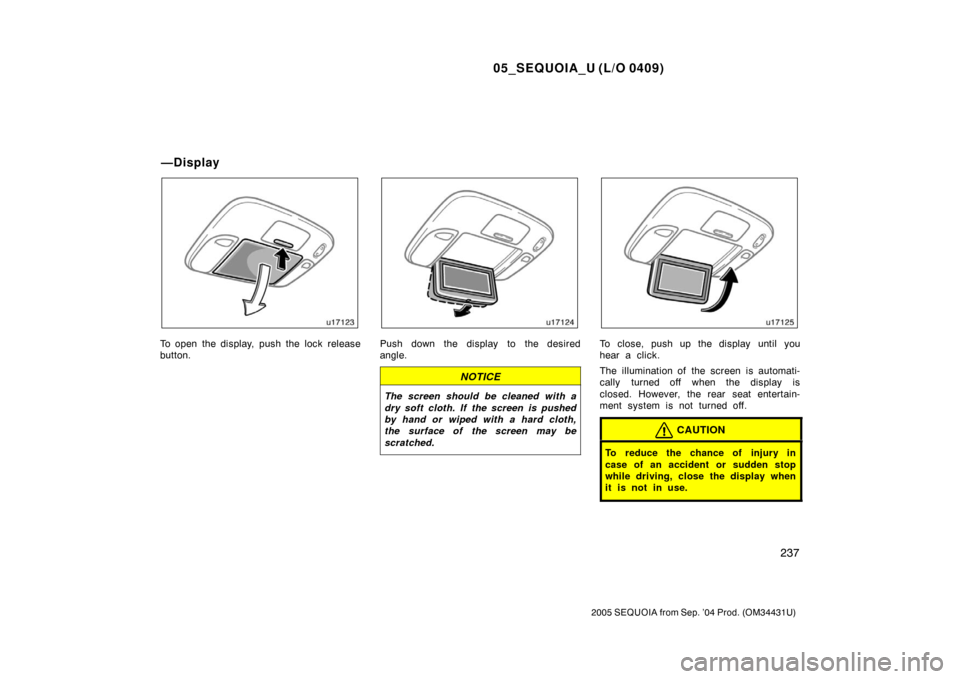
To open the display, push the lock release
button.Push down the display to the desired
angle.
NOTICE
The screen should be cleaned with a
dry soft cloth. If the screen is pushed
by hand or wiped with a hard cloth,
the surface of the screen may be
scratched.
To close, push up the display until you
hear a click.
The illumination of the screen is automati-
cally turned off when the display is
closed. However, the rear seat entertain-
ment system is not turned off.
CAUTION
To reduce the chance of injury in
case of an accident or sudden stop
while driving, close the display when
it is not in use.
—Display
Page 249 of 480
05_SEQUOIA_U (L/O 0409)
239
2005 SEQUOIA from Sep. ’04 Prod. (OM34431U)
USING THE CONTROLLER
To use the rear seat entertainment sys-
tem controller, direct the signal output
portion of the controller to the signal
reception portion of the rear seat enter-
tainment system display.
The controller does not operate properly
when the signal reception portion of the
display is exposed to direct sunlight.
Block the display from direct sunlight.
NOTICE
Observe the followings, otherwise the
controller may be damaged.
�Do not drop or strongly knock the
controller against hard objects.
� Do not sit on or place heavy ob-
jects on the controller.CONTROLLER HOLDER
The controller can be stowed in the
holder when it is not in use. The holder
can be hooked on the back of the driv-
er ’s or front passenger ’s seatback.
CAUTION
To reduce the chance of injury in
case of an accident or a sudden stop
while driving, stow the controller in
the holder when it is not in use.
Page 257 of 480

05_SEQUOIA_U (L/O 0409)
247
2005 SEQUOIA from Sep. ’04 Prod. (OM34431U)
REPLACING CONTROLLER BATTERY
For replacement, use a CR2025 lithium
battery or equivalent.
CAUTION
Special care should be taken that
small children do not swallow the re-
moved battery or components.
NOTICE
�When replacing the battery, be care-
ful not to lose the components.
� Replace only with the same or
equivalent type of battery recom-
mended by a Toyota dealer.
� Dispose of used batteries according
to local regulations.
Replace the battery by using the following
procedures:
1. Pull the case out while pushing the lock release button to the side.2. Remove the discharged battery.
3. Put in a new battery with the positive
(+) side up.
Put it in the case securely.
NOTICE
�Be sure that the positive side of
the controller battery is facing cor-
rectly.
� Do not replace the battery with wet
hands. Water may cause rust.
� Do not touch or move any compo-
nents inside of the controller, or it
may interfere with proper operation.