Page 28 of 324

’05 MATRIX_U (L/O 0409)
18
2005 MATRIX from Sep. ’04 Prod. (OM12892U)
To open the glass hatch, push the
“HATCH GLASS” switch of the transmit-
ter for 1 second.
If the ignition key is in the “ON” position,
the glass hatch cannot be opened by the
“HATCH GLASS” switch.
See “Glass hatch” on page 27 in this
Section.Pushing the “PANIC” switch blows the
horn intermittently and flashes the
headlights, turn signal lights and interi-
or lights.
The “PANIC” switch is used to deter ve-
hicle theft when you witness anyone at-
tempting to break into or damage your
vehicle.
The alarm will last for one minute. To stop
alarm midway, do the following:
�Push any of the switch on the wireless
remote control transmitter.
�Turn the ignition key from the “LOCK”
to “ON” position.
The “PANIC” mode does not work when
the ignition key is in the “ON” position. For replacement, use a CR2032 lithium
battery or equivalent.
CAUTION
Special care should be taken to pre-
vent small children from swallowing
the removed transmitter battery or
components.
NOTICE
�
During replacing the transmitter
battery, do not push the “LOCK”,
“UNLOCK” and “HATCH GLASS”
switches many times.
� When replacing the transmitter bat-
tery, be careful not to lose the com-
ponents.
� Replace only with the same or
equivalent type recommended by a
Toyota dealer.
� Dispose of used batteries according
to the local laws.
Replace the transmitter battery by follow-
ing these procedures:
—Opening glass hatch —Activating panic mode—Replacing transmitter
battery
Page 30 of 324

’05 MATRIX_U (L/O 0409)
20
2005 MATRIX from Sep. ’04 Prod. (OM12892U)
�Be careful not to bend the electrode
when inserting the transmitter bat-
tery and that dust or oils do not
adhere to the transmitter case.
� Close the transmitter case securely.
After replacing the battery, check that the
transmitter operates properly. If the trans-
mitter still does not operate properly, con-
tact your Toyota dealer.
LOCKING AND UNLOCKING WITH KEY
Insert the key into the keyhole and turn
it.
To lock: Turn the key forward.
To unlock: Turn the key backward.
Vehicles with power door lock system—
All the side doors and back door lock and
unlock simultaneously with either front
door. In the driver ’s door lock, turning the
key once will unlock the driver’s door and
twice in succession will unlock all the side
doors and back door simultaneously. When the interior light control dial is in
the door position, and all the side doors
and back door are unlocked simultaneous-
ly with a key or wireless remote control
transmitter, the interior lights come on for
about 15 seconds and then fade out, even
if the door is not opened. (For further
information, see “Interior/instrument panel
light control” on page 97 in Section 1
−5.)
Side doors—
Page 31 of 324
’05 MATRIX_U (L/O 0409)
21
2005 MATRIX from Sep. ’04 Prod. (OM12892U)
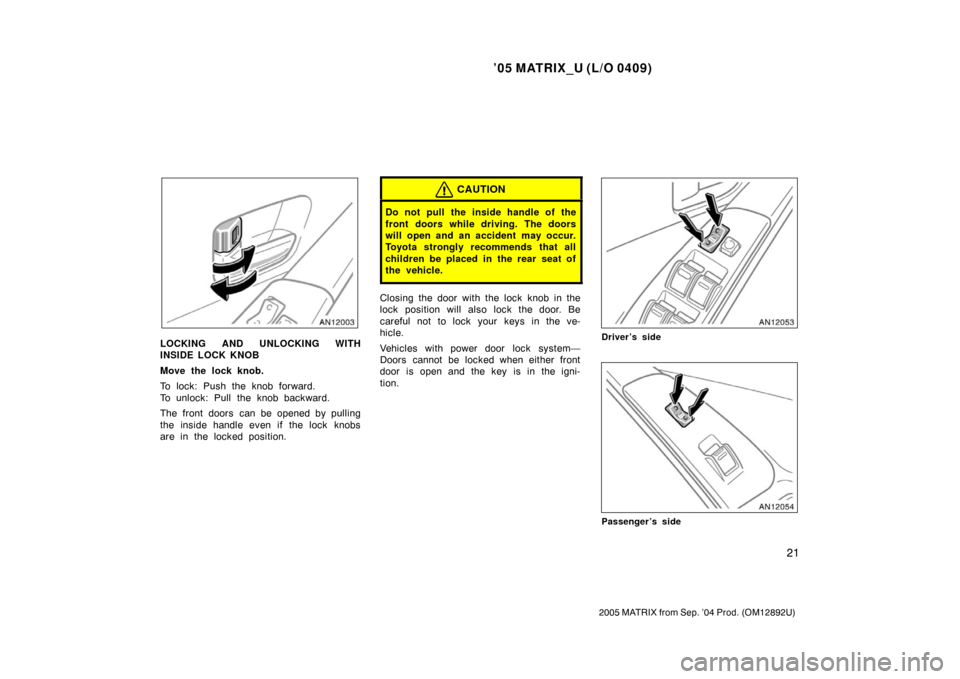
LOCKING AND UNLOCKING WITH
INSIDE LOCK KNOB
Move the lock knob.
To lock: Push the knob forward.
To unlock: Pull the knob backward.
The front doors can be opened by pulling
the inside handle even if the lock knobs
are in the locked position.
CAUTION
Do not pull the inside handle of the
front doors while driving. The doors
will open and an accident may occur.
Toyota strongly recommends that all
children be placed in the rear seat of
the vehicle.
Closing the door with the lock knob in the
lock position will also lock the door. Be
careful not to lock your keys in the ve-
hicle.
Vehicles with power door lock system—
Doors cannot be locked when either front
door is open and the key is in the igni-
tion.
Driver’s side
Passenger’s side
Page 32 of 324

’05 MATRIX_U (L/O 0409)
22
2005 MATRIX from Sep. ’04 Prod. (OM12892U)
LOCKING AND UNLOCKING WITH
POWER DOOR LOCK SWITCH
Push the switch.
To lock: Push the switch down on the
front side.
To unlock: Push the switch down on the
rear side.
Operating the switch simultaneously locks
or unlocks all the side doors and back
door.
If you do either of the followings, no side
door or back door can be unlocked with
the power door lock switch.
�Lock all the side doors and back door
with the key or wireless remote control
transmitter when all the side doors and
back door are closed.
�Open the driver ’s door or front passen-
ger’s door and move the inside lock
knobs of both front doors to the lock
position, then close the front doors.
The power door lock switch can be reset
in the following ways.
�Turn the ignition key to “ON”.
�Unlock all the side doors and back
door with the key or wireless remote
control transmitter.
�Unlock the driver’s door or front pas-
senger ’s door with the inside lock
knob, and then unlock all the side
doors and back door with the power
door lock switch.
REAR DOOR CHILDPROTECTORS
Move the lock lever to the “LOCK”
position as shown on the label.
When the child −protector is locked, you
cannot open the rear door by the inside
door handle. We recommend using this
feature whenever small children are in the
vehicle.
Page 33 of 324

’05 MATRIX_U (L/O 0409)
23
2005 MATRIX from Sep. ’04 Prod. (OM12892U)
CAUTION
Before driving, be sure that the doors
are closed and locked, especially
when small children are in the ve-
hicle. Along with the proper use of
seat belts, locking the doors helps
prevent the driver and passengers
from being thrown out from the ve-
hicle during an accident. It also helps
prevent the doors from being opened
unintentionally.
You can select the following modes of
the automatic locking and unlocking
functions. The initial mode is mode 1.
�Mode 1—Automatic locking linked
with the shift position
All the side doors and back door are
automatically locked when the shift le-
ver is moved out of the “P” position
with the ignition switch in the “ON”
position and all the doors are closed.
�Mode 2—Functions cancelled
Automatic door locking and unlocking
functions do not activate in this mode.
�Mode 3—Automatic locking and un-
locking linked with the shift position
Locking function—All the side doors
and back door are automatically locked
when the shift lever is moved out of
the “P” position with the ignition switch
in the “ON” position and all the doors
are closed.
Unlocking function—All the side doors
and back door are automatically un-
locked when the shift lever is moved
to the “P” position with the ignition
switch in the “ON” position.
�Mode 4—Automatic locking and un-
locking linked with the shift position
and ignition switch
Locking function—All the side doors
and back door are automatically locked
when the shift lever is moved out of
the “P” position with the ignition switch
in the “ON” position and all the doors
are closed.
Unlocking function—All the side doors
and back door are automatically un-
locked when the ignition switch is
turned from the “ON” position to the
“ACC” or “LOCK” position.
CHANGING THE MODE
The mode toggles through from mode
1 to mode 4. To change the mode, do
the following: 1. Set the interior light control dial to the door position. (See “Interior/instrument
panel light control” on page 97 in Sec-
tion 1 −5.)
2. Shift the shift lever into the “P” posi- tion and close all the side doors and
back door.
3. Turn the ignition switch to the “ON” position.
—Automatic door locking and
unlocking functions (vehicles
with automatic transmission)
Page 34 of 324
’05 MATRIX_U (L/O 0409)
24
2005 MATRIX from Sep. ’04 Prod. (OM12892U)
4. Within 5 seconds after the ignitionswitch is turned to the “ON” position,
push and hold the power door lock
switch on the front side for about 5
seconds.
5. The interior light will flash to indicate that the mode has been changed.
The flashing of the interior light indicates
the mode which has been selected.
�Flashing once, the function has
changed to mode 1.
�Flashing twice, the function has
changed to mode 2.
�Flashing three times, the function has
changed to mode 3.
�Flashing four times, the function has
changed to mode 4.
If the battery is disconnected or run down,
the mode is changed into initial mode
(mode 1).
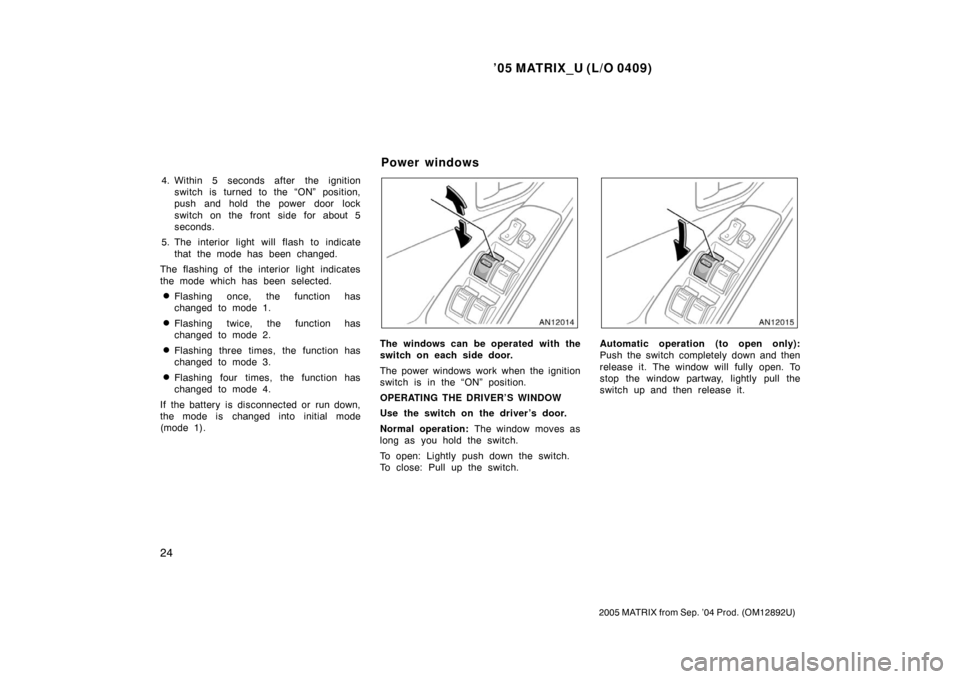
The windows can be operated with the
switch on each side door.
The power windows work when the ignition
switch is in the “ON” position.
OPERATING THE DRIVER’S WINDOW
Use the switch on the driver’s door.
Normal operation: The window moves as
long as you hold the switch.
To open: Lightly push down the switch.
To close: Pull up the switch.Automatic operation (to open only):
Push the switch completely down and then
release it. The window will fully open. To
stop the window partway, lightly pull the
switch up and then release it.
Power windows
Page 35 of 324

’05 MATRIX_U (L/O 0409)
25
2005 MATRIX from Sep. ’04 Prod. (OM12892U)
Window lock
switch
OPERATING THE PASSENGERS’
WINDOWS
Use the switch on each passenger ’s
door or the switches on the driver ’s
door that control each passenger ’s win-
dow.
The window moves as long as you hold
the switch.
To open: Push down the switch.
To close: Pull up the switch.
If you push in the window lock switch on
the driver ’s door, the passengers’ windows
cannot be operated.
CAUTION
To avoid serious personal injury, you
must do the following.
�Before you close the power win-
dows, always make sure there is
nobody around the power windows.
You must also make sure the
heads, hands and other parts of the
bodies of all occupants are kept
completely inside the vehicle. If
someone’s neck, head or hands get
caught in a closing window, it
could result in death or serious in-
jury. When anyone closes the power
windows, make sure he or she op-
erates the windows safely.
�When small children are in the ve-
hicle, never let them use the power
window switches without supervi-
sion. Use the window lock switch to
prevent them from making unex-
pected use of the switches.
Page 36 of 324

’05 MATRIX_U (L/O 0409)
26
2005 MATRIX from Sep. ’04 Prod. (OM12892U)
�Be sure to remove the ignition key
when you leave your vehicle.
�Never leave anyone (particularly a
small child) alone in your vehicle,
especially with the ignition key still
inserted. Otherwise, he/she could
use the power window switches and
get trapped in a window. Unat-
tended person (particularly a small
child) can be involved in a serious
accident.
LOCKING AND UNLOCKING WITH KEY
Insert the key into the keyhole and turn
it.
To lock: Turn the key clockwise.
If you turn the key fully clockwise, the
glass hatch will open. (See “Glass hatch”
on page 27 in this Section.)
To unlock: Turn the key counterclockwise.
To open the back door, pull the lock re-
lease lever.
Operating the power door lock switch or
wireless remote control transmitter simul-
taneously locks or unlocks the back door.
(See “—Locking and unlocking doors” on
page 17 and “Side doors” on page 20 in
this Section.)When closing the back door, the inside
handle can be used to make the reach
easier.
To close the back door, lower it and press
down on it. After closing the back door,
try pulling it up to make sure it is secure-
ly closed.
See “—Stowage precautions” on page 207
in Section 2 for precautions when loading
luggage.
Back door