Page 110 of 282

’05MY CELICA U (L/O 0409)
102
2005 CELICA from Sep. ’04 Prod. (OM20888U)
Ty p e A
Ty p e B
When parking, firmly apply the parking
brake to avoid inadvertent creeping.
To set: Pull up the lever. For better hold-
ing power, first depress the brake pedal
and hold it while setting the parking
brake.
To release: Pull up the lever slightly (1),
press the lock release button (2), and low-
er (3).
To remind you that the parking brake is
set, the parking brake reminder light in
the instrument panel remains on until you
release the parking brake.
CAUTION
Before driving, be sure the parking
brake is fully released and the park-
ing brake reminder light is off.
The cruise control allows you to cruise
the vehicle at a desired speed over 40
km/h (25 mph) even with your foot off
the accelerator pedal.
Your cruising speed can be maintained up
or down grades within the limits of engine
performance, although a slight speed
change may occur when driving up or
down the grades. On steeper hills, a
greater speed change will occur so it is
better to drive without the cruise control.
CAUTION
�To help maintain maximum control
of your vehicle, do not use the
cruise control when driving in
heavy or varying traffic, or on slip-
pery (rainy, icy or snowcovered) or
winding roads.
�Avoid vehicle speed increases when
driving downhill. If the vehicle
speed is too fast in relation to the
cruise control set speed, cancel the
cruise control then downshift the
transmission to use engine braking
to slow down.
Parking brakeCruise control
Page 111 of 282
’05MY CELICA U (L/O 0409)
103
2005 CELICA from Sep. ’04 Prod. (OM20888U)
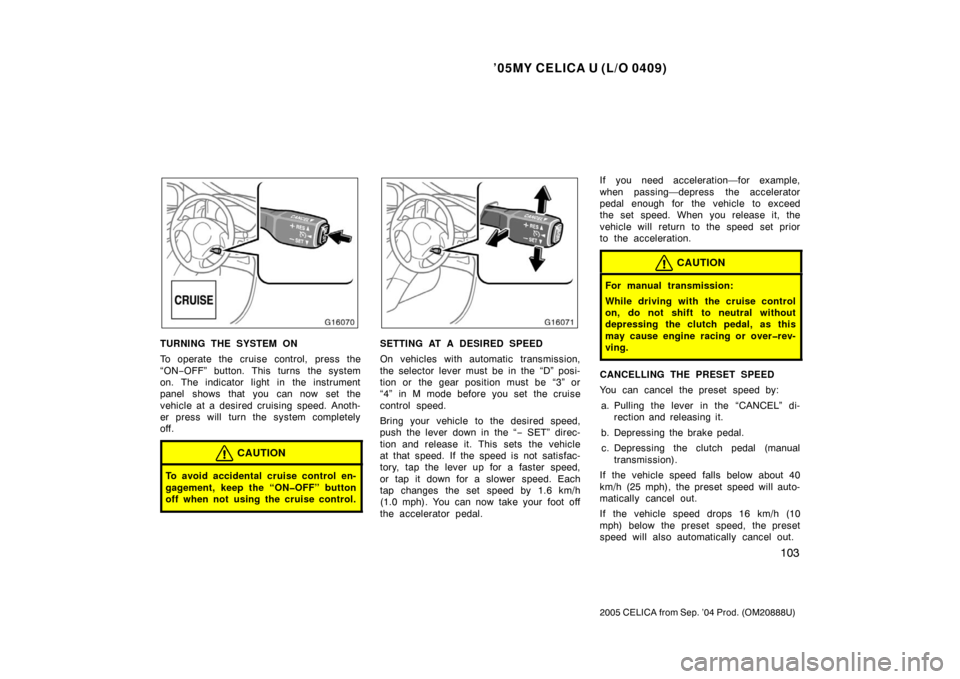
TURNING THE SYSTEM ON
To operate the cruise control, press the
“ON−OFF” button. This turns the system
on. The indicator light in the instrument
panel shows that you can now set the
vehicle at a desired cruising speed. Anoth-
er press will turn the system completely
off.
CAUTION
To avoid accidental cruise control en-
gagement, keep the “ONOFF” button
off when not using the cruise control.
SETTING AT A DESIRED SPEED
On vehicles with automatic transmission,
the selector lever must be in the “D” posi-
tion or the gear position must be “3” or
“4” in M mode before you set the cruise
control speed.
Bring your vehicle to the desired speed,
push the lever down in the “ − SET” direc-
tion and release it. This sets the vehicle
at that speed. If the speed is not satisfac-
tory, tap the lever up for a faster speed,
or tap it down for a slower speed. Each
tap changes the set speed by 1.6 km/h
(1.0 mph). You can now take your foot off
the accelerator pedal. If you need acceleration—for example,
when passing—depress the accelerator
pedal enough for the vehicle to exceed
the set speed. When you release it, the
vehicle will return to the speed set prior
to the acceleration.
CAUTION
For manual transmission:
While driving with the cruise control
on, do not shift to neutral without
depressing the clutch pedal, as this
may cause engine racing or overrev-
ving.
CANCELLING THE PRESET SPEED
You can cancel the preset speed by:
a. Pulling the lever in the “CANCEL” di- rection and releasing it.
b. Depressing the brake pedal. c. Depressing the clutch pedal (manual transmission).
If the vehicle speed falls below about 40
km/h (25 mph), the preset speed will auto-
matically cancel out.
If the vehicle speed drops 16 km/h (10
mph) below the preset speed, the preset
speed will also automatically cancel out.
Page 112 of 282

’05MY CELICA U (L/O 0409)
104
2005 CELICA from Sep. ’04 Prod. (OM20888U)
If the preset speed automatically cancels
out other than for the above cases, have
your vehicle checked by your Toyota deal-
er at the earliest opportunity.
RESETTING TO A FASTER SPEED
Push the lever up in the “+ RES” direction
and hold it. Release the lever when the
desired speed is attained. While the lever
is held up, the vehicle will gradually gain
speed.
However, a faster way to reset is to ac-
celerate the vehicle and then push the
lever down in the “− SET” direction.
RESETTING TO A SLOWER SPEED
Push the lever down in the “− SET” direc-
tion and hold it. Release the lever when
the desired speed is attained. While the
lever is held down, the vehicle speed will
gradually decrease.
However, a faster way to reset is to de-
press the brake pedal and then push the
lever down in the “− SET” direction. On vehicles with automatic transmission,
even if you turn off the overdrive switch
with the cruise control on, engine braking
will not be applied because the cruise
control is not cancelled. To decrease the
vehicle speed, reset to a slower speed
with the cruise control lever or depress
the brake pedal. If you use the brake
pedal, cruise control is cancelled.
RESUMING THE PRESET SPEED
If the preset speed is cancelled by pulling
the control lever or by depressing the
brake pedal or clutch pedal, pushing the
lever up in the “+ RES” direction will re-
store the speed set prior to cancellation.
However, once the vehicle speed falls be-
low about 40 km/h (25 mph), the preset
speed will not be resumed.
CRUISE CONTROL FAILURE WARNING
If the “CRUISE” indicator light in the in-
strument cluster flashes when using the
cruise control, press the “ON
−OFF” button
to turn the system off and then press it
again to turn it on.
If any of the following conditions then oc-
curs, there is some trouble in the cruise
control system.
�The indicator light does not come on.
�The indicator light flashes again.
�The indicator light goes out after it
comes on.
If this is the case, contact your Toyota
dealer and have your vehicle inspected.
Page 275 of 282

’05MY CELICA U (L/O 0409)
267
2005 CELICA from Sep. ’04 Prod. (OM20888U)
16. EFI 20 A: Multiport fuel injection sys-
tem/sequential multiport fuel injection
system, “EFI NO.1” and “EFI NO.2”
fuses
17. ST 7.5 A: Starting system, multiport
fuel injection system/sequential multi-
port fuel injection system
18. AM2 7.5 A: Starting system
19. IG2 15 A: Starting system, multiport
fuel injection system/sequential multi-
port fuel injection system
20. HAZ 10 A: Emergency flashers
21. ETCS 10 A: Electronic throttle control
system
22. HEAD RH UPR 10 A: Right−hand
headlight (high beam)
23. HEAD LH UPR 10 A: Left−hand head-
light (high beam), daytime running light
system
24. S/ROOF 15 A: Electric moon roof
25. FL P/W 20 A: Power windows
26. STOP 10 A: Stop lights, anti −lock
brake system, high mounted stoplight,
multiport fuel injection system/sequen-
tial multiport fuel injection system, elec-
tronically controlled automatic transmis-
sion system, cruise control system 27. SRSIG 7.5 A:
SRS airbag system
28. WASHER 15 A: Windshield washer,
rear window washer
29. RADIO 15 A: Audio system
30. TURN 7.5 A: Turn signal lights
31. HTR 10 A: Air conditioning system
32. TAIL 10 A: Tail lights, instrument panel
lights, license plate lights, front side
maker lights
33. CIG 15 A: Cigarette lighter
34. AM1 25 A: Starting system, “CIG”,
“ECU ACC”, “SRS −IG”, “WASHER”,
“WIPER”, “BK/UP LP”, “TENS RDC”,
“DEF RLY”, “BODY ECU −IG”, “TURN”,
“HTR”, “WARNING”, “FAN RLY”, “ABS −
IG” and “ECU −IG” fuses
35. DOOR 20 A: Power door lock system
36. FR FOG 15 A: Front fog lights
37. OBD 7.5 A: On−board diagnosis sys-
tem
38. WIPER 25 A: Windshield wipers
39. MIR HTR 10 A: No circuit
40. RR WIPER 15 A: Rear window wiper
41. FR P/W 20 A: Power windows Fuses (type B)
42. SPARE 7.5 A: Spare fuse
43. a. MPXB 7.5 A: Wireless remote con-
trol system
b. RR FOG 7.5 A: No circuit
c. DOME 7.5 A: Clock, interior light
d. ECUB 7.5 A: Ai
r conditioning sys-
tem, gauges and meters
44. a. WARNING 5 A: Charging system,
gauges and meters
b. ECUIG 5 A: Cruise control system
c. ABSIG 5 A: Anti−lock brake sys-
tem
d. FAN RLY 5 A: Electric cooling fan
45. a. PANEL1 7.5 A: Glove box light, in-
strument panel lights
b. PANEL2 7.5 A: Front fog lights, in-
strument panel lights, instrument
cluster lights
c. ECUACC 7.5 A: Clock, audio sys-
tem, power rear view mirror con-
trols, power antenna