Page 41 of 352

’05Camry_U (L/O 0409)
33
2005 CAMRY from Sep. ’04 Prod. (OM33684U)
Reactivating the alarm
Once set, the system automatically resets
the alarm after the alarm stops.
The alarm will activate again under the
same circumstances described in
“Activating the system”.
Stopping the alarm
The alarm will be stopped by the following
three ways:
�Turn the ignition key from the “LOCK”
to “ON” position.
�Unlock any of the doors with the key
or wireless remote control transmitter.
�Open the trunk with the key or wireless
remote control transmitter.
CANCELLING THE SYSTEM
The system will be cancelled by the
above mentioned 3 ways.
If the tail lights come on for 2 seconds,
the theft deterrent system has been
alarmed. Check to see if there is any
abnormality with your vehicle. TESTING THE SYSTEM
1. Open all the windows.
2. Set the system as described above. The doors should be locked with the
key or wireless remote control transmit-
ter. Be sure to wait until the indicator
light goes off or starts flashing.
3. Unlock any door from the inside. The system s hould activate the alarm.
4. Stop the alarm as described above.
5. Repeat this operation for the other doors, trunk and hood. When testing
the hood, also check that the system
is activated when the battery terminal
is disconnected and then reconnected.
If the system does not work properly,
have it checked by your Toyota dealer.
This indicates that the fuel filler door
is on the left side of your vehicle.
Fuel tank cap
Page 111 of 352

’05Camry_U (L/O 0409)
103
2005 CAMRY from Sep. ’04 Prod. (OM33684U)
Automatic light cut off system
Position 1 or “AUTO” position with the
tail lights on—
The lights automatically turn off when the
driver ’s door is opened with the ignition
key in the “ACC” or “LOCK” position.
Position 2 or “AUTO” position with the
headlights on—
The lights automatically turn off after 30
seconds when any of the doors or trunk
lid is opened and closed with the ignition
key in the “ACC” or “LOCK” position.
With wireless remote control—If you want
to turn off the lights immediately, push the
“LOCK” button on the wireless remote
control transmitter twice. The lights also
can be turned off immediately by pushing
the “LOCK” button on the wireless remote
control transmitter with all the doors
locked and the trunk lid closed.
If any of the doors or trunk lid is kept
open, the lights automatically turn off after
20 minutes.
To turn on the lights again, turn the igni-
tion key to the “ON” position or actuate
the headlight switch. If you are going to
park for over one week, make sure the
light switch is in the “DRL OFF” position.NOTICE
To prevent the battery from being dis-
charged, do not leave the lights on
for a long period when the engine is
not running.
Daytime Running Light (DRL) system
The Daytime Running Light (DRL) system
can make it easier for others to see the
front of your vehicle during the day. The
DRL system can be helpful in many differ-
ent driving conditions, but they can be
especially helpful in the short periods after
dawn and before sunset.
The DRL system will make your headlights
come on at a reduced brightness when:
�The ignition is on with the engine run-
ning.
�The light switch is in the “AUTO” posi-
tion or position 1.
�The parking brake is released.
To turn on the other exterior lights and
instrument panel lights, twist the knob to
position 1.
Twist the knob to position 2 to turn the
headlights to full intensity for night driving.
To turn off the DRL system, twist the knob
to the position 3 (“DRL OFF”) or turn the
ignition switch off.
Page 113 of 352

’05Camry_U (L/O 0409)
105
2005 CAMRY from Sep. ’04 Prod. (OM33684U)
Manually twist the knob to the position 2
to turn on the headlights if they are need-
ed immediately when entering a dark tun-
nel, parking structure, etc.
The automatic light control sensor is on
the top of the driver’s side instrument
panel.
Do not place anything on the instrument
panel, and/or do not affix anything on the
windshield to block this sensor.Automatic light cut off system
Position 1 or position 3 with the tail
lights on—
The lights automatically turn off when the
driver ’s door is opened with the ignition
key in the “ACC” or “LOCK” position.
Position 2 or position 3 with the head-
lights on—
The lights automatically turn off after 30
seconds when any of the doors or trunk
lid is opened and closed with the ignition
key in the “ACC” or “LOCK” position.
If you want to turn off the lights immedi-
ately, push the “LOCK” button on the wire-
less remote control transmitter twice. The
lights also can be turned off immediately
by pushing the “LOCK” button on the wire-
less remote control transmitter with all the
doors locked and the trunk lid closed.
If any of the doors or trunk lid is kept
open, the lights automatically turn off after
20 minutes.
To turn on the lights again, turn the igni-
tion key to the “ON” position or actuate
the headlight switch. If you are going to
park for over one week, make sure the
light switch is in the “OFF” position.
Page 149 of 352
’05Camry_U (L/O 0409)
141
2005 CAMRY from Sep. ’04 Prod. (OM33684U)
OPERATION OF INSTRUMENTS AND
CONTROLS
Audio system
Reference142
. . . . . . . . . . . . . . . . . . . . . . . . . . . . . . . . . . . . .\
. . . . . . . . . . . .
Using your audio system 143
. . . . . . . . . . . . . . . . . . . . . . . . . . . . . . . . . . . . \
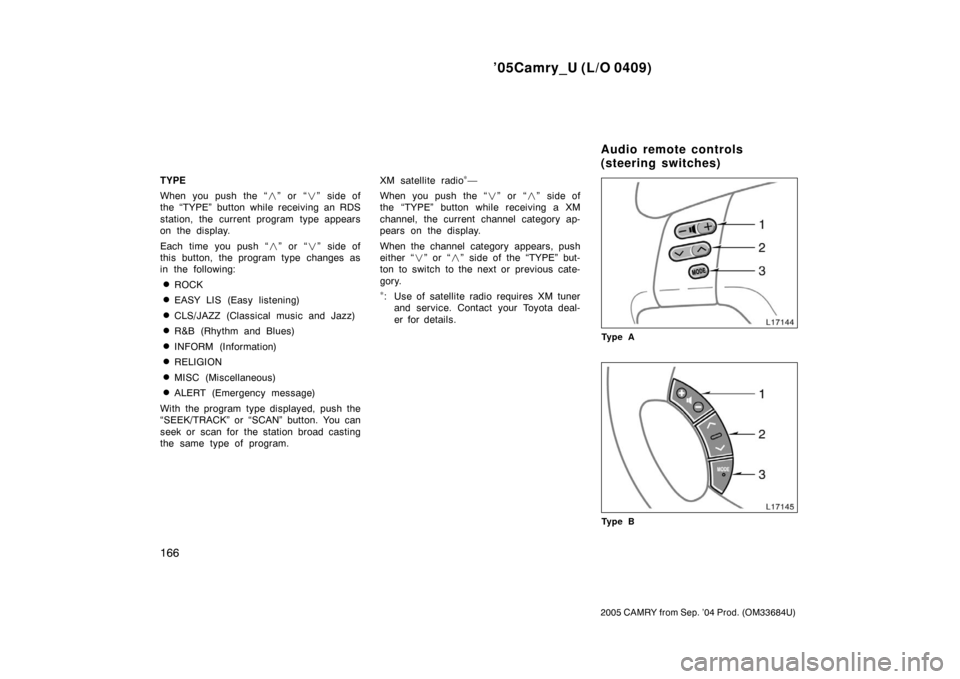
Audio remote controls 166
. . . . . . . . . . . . . . . . . . . . . . . . . . . . . . . . . . . . \
. . .
Audio system operating hints 168
. . . . . . . . . . . . . . . . . . . . . . . . . . . . . . . .
For vehicle equipped with Navigation system, please refer to the
separate “Navigation System Owner’s Manual”.
SECTION 1 8
Page 174 of 352
’05Camry_U (L/O 0409)
166
2005 CAMRY from Sep. ’04 Prod. (OM33684U)
TYPE
When you push the “�” or “�” side of
the “TYPE” button while receiving an RDS
station, the current program type appears
on the display.
Each time you push “ �” or “ �” side of
this button, the program type changes as
in the following:
�ROCK
�EASY LIS (Easy listening)
�CLS/JAZZ (Classical music and Jazz)
�R&B (Rhythm and Blues)
�INFORM (Information)
�RELIGION
�MISC (Miscellaneous)
�ALERT (Emergency message)
With the program type displayed, push the
“SEEK/TRACK” or “SCAN” button. You can
seek or scan for the station broad casting
the same type of program. XM satellite radio
∗—
When you push the “� ” or “�” side of
the “TYPE” button while receiving a XM
channel, the current channel category ap-
pears on the display.
When the channel category appears, push
either “ �” or “ �” side of the “TYPE” but-
ton to switch to the next or previous cate-
gory.
∗: Use of satellite radio requires XM tuner and service. Contact your Toyota deal-
er for details.
Ty p e A
Ty p e B
Audio remote controls
(steering switches)
Page 265 of 352

’05Camry_U (L/O 0409)
257
2005 CAMRY from Sep. ’04 Prod. (OM33684U)
IN CASE OF AN EMERGENCY
In case of an emergency
If your vehicle will not start258
. . . . . . . . . . . . . . . . . . . . . . . . . . . . . . . . . . .
If your engine stalls while driving 262
. . . . . . . . . . . . . . . . . . . . . . . . . . . . .
If you cannot increase engine speed 262
. . . . . . . . . . . . . . . . . . . . . . . . . .
If your vehicle overheats 262
. . . . . . . . . . . . . . . . . . . . . . . . . . . . . . . . . . . . \
If you have a flat tire 263
. . . . . . . . . . . . . . . . . . . . . . . . . . . . . . . . . . . . \
. . . . .
If your vehicle becomes stuck 273
. . . . . . . . . . . . . . . . . . . . . . . . . . . . . . . .
If your vehicle needs to be towed 274
. . . . . . . . . . . . . . . . . . . . . . . . . . . . .
If you cannot shift automatic transmission selector lever 279
. . . . . . . .
If you lose your keys 280
. . . . . . . . . . . . . . . . . . . . . . . . . . . . . . . . . . . . \
. . . .
If you lose your wireless remote control transmitter 280
. . . . . . . . . . . . .
SECTION 4
Page 288 of 352

’05Camry_U (L/O 0409)
280
2005 CAMRY from Sep. ’04 Prod. (OM33684U)
You can purchase a new key at your
Toyota dealer if you can give them the
key number. If your vehicle is equipped
with the engine immobilizer system, the
dealer will also need your master key.
Vehicles with engine immobilizer system—
Even if you lose only one key, contact
your Toyota dealer to make a new key. If
you lose all your master keys, you cannot
make new keys; the whole engine immobi-
lizer system must be replaced.
See the suggestion given in “Keys” on
page 12 in Section 1−2.
If your keys are locked in the vehicle and
you cannot get a duplicate, many Toyota
dealers can still open the door for you,
using their special tools. If you must
break a window to get in, we suggest
breaking the smallest side window be-
cause it is the least expensive to replace.
Be extremely cautious to avoid cuts from
the glass. You can purchase a new wireless re-
mote control transmitter at your Toyota
dealer.
Have the registered identification numbers
of your transmitters deleted from your ve-
hicle by your Toyota dealer as soon as
possible to avoid the possibility of theft or
an accident. Then, have the identification
number of your new transmitter registered.
At the same time, you must bring all of
the remaining transmitters to have them
registered again as well.
You can use the wireless remote control
system with the new transmitter. Contact
your Toyota dealer for detailed information.
If you lose your keys
If you lose your wireless
remote control transmitter
Page 344 of 352

’05Camry_U (L/O 0409)
336
2005 CAMRY from Sep. ’04 Prod. (OM33684U)
Engine compartment
Instrument panel
Fuses (type A)1. HEAD LH LWR 15 A: Left−hand head-
light (low beam)
2. HEAD RH LWR 15 A: Right−hand
headlight (low beam)
3. DRL 5 A: Daytime running light system
4. A/C 10 A: Air conditioning system
5. SPARE 10 A: Spare fuse
6. SPARE 15 A: Spare fuse
7. SPARE 5 A: Spare fuse
8. AM2 30 A: Starting system, “IGN” and
“IG2” fuses 9. HEAD LH UPR 10 A:
Left−hand head-
light (high beam)
10. HEAD RH UPR 10 A: Right−hand
headlight (high beam)
11. ST 5 A: Multiport fuel injection system/
sequential multiport fuel injection sys-
tem
12. TEL 5 A: No circuit
13. ALTS 5 A: Charging system
14. IGN 15 A: Starting system
15. IG2 10 A: Multiport fuel injection sys-
tem/sequential multiport fuel injection
system, SRS airbag system, front seat
belt pretensioners, cruise control sys-
tem
16. DOOR1 25 A: Multiplex communication
system (power door lock system, auto −
door locking system, wireless remote
control system)
17. EFI 20 A: Multiport fuel injection sys-
tem/sequential multiport fuel injection
system
18. HORN 10 A: Horns
19. D.C.C 30 A: “ECU−B”, “RAD1” and
“DOME” fuses
20. A/F 25 A: Multiport fuel injection sys-
tem/sequential multiport fuel injection
system
Fuses
