Page 201 of 352

’05Camry_U (L/O 0409)
193
2005 CAMRY from Sep. ’04 Prod. (OM33684U)
OPERATION OF INSTRUMENTS AND
CONTROLS
Other equipment
Clock194
. . . . . . . . . . . . . . . . . . . . . . . . . . . . . . . . . . . . .\
. . . . . . . . . . . . . . . . .
Outside temperature display 194
. . . . . . . . . . . . . . . . . . . . . . . . . . . . . . . . .
Multi −information display 195
. . . . . . . . . . . . . . . . . . . . . . . . . . . . . . . . . . . . \
Compass 197
. . . . . . . . . . . . . . . . . . . . . . . . . . . . . . . . . . . . \
. . . . . . . . . . . . . .
Cigarette lighter and ashtrays 202
. . . . . . . . . . . . . . . . . . . . . . . . . . . . . . . .
Power outlets 203
. . . . . . . . . . . . . . . . . . . . . . . . . . . . . . . . . . . . \
. . . . . . . . . .
Garage door opener 204
. . . . . . . . . . . . . . . . . . . . . . . . . . . . . . . . . . . . \
. . . .
Glove box 207
. . . . . . . . . . . . . . . . . . . . . . . . . . . . . . . . . . . . \
. . . . . . . . . . . . . .
Auxiliary boxes 207
. . . . . . . . . . . . . . . . . . . . . . . . . . . . . . . . . . . . \
. . . . . . . . .
Rear console box 208
. . . . . . . . . . . . . . . . . . . . . . . . . . . . . . . . . . . . \
. . . . . . .
Front cup holder 209
. . . . . . . . . . . . . . . . . . . . . . . . . . . . . . . . . . . . \
. . . . . . . .
Rear cup holder 210
. . . . . . . . . . . . . . . . . . . . . . . . . . . . . . . . . . . . \
. . . . . . . .
Storage box 211
. . . . . . . . . . . . . . . . . . . . . . . . . . . . . . . . . . . . \
. . . . . . . . . . . .
Grocery bag hooks 211
. . . . . . . . . . . . . . . . . . . . . . . . . . . . . . . . . . . . \
. . . . .
Cargo net 211
. . . . . . . . . . . . . . . . . . . . . . . . . . . . . . . . . . . . \
. . . . . . . . . . . . . .
Rear sun shade 212
. . . . . . . . . . . . . . . . . . . . . . . . . . . . . . . . . . . . \
. . . . . . . .
Floor mat 212
. . . . . . . . . . . . . . . . . . . . . . . . . . . . . . . . . . . . \
. . . . . . . . . . . . . .
SECTION 1 10
Page 202 of 352

’05Camry_U (L/O 0409)
194
2005 CAMRY from Sep. ’04 Prod. (OM33684U)
To reset the hour: Push the “H” button.
To reset the minutes: Push the “M” button.
The key must be in the “ACC” or “ON”
position.
If the electrical power source has been
disconnected from the clock, the time dis-
play will automatically be set to 1:00 (one
o’clock).
When the instrument panel lights are
turned on, the brightness of the time indi-
cator will be reduced.With multiinformation display
Without multiinformation display
Without multi−information display—To se-
lect “ �C” or “ �F”, push the “E/M” button.
The displayed temperature ranges from
− 30 �C ( −22 �F) up to 50 �C (122 �F).
The key must be in the “ON” position.
If an abnormality exists in the connection
of the outside air temperature sensor, “ −−”
will appear on the display. If “ −−” appears
on the display, contact your Toyota dealer.
There may be a case that “−−” appears
momentarily when the ignition is quickly
turned to “ON”. It is normal if it goes out
soon.
Clock Outside temperature display
Page 203 of 352
’05Camry_U (L/O 0409)
195
2005 CAMRY from Sep. ’04 Prod. (OM33684U)
The following information is displayed
on the clock/outside temperature dis-
play when you push the “INFO” button
with the ignition switch turned on.
Each time you push the “MODE/RESET”
button, the display toggles through this
information.1. Instantaneous fuel consumption
2. Average fuel consumption
3. Driving range
4. Average vehicle speed
5. Driving time
The displayed values in the multi −informa-
tion display indicate general driving condi-
tions. Accuracy varies with driving habits
and road conditions.
Push the “INFO” button once again, the
display will return to the clock and outside
temperature gauge.
When the ignition switch is on, the last
previously used mode displayed just be-
fore the ignition switch is off will appear.
Multiinformation display
Page 215 of 352
’05Camry_U (L/O 0409)
207
2005 CAMRY from Sep. ’04 Prod. (OM33684U)
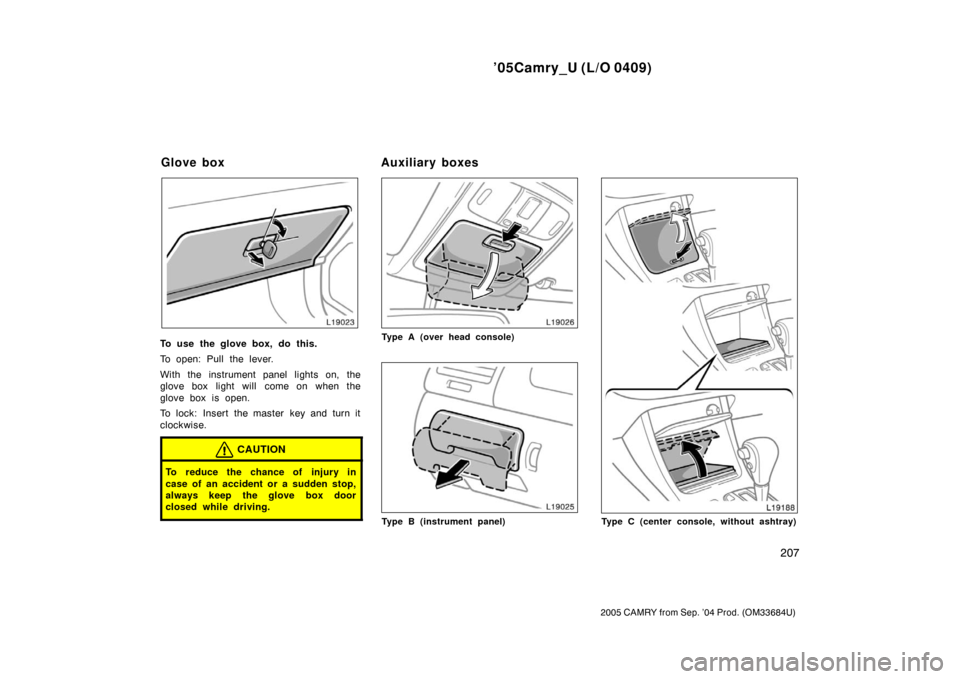
To use the glove box, do this.
To open: Pull the lever.
With the instrument panel lights on, the
glove box light will come on when the
glove box is open.
To lock: Insert the master key and turn it
clockwise.
CAUTION
To reduce the chance of injury in
case of an accident or a sudden stop,
always keep the glove box door
closed while driving.
Type A (over head console)
Type B (instrument panel)Type C (center console, without ashtray)
Glove boxAuxiliary boxes
Page 276 of 352
’05Camry_U (L/O 0409)
268
2005 CAMRY from Sep. ’04 Prod. (OM33684U)
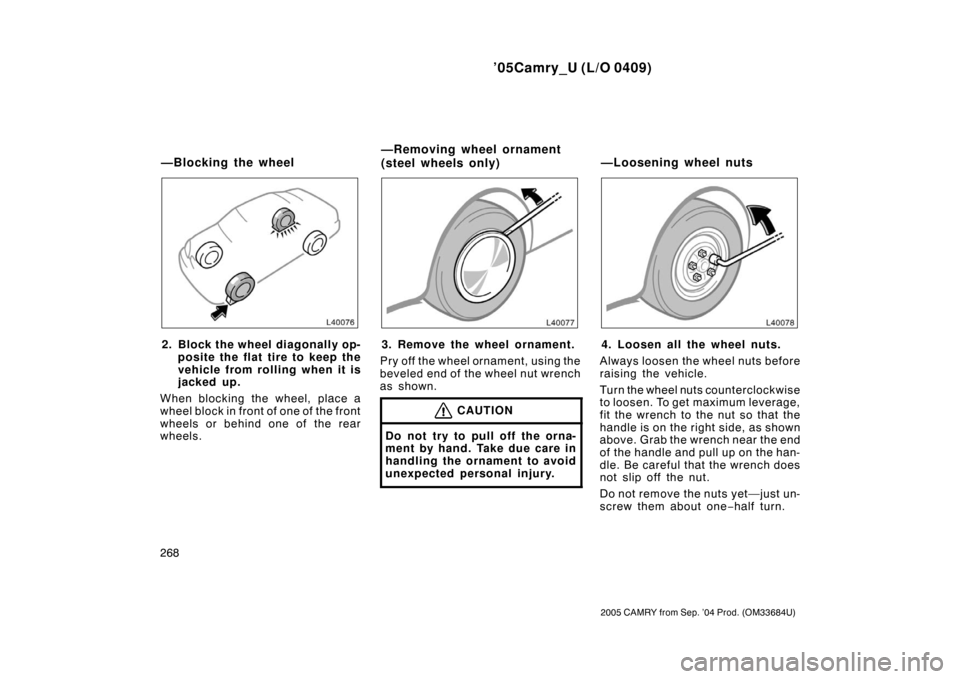
2. Block the wheel diagonally op-posite the flat tire to keep the
vehicle from rolling when it is
jacked up.
When blocking the wheel, place a
wheel block in front of one of the front
wheels or behind one of the rear
wheels.3. Remove the wheel ornament.
Pry off the wheel ornament, using the
beveled end of the wheel nut wrench
as shown.
CAUTION
Do not try to pull off the orna-
ment by hand. Take due care in
handling the ornament to avoid
unexpected personal injury.
4. Loosen all the wheel nuts.
Always loosen the wheel nuts before
raising the vehicle.
Turn the wheel nuts counterclockwise
to loosen. To get maximum leverage,
fit the wrench to the nut so that the
handle is on the right side, as shown
above. Grab the wrench near the end
of the handle and pull up on the han-
dle. Be careful that the wrench does
not slip off the nut.
Do not remove the nuts yet—just un-
screw them about one −half turn.
—Blocking the wheel —Removing wheel ornament
(steel wheels only)
—Loosening wheel nuts
Page 277 of 352
’05Camry_U (L/O 0409)
269
2005 CAMRY from Sep. ’04 Prod. (OM33684U)
CAUTION
Never use oil or grease on the
bolts or nuts. The nuts may loose
and the wheels may fall off,
which could cause a serious ac-
cident.
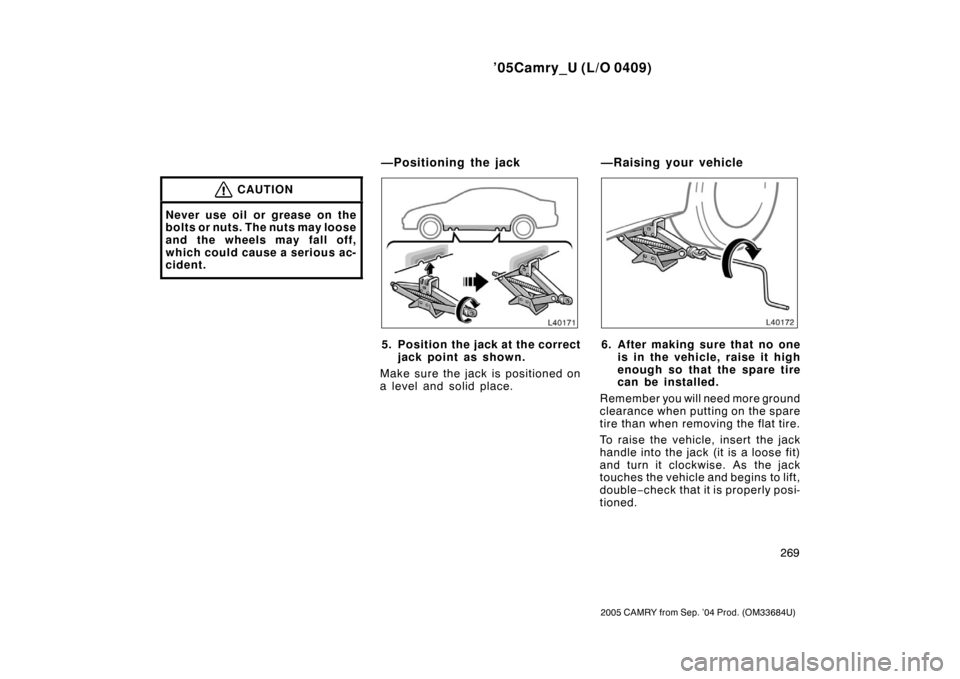
5. Position the jack at the correctjack point as shown.
Make sure the jack is positioned on
a level and solid place.6. After making sure that no one is in the vehicle, raise it high
enough so that the spare tire
can be installed.
Remember you will need more ground
clearance when putting on the spare
tire than when removing the flat tire.
To raise the vehicl e, insert the jack
handle into the jack (it is a loose fit)
and turn it clockwise. As the jack
touches the vehicle and begins to lift,
double −check that it is properly posi-
tioned.
—Positioning the jack —Raising your vehicle
Page 279 of 352
’05Camry_U (L/O 0409)
271
2005 CAMRY from Sep. ’04 Prod. (OM33684U)
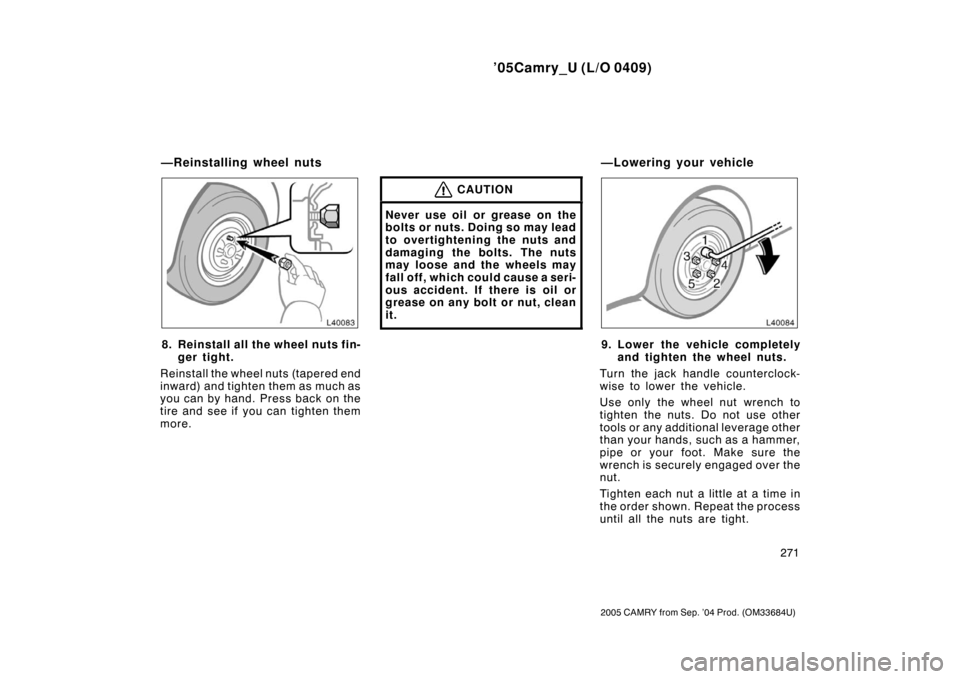
8. Reinstall all the wheel nuts fin-ger tight.
Reinstall the wheel nuts (tapered end
inward) and tighten them as much as
you can by hand. Press back on the
tire and see if you can tighten them
more.
CAUTION
Never use oil or grease on the
bolts or nuts. Doing so may lead
to overtightening the nuts and
damaging the bolts. The nuts
may loose and the wheels may
fall off, which could cause a seri-
ous accident. If there is oil or
grease on any bolt or nut, clean
it.
9. Lower the vehicle completely and tighten the wheel nuts.
Turn the jack handle counterclock-
wise to lower the vehicle.
Use only the wheel nut wrench to
tighten the nuts. Do not use other
tools or any additional leverage other
than your hands, such as a hammer,
pipe or your foot. Make sure the
wrench is securely engaged over the
nut.
Tighten each nut a little at a time in
the order shown. Repeat the process
until all the nuts are tight.
—Reinstalling wheel nuts —Lowering your vehicle
Page 286 of 352
’05Camry_U (L/O 0409)
278
2005 CAMRY from Sep. ’04 Prod. (OM33684U)
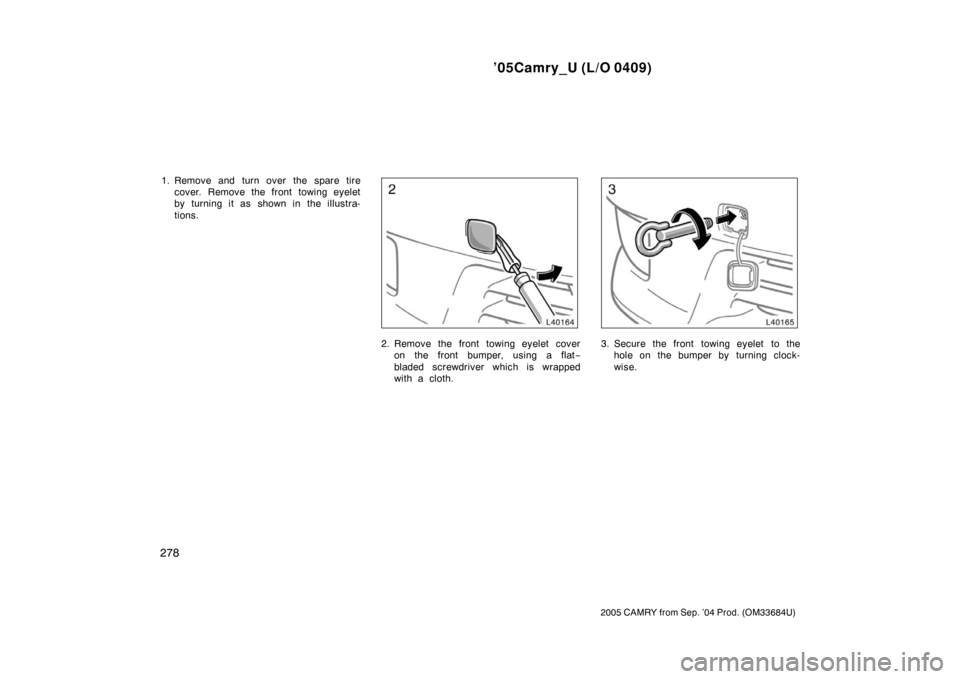
1. Remove and turn over the spare tirecover. Remove the front towing eyelet
by turning it as shown in the illustra-
tions.
2. Remove the front towing eyelet coveron the front bumper, using a flat −
bladed screwdriver which is wrapped
with a cloth.3. Secure the front towing eyelet to the hole on the bumper by turning clock-
wise.