Page 2704 of 5135
40±36
±
AUTOMATIC TRANSMISSION / TRANS AUTOMATIC TRANSAXLE ASSY (U241E)
AVENSIS REPAIR MANUAL (RM1018E)
(a)ABS WITH EBD SYSTEM (See pege 05±699)
(b)ABS WITH EBD & BA &TRAC & VSC SYSTEM (See pege 05±756)
76. RESET MEMORY
(a)1AZ±FE (See pege 05±863)
(b)1AZ±FSE (See pege 05±920)
Page 2718 of 5135
40±22
±
AUTOMATIC TRANSMISSION / TRANS AUTOMATIC TRANSAXLE ASSY (U341E)
AVENSIS REPAIR MANUAL (RM1018E)
78.CHECK ABS SPEED SENSOR SIGNAL (See page 05±699)
79.RESET MEMORY (See page 05±985)
Page 2923 of 5135
55±18
± HEATER & AIR CONDITIONERCOMBUSTION TYPE POWER HEATER SYSTEM
AVENSIS REPAIR MANUAL (RM1018E)DTC No.Comment / Remedy Description of fault
071Surface sensor break
Check connecting leads.
Resistance value between 4 and 11 at connector B > 2 �� (If
break)
072Surface sensor short±circuit
Check connecting leads.
Resistance value between 4 and 11 at connector B > 50 � (If
short±circuit)
090
092
093Control unit detective (Internal fault / Reset)
Control unit detective (ROM error)
Control unit detective (RAM error)
Control unit malfunction due to interference voltage from ve-
hicle electrical system;
possible causes low batteries, chargers, other sources of
interference; eliminate interference voltages.
Internal faults detected in microprocessor / memory detected.
Replace control unit.
097Internal control unit faultsOther faults which cannot lead to DTC No. 90, 92 and 93,
replace control unit.
Page 2988 of 5135
60±2
± SUPPLEMENTAL RESTRAINT SYSTEMSUPPLEMENTAL RESTRAINT SYSTEM
AVENSIS REPAIR MANUAL (RM1018E)
�When the negative (±) terminal cable is disconnected from the battery, the memory of the clock
and audio system will be canceled. So before starting work, make a record of the contents mem-
orized in the audio memory system. When work is finished, reset the audio systems as they
were before and adjust the clock. To avoid erasing the memory in each memory system, never
use a back±up power supply from outside the vehicle.
�If the vehicle is equipped with a mobile communication system, refer to the precaution in the
INTRODUCTION section.
Page 3132 of 5135
670S4±01
± AUDIO & VISUAL SYSTEMAUDIO & VISUAL SYSTEM
67±1
AVENSIS REPAIR MANUAL (RM1018E)
AUDIO & VISUAL SYSTEM
PRECAUTION
1. OBSERVE HANDLING AND OPERATIONAL PRECAUTIONS
(a) Please explain to the customer that when the negative terminal is disconnected from the battery, the
channel information memory of the AM/FM broadcast stations in the radio receiver is cleared. If neces-
sary, make a note of the recorded channel information before the negative terminal is disconnected,
then reset the information after the negative terminal is reconnected.
(b) The removal/installation of the radio receiver should be performed after all the cassette tapes and au-
dio CDs are ejected from the radio receiver.
HINT:
If the cassette tapes and the audio CDs cannot be ejected due to the malfunction of the radio receiver, do
not try to drag them out by force. Bring the vehicle to the repair plant.
(c) Fasten the earth bolt securely when the antenna cord is removed or installed.
HINT:
Failing to fasten the earth bolt securely causes noise at the time of radio wave reception.
(d) Do not touch the cone paper of the speaker.
Page 3206 of 5135
700SB±01
± WINDSHIELD/WINDOWGLASS/MIRRORPOWER WINDOW CONTROL SYSTEM
70±13
AVENSIS REPAIR MANUAL (RM1018E)
RESET
NOTICE:
�The power window regulator motor must be reset when the fitting of the door glass is adjusted
or when the door glass run is replaced.
�Whenever disconnecting the battery terminal, reset all the other systems besides the power
window control system.
1. RESET WINDOW REGULATOR SUB±ASSY (REGULATOR MOTOR)
(a) Turn the ignition switch ON.
(b) Operate the power window using the master (regulator) switch.
(c) Disconnect the battery, fuse or motor connector while the power window is operating, so that the power
window motor is forced to stop.
(d) Reconnect the battery, fuse or motor connector.
(e) Pull up the power window switch until the power window is fully closed and hold the switch at least 1
second.
(f) Check that the AUTO UP/DOWN function operates completely.
Page 3218 of 5135
B51853
Hammer 70±2
± WINDSHIELD/WINDOWGLASS/MIRRORPOWER WINDOW CONTROL SYSTEM
AVENSIS REPAIR MANUAL (RM1018E)
4. CHECK REMOTE UP/DOWN FUNCTION
(a) Check that each switch of the power window master switch can operate each power window as follows:
Standard:
ConditionMaster SwitchSwitch OperationPower Window
Passenger sideHalfway pulled UPUP (Closed)Passenger sideHalfway pushed DOWNDOWN (Open)
�Ignition switch ONRear LHHalfway pulled UPUP (Closed)Ignition switch ON
�Window lock switch OFFRear LHHalfway pushed DOWNDOWN (Open)
Rear RHHalfway pulled UPUP (Closed)Rear RHHalfway pushed DOWNDOWN (Open)
5. CHECK REMOTE AUTO UP/DOWN FUNCTION
(a) Check that each switch of the power window master switch can operate each power window as follows:
Standard:
ConditionMaster SwitchSwitch OperationPower Window
Passenger sideFully pulled UPAUTO UP (Fully closed)Passenger sideFully pushed DOWNAUTO DOWN (Fully open)
�Ignition switch ONRear LHFully pulled UPAUTO UP (Fully closed)Ignition switch ON
�Window lock switch OFFRear LHFully pushed DOWNAUTO DOWN (Fully open)
Rear RHFully pulled UPAUTO UP (Fully closed)Rear RHFully pushed DOWNAUTO DOWN (Fully open)
6. CHECK POWER WINDOW OPERATION FUNCTION AFTER IGNITION SWITCH IS TURNED OFF
(a) When both of the following conditions are fulfilled, check that the power windows can be operated even
after the ignition switch is turned OFF.
�Within 45 seconds after the ignition switch is turned OFF
�The front doors are closed
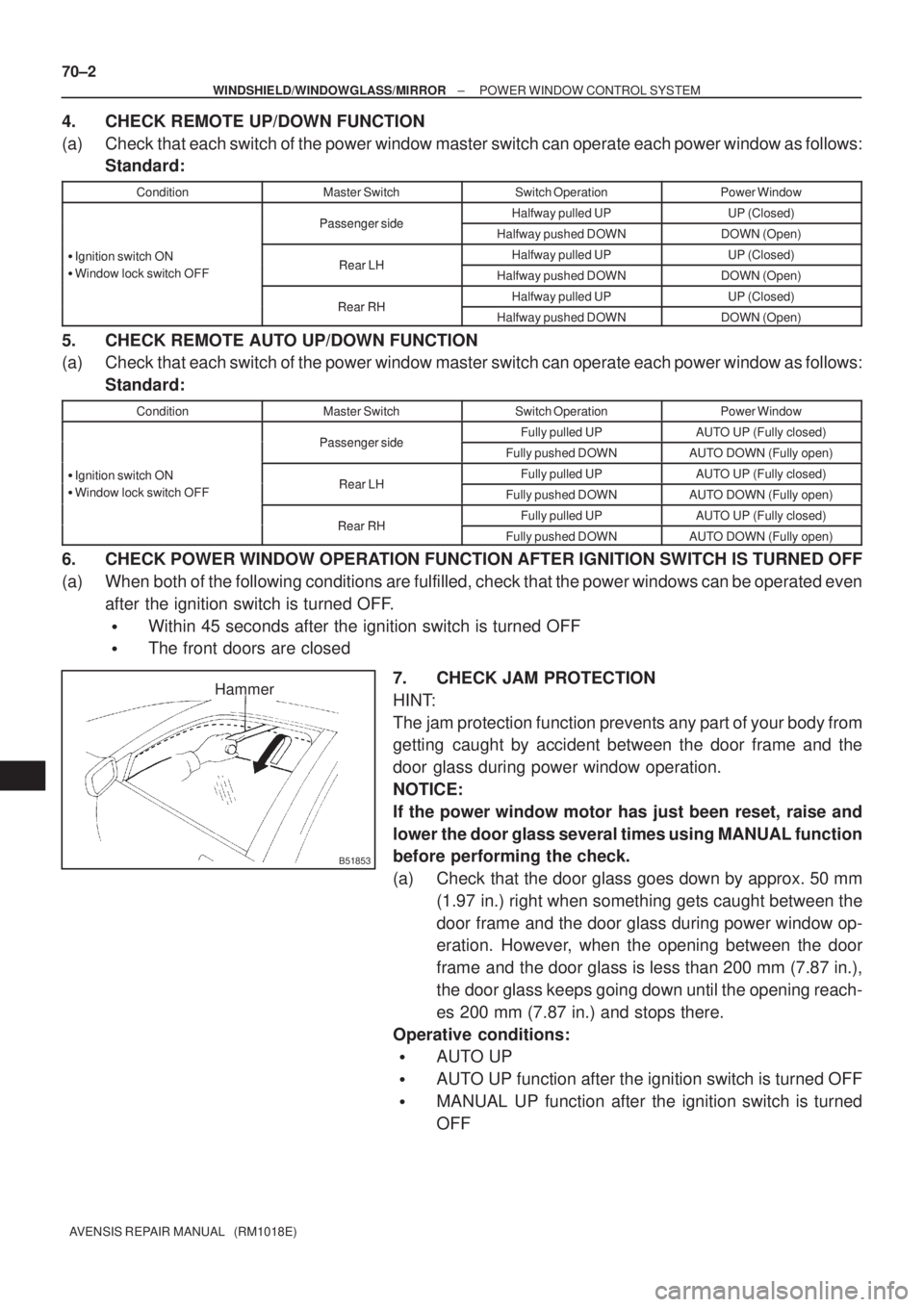
7. CHECK JAM PROTECTION
HINT:
The jam protection function prevents any part of your body from
getting caught by accident between the door frame and the
door glass during power window operation.
NOTICE:
If the power window motor has just been reset, raise and
lower the door glass several times using MANUAL function
before performing the check.
(a) Check that the door glass goes down by approx. 50 mm
(1.97 in.) right when something gets caught between the
door frame and the door glass during power window op-
eration. However, when the opening between the door
frame and the door glass is less than 200 mm (7.87 in.),
the door glass keeps going down until the opening reach-
es 200 mm (7.87 in.) and stops there.
Operative conditions:
�AUTO UP
�AUTO UP function after the ignition switch is turned OFF
�MANUAL UP function after the ignition switch is turned
OFF
Page 3347 of 5135
B66980
B69209
B65138
1
2
3
B61450
±
ENGINE HOOD/DOOR REAR DOOR
75±29
AVENSIS REPAIR MANUAL (RM1018E)
27.INSTALL REAR DOOR GLASS SUB±ASSY LH
NOTICE:
Be careful not to drop the glass as this may cause deformation.
(a)Install the door glass into the door panel.
HINT:
Insert a shop rag inside the door panel to prevent the door glass from b\
eing scratched.
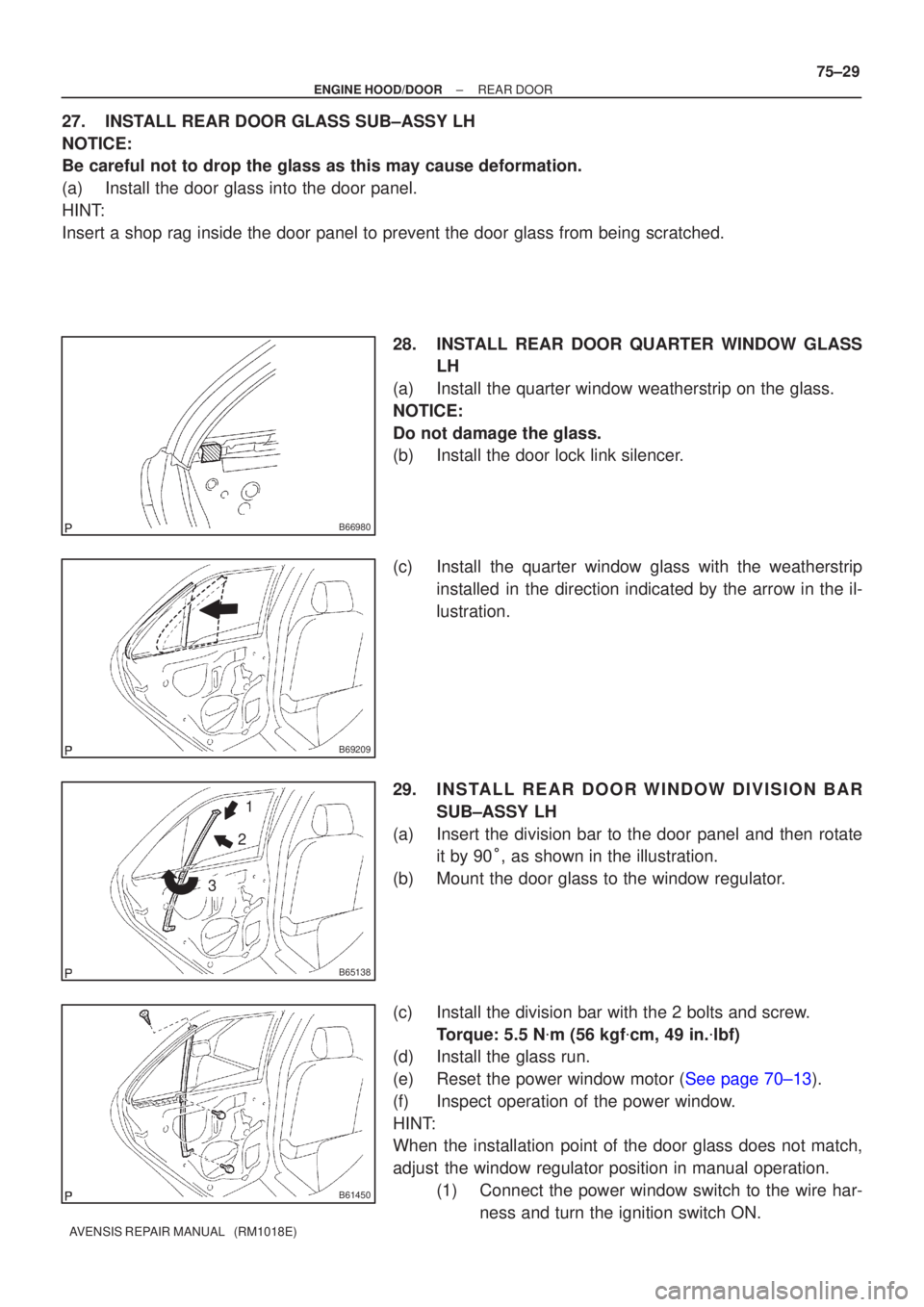
28.INSTALL REAR DOOR QUARTER WINDOW GLASSLH
(a)Install the quarter window weatherstrip on the glass.
NOTICE:
Do not damage the glass.
(b)Install the door lock link silencer.
(c)Install the quarter window glass with the weatherstrip installed in the direction indicated by the arrow in the il-
lustration.
29.INSTALL REAR DOOR WINDOW DIVISION BAR SUB±ASSY LH
(a)Insert the division bar to the door panel and then rotate it by 90 �� as shown in the illustration.
(b)Mount the door glass to the window regulator.
(c)Install the division bar with the 2 bolts and screw. Torque: 5.5 N �m (56 kgf �cm, 49 in. �lbf)
(d)Install the glass run.
(e)Reset the power window motor (See page 70±13).
(f) Inspect operation of the power window.
HINT:
When the installation point of the door glass does not match,
adjust the window regulator position in manual operation.
(1) Connect the power window switch to the wire har-ness and turn the ignition switch ON.