Page 409 of 627
7-54
Starting and operating
The “ ” indicator light on the combination
meter will come on.
2. Depress the accelerator pedal until the vehicle
reaches the desired speed.
3. Push the control lever downward in the “SET/
COAST” direction and release it. Then release the ac-
celerator pedal.
UB7507HAUB7203BA
Page 410 of 627

7-55
Starting and operating
– CONTINUED –
At this time, the “ ” indicator light is illuminated in the combination meter.
The vehicle will maintain the desired speed.
Vehicle speed can be temporarily increased while
driving with the cruise control activated. Simply de-
press the accelerator pedal to accelerate the vehicle.
When the accelerator pedal is released, the vehicle
will return to and maintain the previous cruising speed. !To temporarily cancel the cruise con- trol
There are four ways to cancel the cruise control tem-
porarily: "
Pull the control lever in the “CANCEL” direction (if
so equipped). " Depress the brake pedal.
" Depress the clutch pedal (manual transmission ve-
hicles only)." Shift the selector lever into the “N” position (auto-
matic transmission vehicles only).
The “ ” indicator light in the combination meter
goes off when the cruise control is cancelled.
To resume the cruise control after it has been tempo-
rarily canceled and with vehicle speed of about 20
mph (32 km/h) or more, push the control lever upward
in the “RES/ACC” direction to return to the original
UB7507IAUB7204BA
Page 411 of 627

7-56
Starting and operating
cruising speed automatically.
The “ ” indicator light in the combination meter will
automatically come on at this time. !
To turn off the cruise control
There are two ways to turn off the cruise control: " Push the main switch again.
" Turn the ignition switch to the “ACC” or “LOCK” po-
sition (but only when the vehicle is completely
stopped). ! To change the cruising speed
! To increase the speed (by control lever) Push the control lever upward in the “RES/ACC” direc-
tion and hold it until the vehicle reaches the desired
speed. Then, release the control lever. The vehicle
speed at that moment will be memorized and treated
as the new set speed.
When the difference between the actual vehicle speed
and the set speed is less than 4 mph (6.8 km/h), the
set speed can be increased 1 mph (1.6 km/h) each
time by pressing the control lever upward in the “RES/
ACC” direction quickly within 0.25 second. !
To increase the speed (by accelerator pedal)
1. Depress the accelerator pedal to accelerate the ve-
hicle to the desired speed.
2. Push the control lever downward in the “SET/
COAST” direction once. Now the desired speed is set
and the vehicle will keep running at that speed without
depressing the accelerator pedal.
NOTE
If the difference between the actual vehicle speed
when the control lever is pushed downward and
the speed last time you set it is less than 4 mph
(6.8 km/h), the vehicle speed will be lowered by 1
mph (1.6 km/h). This occurs because the cruise
control system unit regards this lever operation as
that intended to decrease the vehicle speed.
UB7203CA
Page 412 of 627
7-57
Starting and operating
– CONTINUED –
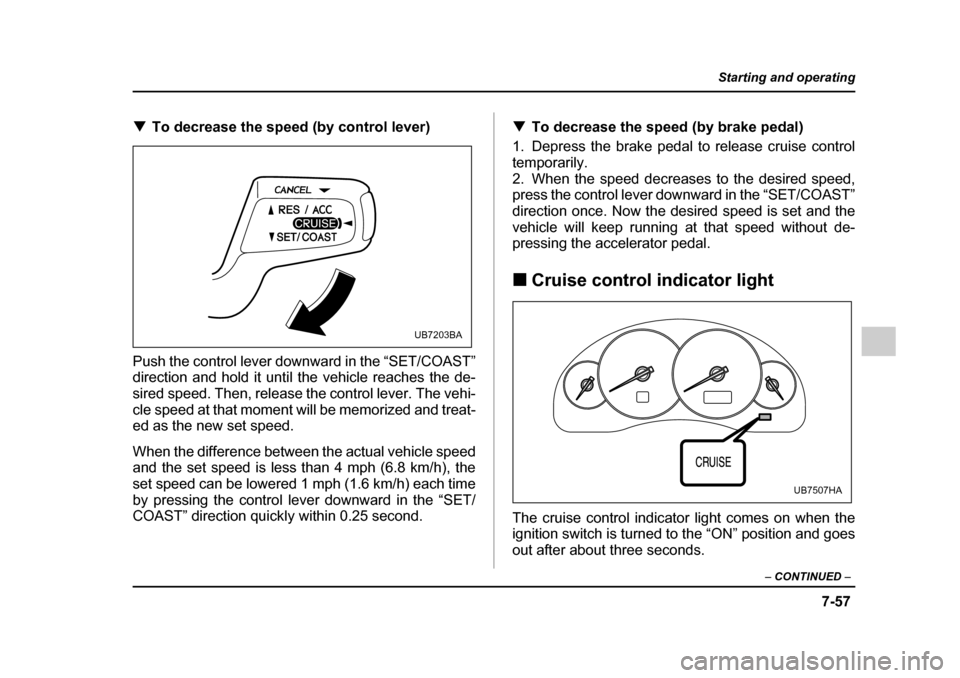
!To decrease the speed (by control lever)
Push the control lever downward in the “SET/COAST”
direction and hold it until the vehicle reaches the de-
sired speed. Then, release the control lever. The vehi-
cle speed at that moment will be memorized and treat-
ed as the new set speed.
When the difference between the actual vehicle speed
and the set speed is less than 4 mph (6.8 km/h), the
set speed can be lowered 1 mph (1.6 km/h) each time
by pressing the control lever downward in the “SET/
COAST” direction quickly within 0.25 second. !
To decrease the speed (by brake pedal)
1. Depress the brake pedal to release cruise control
temporarily.
2. When the speed decreases to the desired speed,
press the control lever downward in the “SET/COAST”
direction once. Now the desired speed is set and the
vehicle will keep running at that speed without de-
pressing the accelerator pedal. ! Cruise control indicator light
The cruise control indicator light comes on when the
ignition switch is turned to the “ON” position and goes
out after about three seconds.
UB7203BA
UB7507HA
Page 413 of 627
7-58
Starting and operating
The light comes on when the “CRUISE” main switch is
pressed.
If you move the cruise control lever while turning the
ignition switch “ON”, the cruise control function is de-
activated and the “CRUISE” indicator light flashes. To
reactivate the cruise control function, turn the ignition
switch back to the “ACC” or “LOCK” position, and then
turn it again to the “ON” position. !
Cruise control set indicator light
The cruise control set indicator light comes on when
the ignition switch is turned to the “ON” position and
goes out after about three seconds. The light comes on when vehicle speed has been set.
UB7507IA
Page 424 of 627

8-11
Driving tips
– CONTINUED –
"Always check your brakes for effectiveness immedi-
ately after driving in sand, mud or water. Do this by
driving slowly and stepping on the brake pedal. Re-
peat that process several times to dry out the brake
discs and brake pads." Do not drive or park over or near flammable materi-
als such as dry grass or fallen leaves, as they may
burn easily. The exhaust system is very hot while the
engine is running and right after engine stops. This
could create a fire hazard. " After driving through tall grass, mud, rocks, sand,
rivers, etc., check that there is no grass, bush, paper,
rags, stones, sand, etc. adhering to or trapped on the
underbody. Clear off any such matter from the under-
body. If the vehicle is used with these materials
trapped or adhering to the underbody, a mechanical
breakdown or fire could occur." Secure all cargo carried inside the vehicle and make
certain that it is not piled higher than the seatbacks.
During sudden stops or jolts, unsecured cargo could
be thrown around in the vehicle and cause injury. Do
not pile heavy loads on the roof. Those loads raise the
vehicle’s center of gravity and make it more prone to
tip over. " If you must rock the vehicle to free it from sand or
mud, depress the accelerator pedal slightly and move
the selector lever back and forth between “D” and “R” repeatedly. Do not race the engine. For the best pos-
sible traction, avoid spinning the wheels when trying to
free the vehicle. "
When the road surface is extremely slippery, you
can obtain better traction by starting the vehicle with
the transmission in 2nd than 1st (both for MT and AT). " Never equip your vehicle with tires larger than those
specified in this manual. " Wash the vehicle’s underbody after off-road driving.
Suspension components are particularly prone to dirt
buildup, so they need to be washed thoroughly." Frequent driving of an AWD vehicle under hard-driv-
ing conditions such as rough roads or off roads will ne-
cessitate more frequent replacement of engine oil,
brake fluid and transmission oil than that specified in
the maintenance schedule described in the “Warranty
and Maintenance Booklet”.
Remember that damage done to your SUBARU while
operating it off-road and not using common sense pre-
cautions such as those listed above is not eligible forwarranty coverage.
Page 430 of 627

8-17
Driving tips
– CONTINUED –
!Tire chains
Tire chains cannot be used on tires listed below
because of lack of clearance between the tires
and vehicle body. "2.5-liter non-turbo models (except OUT-
BACK): P205/55R16 tires " 2.5-liter turbo models (except OUTBACK):
215/45ZR17 tires " 2.5-liter non-turbo models (OUTBACK): P225/
60R16 tires" 2.5-liter turbo and 3.0-liter models (OUT-
BACK): P225/55R17 tires " 2.5-liter non-turbo and 3.0-liter models (OUT-
BACK): P225/60R16 winter (snow) tires " 2.5-liter non-turbo and 3.0-liter models (OUT-
BACK): P215/60R16 winter (snow) tires " 2.5-liter turbo and 3.0-liter models (OUT-
BACK): P215/55R17 winter (snow) tires
Driving on snowy grades or icy roads may require the
use of tire chains, in which case put the chains on the
front wheels only. Use only SAE class S type chains
that are of the correct size for your tires so as not to
damage the vehicle body or suspension. When driving with tire chains, drive at speeds below
19 mph (30 km/h). When a temporary spare tire is on
a front wheel, replace the temporary spare tire with the
rear tire on the same side of the vehicle, and then fit
chains on the front tires.
Always use the utmost care when driving with tire
chains – overconfidence because you are driving with
tire chains could easily lead to a serious accident. !
Rocking the vehicle
If you must rock the vehicle to free it from snow, sand,
or mud, depress the accelerator pedal slightly and
move the selector lever back and forth between “D”
and “R” repeatedly. Do not race the engine. For the
best possible traction, avoid spinning the wheels when
trying to free the vehicle.
When the road surface is extremely slippery, you can
obtain better traction by starting the vehicle with the
transmission in 2nd than 1st (both for MT and AT).
Refer to the “Automatic transmission” section in chap-
ter 7 for information on holding the transmission in 2nd
position.
Page 443 of 627
8-30
Driving tips
Hitch harness connector
8. Connect the hitch wire harness’s black four-pin
wire connector to the towing trailer’s wire harness.
9. Confirm proper function of the hitch wire harness
by individually activating the brake, right turn signal,
left turn signal, stop, and parking lights on the trailer.
NOTE
Always disconnect the trailer wire harness before
launching or retrieving a watercraft. !
When you do not tow a trailer
" Remove the ball mount from the hitch receiver tube
and insert the receiver cover onto the hitch receiver tube." Place the dust cap over the four-pin connector of the
hitch wire harness to protect against possible damage." Occasionally lubricate terminals of the four-pin con-
nector using the terminal grease.
HS8015BA


