2005 SUBARU LEGACY ignition
[x] Cancel search: ignitionPage 395 of 627
7-40
Starting and operating
"
The warning light does not come on when the
ignition switch is turned to the “ON” position. " The warning light comes on when the ignition
switch is turned to the “ON” position, but it
does not go out even when the vehicle speed
exceeds approximately 8 mph (12 km/h). " The warning light comes on during driving.
If these occur, have the ABS system repaired at
the first available opportunity by your SUBARU
dealer.
NOTE
If the warning light behavior is as described be-
low, the ABS system may be considered normal. " The warning light comes on right after the en-
gine is started but goes out immediately, remain-
ing off. " The warning light remains on after the engine
has been started, but it goes out when the vehicle
speed reaches about 8 mph (12 km/h). " The warning light comes on during driving, but
it goes out immediately and remains off.
When driving with an insufficient battery voltage such
as when the engine is jump started, the ABS warning
light may come on. This is due to the low battery volt- age and does not indicate a malfunction. When the
battery becomes fully charged, the light will go out.
Page 400 of 627

7-45
Starting and operating
– CONTINUED –
snow chains, however, the effectiveness of the Ve-
hicle Dynamics Control system is reduced and
this should be taken into account when driving the
vehicle in such a condition. "It is always important to reduce speed when ap-
proaching a corner, even if the vehicle is equipped
with Vehicle Dynamics Control. " All four wheels should be fitted with tires of the
same size, type, and brand; furthermore, the
amount of wear should be the same for all four
tires. If these precautions are not observed and
non-matching tires are used, it is quite possible
that the Vehicle Dynamics Control system will be
unable to operate correctly as intended." Always turn off the engine before replacing a
tire as failure to do so may render the Vehicle Dy-
namics Control system unable to operate correct-ly. !
Vehicle Dynamics Control system
monitor
! Vehicle Dynamics Control operation indicator
light
The indicator light turns on when the ignition key is
turned to the ON position; it turns off approximately
two seconds later. This indicator light flashes during
activation of the skid suppression function and is illu-
minated steadily during activation of the traction con-
trol function.
The following two situations could indicate a malfunc-
tion of the Vehicle Dynamics Control system; if either
UB7507GA
Page 401 of 627

7-46
Starting and operating
should occur, have an authorized SUBARU dealer
carry out an inspection of that system at the first avail-
able opportunity. "
The indicator light does not turn on when the ignition
key is turned to the ON position. " The indicator light does not turn off approximately
two seconds after the ignition key has been turned to
the ON position. ! Vehicle Dynamics Control warning light/Vehi-
cle Dynamics Control OFF indicator light
This single light has the function of indicating malfunc-
tions in the Vehicle Dynamics Control system and the
function of indicating that the Vehicle Dynamics Con- trol system is not operating. It comes on in the event
of a malfunction in the system and is illuminated when-
ever the system is not operating. "
Vehicle Dynamics Control warning
The warning light comes on when the ignition switch is
turned to the “ON” position and goes off several sec-
onds after engine startup. This lighting pattern indi-
cates that the Vehicle Dynamics Control system is op-
erating normally.
The following situations could indicate a malfunction of
the Vehicle Dynamics Control system; if any should
occur, we recommend that you have an authorized
SUBARU dealer carry out an inspection of the system
at the first available opportunity. " The warning light does not turn on when the ignition
key is turned to the ON position. " The warning light turns on while the vehicle is being
driven. " When a malfunction has occurred in the Vehicle Dy-
namics Control electrical system, only the warninglight will turn on. In such an event, the ABS will still be
operating normally. " The warning light will also turn on when a problem
occurs with the ABS or Vehicle Dynamics Control
electronic control systems.
Because the Vehicle Dynamics Control system con-
UB7507FA
Page 402 of 627

7-47
Starting and operating
– CONTINUED –
trols each brake through the ABS, whenever the ABS
stops operating due to a malfunction in that electrical
system, the Vehicle Dynamics Control will also be-
come unable to control all four brakes. Thus Vehicle
Dynamics Control system operation halts and the
warning light turns on. Although both the Vehicle Dy-
namics Control system and the ABS will be inoperable
in this situation, it will still be possible to stop the vehi-
cle using normal braking. The Vehicle Dynamics Con-
trol system and the ABS do not adversely affect oper-
ation of the vehicle in any way when they are inopera-
ble; however should such a situation occur, drive with
care and have an authorized SUBARU dealer carry
out an inspection of those systems at the first available
opportunity.
NOTE
When the warning light turns on and off in the fol-
lowing way, it indicates that the Vehicle Dynamics
Control system is operating normally. "Although turning on after the engine has been
started, the warning light quickly turns off and
stays off. " The warning light turns on when the vehicle is
being driven; it then turns off and stays off. " Vehicle Dynamics Control OFF indicator light
This light comes on to indicate that the Vehicle Dy- namics Control system is in non-operation mode. This
does not constitute failure of the Vehicle DynamicsControl system.
NOTE "
The indicator light may stay on for a while after
the engine has been started, especially in cold
weather. This occurs because the engine has not
yet warmed up and is completely normal. The light
will turn off when the engine has reached a suit-
able operating temperature. " When an engine problem occurs and the mal-
function indicator lamp turns on, the indicator
light will also come on.
The following two situations could indicate malfunction
of the Vehicle Dynamics Control system; if either
should occur, have an authorized SUBARU dealer
carry out an inspection of that system at the first avail-
able opportunity. " The indicator light does not turn on when the ignition
key is turned to the ON position. " The indicator light fails to turn off after the engine is
started, even when several minutes have passed to al-
low the engine to heat up sufficiently.
Page 403 of 627
7-48
Starting and operating
!
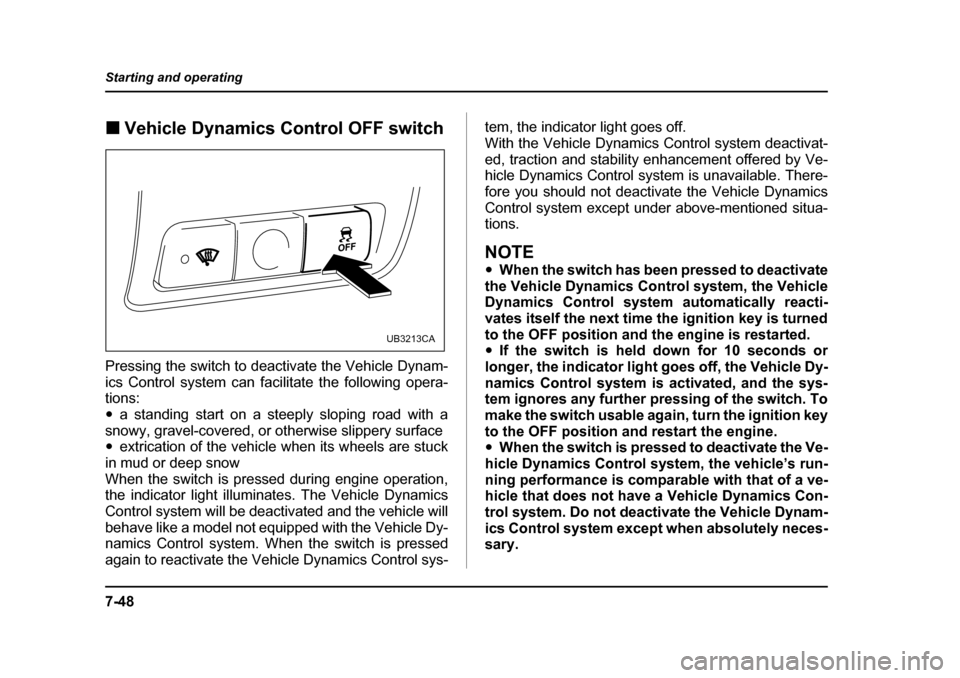
Vehicle Dynamics Control OFF switch
Pressing the switch to deactivate the Vehicle Dynam-
ics Control system can facilitate the following opera- tions: " a standing start on a steeply sloping road with a
snowy, gravel-covered, or otherwise slippery surface " extrication of the vehicle when its wheels are stuck
in mud or deep snow
When the switch is pressed during engine operation,
the indicator light illuminates. The Vehicle Dynamics
Control system will be deactivated and the vehicle will
behave like a model not equipped with the Vehicle Dy-
namics Control system. When the switch is pressed
again to reactivate the Vehicle Dynamics Control sys- tem, the indicator light goes off.
With the Vehicle Dynamics Control system deactivat-
ed, traction and stability enhancement offered by Ve-
hicle Dynamics Control system is unavailable. There-
fore you should not deactivate the Vehicle Dynamics
Control system except under above-mentioned situa- tions.
NOTE "
When the switch has been pressed to deactivate
the Vehicle Dynamics Control system, the Vehicle
Dynamics Control system automatically reacti-
vates itself the next time the ignition key is turned
to the OFF position and the engine is restarted. " If the switch is held down for 10 seconds or
longer, the indicator light goes off, the Vehicle Dy-
namics Control system is activated, and the sys-
tem ignores any further pressing of the switch. To
make the switch usable again, turn the ignition key
to the OFF position and restart the engine. " When the switch is pressed to deactivate the Ve-
hicle Dynamics Control system, the vehicle’s run-
ning performance is comparable with that of a ve-
hicle that does not have a Vehicle Dynamics Con-
trol system. Do not deactivate the Vehicle Dynam-
ics Control system except when absolutely neces-
sary.
UB3213CA
Page 411 of 627

7-56
Starting and operating
cruising speed automatically.
The “ ” indicator light in the combination meter will
automatically come on at this time. !
To turn off the cruise control
There are two ways to turn off the cruise control: " Push the main switch again.
" Turn the ignition switch to the “ACC” or “LOCK” po-
sition (but only when the vehicle is completely
stopped). ! To change the cruising speed
! To increase the speed (by control lever) Push the control lever upward in the “RES/ACC” direc-
tion and hold it until the vehicle reaches the desired
speed. Then, release the control lever. The vehicle
speed at that moment will be memorized and treated
as the new set speed.
When the difference between the actual vehicle speed
and the set speed is less than 4 mph (6.8 km/h), the
set speed can be increased 1 mph (1.6 km/h) each
time by pressing the control lever upward in the “RES/
ACC” direction quickly within 0.25 second. !
To increase the speed (by accelerator pedal)
1. Depress the accelerator pedal to accelerate the ve-
hicle to the desired speed.
2. Push the control lever downward in the “SET/
COAST” direction once. Now the desired speed is set
and the vehicle will keep running at that speed without
depressing the accelerator pedal.
NOTE
If the difference between the actual vehicle speed
when the control lever is pushed downward and
the speed last time you set it is less than 4 mph
(6.8 km/h), the vehicle speed will be lowered by 1
mph (1.6 km/h). This occurs because the cruise
control system unit regards this lever operation as
that intended to decrease the vehicle speed.
UB7203CA
Page 412 of 627
7-57
Starting and operating
– CONTINUED –
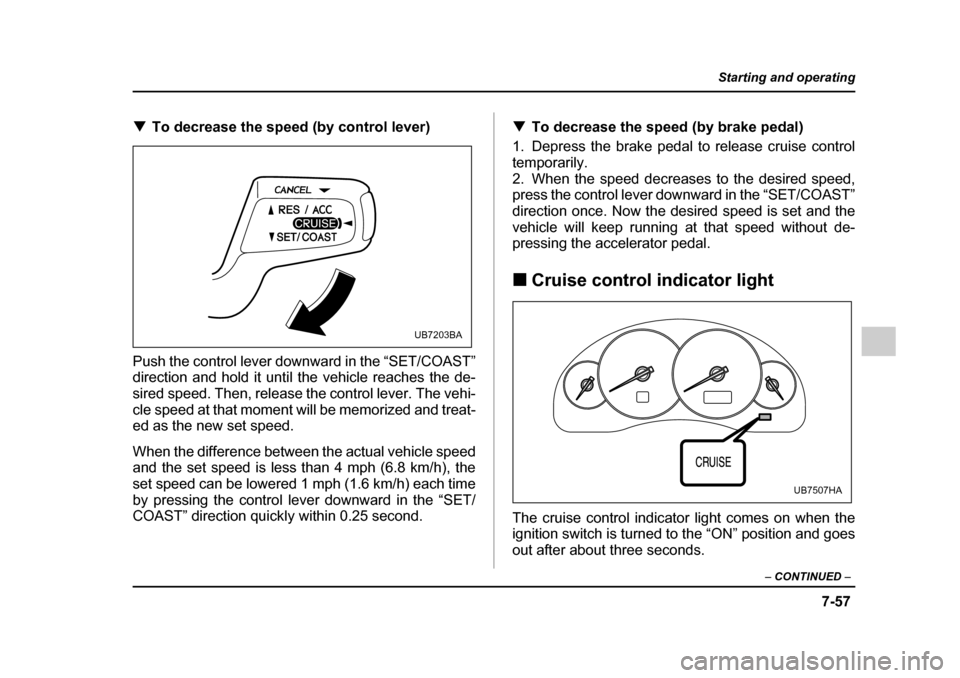
!To decrease the speed (by control lever)
Push the control lever downward in the “SET/COAST”
direction and hold it until the vehicle reaches the de-
sired speed. Then, release the control lever. The vehi-
cle speed at that moment will be memorized and treat-
ed as the new set speed.
When the difference between the actual vehicle speed
and the set speed is less than 4 mph (6.8 km/h), the
set speed can be lowered 1 mph (1.6 km/h) each time
by pressing the control lever downward in the “SET/
COAST” direction quickly within 0.25 second. !
To decrease the speed (by brake pedal)
1. Depress the brake pedal to release cruise control
temporarily.
2. When the speed decreases to the desired speed,
press the control lever downward in the “SET/COAST”
direction once. Now the desired speed is set and the
vehicle will keep running at that speed without de-
pressing the accelerator pedal. ! Cruise control indicator light
The cruise control indicator light comes on when the
ignition switch is turned to the “ON” position and goes
out after about three seconds.
UB7203BA
UB7507HA
Page 413 of 627

7-58
Starting and operating
The light comes on when the “CRUISE” main switch is
pressed.
If you move the cruise control lever while turning the
ignition switch “ON”, the cruise control function is de-
activated and the “CRUISE” indicator light flashes. To
reactivate the cruise control function, turn the ignition
switch back to the “ACC” or “LOCK” position, and then
turn it again to the “ON” position. !
Cruise control set indicator light
The cruise control set indicator light comes on when
the ignition switch is turned to the “ON” position and
goes out after about three seconds. The light comes on when vehicle speed has been set.
UB7507IA