2005 Seat Leon 5D maintenance
[x] Cancel search: maintenancePage 51 of 280

Child safety49
Safety First
Operating instructions
Tips and Maintenance
Te c h n i c a l D a t a
Child seatsCategorisation of child seats into groups
Use only child seats that are officially approved and suitable
for the child.Child seats are covered by the European standard ECE R 44 (issued by the
Economic Commission of Europe).
The child seats are grouped into 5 categories:
Group 0: up to 10 kg
Group 0+ : up to 13 kg
Group 1: from 9 to 18 kg
Group 2: from 15 to 25 kg
Group 3: from 22 to 36 kg
Child seats that have been tested and approved under the ECE R 44 standard
bear the test mark on the seat (the letter E in a circle with the test number
below it).
Group 0 and 0+ child seats
A suitable child seat and a corr ectly adjusted seat belt can
help to protect your child.Group 0: For babies from about 9 months old and 10 kg in weight the most
suitable seats are those appearing in the illustratio n ⇒ fig. 27.
Group 0+: For babies from about 18 months old and 13 kg in weight the most
suitable seats are those ap pearing in the illustration.
Follow the manufacturer's instructio ns and observe any statutory require-
ments when installing and using child seats.
We recommend that you include the manufacturer's directions for child seat
use in the vehicle wallet and always keep them in the vehicle.
WARNING
Read and always observe information and warnings concerning the use of
child seats ⇒ in “Safety notes on using child seats” on page 48.
Fig. 27 A group 0 rear-
facing child seat fitted on
the rear seat.
leon_ingles Seite 49 Donner stag, 20. Oktober 2005 12:14 12
Page 53 of 280

Child safety51
Safety First
Operating instructions
Tips and Maintenance
Te c h n i c a l D a t a
WARNING
•
The shoulder part of the seat belt mu st lie approximately on the centre
of the shoulder, never across the neck or the arm. The seat belt must lie
close to the torso. The lap belt part must lie across the pelvis, not across the stomach, and always fit closely. Pull the belt tight if necessary to take
up any slack ⇒
page 24, “Seat belts”.
•
Read and always observe information and warnings concerning the use
of child seats ⇒ in “Safety notes on using child seats” on page 48.
Securing child seatsWays to secure a child seat
A child seat can be secured differently on th e rear seat and on the front passenger seat.You can secure a child seat to the rear seat or front passenger seat in the
following ways:
•
Child seats in groups 0 to 3 can be secured with a seat belt.
•
Group 0, 0+ and 1 child seats with the “ISOFIX” system can be secured to
the “ISOFIX” retaining rings without seat belts ⇒ page 52.
U: Suitable for approved universal retention systems for use with this age group (universal retention systems, ar e those that can be fitted using the
standard adult safety belt)
*: Move the passenger seat as far back as possible, to the highest setting and always turn the airbag off. L: Suitable for anchored retention systems using the “ISOFIX” anchors.WARNING (continued)
Weight class
Weight Seat locations
Front passenger Rear outerRear centre
Group 0 <10 kgU*U/L U
Group 0+ <13 kgU*U/L U
Group 1 9-18 kgU*U/L U
Group 2 / 3 15-36 kgU*UU
leon_ingles Seite 51 Donnerstag, 20. Oktober 2005 12:14 12
Page 55 of 280

53
Safety First
Operating instructions
Tips and Maintenance
Te c h n i c a l D a t a
leon_ingles Seite 53 Donnerstag, 20. Oktober 2005 12:14 12
Page 57 of 280

Cockpit55
Safety First
Operating instructions
Tips and Maintenance
Te c h n i c a l D a t a
Operating instructionsCockpitOverviewOverview of the instrument panel
This overview will help you to familiarise yourself with the
controls and displays quickly.
Door release lever
Light switch . . . . . . . . . . . . . . . . . . . . . . . . . . . . . . . . . . . . . . . . .
Air vent
Lighting control for instrument and control lighting . . . . . . . .
Headlight range control . . . . . . . . . . . . . . . . . . . . . . . . . . . . . . .
Turn signal and main beam lever and cruise control system* .
Instrument panel:
− Instruments . . . . . . . . . . . . . . . . . . . . . . . . . . . . . . . . . . . . . . .
− Display . . . . . . . . . . . . . . . . . . . . . . . . . . . . . . . . . . . . . . . . . . .
− Indication lamps . . . . . . . . . . . . . . . . . . . . . . . . . . . . . . . . . . .
Horn (works only when the igni tion is on)/ and driver front
airbag . . . . . . . . . . . . . . . . . . . . . . . . . . . . . . . . . . . . . . . . . . . . . .
Windscreen wiper and windscreen wash lever and operation of
the multi-function display* . . . . . . . . . . . . . . . . . . . . . . . . . . . . .
Thumb wheel for left seat heating . . . . . . . . . . . . . . . . . . . . . . .
Controls for
− Heating* and ventilation . . . . . . . . . . . . . . . . . . . . . . . . . . . .
− Air conditioning* . . . . . . . . . . . . . . . . . . . . . . . . . . . . . . . . . . −
Air conditioner* . . . . . . . . . . . . . . . . . . . . . . . . . . . . . . . . . . .
Radio
Thumb wheel for right seat heating . . . . . . . . . . . . . . . . . . . . . .
Front passenger airbag . . . . . . . . . . . . . . . . . . . . . . . . . . . . . . . .
Glove compartment lever . . . . . . . . . . . . . . . . . . . . . . . . . . . . . .
Gear selector lever
Cup holder compartment
Rotary control for adjustment of the exterior rear view mirrors
Switches for
− Central locking . . . . . . . . . . . . . . . . . . . . . . . . . . . . . . . . . . . .
− Electronic Stabilisation Program (ESP)* . . . . . . . . . . . . . . . .
− Tyre pressure . . . . . . . . . . . . . . . . . . . . . . . . . . . . . . . . . . . . . .
Handbrake
Indication lamp for deactivated front passenger airbag . . . . .
Pedals
Ignition lock . . . . . . . . . . . . . . . . . . . . . . . . . . . . . . . . . . . . . . . . .
Handle for releasing the bonnet . . . . . . . . . . . . . . . . . . . . . . . .
Button for opening and closing the front windows . . . . . . . . .
Safety switch* for the rear windows . . . . . . . . . . . . . . . . . . . . .
Controls* for opening and closing the rear windows . . . . . . . .
Note
Some of the items of equipment listed here are fitted only on certain
models/models years or are optional extras.
A1A2
109
A3A4
111
A5
111
A6
113
A7
56
59
71
A8
30
A9
116, 61
A10
127
A11
136
138 141
A12A13
127
A14
30
A15
128
A16A17A18
121
A19
91
147 78
A20A21
45
A22A23
148
A24
193
A25
104
A26
104
A27
104
leon_ingles Seite 55 Donner stag, 20. Oktober 2005 12:14 12
Page 59 of 280

Cockpit57
Safety First
Operating instructions
Tips and Maintenance
Te c h n i c a l D a t a
Fuel gauge
and reserve indicator
Details of the instrument panel: Fuel gauge
The fuel tank has a capacity of approx. 55 litres.
When the needle reaches the reserve zone ⇒fig. 33 (arrow), the warning
lamp will light and an acoustic signal will sound reminding the driver to
refuel . At this point there are still about 7 litres of fuel in the tank.
The following text appears in the instrument panel display
2) PLEASE
REFUE L*.
Engine coolant temperature display
This gauge shows the engine coolant temperature.
Needle in cold zone
Avoid high engine speeds and heavy engine loads ⇒fig. 34.
Needle in normal zone
In normal driving conditions, the needle should be in the middle section of
the scale. The temperature may also rise when the engine is working hard,
especially at high outside temperatures. This is no cause for concern as long
as the warning lamp does not light up and no warning* text appears in the
combi-instrument display.
Needle in warning zone
The warning lamp* ⇒page 71, fig. 46 will light up if the needle is in the
warning zone. The following warning appears in the instrument panel
2)Depending on the model version
Fig. 33 Details of the
instrument panel: Fuel
gauge
Fig. 34 Details of the
instrument panel: Engine
coolant temperature
gauge
AAABAC
A2
leon_ingles Seite 57 Donnerstag, 20. Oktober 2005 12:14 12
Page 61 of 280
Cockpit59
Safety First
Operating instructions
Tips and Maintenance
Te c h n i c a l D a t a
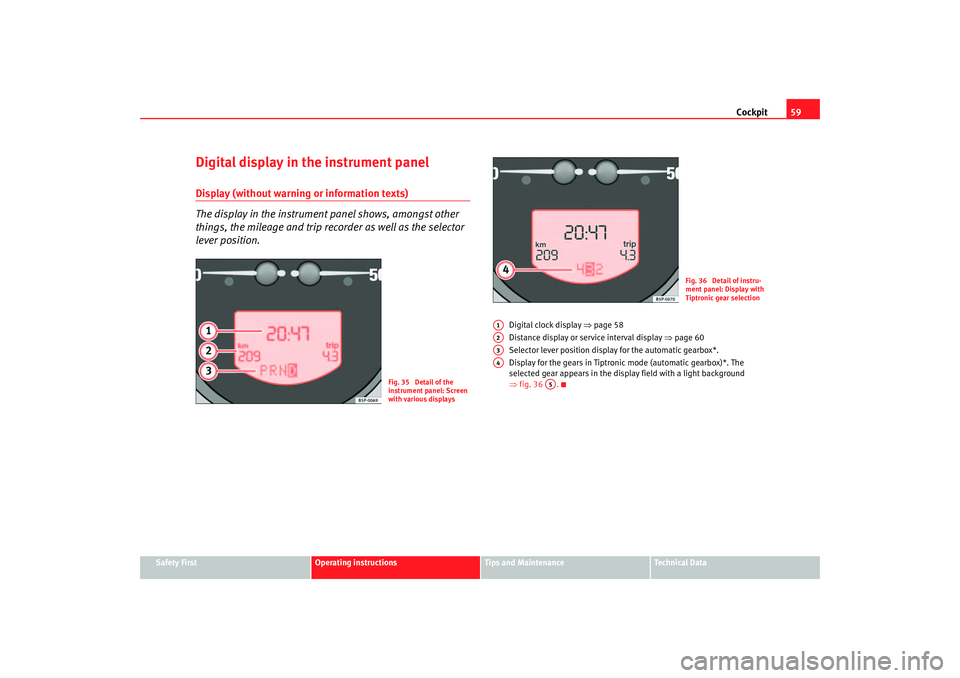
Digital display in the instrument panelDisplay (without warning or information texts)
The display in the instrument panel shows, amongst other
things, the mileage and trip recorder as well as the selector
lever position.
Digital clock display ⇒page 58
Distance display or service interval display ⇒page 60
Selector lever position display for the automatic gearbox*.
Display for the gears in Tiptronic mode (automatic gearbox)*. The
selected gear appears in the display field with a light background
⇒ fig. 36 .
Fig. 35 Detail of the
instrument panel: Screen
with various displays
Fig. 36 Detail of instru-
ment panel: Display with
Tiptronic gear selection
A1A2A3A4
A5
leon_ingles Seite 59 Donner stag, 20. Oktober 2005 12:14 12
Page 63 of 280

Cockpit61
Safety First
Operating instructions
Tips and Maintenance
Te c h n i c a l D a t a
An
overdue service is indicated by a minus sign in front of the mileage or day
information.
Display with multi-function display (MFD)*
The multi-function display (M FD) shows you diverse journey
and consumption data.
The multi-function display is equipped with two automatic memo-
ries: 1 - Trip memory and 2 - Total journey memory . The selected
memory will be shown in the upper right-hand corner of the display.
Selecting memory
– With the ignition switched on, briefly press the button ⇒fig. 38
on the windscreen wiper lever to move between the two
memories.
Resetting the memory
– Select the memory that you would like to reset.
– Press and hold button on the windscreen wiper lever for at least 2 seconds.The trip memory 1 collects the travel and consumption data from the moment
the ignition is switched on until it is switched off. If the journey is continued
within two hours of switching off the ignition, the new values will be added to
Fig. 38 Windscreen wiper
and washer lever: Button
A and rocker switch B
Fig. 39 Digital screen on
the instrument panel:
Average fuel consumption
display
AA
AA
leon_ingles Seite 61 Donner stag, 20. Oktober 2005 12:14 12
Page 65 of 280

Cockpit63
Safety First
Operating instructions
Tips and Maintenance
Te c h n i c a l D a t a
Set speed indicator
When driving at the required speed, enter the speed indicator mode and
press the button
A (Reset), the display remembers the indicated speed. If the
indicated speed is exceeded, a warning text is displayed on the screen
5) and
a warning signal sounds.
This may be deactivated by pressing the button A (Reset).
The speed may be altered using the rocker switch B in steps of 5 km/h within
5 seconds of the initial memory value.
Ø km/h - Average speed
The average speed will be shown after a distance of approximately 100
metres has been travelled. Dashes will appear in the display until that time.
The display will be updated every 5 seconds whilst the vehicle is in motion.
km - Distance covered
The display shows the distance travelled since the ignition was switched on.
The maximum display value in both memories is 9999 miles. The memory will
automatically be deleted once this value has been reached.
km - Distance to empty
The fuel range is calculated using the fi gures for tank content and current fuel
consumption. It shows how far the vehicle can travel using the same condi-
tions as a reference.
Ø ltr/100km - Average fuel consumption
The average fuel consumption will be shown ⇒page 62, fig. 41 after a
distance of approximately 100 metres has been travelled. Dashes will appear
in the display until that time. The display will be updated every 5 seconds
whilst the vehicle is in motion. The am ount of fuel used will not be shown. litres/100km or litres/h - Current fuel consumption
The display will show the current fuel consumption in litre/km whilst the
vehicle is in motion or in litre/hour when
the vehicle is in a stationary position
with the engine running.
Using this display you can see how your driving style affects fuel consump-
tion ⇒page 175.
Ambient temperature display
The measurement margin extends from -45° C to +58° C. At temperatures
lower than +4° C, an “ice crystal symbol” is displayed and a “warning”
sounds if the vehicle is moving at more than 20 km/h (ice warning). This
symbol will flash for about 10 seconds and remains lit until the exterior
temperature rises above +4° C or 6° C if it was already lit.
WARNING
There could be black ice on the road surface even if the “snowflake symbol”
is not shown. You should, for this reason, not rely exclusively on this
display - Risk of accident!
Note
When the vehicle is stationary or travelling at very low speeds, the tempera-
ture displayed may be slightly higher than the actual ambient temperature as
a result of the heat radiated from the engine.Warning or information text in the display
Faults are shown in the display with warning lamps and
warning/information reports.The system runs a check on certain components and functions when the igni-
tion is switched on and while the vehicle is moving. Functional faults are indi-
5)Depending on the model version, the message on the screen may vary and may be
represented by flashing of the speed indication or by a speed message.
leon_ingles Seite 63 Donner stag, 20. Oktober 2005 12:14 12