2005 SAAB 9-3 page 74
[x] Cancel search: page 74Page 134 of 292

132 Interior equipmentPower Outlet(if equipped)
You can use the electrical socket in the stor-
age compartment under the armrest
between the front seats to charge a mobile
phone, for example. There is a recess on
each side of the compartment which will
accept a lead so that you can close the lid
without damaging the charger lead.
Storage compartmentsThere are additional storage compartments
in the rear seat armrest, below the front ash-
tray and in the doors.
WARNING
The maximum output of the cigarette
lighter socket is 240 W (20 A). The rating
of the socket in the compartment between
the seats is the same. Overloading can
result in melting or even fire.
WARNING
The glove box must be closed while trav-
elling. An open glove box door could
cause personal injury in the event of a
crash.
Open the glove box with the button on the
left of the moulding.
Convertible has lockable glove box. Use
the traditionally key, see page 48.
ProCarManuals.com
Page 136 of 292
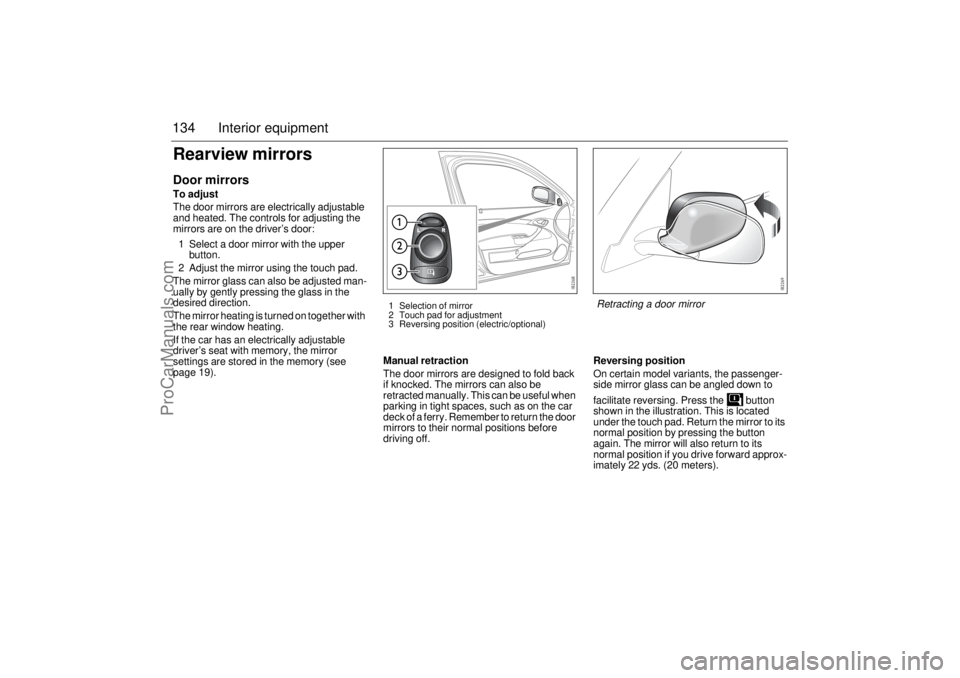
134 Interior equipmentRearview mirrorsDoor mirrorsTo adjust
The door mirrors are electrically adjustable
and heated. The controls for adjusting the
mirrors are on the driver’s door:
1 Select a door mirror with the upper
button.
2 Adjust the mirror using the touch pad.
The mirror glass can also be adjusted man-
ually by gently pressing the glass in the
desired direction.
The mirror heating is turned on together with
the rear window heating.
If the car has an electrically adjustable
driver’s seat with memory, the mirror
settings are stored in the memory (see
page 19).Manual retraction
The door mirrors are designed to fold back
if knocked. The mirrors can also be
retracted manually. This can be useful when
parking in tight spaces, such as on the car
deck of a ferry. Remember to return the door
mirrors to their normal positions before
driving off.Reversing position
On certain model variants, the passenger-
side mirror glass can be angled down to
facilitate reversing. Press the button
shown in the illustration. This is located
under the touch pad. Return the mirror to its
normal position by pressing the button
again. The mirror will also return to its
normal position if you drive forward approx-
imately 22 yds. (20 meters).
1 Selection of mirror
2 Touch pad for adjustment
3 Reversing position (electric/optional)
Retracting a door mirror
ProCarManuals.com
Page 138 of 292

136 Interior equipmentInterior rearview mirror with
garage opener, autodimming
function and compass(if equipped
Retain your original garage door opener
(transmitter) for future programming proce-
dures (i.e., new vehicle purchase). It is also
suggested that upon the sale of the vehicle,
the programmed garage opener buttons be
erased for security purposes, see
page 138.Preparations for first-time programming
Before programming the garage opener for
the first time, you must delete any factory
codes.
Press and hold the two outer buttons until
the indicator light begins to flash-after
20 seconds. Release both buttons. Do not
hold for longer that 30 seconds. The garage
opener is now in the train (or learning) mode
and can be programmed at any time begin-
ning with "Programming" - step 2.
Programming
The garage opener can record and store the
frequencies of three different remote con-
trols.
The battery in the remote control should be
fairly new for programming to work well.
Do not repeat "Programming" - step two
to train additional devices to a second or
third button. Begin with "Programming" -
step three.
1 Turn the ignition ON.
2 Press and hold the two outer buttons
(buttons one and three) - releasing only
when the indicator light begins to flash
(after 20 seconds). Do not hold the
buttons for longer than 30 seconds and
do not repeat step two to program a
second and/or third hand-held transmit-
ter to the remaining two buttons.
3 Position the end of your hand-held
transmitter 1-3 inches (5-14 cm) away
from the button you wish to program
while keeping the indicator light in view.
WARNING
Make sure that people and objects are out
of the way of moving door or gate to
prevent potential harm or damage.
When programming the garage opener,
you may be operating a garage door or
gate operator. Therefore it is advised to
park outside of the garage.
Do not use the garage opener with any
garage door opener that lacks the safety
stop and reverse feature as required by
federal safety standards. (This includes
any garage door opener model manufac-
tured before April 1, 1982.). A garage
door opener which cannot detect an
object, signaling the door to stop and
reverse, does not meet current federal
safety standards. Using a garage door
opener without these features increases
risk of serious injury or death.
Buttons for garage opener, autodimming
and compass1–3 Garage opener
4LED
5 Autodimming/compass ON/OFF
6 Compass bearing
ProCarManuals.com
Page 140 of 292

138 Interior equipmentReprogramming a single button
To program a device to the garage opener
using a button previously trained, follow
these steps:
1 Press and hold the desired button. DO
NOT release the button.
2 The indicator light will begin to flash after
20 seconds. Without releasing the
button, proceed with "Programming" -
step 3.
Erasing the three buttons
To erase programming from the three but-
tons (individual buttons cannot be erased
but can be "reprogrammed" as outlined
below), follow the step noted:
Press and hold the two outer buttons until
the indicator light begins to flash-after
20 seconds. Release both buttons. Do
not hold for longer that 30 seconds. The
garage opener is now in the train (or
learning) mode and can be programmed
at any time beginning with "Programming"
- step 3.Opening a garage door
To operate, simply press and release the
programmed button. Activation will now
occur for the trained device (i.e. garage door
opener, gate operator, security system,
entry door lock, home/office lighting, etc.).
For convenience, the hand-held transmitter
of the device may also be used at any time.
AutodimmingPress button 5 briefly to switch autodimming
on or off. When autodimming is switched on,
a 1 is displayed briefly in the compass win-
dow. A 0 indicates that autodimming is
switched off. See page 135 for a description
of operation.
This device complies with Part 15 of the FCC Rules.
Operation is subject to the following two conditions: (1)
this device may not cause harmful interference, and (2)
must accept any interference received, including inter-
ference that may cause undesired operation.
Changes or modifications not expressly approved by the
manufacturer could void the user’s authority to operate
the equipment.
Canada only:
This device complies with RSS-210 of Industry Canada.
Operation is subject to the following two conditions: (1)
this device may not cause interference, and (2) this
device must accept any interference, including interfer-
ence that may cause undesired operation of this device.
Buttons for garage opener, autodimming
and compass1–3 Garage opener
4LED
5 Autodimming/compass ON/OFF
6 Compass bearing
ProCarManuals.com
Page 141 of 292

139 Interior equipment
CompassThe compass is built into the rearview mir-
ror. The compass bearing is displayed in the
top right-hand corner of the mirror and is
updated every other second. The compass
displays the car’s direction of travel: N, NE,
E, etc.
Switch the compass display on and off by
pressing button 5 for 3 seconds, see illus-
tration on page 138.
Changing zones
The earth’s magnetic field varies depending
on one’s position on the globe. If you drive
your car from one magnetic zone to another
the compass setting will need to be changed
to ensure a correct bearing.
1 Study the illustrations to determine the
correct zone.
2 Press and hold button 5 until "ZONE" is
shown in the display on the mirror (6 s).
The zone number is now also shown.
3 Press button 5 repeatedly to change the
zone number. There are 15 zones from
which to choose. Once the correct zone
is selected, release the button and wait
4 seconds. The compass will now
display the bearing.Calibration
Calibration is performed automatically
during travel.
If, for any reason, a manual calibration is
needed perform as follows:
1 Press and hold button 5 until "CAL" and
the compass bearing are displayed
(approx. 9 s).
2 Drive in circles (max. 5 mph/8 km/h) or
drive as normal until "CAL" is no longer
displayed.
Compass zones in Canada
Compass zones in USA
ProCarManuals.com
Page 142 of 292

140 Interior equipmentTrunkFolding down the rear seat, Sport SedanConvertible: The rear seat cannot be folded.
WARNING
Never drive the car if the backrest is not correctly locked into
position as this increases the risk of personal injury in the
event of heavy braking or a crash.
Never leave a child or animal unattended in the car. During
sunny weather the temperature in the passenger and trunk
can climb to 160–180°F (70–80°C). Small children are very
susceptible to heat stroke.
Keep hands well clear of all moving parts.
Never place heavy objects on the parcel shelf. There is always
a danger of loose objects being thrown forward and causing
injury if the car should brake suddenly or be involved in a
crash. See also page 189.
When folding the backrest back upright, make sure that it is
locked correctly on both sides. This is imperative since the
center safety belt is mounted in the backrest.
When folding the backrest back upright, make sure that it is
locked correctly on both sides. This is imperative since other-
wise objects in the trunk could force their way into the cabin
during heavy breaking or a crash.
Adjust the head restraints for the rear seats to be occupied to
a suitable height before riding in the car.
ProCarManuals.com
Page 143 of 292

141 Interior equipment
For greater flexibility, the rear seat is split so that the narrow and
the wide part can be folded down separately.
Next to the hinges in the trunk are handles for unlocking the rear seat
backrests.
The operation is easier if the front seats are not too far back and
the rear seat head restraints are fully lowered.
1 Unlock the backrest by pulling the appropriate handle in the
trunk.
2 Fold the backrest forward.
Note: When returning the backrest to its upright position, make
sure that it locks properly in place and that the safety belt does
not get caught.
If the left-hand backrest is not properly locked in position, the follow-
ing message is displayed on the SID (equivalent message displayed
for right-hand backrest):
Trunk Release Handle, see page 143.
Emergency opening of the narrow backrest, see page 144.Rear left seat backrest
unlocked.
ProCarManuals.com
Page 144 of 292

142 Interior equipmentLoad-through hatch, Sport SedanConvertible: There is no load-through hatch.
A load-through hatch is incorporated in the rear seat backrest to
enable long, narrow items to be carried inside the car.
Before loading or unloading long items, switch off the engine and
apply the parking brake. This avoids the danger of the car moving
off if a long item were to knock the gear or selector lever into gear.
Fold down the armrest and open the hatch by lifting the handle.
There is a lock on the rear side of the hatch. Use this to lock or unlock
the hatch. The position of the lock is designed to prevent unautho-
rized persons from accessing the trunk from inside the cabin.
To lock: Open the hatch and lock the lock. Close the hatch. The
hatch is now locked.
To unlock: Fold down the wide section of the backrest and unlock
the lock. Alternatively, you can unlock the hatch from the trunk.
WARNING
Always secure the load firmly, for example using the middle
safety belt. This reduces the danger of personal injury result-
ing from the displacement of the load on hard braking or in the
event of a crash.
Do not exceed the load capacity of the car, as this will alter its
handling characteristics (see page 268).
ProCarManuals.com