Page 62 of 292

60 9-3 ConvertibleRaisingThe following conditions must be fulfilled for
raising the soft top:
Vehicle speed must not exceed
20 mph (30 km/h).
Battery voltage must exceed 10 V.
The trunk lid must be locked.
1 Star t the engine and let it idle. Clearance
for soft top operation: height, min. 7.2 ft
(2.2 m); behind car, min. 2" (5 cm).
2 Press and hold the soft top button until
the soft top is fully raised and the soft top
cover closed. Completed raising is indi-
cated by a chime. If there is a malfunc-
tion a text message will be shown on the
SID. Refer to page 65.
Do not press any of the buttons on the
same section of the instrument panel as
the soft top switch while raising the soft
top. This will cause the soft top to stop
and then sink after about 20 seconds.
All side windows are opened slightly to pro-
tect the seals when the soft top is raised.
Check that the hooks in the soft top hold it securely to the upper edge of the wind-
shield.
If you hold the button pressed up after the
chime, all the windows will be closed after a
short delay.
Raising
ProCarManuals.com
Page 64 of 292

62 9-3 ConvertibleRaising the soft top
manuallyIf the soft top has been folded mechanically
there will be a delay of 20 seconds before it
is possible to raise it manually (the pressure
must be released from the hydraulic sys-
tem).
If the car is without electrical power, the
trunk must be unlocked manually. Refer to
page 73.1 Find the lug wrench, Allen key and
screwdriver located under the luggage
compartment floor.
2 Remove the two covers from the side
trim in the trunk, one from either side.
If there are two of you, it is easiest if you
stand on either side of the car and perform
steps 3-6 and 9-10 together.
3 Unlock the soft top cover by pressing
forward the two wire catches, one on the
left and one on right-hand side.
WARNING
Only raise the soft top manually in an
emergency (e.g. due to an electrical
fault).
Do not touch the soft top button on the
instrument panel while closing the soft top
manually. This could cause personal
injury and damage the soft top mecha-
nism.
Do not fold the soft top having closed it
manually. This can damage the soft top
mechanism.
Tools under luggage compartment floor Wire catch for unlocking soft top cover
ProCarManuals.com
Page 79 of 292
77 Instruments and controls
Warning and indicator
lights _______________ 78
Instruments ___________ 82
Information display,
main instrument panel _ 85
Saab Information Display
(SID) ________________ 87
Switches _____________ 96
Wipers and washers ____ 100
Manual climate-control
system ______________ 103
Automatic climate-
control system (ACC)__ 108
Instruments and controls
ProCarManuals.com
Page 80 of 292
78 Instruments and controls
Warning and indicator
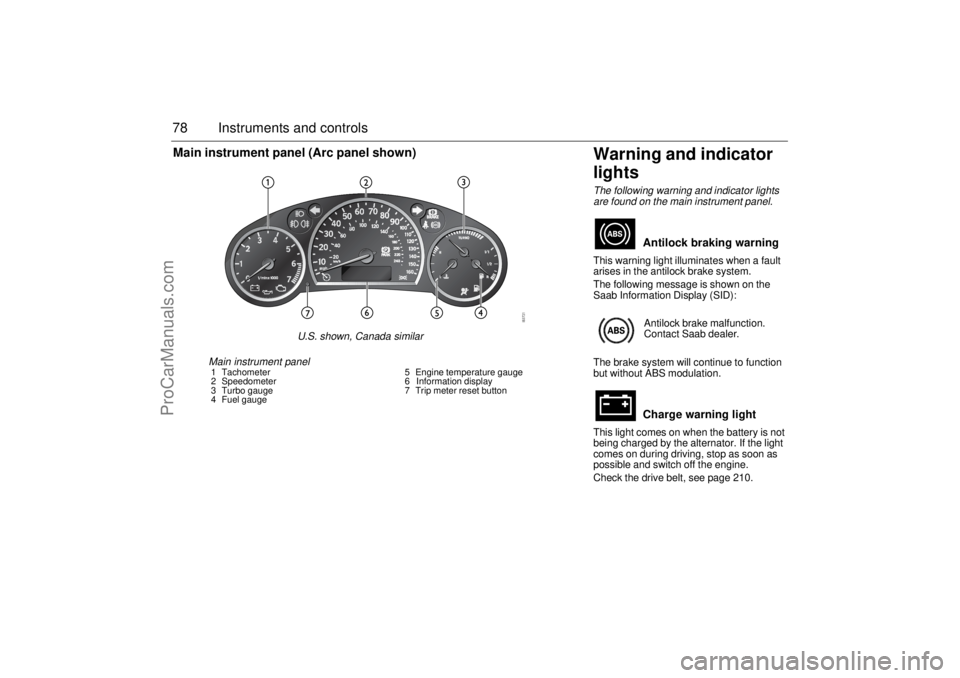
lightsThe following warning and indicator lights
are found on the main instrument panel.This warning light illuminates when a fault
arises in the antilock brake system.
The following message is shown on the
Saab Information Display (SID):
The brake system will continue to function
but without ABS modulation.
This light comes on when the battery is not
being charged by the alternator. If the light
comes on during driving, stop as soon as
possible and switch off the engine.
Check the drive belt, see page 210.
Antilock braking warningAntilock brake malfunction.
Contact Saab dealer.Charge warning light
Main instrument panel1 Tachometer
2 Speedometer
3 Turbo gauge
4 Fuel gauge5 Engine temperature gauge
6 Information display
7 Trip meter reset button
Main instrument panel (Arc panel shown)
U.S. shown, Canada similar
ProCarManuals.com
Page 84 of 292
82 Instruments and controlsThis light indicates that the headlights or
parking lights are on.
This light comes on when the system is
engaged.
Autochecking of lights, main
instrument panelThe warning and indicator lights shown
above should come on when the ignition
switch is turned to ON. They should go out
after about 4 seconds once the engine has
started or after the fault-free self-diagnosis
of each system or function.
InstrumentsTachometerThe tachometer displays the engine speed
in thousands of revolutions per minute.
A protective function (interruption of the fuel
supply) limits the engine speed within the
red zone.
Headlight and parking
light indicator
Cruise control indicator
light
ProCarManuals.com
Page 87 of 292

85 Instruments and controls
If the needle repeatedly enters the red zone
and the engine at the same time loses
power, because the monitoring system is
limiting the boost pressure, you should
contact a Saab dealer as soon as possible.
When the speed of the car exceeds
143 mph (230 km/h), acceleration is limited
by reducing the boost pressure. The pres-
sure gauge then moves towards the middle
of the white field, indicating a drop in engine
power and consequently the car’s speed.
Fuel gaugeWhen less than about 2.5 gallons (10 litre)
of fuel is left in the tank, a warning light on
the main instrument panel comes on.
Refueling, see page 153.
Information display,
main instrument panelUnder the speedometer is a display. The
information shown here varies depending
on whether the car has a manual transmis-
sion or automatic transmission.Cars with manual transmission: The odometer reading is shown on the
left-hand side of the display.
Various information and faults are
displayed in the center of the display.
The trip meter reading is shown on the
right-hand side of the display.
ProCarManuals.com
Page 89 of 292

87 Instruments and controls
The following message is shown on the
Saab Information Display (SID):
or
If so, have the system checked at a Saab
dealer.
See also Traction Control System (TCS) on
page 169 and Electronic Stability Program
(ESP) on page 171.
Saab Information
Display (SID)Various types of information are shown on
the SID: warnings, indications, trip com-
puter information and information from the
car’s Infotainment System.
The warnings and indications that can be
shown on the SID are listed on page 281.
When the engine is switched off, the current
warnings and indications are displayed.
If there is more than one message on the
SID, a plus sign will be displayed to the left
of the first message. Each message will be
displayed for 10 seconds.
Press the CLEAR button to acknowledge
a SID message. If you acknowledge a mes-
sage but do nothing about it, the message
will be displayed again the next time you
start the car.
You can adjust the settings of several of the
car’s systems, such as the clock, alarm and
climate control system. These are known as
Profiler.
ProfilerAdjustments can be made with the control
unit situated between the main instrument
panel and the audio system. This is called
Profiler.
1 Activate Profiler by pressing the
CUSTOMIZE button.
2 Turn the INFO dial until the appropriate
system is selected.
3 Confirm selection by pressing the
INFO dial.
Select Exit once you have made the desired
settings. Traction control failure.
Contact Saab dealer.
Stability control failure.
Contact Saab dealer.SID, control unit and display
ProCarManuals.com
Page 91 of 292
89 Instruments and controls
When the engine is started, the function that
was selected when the engine was
switched off is displayed, with the following
exceptions:
Te m p is displayed if the outside tempera-
ture is between 26 and 38°F (–3 and
+3°C).
D.T.E is displayed if less than or equal to
30 miles (50 km).
Outdoor temperature
The Temp function is always activated
(even in NIGHTPANEL mode) if the outdoor
temperature rises or falls to between 26 and
38°F (–3 and +3°C).
If the temperature sensor, located under the
front bumper, is covered by snow or ice,
temperature readings will be unreliable.
For how to set the year, month and day,
refer to Clock on page 92.Setting values
1 Select one of the functions using the
INFO dial.
Speed W (preset to 55 mph (90 km/h)
Dist (preset to 100 miles (100 km) if not
previously set)
Speed Ø
Arriv
2 Press and hold the INFO dial until given
audible confirmation.
3 Turn the INFO dial to change the value.
(Press CLEAR to reset the value.)
4 Press the INFO dial to finish setup.
Using DIST as a trip meter
1 Select Dist using the INFO dial.
2 Press and hold the CLEAR button for
approx. 1 second.
An arrow will now appear on the right-hand
side of the display, indicating that the trip
meter is running.Resetting a single function
1 Select the function you wish to reset with
the INFO dial.
Fuel Ø
Speed Ø
Tr i p (Dist used as trip meter)
2 Press and hold the CLEAR button for
approx. 1 second.
The selected function will now be reset.
Resetting the trip computer
1 Select one of the functions using the
INFO dial.
Fuel Ø
Speed Ø
D.T.E.
Arriv
Tr i p (Dist used as trip meter)
2 Press and hold the CLEAR button
(approx. 3 seconds) until audible confir-
mation is given.
WARNING
Remember that roads can be icy even at
temperatures of above 38°F (+3°C),
especially on bridges and stretches of
road that are sheltered from the sun.
ProCarManuals.com