2005 PORSCHE CAYENNE TURBO wheel
[x] Cancel search: wheelPage 53 of 369

Controls, Safety, Instruments
53
Multi-Functional Steering Wheel
Warning!
There is a danger of accident if you set or
operate the on-board computer, radio, navi-
gation system, telephone or other equipment
when driving.
This could distract you from the traffic and
cause you to lose control of the vehicle.
fOperate the components while driving only if
the traffic situation allows you to do so safely.
fCarry out any complicated operating or setting procedures only with the vehicle stationary.
Depending on the equipment in your vehicle, you
can use these function keys to operate the follow-
ing Porsche communication systems:
– Radio with CD drive
–CD changer
– Satelite radio
Readiness for operation of multi-
functional steering wheel– With ignition switched on and
– With Porsche communication systems
switched on.
fPlease observe the operating instructions sup-
plied for the Porsche communication systems
before operating the function keys.
Note on operation
The Porsche communication systems cannot be
switched on and off using the multi-functional
steering wheel.
Operating the function keysThe function keys on the steering wheel (arrows)
can be operated by pressing and by pulling.
Various functions may require you to press or pull
the buttons several times in order to achieve the
desired setting.
Page 54 of 369

54
Controls, Safety, Instruments
Function keysfPlease read the operating instructions sup-
plied for the Porsche communication systems
before operating the function keys.
Steering wheel buttons – lightingWhen the light switch is operated, the light switch-
es on automatically.
Using the buttons on the back of the steering
wheel (arrow), the lighting for the function keys
and the rocker switches can be switched on and
off.
Switching lighting off
fPress button.
Switching lighting on
fPress button again.
Manual tuning
– Set radio station manually.
Scan titles, radio stations
– Scan titles, radio stations briefly.
Increase the volume of the relevant
communication system
Decrease the volume of the relevant
communication system
Next radio station/title
– Select the next radio station or title.
Last radio station/title
– Select the previous radio station or tit-
le.
Switch off the sound
Source selection
– Select available audio source.
Depending on the equipment in your
vehicle, the following sources are avai-
lable:
radio, CDS (single CD player), CDC
(CD changer).
Page 62 of 369

62
Controls, Safety, Instruments
Parking BrakeThe parking brake acts on the rear wheels and
serves to secure the car while parked.
fUse the parking brake only after the vehicle
has come to a full stop.
Applying the parking brakefPress down firmly on the foot pedal.
The warning light in the instrument panel lights
up.
A message will be displayed on the multi-pur-
pose display of the instrument panel if the
parking brake is not released before moving
off.
If the brake is not fully set, the vehicle may roll
without control.
fMove the selector lever to “P“.
fBefore exiting the vehicle, make sure that the
parking brake is fully applied and the vehicle is
not moving at all.
Danger!
Risk of serious personal injury or death. A
partially engaged parking brake may allow
the vehicle to roll, causing serious personal
injury or death to any person in its path.
fEngage the parking brake fully.
fPlease observe the chapter “WARNING LIGHTS
AND WARNING MESSAGES” on Page 106.fPress on the footbrake and pull handle A of the
parking brake.
The warning light and the message disappear.
Releasing the parking brake
Page 63 of 369

Controls, Safety, Instruments
63
The warning lights will go out after the parking
brake is fully released.
The warning lights are not an indicator that the
parking brake is fully applied; it is only intended to
be a warning to release the parking brake before
driving the car.
Caution!
A partially engaged brake will overheat the
rear brakes, reduce their effectiveness and
cause excessive wear.
fRelease the parking brake fully.
fWhen parking your car, press down firmly on
the foot pedal.
fMove the selector lever to “P“.
fOn hills also turn the front wheels towards the
curb.
BrakesfMake it a habit to check the operation of your
brakes before driving.
Keep in mind that the braking distance increases
very rapidly as the speed increases. At 60 mph or
100 km/h, for example, it is not twice but four
times longer than 30 mph or 50 km/h. Tire trac-
tion is also less effective when the roads are wet
or slippery.
fTherefore, always maintain a safe distance
from the car in front of you.Note
Even though the brake discs consist of alloyed
grey cast iron, they will unavoidably start to cor-
rode if your car is parked for an extended period.
The brakes will tend to “rub“ as a result.
The nature, extent and effects of corrosion de-
pend on the amount of time the vehicle was
parked, whether road salt or grit was spread and
whether grease-dissolving agents were used in
car washes.
If the braking comfort is noticeably impaired, we
recommend having the brake system checked by
experts at an authorized Porsche dealer.
Parking Brake warning
light USA
Parking Brake warning
light Canada
Page 64 of 369

64
Controls, Safety, Instruments
Brake system functionYour Porsche is equipped with a power assisted
hydraulic dual circuit brake system with disc
brakes at the front and rear.
Both circuits function independently. One brake
circuit operates the front left and rear right wheel
and the other operates the front right and rear left
wheel.
If one brake circuit has failed, the other will still op-
erate. However, you will notice an increased pedal
travel when you apply the brakes.Failure of one
brake circuit will cause the stopping distance to in-
crease.
Warning!
Risk of an accident. In the unlikely event of
hydraulic failure of one brake circuit:
fPush the brake pedal down firmly and hold it in
that position. A mechanical linkage activates
the second circuit, and you will be able to bring
the vehicle to a stop.
fAfter bringing your vehicle to a complete stop,
avoid driving the vehicle and instead have it
towed to the nearest authorized Porsche deal-er for repair.The warning light in the instrument panel lights up.
A message will be displayed on the multi-purpose
display of the instrument panel if the brake fluid
level is too low, or (if the brake pedal travel has in-
creased) one of the two brake circuits has failed.
A greater braking pressure will be required, stop-
ping distances will be longer and the braking be-
havior will change, particularly in curves.
With correctly adjusted brakes and a correctly
working brake system, the pedal travel to the
point of brake application should be 1-3/16 in. to
1-9/16 in. or 30 to 40 mm. Whenever the brake
pedal travel exceeds this value, have the brake
system checked.
Brake pedal
Warning!
Risk of an accident.
Any obstruction of the brake pedal could in-
crease the stopping distance.
fAlways check the movement of the brake pedal
before driving and make sure that it is not ob-
structed by a floor mat or any other object.
fSecure the floor mat to prevent it from sliding
into positions that could interfere with the safe
operation of your vehicle.
Your Porsche dealer will be glad to offer you
floor mats of the correct size including a secur-ing possibility.
Note
In case one of the two brake circuits fails, in-
creased pedal travel is required to bring your vehi-
cle to a full stop.
Brake warning light USA
Brake warning light
Canada
Page 85 of 369

Controls, Safety, Instruments
85
Tire PressureThe tire pressure monitoring system continuously
monitors tire pressure and tire temperature on all
four wheels and warns the driver when the tire
pressure is too low.
The display as well as the settings for tire
pressure monitoring are done on the multi-
purpose display in the TYRE PRESSURE menu.
However the tire pressure must be set manually
on the wheel.
The tire pressures to be monitored for tire type
are permanently set in the tire pressure
monitoring system and cannot be changed.
The driver is solely responsible for filling the tires
correctly and for selecting in the multi-purpose dis-
play.
Danger!
Risk of serious personal injury or death.
Driving the vehicle with low tire pressure in-
creases increases risk of a tire failure and re-
sulting loss of control. Furthermore, low tire
pressure increases rate of wear of the affect-
ed tires.
fWhen a flat tire has been displayed, immediate-
ly stop in a suitable place and check the tires
for damage. If necessary remedy the damages
with a tire sealant.
fDo not by any means continue to drive with
leaking tires.
fDefective tires must be immediately replaced
by a specialist workshop.
Tyre repairs are not permissible under
any circumstances.
fSealing the tyre with the tyre sealant is only an
emergency repair, so you can drive to the next
workshop. The maximum permitted speed is
50 mph (80 km/h).
fDo not drive with tires whose tyre pressure
drops again in a short period of time. In cases
of doubt, have tires checked by a specialist
workshop.
fIf the tire pressure monitoring system is defec-
tive (e.g., defective wheel transmitter), contact
a specialist workshop immediately and have
the damages repaired.
The tire pressure will not be monitored by a
defective tire pressure monitoring system.fUse only the pressure differences shown in the
TYRE PRESSURE menu or from tyre pressure
messages or warnings when correcting the
tyre pressure.
fTires lose air over time without a tire defect be-
ing present. A tire pressure warning will then
appear in the multi-purpose display
Correct the tire pressure.
fThe tire pressure monitoring system gives a
warning about tyre damages due to insufficient
tyre pressure as well as about a gradual loss
of pressure due to foreign objects.
The tyre pressure monitoring system cannot
warn you about tyre damages occurring sud-
denly (e.g., flat tyre due to sudden external ef-
fects).
fIf a message is displayed, check the tire
pressure at the next opportunity.
fBefore fitting tires approved by Porsche which
are not stored in the on-board computer, the
missing information should be supplemented
in the on-board computer.
Page 87 of 369
Controls, Safety, Instruments
87
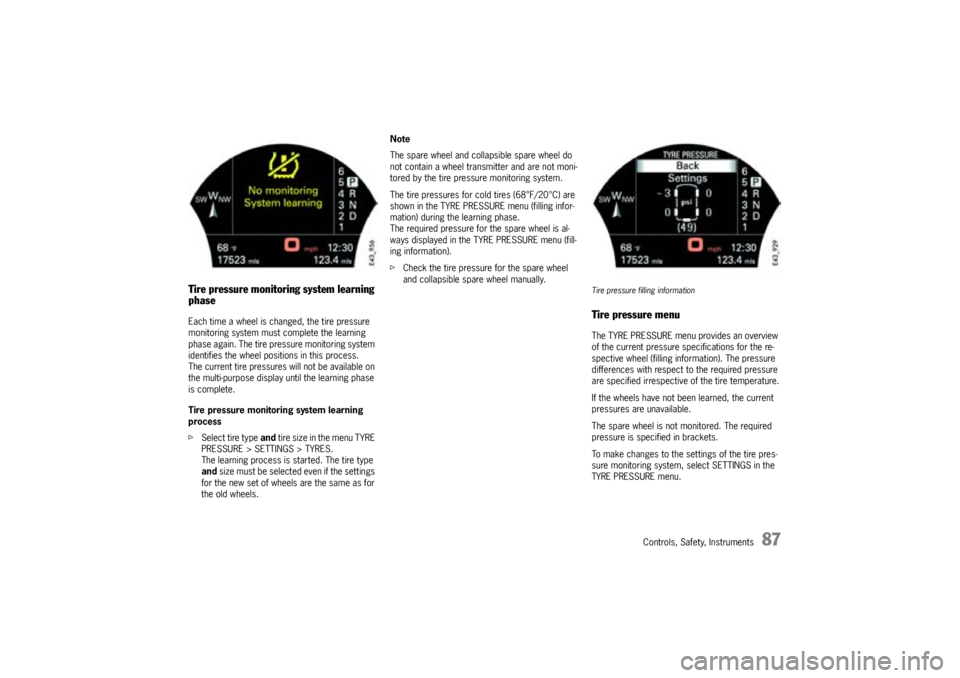
Tire pressure monitoring system learning
phaseEach time a wheel is changed, the tire pressure
monitoring system must complete the learning
phase again. The tire pressure monitoring system
identifies the wheel positions in this process.
The current tire pressures will not be available on
the multi-purpose display until the learning phase
is complete.
Tire pressure monitoring system learning
process
fSelect tire type and tire size in the menu TYRE
PRESSURE > SETTINGS > TYRES.
The learning process is started. The tire type
and size must be selected even if the settings
for the new set of wheels are the same as for
the old wheels.Note
The spare wheel and collapsible spare wheel do
not contain a wheel transmitter and are not moni-
tored by the tire pressure monitoring system.
The tire pressures for cold tires (68°F/20°C) are
shown in the TYRE PRESSURE menu (filling infor-
mation) during the learning phase.
The required pressure for the spare wheel is al-
ways displayed in the TYRE PRESSURE menu (fill-
ing information).
fCheck the tire pressure for the spare wheel
and collapsible spare wheel manually.
Tire pressure filling informationTire pressure menuThe TYRE PRESSURE menu provides an overview
of the current pressure specifications for the re-
spective wheel (filling information). The pressure
differences with respect to the required pressure
are specified irrespective of the tire temperature.
If the wheels have not been learned, the current
pressures are unavailable.
The spare wheel is not monitored. The required
pressure is specified in brackets.
To make changes to the settings of the tire pres-
sure monitoring system, select SETTINGS in the
TYRE PRESSURE menu.
Page 88 of 369

88
Controls, Safety, Instruments
Tire pressure settingsMAIN MENU > TYRE PRESSURE > SETTINGS
Warning!
Incomplete entries on the multi-purpose
display affect correct information of
warnings and messages.
fAfter one of the following actions, the settings
must be updated in the TYRE PRESSURE
menu:
– Changing a wheel
– Filling with tire sealant
– Adding air (after previous warning “Flat tyre”)
fPlease observe the chapter “SELECTION AF-TER WARNING” on Page 95.The following settings made in this menu serve as
the basis on which the tire pressure monitoring
system determines the correct pressure.
–Tires
Select the type and size of the tires on the
vehicle
–Load
Select the type of loading
–System
Switch tire pressure monitoring on/off
Note on operation
Settings can be made only when the vehicle is sta-
tionary.
Tyre typeMAIN MENU > TYRE PRESSURE > SETTINGS >
TYRE TYPE
The tire type and corresponding tire size are set in
the TYRE TYPE menu.
–Summer
– All season
– Winter
– All terrain
–Spare wheel