Page 2 of 304
Tires, Wheels and Loading 151
Tire Information 153
Tire Inflation 155
Changing tires 159
Lug Nut Torque 167
Tire Pressure Monitoring System (TPMS) 177
Vehicle loading 182
Trailer towing 189
Recreational towing 194
Driving 195
Starting 195
Brakes 198
Traction control/AdvanceTrac 201
Transmission operation 205
Roadside Emergencies 219
Getting roadside assistance 219
Hazard flasher switch 220
Fuel pump shut-off switch 220
Fuses and relays 221
Jump starting 231
Wrecker towing 237
Customer Assistance 238
Reporting safety defects (U.S. only) 246
Cleaning 247
Table of Contents
2
2005 Mountaineer(mnt)
Owners Guide (post-2002-fmt)
USA(fus)
Page 6 of 304

SPECIAL NOTICES
Emission warranty
The New Vehicle Limited Warranty includes Bumper-to-Bumper Coverage,
Safety Restraint Coverage, Corrosion Coverage, and 6.0L Power Stroke
Diesel Engine Coverage. In addition, your vehicle is eligible for Emissions
Defect and Emissions Performance Warranties. For a detailed description
of what is covered and what is not covered, refer to theWarranty Guide
that is provided to you along with yourOwner’s Guide.
Special instructions
For your added safety, your vehicle is fitted with sophisticated electronic
controls.
Please read the sectionSupplemental restraint system (SRS)
in theSeating and Safety Restraintschapter. Failure to follow
the specific warnings and instructions could result in personal injury.
Front seat mounted rear-facing child or infant seats should
NEVERbe placed in front of an active passenger air bag.
Service Data Recording
Service data recorders in your vehicle are capable of collecting and
storing diagnostic information about your vehicle. This potentially
includes information about the performance or status of various systems
and modules in the vehicle, such as engine, throttle, steering or brake
systems. In order to properly diagnose and service your vehicle, Ford
Motor Company, Ford of Canada, and service and repair facilities may
access vehicle diagnostic information through a direct connection to your
vehicle when diagnosing or servicing your vehicle.
Event Data Recording
Other modules in your vehicle — event data recorders — are capable of
collecting and storing data during a crash or near crash event. The
recorded information may assist in the investigation of such an event.
The modules may record information about both the vehicle and the
occupants, potentially including information such as:
•how various systems in your vehicle were operating;
•whether or not the driver and passenger seatbelts were buckled;
•how far (if at all) the driver was depressing the accelerator and/or the
brake pedal;
2005 Mountaineer(mnt)
Owners Guide (post-2002-fmt)
USA(fus)
Introduction
6
Page 8 of 304
These are some of the symbols you may see on your vehicle.
Vehicle Symbol Glossary
Safety Alert
See Owner’s Guide
Fasten Safety BeltAir Bag-Front
Air Bag-SideChild Seat
Child Seat Installation
WarningChild Seat Lower
Anchor
Child Seat Tether
AnchorBrake System
Anti-Lock Brake SystemBrake Fluid -
Non-Petroleum Based
Powertrain MalfunctionSpeed Control
Master Lighting SwitchHazard Warning Flasher
Fog Lamps-FrontFuse Compartment
Fuel Pump ResetWindshield Wash/Wipe
Windshield
Defrost/DemistRear Window
Defrost/Demist
2005 Mountaineer(mnt)
Owners Guide (post-2002-fmt)
USA(fus)
Introduction
8
Page 11 of 304

On board diagnostics (OBD-II)in theMaintenance and Specifications
chapter. If the light is blinking, engine misfire is occurring which could
damage your catalytic converter. Drive in a moderate fashion (avoid
heavy acceleration and deceleration) and have your vehicle serviced
immediately.
Under engine misfire conditions, excessive exhaust temperatures
could damage the catalytic converter, the fuel system, interior
floor coverings or other vehicle components, possibly causing a fire.
Check fuel cap (if equipped):
Illuminates when the fuel cap may
not be properly installed. Continued
driving with this light on may cause
the Service engine soon light to
come on, refer toFuel filler capin theMaintenance and
Specificationschapter.
Brake system warning light:To
confirm the brake system warning
light is functional, it will
momentarily illuminate when the
ignition is turned to the ON position
when the engine is not running, or in a position between ON and START,
or by applying the parking brake when the ignition is turned to the ON
position. If the brake system warning light does not illuminate at this
time, seek service immediately from your dealership. Illumination after
releasing the parking brake indicates low brake fluid level and the brake
system should be inspected immediately by your servicing dealership.
Driving a vehicle with the brake system warning light on is
dangerous. A significant decrease in braking performance may
occur. It will take you longer to stop the vehicle. Have the vehicle
checked by your dealer immediately.
Anti-lock brake system:If the
ABS light stays illuminated or
continues to flash, a malfunction has
been detected, have the system
serviced immediately. Normal
braking is still functional unless the brake warning light also is
illuminated.
CHECK
FUEL
CAP
P!
BRAKE
ABS
2005 Mountaineer(mnt)
Owners Guide (post-2002-fmt)
USA(fus)
Instrument Cluster
11
Page 44 of 304

HEADLAMP CONTROL
Turns the lamps off.
Turns on the parking lamps,
instrument panel lamps, license
plate lamps and tail lamps.
Turns the headlamps on.
Autolamp system
The autolamp system sets the headlamps to turn on and off
automatically. The autolamp control, located on the headlamp control,
may be set to:
•turn on the lamps automatically at night
•turn off the lamps automatically during the daylight
•keep the lamps on for up to three minutes after the key is turned to
OFF.
To turn the autolamps on, rotate the control counterclockwise to
.
Foglamp control
The foglamps can be turned on only
when the headlamp control is in
the
,andposition and
the high beams are not turned on.
Pull headlamp control towards you
to turn foglamps on. The foglamp
indicator light
will illuminate
when foglamp is activated.
Push the headlamp control towards the instrument panel to deactivate
the foglamps.
Daytime running lamps (DRL) (if equipped)
To activate DRL:
•the ignition must be in the ON position and
•the headlamp control is in the
orposition
•the parking brake must be disengaged.
A
A
2005 Mountaineer(mnt)
Owners Guide (post-2002-fmt)
USA(fus)
Lights
44
Page 49 of 304
Function Number of bulbs Trade number
Park/turn lamps
(front)2
3157 AK (amber)
Headlamps 2 9007
Rear stop/turn/tail
lamps4
3057
Rear license plate
lamps2
168
Backup lamp 2 3156K
High-mount brake
lamps5
W5W
Side mounted turn
signal2
WY5W (amber)
Front sidemarker 2 194
Rear sidemarker 2 194
Fog lamp 2 9145
Cargo lamp 1 211-2
Interior overhead lamp 1 912 (906)
Front door courtesy
lamp1
168
Map lamps 2 168 (T10)
Ashtray lamp 1 161
All replacement bulbs are clear in color except where noted.
To replace all instrument panel lights - see your dealer.
2005 Mountaineer(mnt)
Owners Guide (post-2002-fmt)
USA(fus)
Lights
49
Page 53 of 304
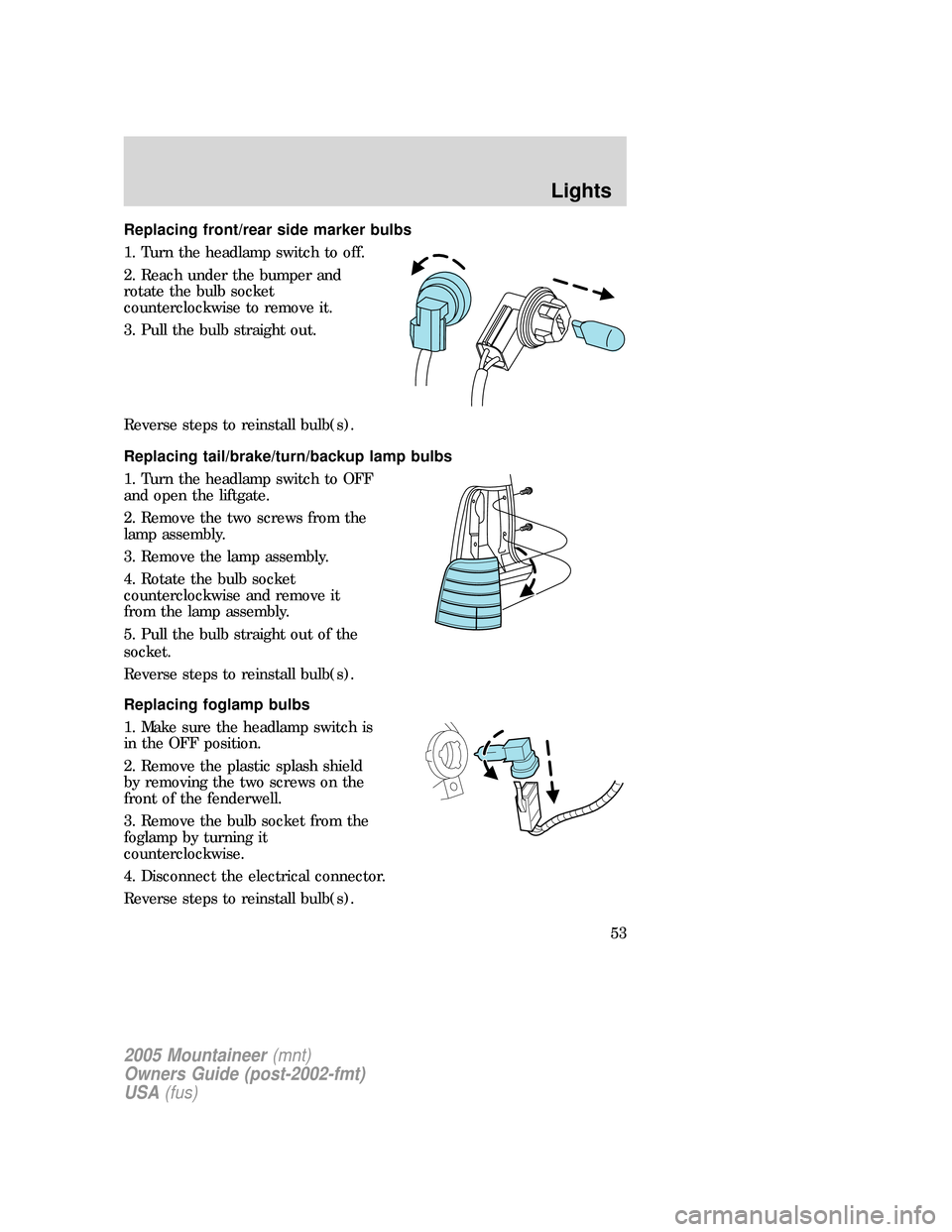
Replacing front/rear side marker bulbs
1. Turn the headlamp switch to off.
2. Reach under the bumper and
rotate the bulb socket
counterclockwise to remove it.
3. Pull the bulb straight out.
Reverse steps to reinstall bulb(s).
Replacing tail/brake/turn/backup lamp bulbs
1. Turn the headlamp switch to OFF
and open the liftgate.
2. Remove the two screws from the
lamp assembly.
3. Remove the lamp assembly.
4. Rotate the bulb socket
counterclockwise and remove it
from the lamp assembly.
5. Pull the bulb straight out of the
socket.
Reverse steps to reinstall bulb(s).
Replacing foglamp bulbs
1. Make sure the headlamp switch is
in the OFF position.
2. Remove the plastic splash shield
by removing the two screws on the
front of the fenderwell.
3. Remove the bulb socket from the
foglamp by turning it
counterclockwise.
4. Disconnect the electrical connector.
Reverse steps to reinstall bulb(s).
2005 Mountaineer(mnt)
Owners Guide (post-2002-fmt)
USA(fus)
Lights
53
Page 54 of 304
Replacing license plate lamp bulbs
1. Make sure the headlamp switch is
in the OFF position and then
remove two screws and the license
plate lamp assembly.
2. Remove the bulb socket from the
lamp assembly by turning
counterclockwise and pull the bulb
straight out.
Reverse steps to reinstall bulb(s).
Replacing high-mount brakelamp bulb
1. Remove the two screws and lamp
assembly from vehicle.
2. Remove the bulb socket from the
lamp assembly by depressing the
snaps and pull the bulb straight out.
Reverse steps to reinstall bulb(s).
2005 Mountaineer(mnt)
Owners Guide (post-2002-fmt)
USA(fus)
Lights
54