Page 124 of 474
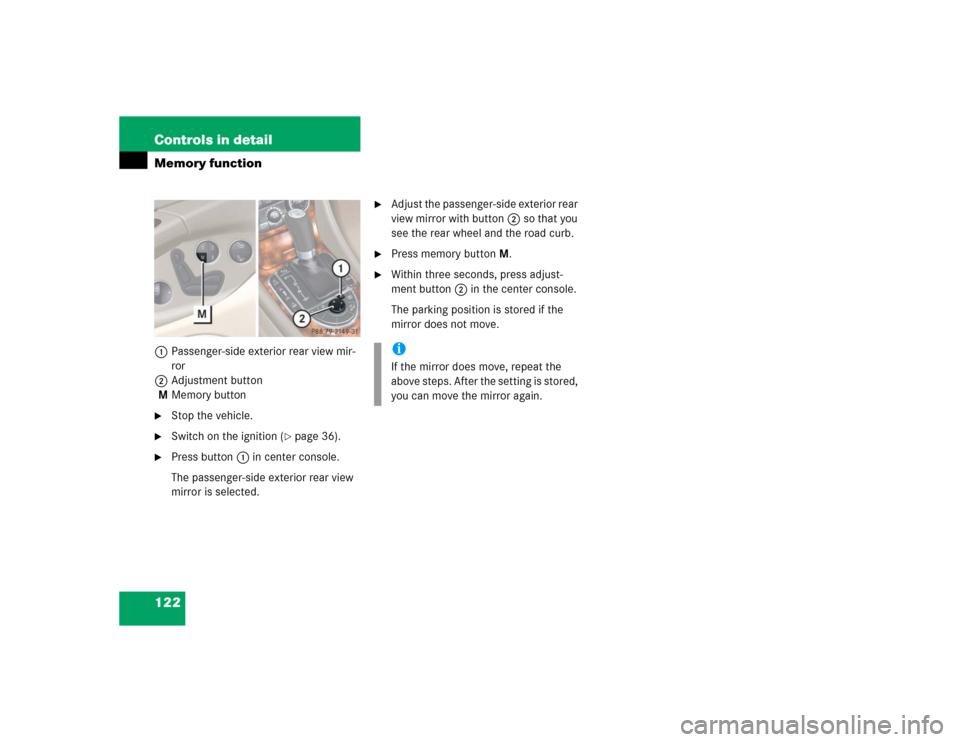
122 Controls in detailMemory function1Passenger-side exterior rear view mir-
ror
2Adjustment button
MMemory button�
Stop the vehicle.
�
Switch on the ignition (
�page 36).
�
Press button1 in center console.
The passenger-side exterior rear view
mirror is selected.
�
Adjust the passenger-side exterior rear
view mirror with button2 so that you
see the rear wheel and the road curb.
�
Press memory buttonM.
�
Within three seconds, press adjust-
ment button2 in the center console.
The parking position is stored if the
mirror does not move.iIf the mirror does move, repeat the
above steps. After the setting is stored,
you can move the mirror again.
Page 140 of 474
138 Controls in detailControl systemMenus, submenus and functions
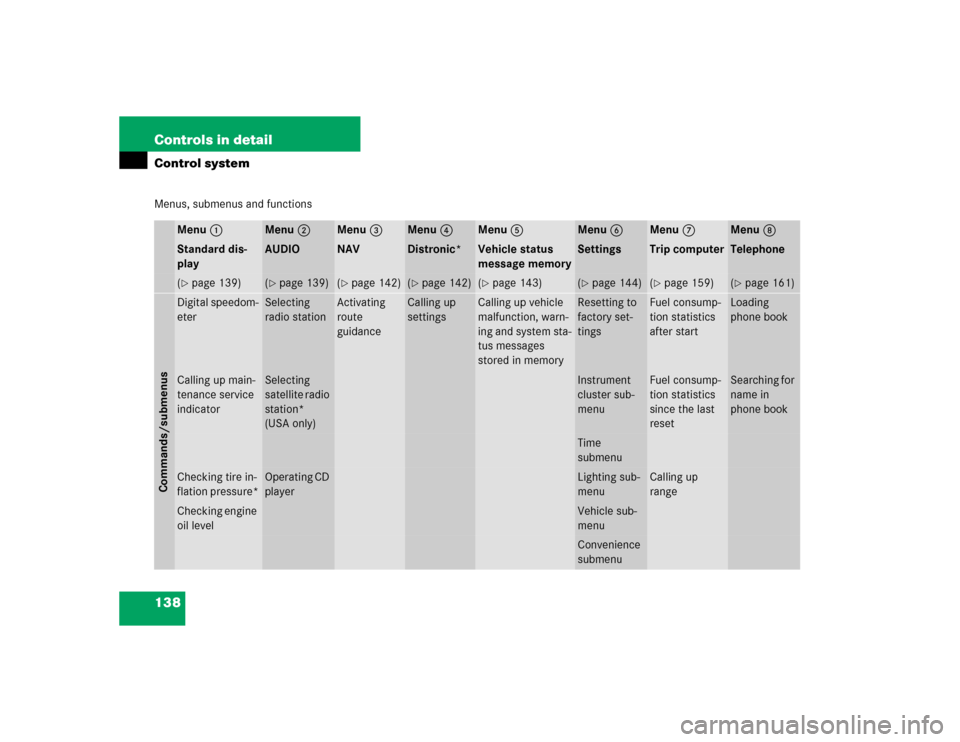
Menu 1
Menu 2
Menu 3
Menu 4
Menu 5
Menu 6
Menu 7
Menu 8
Standard dis-
play
AUDIO
NAV
Distronic*
Vehicle status
message memory
Settings
Trip computer
Telephone
(�page 139)
(�page 139)
(�page 142)
(�page 142)
(�page 143)
(�page 144)
(�page 159)
(�page 161)
Commands/submenusDigital speedom-
eter
Selecting
radio station
Activating
route
guidance
Calling up
settings
Calling up vehicle
malfunction, warn-
ing and system sta-
tus messages
stored in memory
Resetting to
factory set-
tings
Fuel consump-
tion statistics
after start
Loading
phone book
Calling up main-
tenance service
indicator
Selecting
satellite radio
station*
(USA only)
Instrument
cluster sub-
menu
Fuel consump-
tion statistics
since the last
reset
Searching for
name in
phone book
Time
submenu
Checking tire in-
flation pressure*
Operating CD
player
Lighting sub-
menu
Calling up
range
Checking engine
oil level
Vehicle sub-
menuConvenience
submenu
Page 145 of 474
143 Controls in detail
Control system
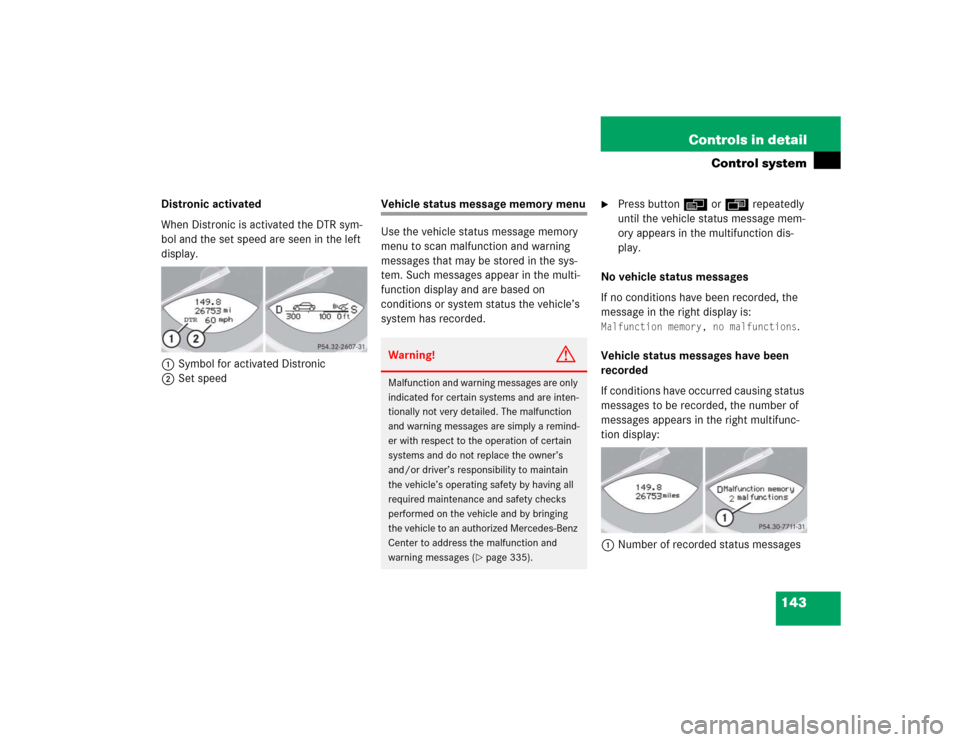
Distronic activated
When Distronic is activated the DTR sym-
bol and the set speed are seen in the left
display.
1Symbol for activated Distronic
2Set speed
Vehicle status message memory menu
Use the vehicle status message memory
menu to scan malfunction and warning
messages that may be stored in the sys-
tem. Such messages appear in the multi-
function display and are based on
conditions or system status the vehicle’s
system has recorded.
�
Press button è or ÿ repeatedly
until the vehicle status message mem-
ory appears in the multifunction dis-
play.
No vehicle status messages
If no conditions have been recorded, the
message in the right display is:
Malfunction memory, no malfunctions
.
Vehicle status messages have been
recorded
If conditions have occurred causing status
messages to be recorded, the number of
messages appears in the right multifunc-
tion display:
1Number of recorded status messages
Warning!
G
Malfunction and warning messages are only
indicated for certain systems and are inten-
tionally not very detailed. The malfunction
and warning messages are simply a remind-
er with respect to the operation of certain
systems and do not replace the owner’s
and/or driver’s responsibility to maintain
the vehicle’s operating safety by having all
required maintenance and safety checks
performed on the vehicle and by bringing
the vehicle to an authorized Mercedes-Benz
Center to address the malfunction and
warning messages (
�page 335).
Page 146 of 474
144 Controls in detailControl system�
Press button k or j.
The stored messages will now be dis-
played in the order in which they have
occurred. For malfunction and warning
messages, see “Vehicle status messag-
es in the multifunction display”
(�page 335).
Should the vehicle’s system record any
conditions while driving, the number of
messages will reappear in the multifunc-
tion display
�
when the SmartKey in the starter
switch is turned to position0 or re-
moved from the starter switch
or
�
when you turn off the engine by press-
ing the KEYLESS-GO* start/stop but-
ton on the gear selector lever once and open the driver’s door (this puts the
starter switch in position 0, same as
with the SmartKey removed from the
starter switch)
Settings menu
In the
Settings
menu there are two func-
tions:
�
The function
Reset
, with which you can
reset all the settings to those set at the
factory.
�
A collection of submenus with which
you can make individual settings for
your vehicle.
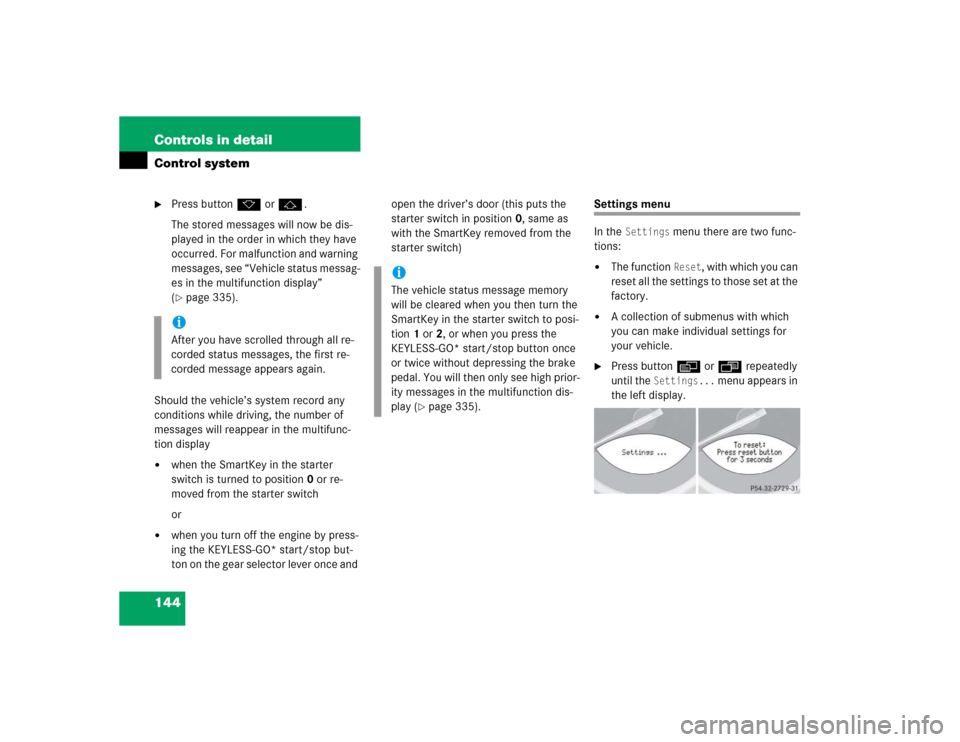
�
Press button è or ÿ repeatedly
until the
Settings...
menu appears in
the left display.
iAfter you have scrolled through all re-
corded status messages, the first re-
corded message appears again.
iThe vehicle status message memory
will be cleared when you then turn the
SmartKey in the starter switch to posi-
tion 1 or 2, or when you press the
KEYLESS-GO* start/stop button once
or twice without depressing the brake
pedal. You will then only see high prior-
ity messages in the multifunction dis-
play (
�page 335).
Page 159 of 474
157 Controls in detail
Control system
Convenience submenu
Access the
Convenience
submenu via the
Settings
menu. Use the
Convenience
sub-
menu to change the settings for a number
of convenience features. The following
functions are available:
Activating easy-entry/exit feature
Use this function to activate and deacti-
vate the easy-entry/exit feature
(
�page 113).
�
Move the selection marker with the
æ orç button to the
Conve-
nience
submenu.
�
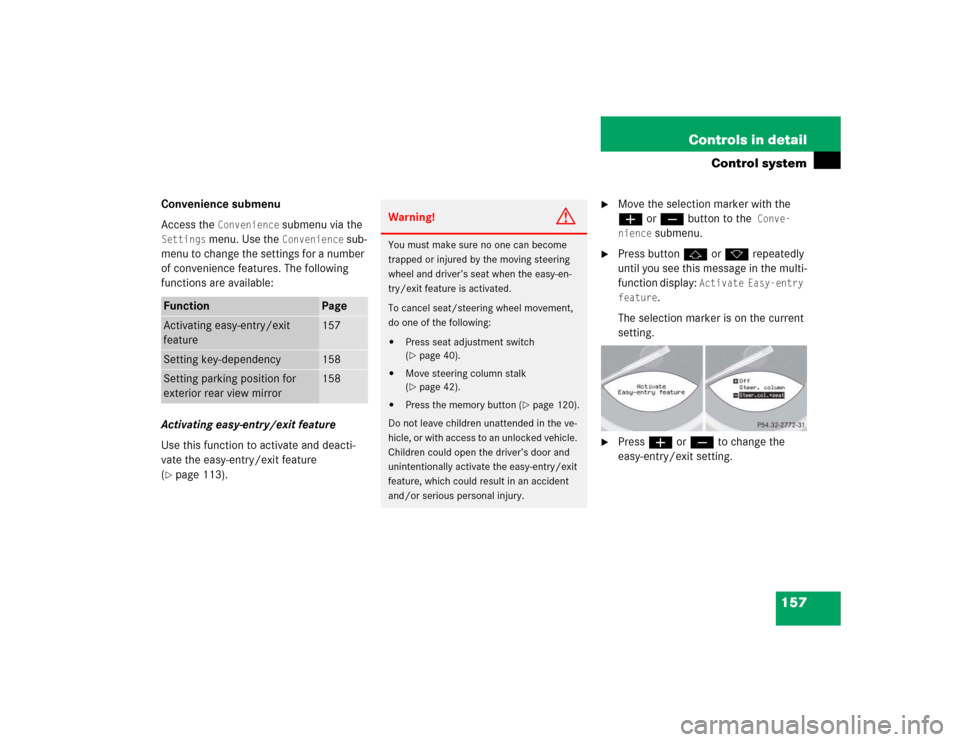
Press button j or k repeatedly
until you see this message in the multi-
function display:
Activate Easy-entry
feature
.
The selection marker is on the current
setting.
�
Press æ or ç to change the
easy-entry/exit setting.
Function
Page
Activating easy-entry/exit
feature
157
Setting key-dependency
158
Setting parking position for
exterior rear view mirror
158
Warning!
G
You must make sure no one can become
trapped or injured by the moving steering
wheel and driver’s seat when the easy-en-
try/exit feature is activated.
To cancel seat/steering wheel movement,
do one of the following:�
Press seat adjustment switch
(�page 40).
�
Move steering column stalk
(�page 42).
�
Press the memory button (
�page 120).
Do not leave children unattended in the ve-
hicle, or with access to an unlocked vehicle.
Children could open the driver’s door and
unintentionally activate the easy-entry/exit
feature, which could result in an accident
and/or serious personal injury.
Page 210 of 474
208 Controls in detailDriving systemsFine adjustment in 1 mph
(Canada: 1 km/h) increments
Faster�
Briefly tip the cruise control lever in
direction of arrow1 (
�page 206).
Slower
�
Briefly tip the cruise control lever in
direction of arrow2 (
�page 206).Setting to last stored speed
(“Resume” function)
�
Briefly pull the cruise control lever in di-
rection of arrow4 (
�page 206).
The cruise control will resume the last
set speed.
�
Remove your foot from the accelerator
pedal.
The selected speed appears in the mul-
tifunction display.
Distronic*
When activated, the Distronic adaptive
cruise control system increases the driving
convenience afforded by the cruise control
during travel on expressways and other
major roads.�
If the Distronic distance sensor detects
a slower moving vehicle directly ahead,
your vehicle speed will be reduced so
that you follow that vehicle at a preset
distance.
�
If there is no vehicle directly ahead of
you, Distronic will function in the same
way as cruise control (
�page 205).
Warning!
G
The speed stored in memory should only be
set again if prevailing road conditions per-
mit. Possible acceleration or deceleration
differences arising from returning to the pre-
set speed could cause an accident and/or
serious injury to you and others.
Warning!
G
Distronic adaptive cruise control is no sub-
stitute for active driving involvement. It does
not react to stationary objects, nor recog-
nize or predict the curvature and lane layout
or the movement of vehicles ahead. Distron-
ic can only apply a maximum of 20% of the
vehicle’s braking power.
Page 217 of 474
215 Controls in detail
Driving systems
Setting to last stored speed (“Resume”
function)�
Briefly tip the cruise control lever in
direction of arrow4 (
�page 213).
Distronic is set to the last stored
speed.
�
Remove your foot from the accelerator
pedal.Deactivating Distronic
There are several ways to deactivate the
Distronic system:
�
Briefly tip the cruise control lever in
direction of arrow3 (
�page 213).
or
�
Step on the brake pedal.
Distronic will be deactivated. The last
speed set will be stored into memory.Distronic deactivates automatically when
�
you set the parking brake
�
you drive slower than 25 mph
(40 km/h)
�
the ESP is active (
�page 82) or you de-
activate the ESP
�
You move the gear selector lever into
positionN.
A signal will sound. The
DTR off
mes-
sage appears in the speedometer dis-
play for approximately five seconds.
Warning!
G
The speed stored in memory should only be
set again if prevailing road conditions per-
mit. Possible acceleration or deceleration
differences arising from returning to the pre-
set speed could endanger yourself and oth-
ers.
iThe last stored speed is deleted when
you turn off the engine.
Warning!
G
Distronic switches off and releases the
brakes when the vehicle decelerates below
the minimum speed of 25 mph (40 km / h)
by operation of the system. At that time the
driver must apply the brakes in order to re-
duce vehicle speed further or bring it to a
stop.
Page 337 of 474
335 Practical hints
What to do if …
Vehicle status messages in the multi-function display
Warning and malfunction messages ap-
pear in the in the multifunction display lo-
cated in the instrument cluster.
Certain warning and malfunction messag-
es are accompanied by an audible signal.
Address these messages accordingly and
follow the additional instructions given in
this Operator’s Manual.
Selecting the vehicle status message
memory menu in the control system
(�page 143) displays both cleared and
uncleared messages.
High-priority messages appear in the mul-
tifunction display in red color.Certain messages of high priority cannot
be cleared from the multifunction display
using the reset button (
�page 24) or but-
ton j, k, ÿ, or è on the
multifunction steering wheel.
Other messages of high priority and mes-
sages of less immediate priority can be
cleared from the multifunction display us-
ing the reset button or button j, k,
ÿ, or è on the multifunction steer-
ing wheel. They are then stored in the vehi-
cle status message memory (
�page 143).
Remember that clearing a message will not
correct the condition that caused the mes-
sage to appear.
Warning!
G
All categories of messages contain impor-
tant information which should be taken note
of and, where a malfunction is indicated, ad-
dressed as soon as possible at an autho-
rized Mercedes-Benz Center.
Failure to repair condition noted may cause
damage not covered by the Mercedes-Benz
Limited Warranty, or result in property dam-
age or personal injury.Warning!
G
No messages will be displayed if either the
instrument cluster or the multifunction dis-
play is inoperative. Contact your nearest au-
thorized Mercedes-Benz Center.