Page 93 of 226
91
Telephone*
Important notes
�The message Activating Telepho-
ne Please Wait
appears.
COMAND prepares the telephone for
use. Select other system functions, e.g.
radio, by pressing the corresponding
button or wait until the telephone is ac-
tive.
�The message Telephone Unavai-
lable
appears if telephone* is not in-
stalled or a malfunction has occured.
Please contact an authorized
Mercedes-Benz Center.
�The message Telephone Not In-
serted
appears if the mobile phone is
not inserted in the cradle.
Please connect the mobile phone. GSM mobile phone�If the message Check SIM Card
(Emergency Call “911” Only
Possible With Tel.)
:
�Insert the SIM card into the mobile
phone (Telephone Operating
Manual).i
Depending on power state of the phone
it may take up to 8 seconds from phone
insertion until this message disappears
(e.g. if a powered-off phone is inser-
ted).
230_Telefon_US_B.fm Seite 91 Mi ttwoch, 8. Dezember 2004 4:32 16
Page 94 of 226

92 Telephone*
Telephone operation
� Telephone operation
Automatically
The telephone* is automatically activated
when the COMAND is switched on. The
mobile phone must be inserted in the
mobile phone cradle* at the time
COMAND is switched on.
Manually
�Press a.
The menu to enter the unlock code
(
�page 95) will appear (only if phone
has been locked before). GSM mobile phone:
�Enter the PIN and, if necessary, the
unlock code for the mobile phone.
If no SIM card is in the telephone,
the message
Check SIM Card ap-
pears.
�Insert a SIM card. Refer to the mo-
bile phone operator’s manual.
�Switch the COMAND off (�page 27) or
turn off the engine.
The telephone* is switched off with a
time-lag of around 10 minutes. You
cannot make an outgoing call or accept
an incoming call within that time. or
�In the Telephone menu (�page 94),
press a longer than two seconds.
The message
Deactivating Tele-
phone
will appear.
Switching telephone operation on
i
In this case, you can dial the emergen-
cy call
911 on the telephone only.
Switching telephon e operation off
230_Telefon_US_B.fm Seite 92 Mi ttwoch, 8. Dezember 2004 4:32 16
Page 95 of 226

93
Telephone*
Telephone operation
You can make an emergency call to an
emergency rescue station with a mobile
communication network.
The emergency call will be placed as long
as the corresponding mobile communicati-
on network is available. To do this, switch
the telephone on if you have not already
done so.
�TDMA/CDMA mobile phone
The emergency call will also be placed
if the phone is locked (
�page 94).
�GSM mobile phone
If no SIM card is in the phone or SIM
PIN is not entered, you can only make
an emergency call at the mobile phone.
Emergency calls may not be possible with
all mobile phone networks or if certain net-
work services and/or telephone functions
are active. Check with your local network
operating company.
If you cannot make an emergency call, you
must initiate rescue measures yourself.
Emergency call “911”
i
This function places a call to the local
911 provider. It does not initiate a
Tele Aid* call.
WarningG
The 911 emergency call system is a public
service. Using it witho ut due cause is a cri-
minal offense.
230_Telefon_US_B.fm Seite 93 Mi ttwoch, 8. Dezember 2004 4:32 16
Page 97 of 226
95
Telephone*
Telephone operation
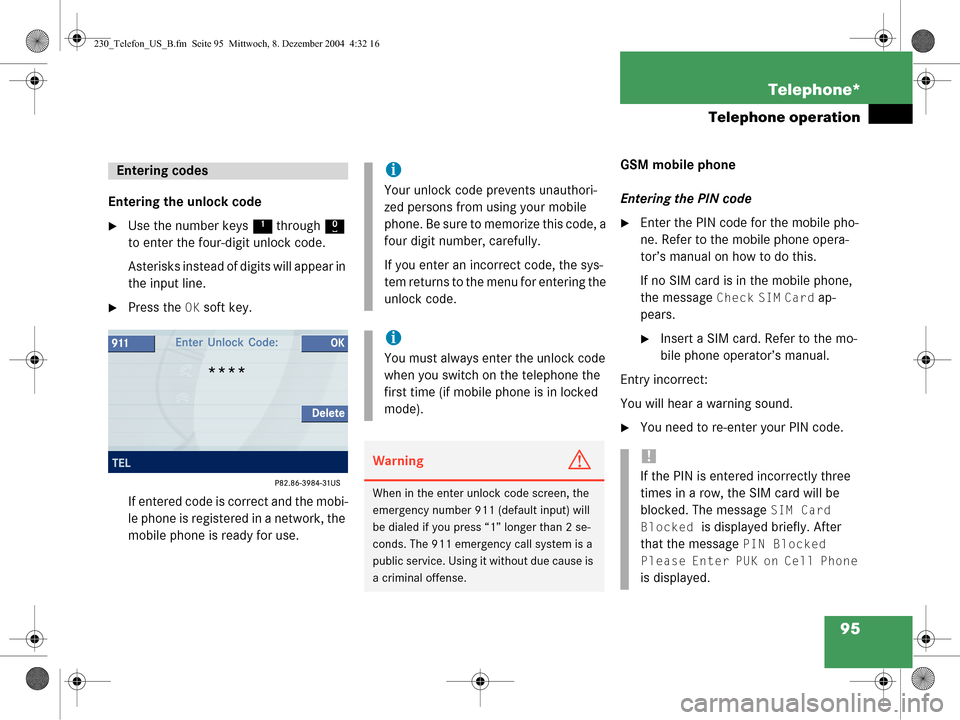
Entering the unlock code
�Use the number keys
1 through 0
to enter the four-digit unlock code.
Asterisks instead of digits will appear in
the input line.
�Press the OK soft key.
If entered code is correct and the mobi-
le phone is registered in a network, the
mobile phone is ready for use. GSM mobile phone
Entering the PIN code
�Enter the PIN code for the mobile pho-
ne. Refer to the mobile phone opera-
tor’s manual on how to do this.
If no SIM card is in the mobile phone,
the message
Check SIM Card ap-
pears.
�Insert a SIM card. Refer to the mo-
bile phone operator’s manual.
Entry incorrect:
You will hear a warning sound.
�You need to re-enter your PIN code.
Entering codesi
Your unlock code prevents unauthori-
zed persons from using your mobile
phone. Be sure to memorize this code, a
four digit number, carefully.
If you enter an incorrect code, the sys-
tem returns to the menu for entering the
unlock code.
i
You must always enter the unlock code
when you switch on the telephone the
first time (if mobile phone is in locked
mode).
WarningG
When in the enter unlock code screen, the
emergency number 911 (default input) will
be dialed if you press “1” longer than 2 se-
conds. The 911 emergency call system is a
public service. Using it without due cause is
a criminal offense.
!
If the PIN is entered incorrectly three
times in a row, the SIM card will be
blocked. The message
SIM Card
Blocked
is displayed briefly. After
that the message
PIN Blocked
Please Enter PUK on Cell Phone
is displayed.
230_Telefon_US_B.fm Seite 95 Mi ttwoch, 8. Dezember 2004 4:32 16
Page 101 of 226

99
Telephone*
Telephone operation
�Use the number keys
1 - 0 to enter
the telephone number.
Deleting the last or several digits:
�Press the Delete soft key once or
several times.
Deleting all digits:
�Press K.
or
�Press and hold the Delete soft key for
more than 2 seconds.
Begin dialing
�When you have entered the telephone
number, press k to confirm your
input.
or
�In the Telephone menu, press the Send
soft key.
or
�Press E. Dialing will begin. If a name is associa-
ted with the phone number saved in the
phone book, the name appears on the
screen. In the status bar, the off-hook
symbol will appear.
COMAND will mute an active audio
source. If the person called answers
the call, the call is active. You talk over
the hands-free set.
Ending a call
�Press K.
or
�Press the End soft key. Subsequent dialing
Transmitting other dial tones:
�During a call you can press the number
keys
1 through 0, # and *.
Redial
�In the Telephone menu, press k or
E twice.
The telephone dials the number that
was dialed last.
i
If the system is downloading the phone
book at that time (e.g. after inserting
the mobile phone) these tones may be
transmitted with delay.
i
If you press k or E just once, the
dialed numbers list is displayed
(
�page 100).
230_Telefon_US_B.fm Seite 99 Mi ttwoch, 8. Dezember 2004 4:32 16
Page 105 of 226
103
Telephone*
Telephone operation
The following functions can be used during
a call:
�Ending an active call
�Switch on/off hands-free microphone
�Change sound settings (Balance only),
(
�page 98)
�Transmitting other dial tones
(
�page 99)
Ending an active call
�Press
K.
The Telephone menu will appear.
Switching hands-free microphone on/
off (available if microphone is switched
on)
The microphone status is indicated by the
status of the
Mic Off soft key.
�Press the Mic Off soft key.
The microphone is switched on or off.
The soft key status changes
accordingly.
When the microphone is off, the other
party cannot hear you. You can still
hear your partner.
i
You can use three-way calling if this
feature is offered by your mobile phone
service provider.
Refer to the mobile phone operator’s
manual or contact your mobile phone
service provider for feature availability
and operating instructions.Microphone
statusSymbol
Mic Off
Onwhite
Off black
230_Telefon_US_B.fm Seite 103 Mittwoch, 8. Dezember 2004 4:32 16
Page 119 of 226
117
Navigation
Important notes
The following applies if you interrupt your
trip and continue later on:
�Trip is continued within 2 hours:
The system will automatically resume
route guidance.
�Trip is continued after more than
2 hours:
�Press
E to confirm Continue
Route Guidance
in the
Navigation main menu
(
�page 118).
Trip interruption during route
guidance
i
Trip interruption means the vehicle is
parked and COMAND is switched off.
Trip continuation means the vehicle is
moving and COMAND is switched on
again.
230_Navigati_US_B.fm Seite 117 Mittwoch, 8. Dezember 2004 4:37 16
Page 122 of 226
120 Navigation
Navigation main menu
The COMAND calculates the route as
Fastest route.
Including or avoiding traffic routes
�In the Navigation main menu
(
�page 118), press the
Mode soft key.
The
Mode menu will appear. Selectable traffic routes
�Minimize Freeways:
The system calculates the route with/
without minimizing freeways.
�Min. Ferry/Auto-Train:
The system calculates the route with/
without minimizing ferry connections
or railfreight.
�Minimize Toll Roads:
The system calculates the route with/
without minimizing toll roads.
�Minimize Tunnels:
The system calculates the route with/
without minimizing tunnels.
�Use g or G to select a traffic route.
�Press E.
Switches the option on or off. You can
switch on more than one option.
�Press the Back soft key to confirm.
The setting is saved. The Navigation
main menu will appear.
Setting the route mode
OptionSymbol
OnQ
Off q
230_Navigati_US_B.fm Seite 120 Mittwoch, 8. Dezember 2004 4:37 16


