Page 132 of 506

130 Controls in detailMemory function
You can store up to three different settings
for each SmartKey or SmartKey with
KEYLESS-GO*.
The following settings are stored when us-
ing the buttons on the driver’s door:�
Driver’s seat, backrest, head restraint
position and settings for multicontour
seat
�
Steering wheel position
�
Exterior rear view mirror positions
These SmartKey-dependent memory set-
tings can be deactivated if desired. For in-
formation on SmartKey-dependent
memory settings, see “Setting
SmartKey-dependency” (
�page 168).
The following settings are not
SmartKey-dependent. They are stored
when using the buttons on the front pas-
senger door:
�
Front passenger seat, backrest, head
restraint position and settings for mul-
ticontour seat
!Prior to operating the vehicle, the driv-
er should check and adjust the seat
height, seat position fore and aft, and
seat backrest angle if necessary, to
ensure adequate control, reach and
comfort. The head restraint should also
be adjusted for proper height. See also
the section on air bags (
�page 61) for
more information on proper seat posi-
tioning.
In addition, adjust the steering wheel to
ensure adequate control, reach, opera-
tion and comfort. Both the interior and
exterior rear view mirrors should be ad-
justed for adequate rear vision.
Fasten seat belts. Infants and small
children should be seated in a properly
secured restraint system that complies
with U.S. Federal Motor Vehicle Safety
Standards 213 and 225 and Canadian
Motor Vehicle Safety Standards 213
and 210.2.
Warning!
G
Do not activate the memory function while
driving. Activating the memory function
while driving could cause the driver to lose
control of the vehicle.
Page 133 of 506

131 Controls in detail
Memory function
The memory button and stored position
button are located on the door.
MMemory button
1, 2, 3Stored position button�
Switch on the ignition (
�page 33).
or
�
Open the respective door and insert
the SmartKey in the starter switch.
Storing positions into memory�
Adjust the seats, steering wheel and
exterior rear view mirrors to the de-
sired position (
�page 37).
�
Press memory buttonM.
�
Release memory buttonM and press
stored position button 1, 2 or 3 within
three seconds.
All the settings are stored to the select-
ed position.
Recalling positions from memory�
Press and hold stored position
button1, 2 or3 until the seat, steering
wheel and exterior rear view mirrors
have completely moved to the stored
positions.!Do not operate the power seats using
the memory button if the seat backrest
is in an excessively reclined position.
Doing so could cause damage to front
or rear seats.iReleasing the stored position button
stops movement to the stored posi-
tions immediately.
Page 135 of 506
133 Controls in detail
Lighting
�Lighting
For information on how to switch on the
headlamps and use the turn signals, see
“Switching on headlamps” (
�page 50)
and see “Turn signals” (
�page 51).
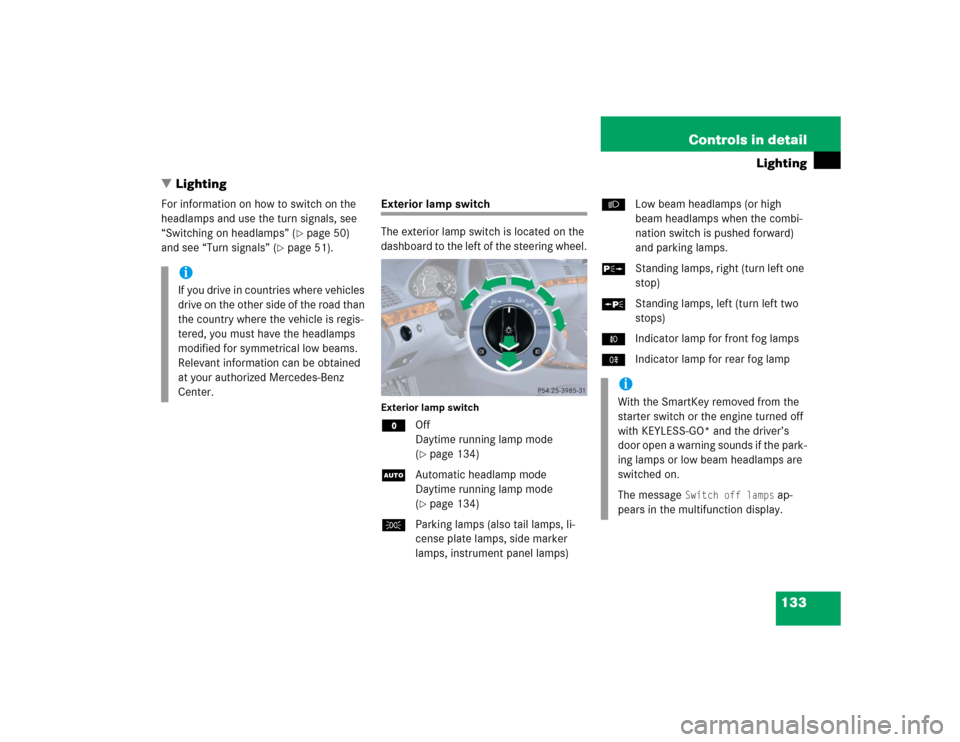
Exterior lamp switch
The exterior lamp switch is located on the
dashboard to the left of the steering wheel.Exterior lamp switchMOff
Daytime running lamp mode
(
�page 134)
UAutomatic headlamp mode
Daytime running lamp mode
(�page 134)
CParking lamps (also tail lamps, li-
cense plate lamps, side marker
lamps, instrument panel lamps)BLow beam headlamps (or high
beam headlamps when the combi-
nation switch is pushed forward)
and parking lamps.
ˆStanding lamps, right (turn left one
stop)
‚Standing lamps, left (turn left two
stops)
‡Indicator lamp for front fog lamps
†Indicator lamp for rear fog lamp
iIf you drive in countries where vehicles
drive on the other side of the road than
the country where the vehicle is regis-
tered, you must have the headlamps
modified for symmetrical low beams.
Relevant information can be obtained
at your authorized Mercedes-Benz
Center.
iWith the SmartKey removed from the
starter switch or the engine turned off
with KEYLESS-GO* and the driver’s
door open a warning sounds if the park-
ing lamps or low beam headlamps are
switched on.
The message
Switch off lamps
ap-
pears in the multifunction display.
Page 138 of 506

136 Controls in detailLightingLocator lighting and night security illu-
mination
Locator lighting and night security illumi-
nation are described in the “Control sys-
tem” section, see (
�page 163) and
(
�page 164).
Fog lampsFront fog lamps
�
Switch on the low beam headlamps
(�page 50).
�
Pull out exterior lamp switch to first
stop.
The front fog lamps are switched on.
The green indicator lamp‡ in the
exterior lamp switch comes on
(�page 133).
�
Push in the exterior lamp switch.
The front fog lamps are switched off.
The green indicator lamp‡ in the
exterior lamp switch goes out.
Warning!
G
In low ambient lighting or foggy conditions,
only switch from position U to B with
the vehicle at a standstill. Switching from
U to B will briefly switch off the head-
lamps. Doing so while driving in low ambient
lighting conditions may result in an acci-
dent.
iFog lamps will operate with the parking
lamps and/or the low beam headlamps
on. Fog lamps should only be used in
conjunction with low beam headlamps.
Consult your State or Province Motor
Vehicle Regulations regarding permis-
sible lamp operation.iFog lamps cannot be switched on with
the exterior lamp switch in
positionU. For switching on the fog
lamps, turn the exterior lamp switch to
positionB.
Page 139 of 506

137 Controls in detail
Lighting
Rear fog lamp (driver’s side only)�
Switch on the low beam headlamps
(�page 50).
�
Pull out exterior lamp switch to second
stop.
The yellow indicator lamp† in the
exterior lamp switch comes on
(�page 133).
�
Push in the exterior lamp switch to first
stop.
The rear fog lamp switches off.
The yellow indicator lamp† in the
exterior lamp switch goes out.
The front fog lamps remain lit.
Combination switch
The combination switch is located on the
left side of the steering column.Combination switch1High beam
2High beam flasherHigh beam
�
Turn the exterior lamp switch to
positionB orU (
�page 133).
�
Push the combination switch in direc-
tion of arrow1 to switch on the high
beam.
The high beam headlamp indicator
lampA in the instrument cluster
comes on (
�page 24).
�
Pull the combination switch in direction
of arrow2 to its original position to
switch off the high beam.
The high beam headlamp indicator
lampA in the instrument cluster
goes out.
High beam flasher
�
Pull the combination switch briefly in
direction of arrow2.
Page 141 of 506

139 Controls in detail
Lighting
Interior lighting in the front
1Left front reading lamp on/off
2Rear interior lighting on/off
3Automatic control on/off
4Front interior lighting on/off
5Right front reading lamp on/off
6Ambient lighting
7Interior lighting
8Front reading lampThe controls are located in the overhead
control panel.
Automatic control
Activating
�
Press automatic control switch3.
The Interior lighting switches on in
darkness, when you:�
unlock the vehicle
�
remove the SmartKey from the
starter switch
�
open a door
�
open the trunk
The interior lighting switches off automati-
cally following an adjustable time delay.For more information, see “Setting interior
lighting delayed shut-off” (
�page 165).
Deactivating
�
Press automatic control switch3
again.
The interior lighting remains switched
off in darkness, even when you:�
unlock the vehicle
�
remove the SmartKey from the
starter switch
�
open a door
�
open the trunk
iLeaving an interior light switch in the
ON position for extended periods of
time with the engine turned off could
result in a discharged battery.
iIf the door remains open, the interior
lamps switch off automatically after ap-
proximately five minutes.
Page 142 of 506

140 Controls in detailLightingManual control
Front interior lighting�
Press front interior lighting switch4.
The front interior lighting switches on.
�
Press front interior lighting switch4
again.
The front interior lighting switches off.
Rear interior lighting
�
Press rear interior lighting switch2.
The rear interior lighting switches on.
�
Press rear interior lighting switch2
again.
The rear interior lighting switches off.Front reading lamps
The front reading lamps are located in low-
er edge of the interior rear view mirror.
�
Press front reading lamp
switch1or5 to switch on the de-
sired front reading lamp.
�
Press front reading lamp
switch1or5 again to switch off the
respective front reading lamp.
Door entry lamps
For better orientation in the dark, the cor-
responding door entry lamps will switch on
in darkness when you open a door and the
automatic control is activated.
The door entry lamps will switch off when
the corresponding door is closed.
iThe setting selected for the interior
lighting is used for the trunk lighting as
well.
If the trunk lid remains open, the trunk
lighting switches off automatically after
approximately ten minutes.
iIf you turn the SmartKey in the starter
switch to position0 and switch off the
headlamps, the door entry lamps will
remain lit for approximately five min-
utes.
Page 146 of 506

144 Controls in detailInstrument clusterTachometer
The red marking on the tachometer de-
notes excessive engine speed.
To help protect the engine, the fuel supply
is interrupted if the engine is operated
within the red marking.
Outside temperature indicator
The outside temperature is displayed in
the instrument cluster (
�page 24). For in-
formation on how to select the unit of the
displayed temperature, i.e. degrees Cel-
sius (°C) or degrees Fahrenheit (°F), see
“Selecting temperature display mode”
(
�page 157).The temperature sensor is located in the
front bumper area. Due to its location, the
sensor can be affected by road or engine
heat during idling or slow driving. This
means that the accuracy of the displayed
temperature can only be verified by com-
parison to a thermometer placed next to
the sensor, not by comparison to external
displays (e.g. bank signs etc.).
When moving the vehicle into colder ambi-
ent temperatures (e.g. when leaving your
garage), you will notice a delay before the
lower temperature is displayed.
A delay also occurs when ambient temper-
atures rise. This prevents inaccurate tem-
perature indications caused by heat
radiated from the engine during idling or
slow driving.
!Avoid driving at excessive engine
speeds, as it may result in serious en-
gine damage that is not covered by the
Mercedes-Benz Limited Warranty.
Warning!
G
The outside temperature indicator is not de-
signed to serve as an ice-warning device and
is therefore unsuitable for that purpose.
Indicated temperatures just above the freez-
ing point do not guarantee that the road sur-
face is free of ice. The road may still be icy,
especially in wooded areas or on bridges.